
iPhone Battery Health: What Percentage Is Good When Buying Refurbished?
Buying a refurbished iPhone? Learn which battery health percentage to look for, how charging cycles affect battery life, and how to check battery authenticity before purchasing.

TL;DR When buying a refurbished iPhone, aim for 90% or higher battery health for a strong balance of everyday performance and long-term value. A battery between 85% and 89% can also be a sensible purchase if the price is right and the seller provides a reliable warranty. Below 80%, consider the likely battery replacement cost before buying. However, battery health percentage is only one part of the decision. Check the charge cycle count where available, battery authenticity, parts and service history, and the seller's return policy. Apple designs iPhone 14 and earlier batteries to retain 80% capacity after 500 complete charge cycles, while iPhone 15 and later models are designed for 1,000 cycles under ideal conditions. These figures are benchmarks, not guarantees of actual battery life.
What Is A Good Battery Health Percentage?
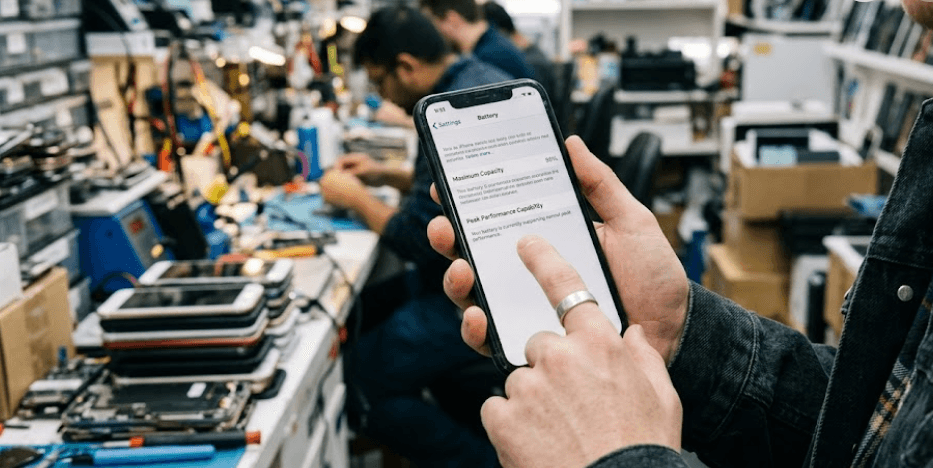
When shopping for a refurbished iPhone, battery health tells you how much capacity the battery can hold compared with when it was new. You can find this information in Settings under Battery, followed by Battery Health or Battery Health & Charging, depending on the model and iOS version. A reading of 100% indicates that the reported maximum capacity is equivalent to the battery's original capacity. As the battery ages, this percentage generally decreases, which can mean fewer hours of use between charges. It does not directly tell you how many hours the phone will last each day because screen brightness, mobile signal, gaming, video streaming, and background activity all affect power consumption.
For most refurbished iPhones, 90% to 100% is a good target if you want to minimize immediate battery concerns. A reading between 85% and 89% is not necessarily a warning sign, particularly when the phone is competitively priced and has passed proper testing. At 80% to 84%, the battery has less remaining capacity, so you should consider whether the lower purchase price compensates for potentially shorter usage time and an earlier replacement. Below 80%, be more cautious. The battery may still function, but its condition and any service recommendation deserve closer attention before you commit to the purchase.
There is no universal minimum battery health percentage that makes every refurbished iPhone a good or bad buy. The right threshold depends on the model, its age, the price difference between available units, and how long you intend to keep it. For example, a phone with 88% battery health, a clear service history, and a warranty may offer better value than a more expensive phone reporting 94% with an unverified replacement battery. Treat the percentage as a starting point, then compare it with the other evidence available.
| Battery Health | What It Means For Buyers |
|---|---|
| 95% to 100% | Excellent reported capacity; check authenticity and usage history |
| 90% to 94% | Strong target for most refurbished buyers |
| 85% to 89% | Reasonable if the price, condition, and warranty are attractive |
| 80% to 84% | Consider shorter battery life and possible replacement costs |
| Below 80% | Inspect service warnings and calculate the cost of replacement |
How Battery Charge Cycles Work
A battery charge cycle measures cumulative battery usage, not the number of times you connect your iPhone to a charger. Apple defines one complete cycle as using an amount equivalent to 100% of the battery's capacity. You do not need to drain the phone from 100% to 0% in one sitting for a cycle to count. For example, if you use 60% of your battery on Monday and 40% on Tuesday, the combined usage represents one complete cycle. Recharging between those days does not reset the calculation. This is why a phone that has been charged hundreds of times does not necessarily have the same number of cycles as its charging sessions.
Apple's published battery design benchmarks differ by generation. iPhone 14 models and earlier are designed to retain 80% of their original capacity at 500 complete charge cycles under ideal conditions. For iPhone 15 models and later, that benchmark increases to 1,000 complete charge cycles under ideal conditions. These figures help buyers understand how the battery is designed to age, but they do not mean that every phone will reach exactly 80% at the stated cycle count. Temperature, charging habits, and the way the device is used can affect actual battery degradation. A lower cycle count is useful information, but it does not guarantee better battery health.
When comparing refurbished iPhones, consider the cycle count alongside maximum capacity rather than judging either number in isolation. A phone with 300 cycles and 91% capacity may be an attractive option, but the figures should be interpreted in the context of the model and its history. A phone with 650 cycles and 89% capacity is not automatically a bad purchase either, especially if its price reflects the condition. For iPhone 15 and later, Apple provides the cycle count directly in Battery Health on supported software versions. On older models, the information may not appear in the same place, so do not assume that a missing cycle count means the phone has never been used.
| iPhone Generation | Apple's Battery Design Benchmark | Where To Check Cycles |
|---|---|---|
| iPhone 14 and earlier | 80% capacity at 500 cycles under ideal conditions | Cycle count may not appear directly in Settings |
| iPhone 15 and later | 80% capacity at 1,000 cycles under ideal conditions | Settings > Battery > Battery Health, on supported software |
Battery Health Vs. Cycle Count
Battery health and cycle count answer two different questions. Maximum capacity estimates how much energy the battery can hold relative to when it was new, while cycle count records cumulative battery usage. Neither measurement provides a complete picture of the phone's condition on its own. A refurbished iPhone may report 95% battery health but have a history that warrants further inspection. Another may report 88% capacity yet have a verified battery, no service warning, and a lower price that makes it a sensible purchase. The goal is to understand the condition you are paying for rather than chase a single number.
It is also important to understand that battery capacity is not the same as battery runtime. Two iPhones with identical health percentages can deliver different results because their models, displays, processors, network conditions, and workloads differ. A person who mostly sends messages and browses websites may get through the day comfortably, while someone who records videos, plays games, or uses mobile data continuously may need to recharge sooner. Battery health helps estimate the capacity available, but it cannot promise a particular number of hours. Real-world testing, where possible, adds useful context.
Before purchasing, compare the displayed health percentage with the available cycle count and the phone's service history. On supported models, open Settings, select Battery, and then Battery Health. On iPhone 15 and later with iOS 18, you can also inspect the parts and service history under Settings > General > About. Apple notes that a previously used genuine battery can display a Used message. An Unknown Part or battery verification warning also deserves attention because battery health information may not be accurate when the battery cannot be verified.
| What You Check | What It Tells You | What It Cannot Confirm Alone |
|---|---|---|
| Maximum capacity | Reported capacity relative to when new | Exact daily battery runtime |
| Cycle count | Cumulative battery usage | Overall battery condition |
| Parts and service history | Available information about battery replacement | The complete history of every repair |
| Battery service warning | Whether iOS flags a battery concern | The final repair cost |
| Warranty and return terms | Your options if the phone has a problem | The phone's actual battery condition |
How To Check A Refurbished iPhone Battery
Start by opening Settings and checking the battery health information available on the phone. For iPhone 11 through iPhone 14, look under Settings > Battery > Battery Health & Charging. For iPhone 15 and later, look under Settings > Battery > Battery Health. The exact labels and available information can vary with the model and software version. Record the maximum capacity and any message about battery performance or recommended service. If the seller has advertised a particular battery health percentage, compare the displayed figure with that promise before accepting the device.
Next, inspect the parts and service history. Go to Settings > General > About and look for the battery entry where available. Apple says that supported iPhones can identify genuine replacement parts and may display messages such as Genuine, Used, or Unknown Part, depending on the repair and software version. A battery that cannot be verified may report inaccurate health information. Do not assume that every replacement battery is poor quality, but ask for documentation and clarification if the device shows an unfamiliar message. If the seller claims the battery is original or recently replaced, request evidence rather than relying only on a verbal assurance.
Finally, test the phone during the return window. Charge it, use it for ordinary tasks, and watch for unusually rapid battery drain, unexpected shutdowns, overheating, or charging interruptions. These symptoms can have several causes, so they should prompt further inspection rather than an immediate conclusion that the battery is defective. Confirm that the phone charges correctly with a compatible charger and cable, and ask the seller what the warranty covers. A clear return policy is especially valuable when buying refurbished because a percentage shown in Settings cannot reveal every potential fault.
Common Battery Buying Mistakes
One common mistake is treating 100% battery health as proof that a refurbished iPhone is practically new. A replacement battery may report full capacity, but the phone could still have other wear or repair history. Conversely, a phone with 90% capacity may be in very good working condition. Battery percentage should be considered alongside the device's overall condition, authenticity information, and warranty. If a seller advertises a new battery, ask whether it is a genuine Apple part, whether it has been verified, and whether the replacement is covered by a written warranty.
Another mistake is assuming that a high cycle count automatically means the battery is about to fail. Cycle count is a useful wear indicator, not a precise countdown to failure. Apple's benchmarks describe expected capacity retention under ideal conditions, while actual results depend on use and charging habits. Likewise, a low cycle count does not prove that a battery has been stored or maintained properly. Extreme temperatures and other factors can affect battery aging. Focus on the available evidence instead of rejecting a phone based on one number without considering the rest of its condition.
The third mistake is ignoring the total cost of ownership. A cheaper refurbished iPhone with a worn battery may appear to offer better value, but the price advantage can disappear if you need a replacement soon. Before buying, compare the device price, the seller's warranty, the return period, and the likely cost of an authorized battery service. Don't assume a replacement will be free or that every third-party repair will preserve the same verification information. Apple recommends having trained technicians perform battery work using appropriate parts and processes because poorly designed or unverified batteries can cause performance and safety issues.
Frequently Asked Questions
Q. What battery health percentage is good when buying a refurbished iPhone?
Aim for 90% or higher for a strong starting point. A phone between 85% and 89% can also be good value if its price, condition, and warranty justify the lower capacity. Always check battery authenticity and service history before deciding.
Q. Is 85% battery health good for a refurbished iPhone?
Yes, 85% can be acceptable, particularly if you do not use demanding apps throughout the day. However, the phone may need charging more frequently than one with higher capacity. Compare the price and warranty with alternatives before buying.
Q. Is 80% battery health too low for a used iPhone?
Not necessarily, but it deserves careful consideration. The battery has lost a meaningful amount of its original capacity, and you may need a replacement sooner. Check for service warnings and include the potential replacement cost in your budget.
Q. What is a battery cycle count on an iPhone?
A cycle represents cumulative usage equivalent to 100% of the battery's capacity. It can build up over several days and does not require draining the battery completely in one session. It helps buyers assess usage alongside battery health.
Q. How many battery cycles are acceptable for a refurbished iPhone?
There is no universal acceptable cycle count for every model. Apple designs iPhone 14 and earlier batteries to retain 80% capacity after 500 cycles, and iPhone 15 and later batteries after 1,000 cycles, under ideal conditions. Compare the count with the model, health percentage, and price.
Q. Is 100% battery health always better than 90%?
Not automatically. A 100% reading indicates reported maximum capacity equivalent to when new, but it does not establish the phone's overall condition or battery authenticity. A verified battery and reliable service history are important too.
Q. Can I check the battery cycle count before buying a refurbished iPhone?
On iPhone 15 and later with supported software, check Settings > Battery > Battery Health. Older models may not display the count directly in Settings. Ask the seller for reliable diagnostic information if the count is not available.
Q. Does a refurbished iPhone get a new battery?
Not always. Battery replacement policies depend on the refurbishment provider. Ask whether the original battery is retained or replaced, what minimum health is guaranteed, and whether the replacement is genuine and covered by a warranty.
Q. How can I tell whether an iPhone battery is genuine?
Check Settings > General > About for the parts and service history. Depending on the model and repair, the phone may display Genuine, Used, or Unknown Part. An inability-to-verify warning means the battery health information may not be accurate.
Q. Should I replace an iPhone battery below 80% health?
Consider professional battery service, especially if the phone displays a service recommendation, drains quickly, or shuts down unexpectedly. The right decision depends on the device's condition and repair cost. Use an authorized or otherwise appropriately qualified repair provider.
Final Recommendation
For most buyers, a refurbished iPhone with 90% to 100% battery health is a sensible place to start. It offers a useful balance between remaining capacity and the likelihood of needing a battery replacement soon, although individual results vary. If you find a well-priced phone at 85% to 89%, do not dismiss it automatically. Check the cycle count where available, battery verification messages, parts and service history, and the seller's return and warranty terms before deciding.
The most important lesson is to look beyond the percentage. Apple’s 500-cycle and 1,000-cycle benchmarks apply to different iPhone generations and describe battery design performance under ideal conditions, not a guarantee for an individual refurbished device. A verified battery, transparent seller, and fair price can matter just as much as a few percentage points of capacity. Choose a phone whose battery condition matches your daily usage and expected ownership period, and make sure you have a clear way to return or service it if the condition differs from what was advertised.
Ready to upgrade your tech?
Browse our collection of quality refurbished products at unbeatable prices.






