
Intel MacBook Pro vs M1 MacBook: Is an Intel Mac Still Worth Buying in 2026?
Is an Intel MacBook Pro still worth buying in 2026? Compare it with the M1 MacBook, understand software support and longevity, and discover practical ways to keep older Intel Macs useful.

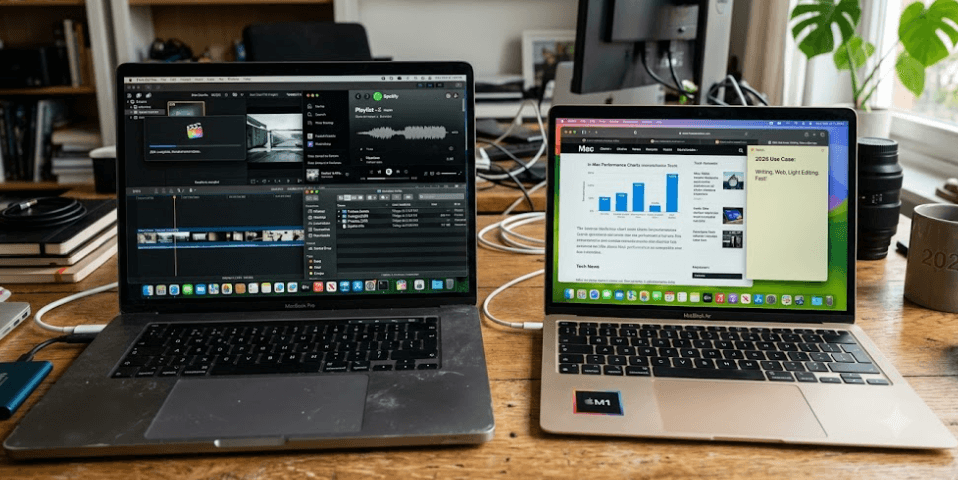
TL;DR: An Intel MacBook Pro can still be useful in 2026, particularly if you already own one or find a well-maintained model at a low price. However, the M1 MacBook is generally the better choice for buyers who want faster everyday performance, better battery efficiency, and a stronger long-term software outlook. Apple's macOS Tahoe 26 compatibility list includes the 2019 16-inch MacBook Pro and the 2020 13-inch Intel model with four Thunderbolt 3 ports, but not every Intel MacBook Pro. Older Intel Macs can still handle writing, browsing, office work, coding, media playback, and selected legacy applications, provided their software and hardware remain suitable. The key is to judge the exact model, battery condition, memory, and supported macOS version rather than assuming every Intel Mac is obsolete.
Intel MacBook Pro vs M1 MacBook: The Main Differences
The shift from Intel processors to Apple's own silicon changed what buyers could expect from a MacBook. Intel MacBook Pros offered capable processors, familiar macOS features, and, on some models, useful advantages such as more ports, larger displays, and support for older professional workflows. The M1 MacBook Air and 13-inch MacBook Pro, introduced in 2020, brought Apple's first-generation M-series chips to laptops. Their integrated design combined the CPU, GPU, memory system, and other components more closely, delivering strong performance without the same power demands as many older Intel configurations.
For everyday work, the difference can be noticeable. An M1 MacBook Air can handle web browsing, documents, video calls, spreadsheets, and moderate creative tasks without feeling like an entry-level machine. It is also fanless, which makes it silent during normal use. The M1 MacBook Pro adds active cooling, which can help during sustained workloads. Older Intel MacBook Pros remain capable, but some generate more heat, run their fans more frequently, and consume more power under demanding workloads. Actual results depend on the Intel processor, cooling system, memory, and condition of the laptop.
The comparison is not simply about which processor has the higher specification. Buyers also need to consider software compatibility, repair costs, battery health, and how many years they expect to use the laptop. A newer Apple silicon model is usually the safer purchase for general use in 2026, but a well-maintained Intel MacBook Pro can still be a sensible option for a specific workflow or a limited budget. Apple continues to list selected Intel models as compatible with macOS Tahoe 26, so it would be inaccurate to say that every Intel Mac has already lost operating system support.
Intel vs M1 MacBook at a Glance
| Feature | Intel MacBook Pro | M1 MacBook |
|---|---|---|
| Everyday performance | Depends on generation and configuration | Strong for most everyday tasks |
| Battery efficiency | Generally lower | Generally better |
| Heat and fan noise | Can be noticeable under load | Usually lower during routine work |
| Software longevity | Varies by exact model | Generally a better long-term prospect |
| RAM and storage | Depends on model; some older models allow limited upgrades | Unified memory and internal storage are not user-upgradable |
| Legacy Intel software | Runs compatible Intel Mac applications natively | Uses Rosetta for many compatible Intel applications |
| Best suited for | Budget buyers and specific legacy workflows | Students, professionals, and general users |
Performance and Battery Life Compared
The M1 chip remains capable of handling everyday computing in 2026. Applications such as Safari, Microsoft Office, Google Chrome, and many photo-editing tools run comfortably on a suitably configured M1 MacBook. Apple's unified memory architecture also allows the processor and graphics hardware to access a shared memory pool efficiently. This is particularly helpful when several applications are open together. However, the base M1 MacBook Air and Pro commonly started with 8GB of unified memory, with 16GB configurations also available, so buyers should check the actual specification rather than assuming every M1 model has the same capacity.
Intel MacBook Pros can still perform well, particularly when equipped with a capable six-core or eight-core processor, 16GB or more of RAM, and a healthy SSD. A 2019 16-inch MacBook Pro, for example, may offer a larger display and discrete graphics that suit certain older professional applications. Nevertheless, sustained performance can vary because of heat, fan behaviour, battery condition, and the age of the components. A higher-end Intel MacBook Pro should not automatically be considered faster or better than an M1 model simply because it has more processor cores or a dedicated graphics chip.
Battery life is another major consideration for anyone purchasing a used MacBook. Apple advertised up to 18 hours of video playback for the M1 MacBook Air under specified testing conditions, but real-world results depend on brightness, applications, connectivity, and battery age. Older Intel laptops may have significantly degraded batteries after years of charging cycles. Even a MacBook that originally offered respectable battery life can become inconvenient if it needs to remain connected to a charger throughout the day. For students, commuters, and remote workers, the M1's efficiency is often more valuable than an older Intel model's extra ports or graphics capabilities.
Which MacBook Is Better For Daily Work?
For writing, browsing, presentations, spreadsheets, online meetings, and light photo editing, an M1 MacBook is generally the more balanced choice. It offers responsive performance and good power efficiency without requiring users to manage heat or fan noise as frequently. An Intel MacBook can still complete these tasks, but its value depends heavily on the price, configuration, and physical condition. Buyers should test the keyboard, trackpad, webcam, speakers, ports, and battery before committing to a used device.
Longevity and macOS Support in 2026
Software support is one of the most important differences between Intel and M1 MacBooks. A laptop may remain physically functional long after it stops receiving major macOS upgrades, but that does not mean its long-term usability is unchanged. New operating system versions introduce features, security improvements, and compatibility requirements that older hardware may not meet. Applications can also gradually stop supporting older macOS releases, creating problems for people who rely on current browsers, productivity tools, development environments, or business software.
Apple's official macOS Tahoe 26 compatibility list includes the 13-inch M1 MacBook Pro from 2020, the 16-inch Intel MacBook Pro from 2019, and the 13-inch Intel MacBook Pro from 2020 with four Thunderbolt 3 ports. However, the 2020 13-inch Intel model with two Thunderbolt 3 ports is not on that list. This distinction matters because two MacBook Pros released in the same year can have different software support.
The M1 MacBook is generally the stronger option for buyers who want to keep their computer for several more years, but no model comes with a guaranteed number of future macOS upgrades. Apple does not promise a fixed support lifespan for every MacBook. Buyers should also consider security updates for older operating systems, app compatibility, and the physical condition of the device. If your Intel Mac no longer supports the latest macOS, it may remain suitable for offline tasks or compatible applications, but using an unsupported operating system for sensitive banking, business, or personal accounts introduces avoidable security risks.
How To Check Your MacBook's Support
Before purchasing, open the Apple menu and select About This Mac to identify the model and processor. Then compare the exact model with Apple's compatibility information. Do not rely solely on a seller's description, the year printed in an advertisement, or the phrase "latest macOS installed." A machine may be running a newer system through an unofficial patch, which is different from having official Apple support. Unofficial installations can introduce compatibility and maintenance complications, so they should not be treated as equivalent to a supported installation.
What Can You Still Do With An Old Intel Mac?
An older Intel MacBook does not automatically belong in electronic waste. If the display, keyboard, SSD, ports, and battery remain in reasonable condition, it can still be useful for everyday tasks. Writing assignments, managing documents, preparing presentations, browsing compatible websites, reading PDFs, organizing photographs, and playing locally stored media are all practical uses. A MacBook with 16GB of RAM and a working SSD may remain comfortable for lightweight multitasking, although the experience depends on the processor, macOS version, and applications involved.
Older Intel Macs can also be useful for specialized workflows. Developers may retain one for testing older Intel software, maintaining legacy projects, or running tools that require an Intel environment. Music producers, photographers, and video editors may keep a compatible older machine for a particular application or peripheral that works reliably on its existing system. However, check the software vendor's compatibility requirements before depending on an old Mac for paid work. Some modern creative applications and plugins may require newer macOS versions, newer graphics capabilities, or Apple silicon optimization.
If your Intel Mac is no longer suitable as a primary computer, you can give it a secondary role. It can serve as a dedicated writing machine, a home media computer, a local file-management station, or a learning device for basic programming. With an external monitor, keyboard, and mouse, a MacBook with a working display or usable external video output can also support a simple desk setup. Before repurposing it, back up your files, install the latest compatible official security updates, remove unnecessary start-up applications, and replace the battery only if the cost makes sense. Avoid using an unsupported Mac for sensitive online activities without carefully assessing the security risks.
Practical Uses For Older Intel Macs
| Use Case | Is An Intel Mac Suitable? | What To Check |
|---|---|---|
| Writing and office work | Yes, for compatible apps | Browser and macOS support |
| Online learning | Usually | Video-call app compatibility |
| Basic programming | Yes, depending on tools | Required compiler and OS version |
| Older creative software | Often | License, plugins, and hardware support |
| Media playback | Yes | Display, speakers, and playback software |
| Modern AI development | Limited for demanding local workloads | Memory, graphics, and software support |
| Secure daily banking | Only with an adequately supported setup | Current security updates and browser support |
Intel MacBook Pro vs M1: Value For Money
A used Intel MacBook Pro can appear attractive because it may offer a larger display, more ports, or a lower purchase price than an Apple silicon MacBook. That initial saving, however, should not be the only factor in the decision. A laptop with a worn battery, aging cooling system, damaged keyboard, or limited operating system support can cost more to maintain than expected. Before buying, check the battery cycle information and condition, run Apple Diagnostics where possible, test every port, inspect the screen, and confirm that the seller has signed out of their Apple Account and removed Activation Lock.
The M1 MacBook is often the better value when the price difference is reasonable. It offers strong everyday performance, lower power consumption, and a more favorable position in Apple's transition toward Apple silicon. Nevertheless, an M1 model with only 8GB of unified memory and limited storage may not be ideal for demanding creative work or large development projects. Because unified memory cannot be upgraded later, buyers should compare the exact RAM and storage configurations rather than choosing solely by processor name.
The sensible approach is to calculate the total cost of ownership. Include the purchase price, potential battery replacement, accessories, storage needs, and the possibility that a lack of software support may force an earlier replacement. A cheap Intel MacBook can make sense as a temporary computer or a dedicated legacy machine, but paying a premium for one in 2026 is difficult to justify when a similarly priced M1 model is available in good condition. The best purchase is the laptop that meets your current needs without creating avoidable costs over the next few years.
Used MacBook Buying Checklist
| Check | Why It Matters |
|---|---|
| Exact model identifier | Confirms specifications and macOS eligibility |
| Battery condition | Helps estimate remaining portable use |
| RAM and SSD capacity | Determines multitasking and storage flexibility |
| Activation Lock status | Prevents problems setting up the device |
| Keyboard, display, and ports | Identifies expensive hardware faults |
| macOS and app compatibility | Helps avoid software limitations |
| Repair history | Reveals potential reliability concerns |
Common Mistakes When Buying An Intel Mac
One common mistake is assuming that every Intel MacBook Pro is obsolete. That is not accurate: selected Intel models remain compatible with macOS Tahoe 26, and older machines can still perform useful work. The opposite mistake is assuming that every Intel MacBook Pro is a good deal simply because it has a Retina display or a Core i7 processor. A model that no longer receives current operating system upgrades may be a poor choice as a primary computer, even if its hardware looks impressive on paper.
Another mistake is comparing processor names without considering the full configuration. An older Intel MacBook Pro with a dedicated GPU may have advantages in certain graphics applications, while an M1 MacBook can outperform it in other workloads with lower power consumption. The result depends on the application, workload, cooling, and configuration. Buyers should also avoid treating battery life figures from original launch specifications as a reliable prediction for a used laptop. A six-year-old battery will not necessarily deliver anything close to its original rated runtime.
Finally, do not buy an Intel Mac solely because an unofficial patch allows it to run a newer version of macOS. Tools such as OpenCore Legacy Patcher can help some unsupported Macs run newer operating systems, but they are not official Apple support. Hardware, drivers, security features, and future updates may not behave as they do on officially supported models. If you depend on your laptop for work or study, choose a configuration that runs the operating system and applications you need without relying on a workaround you may have to maintain.
Frequently Asked Questions
Q. Is an Intel MacBook Pro still worth buying in 2026?
An Intel MacBook Pro can be worth buying if it is inexpensive, well maintained, and suited to a specific task. For most people seeking a primary laptop with a longer software-support outlook, an M1 MacBook is the safer choice.
Q. Is an M1 MacBook faster than an Intel MacBook Pro?
The M1 delivers excellent performance for everyday tasks and many creative workloads. Results vary by Intel model and application, so compare the exact configurations instead of assuming every M1 Mac outperforms every Intel Mac.
Q. How long will an M1 MacBook last?
An M1 MacBook can remain useful for years, depending on its battery, hardware condition, application requirements, and future software support. Apple does not guarantee a fixed number of future macOS upgrades for each model.
Q. Does the Intel MacBook Pro support macOS Tahoe 26?
Some Intel models do. Apple's compatibility list includes the 2019 16-inch MacBook Pro and the 2020 13-inch model with four Thunderbolt 3 ports, but not every Intel MacBook Pro.
Q. Can an old Intel MacBook still be used for college?
Yes, if it runs compatible versions of the applications required for coursework. It can handle documents, presentations, research, and other basic tasks, but check software support and security before relying on it for daily study.
Q. Can I use an old Intel MacBook for programming?
Yes. It can support many programming tasks, particularly when the required development tools remain compatible with its operating system. Newer SDKs, development environments, and specialized workloads may require more recent hardware or software.
Q. Is an Intel MacBook good for video editing in 2026?
It can handle some editing workflows, especially on higher-specification models with sufficient memory and compatible software. For newer editing applications, demanding footage, and sustained workloads, an M1 or newer Apple silicon Mac is generally a better choice.
Q. Can I upgrade the RAM in an Intel MacBook Pro?
Most modern Intel MacBook Pro models have soldered memory, so the RAM cannot be upgraded after purchase. Some older MacBook models have different upgrade options, so check the exact model before assuming its memory is replaceable.
Q. What can I do with an Intel MacBook that no longer receives macOS updates?
You can use it for compatible offline applications, writing, media playback, older software, and other secondary tasks. For sensitive online activities, consider the security implications of an unsupported operating system and browser.
Q. Should I buy a used Intel MacBook Pro or an M1 MacBook Air?
For most students, office users, and general buyers, the M1 MacBook Air is the better option because of its efficiency and strong everyday performance. A used Intel MacBook Pro is worth considering when you need a specific feature, legacy compatibility, or a substantially lower price.
Final Recommendation: Intel MacBook Pro vs M1 MacBook
For most buyers in 2026, the M1 MacBook is the better investment. It combines responsive performance, good battery efficiency, and a stronger position in Apple's Apple silicon transition. It is a practical choice for students, professionals, and people who want a dependable everyday laptop without paying for a newer premium model. Choose the memory and storage configuration carefully, because neither can be upgraded on these M1 MacBooks after purchase.
An Intel MacBook Pro still has a place, but the reason to buy one should be specific. A well-maintained model can be useful for basic office work, older software, development testing, media playback, or workflows that depend on Intel compatibility. If you already own an Intel Mac, there is no need to replace it simply because it is older. Check its software support, battery health, and performance first, and continue using it where it remains safe and practical.
If you are purchasing a MacBook for the first time, prioritize the M1 model when the price and condition are comparable. Consider an Intel Mac only when its lower cost or particular hardware features genuinely outweigh its limitations. Before making the final decision, verify the exact model's macOS compatibility on Apple's official support website and compare the total ownership cost, not just the asking price.
Ready to upgrade your tech?
Browse our collection of quality refurbished products at unbeatable prices.






