iMac M6 in India: Price, Specs and Who It's For
The iMac M6 starts at ₹1,74,900 in India with a 4.5K Retina display, 16GB memory, M6 performance, Wi-Fi 7, and up to 2TB storage. Here's who should buy it.

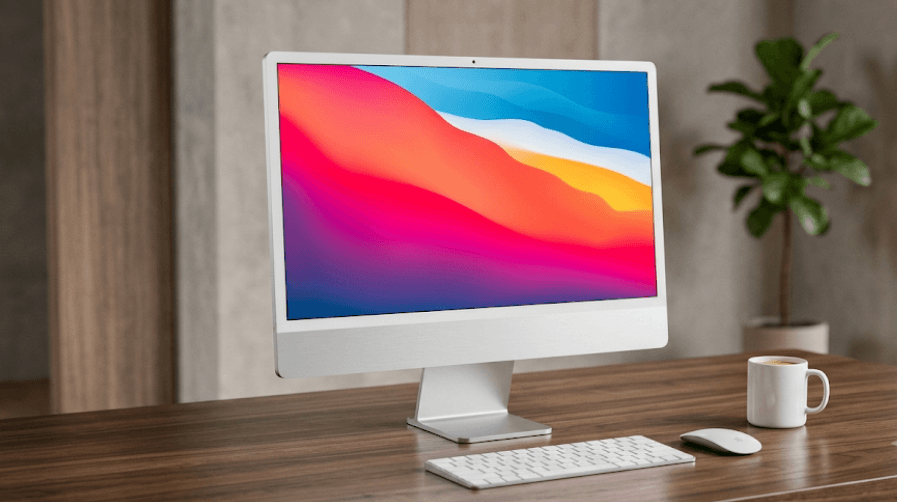
TL;DR: The iMac M6 is Apple's latest 24-inch all-in-one desktop, starting at ₹1,74,900 in India. It combines Apple's M6 chip, a 4.5K Retina display, 16GB unified memory, up to 2TB SSD storage, Wi-Fi 7, Bluetooth 6, and a 12MP Center Stage camera in a slim, colorful design. The base model is aimed at students, professionals, families, and everyday users, while the higher-end 12-core version makes more sense for creators and heavier workloads. Its biggest strengths are the display, compact all-in-one design, performance, and Apple ecosystem integration. However, the price and limited upgradeability mean buyers should choose the configuration carefully before purchasing.
iMac M6 Price In India
Apple has launched the new iMac M6 in India at a starting price of ₹1,74,900. This entry-level configuration comes with a 10-core CPU, 10-core GPU, 16GB unified memory, and 256GB SSD storage. Apple also lists an education price of ₹1,68,900 for eligible buyers, making it a slightly more attractive option for students and education users.
The higher-end iMac M6 configuration starts at ₹1,99,900 in India. It upgrades the chip to a 12-core CPU and 12-core GPU and starts with 16GB unified memory and 256GB storage in Apple's configurable lineup. Education pricing brings the starting price of this version to ₹1,87,900. Buyers can also configure additional memory and storage depending on their workload.
It is worth remembering that the starting price does not represent every possible configuration. Increasing RAM, SSD capacity, or choosing options such as the Magic Trackpad, numeric-keypad keyboard, 2.5Gb Ethernet, or nano-texture glass can push the final price considerably higher. Apple also offers financing and trade-in options, so the effective purchase cost can vary depending on the buyer and current offers.
| iMac M6 Configuration | Starting Price In India | CPU | GPU | Starting Memory | Starting Storage |
|---|---|---|---|---|---|
| Base iMac M6 | ₹1,74,900 | 10-core | 10-core | 16GB | 256GB |
| Higher-end iMac M6 | ₹1,99,900 | 12-core | 12-core | 16GB | 256GB |
iMac M6 Specifications At A Glance
The iMac M6 continues Apple's familiar 24-inch all-in-one formula. Its display has a 4480 × 2520 resolution, 218 pixels per inch, support for one billion colours, P3 wide colour, True Tone, and up to 500 nits of brightness. Apple calls it a 24-inch display, although its actual diagonal measurement is 23.5 inches.
The main hardware upgrade is Apple's M6 chip. The base version has a 10-core CPU and 10-core GPU, while the higher-end configuration gets a 12-core CPU and 12-core GPU. Both versions include Neural Accelerators, hardware-accelerated ray tracing, and a dual 16-core Neural Engine. Memory starts at 16GB and can be configured to 24GB on the 10-core model or up to 32GB on the 12-core version.
Storage starts at a relatively modest 256GB SSD. The 10-core model can be configured with up to 1TB, while the 12-core version can go up to 2TB. This is an important consideration for photographers, video editors, and other users working with large files because the internal storage cannot simply be swapped later like a conventional desktop drive.
| Specification | iMac M6 |
|---|---|
| Display | 24-inch 4.5K Retina |
| Actual display size | 23.5 inches |
| Resolution | 4480 × 2520 |
| Brightness | 500 nits |
| CPU options | 10-core or 12-core |
| GPU options | 10-core or 12-core |
| Unified memory | 16GB, up to 24GB/32GB |
| SSD | 256GB, up to 1TB/2TB |
| Camera | 12MP Center Stage |
| Wireless | Wi-Fi 7, Bluetooth 6 |
| Ports | Up to four Thunderbolt 4 |
| Ethernet | Optional 2.5Gb Ethernet |
| Colours | Blue, Purple, Pink, Orange, Yellow, Green, Silver |
M6 Performance And AI Features
The biggest reason to consider the new iMac is the M6 chip. Apple has increased the CPU and GPU core counts compared with the previous M4 iMac, with the higher-end version reaching 12 CPU and 12 GPU cores. The chip also includes Neural Accelerators and hardware-accelerated ray tracing, giving the iMac more capability for graphics-heavy and AI-related workloads.
For everyday work, the performance is more than enough for browsing, office applications, presentations, spreadsheets, video calls, streaming, and multitasking. Apple says the M6 iMac can deliver up to 1.5x the performance of the M4 iMac in Microsoft Excel and up to 2x the graphics performance in certain photo-editing workloads. These are Apple's own test results, so real-world gains will vary depending on the software and workload.
AI is another focus of the M6 generation. The dual 16-core Neural Engine and Neural Accelerators are designed to handle on-device AI workloads, while Apple Intelligence and the newer Siri AI features are integrated into macOS. The M6 iMac can also handle local AI models, although users interested in serious AI development should look carefully at memory capacity before choosing a configuration.
Display And Design
The iMac's design remains one of its biggest selling points. Instead of purchasing a separate desktop tower and monitor, buyers get the computer, display, speakers, microphones, camera, and accessories in one package. The result is a cleaner desk setup with fewer cables and a smaller footprint than many traditional desktop systems.
The 4.5K Retina display is particularly well suited to people who spend long hours working with visual content. The 4480 × 2520 resolution provides a sharp workspace, while P3 wide colour and True Tone make it suitable for photo editing, graphic design, presentations, and media consumption. The standard display reaches 500 nits, and the higher-end configuration can be ordered with nano-texture glass.
Apple continues to offer the iMac in seven colours: blue, purple, pink, orange, yellow, green, and silver. The machine measures 54.7 cm wide, 46.1 cm high, and 14.7 cm deep with its stand. The 10-core version weighs about 4.42 kg, while the 12-core version weighs about 4.44 kg, making it relatively easy to reposition compared with a traditional desktop setup.
Ports, Connectivity And Accessories
Connectivity has received a meaningful upgrade with the M6 model. The iMac now supports Wi-Fi 7 and Bluetooth 6, while 2.5Gb Ethernet is available depending on configuration. For users moving large files over a wired network, the faster Ethernet option can be useful, particularly in creative or professional environments.
Port selection depends on the chip configuration. The 10-core model has two Thunderbolt 4/USB 4 ports, while the 12-core model gets four Thunderbolt 4/USB 4 ports. The ports support data transfer and DisplayPort, while the iMac also includes a 3.5mm headphone jack. This difference matters if you plan to connect several external drives, docks, displays, or other accessories.
The iMac comes with a colour-matched Magic Keyboard and Magic Mouse. Depending on the configuration, buyers can choose a Magic Keyboard with Touch ID and numeric keypad or a Magic Trackpad. The higher-end configuration also supports nano-texture glass and additional memory and storage options. Users who already own several peripherals should check the port requirements before buying.
Camera, Audio And Everyday Experience
The iMac M6 includes a 12MP Center Stage camera with support for Desk View. This is a useful upgrade for people who regularly attend online meetings, teach remotely, create presentations, or communicate with clients. Center Stage can keep the user framed during compatible video calls, while Desk View can show an overhead view of a workspace.
Audio is another area where the all-in-one design works well. The iMac features a six-speaker system with force-cancelling woofers, wide stereo sound, and support for Spatial Audio when playing compatible Dolby Atmos content. It also has a studio-quality three-microphone array with directional beamforming for clearer voice capture.
For someone building a home office, this combination is convenient because a separate webcam, speaker system, and microphone are not essential for getting started. The experience is especially seamless for people already using iPhones, as Apple's Continuity features allow files, photos, messages, and other activities to move between Apple devices.
Who Should Buy The iMac M6?
Students And Everyday Users
For students, the base iMac M6 is already powerful enough for typical academic workloads. Research, presentations, documents, spreadsheets, online classes, coding, browsing, and entertainment are all well within its capabilities. The large 4.5K display is also useful when working with multiple windows or reading detailed material.
The all-in-one design is especially attractive for students who want a clean study setup without assembling a separate desktop and monitor. The included keyboard and mouse mean there is less equipment to purchase separately.
However, portability is a major limitation. Unlike a MacBook Air, the iMac is designed to remain on a desk. Students who frequently move between home, college, libraries, and group-study spaces would probably benefit more from a laptop.
Professionals And Office Users
For professionals working with documents, presentations, spreadsheets, browser-based tools, communication platforms, and business applications, the iMac M6 offers more than enough performance. The large high-resolution display can also make long working sessions more comfortable by providing plenty of screen space.
The 12MP camera, microphone array, speakers, and Wi-Fi 7 connectivity make it well suited to hybrid work and video meetings. People already invested in the Apple ecosystem can also take advantage of features such as iPhone Mirroring and Continuity.
The main question is whether you need an all-in-one desktop. If your work requires frequent travel, a MacBook may be the more practical choice. If the computer will stay in one workspace, the iMac's combination of display and performance makes considerably more sense.
Creators And Designers
The M6 iMac is a capable machine for photographers, graphic designers, social media creators, and video editors. The 4.5K P3 display gives visual work a strong foundation, while the M6 chip provides significantly more processing and graphics capability than older Apple Silicon iMac models.
The 12-core configuration is the more sensible choice for heavier creative workloads. More GPU cores, the option for up to 32GB unified memory, and up to 2TB SSD storage provide additional headroom for demanding applications.
Still, professional creators should consider the limitations. The iMac's screen size is fixed at 24 inches, and the internal hardware is not designed for traditional component upgrades. Users working with very large video projects, complex 3D scenes, or demanding professional workflows may be better served by a Mac Studio paired with a larger external display.
Who Should Skip The iMac M6?
The iMac M6 is not automatically the best Mac for every buyer. If portability matters, a MacBook Air or MacBook Pro is a more logical choice because the iMac is fundamentally a stationary desktop. You also need a suitable desk space and a power connection wherever you intend to use it.
Buyers who already own a high-quality monitor should also think twice. Apple's all-in-one approach means you are paying for the integrated 4.5K display even if you do not need another screen. A Mac mini paired with an existing monitor can provide a more flexible desktop setup at a lower entry price.
Similarly, buyers who need extensive upgradeability should look elsewhere. The unified memory and internal SSD are configured at purchase, so selecting the right capacity is important. Spending more upfront on memory and storage can make sense if you expect your workload to grow over several years.
iMac M6 Vs MacBook And Mac Mini
The iMac M6 sits in an interesting position within Apple's desktop and laptop lineup. It offers the simplicity of an all-in-one while avoiding the need to buy a separate display. For someone starting from scratch, that convenience has genuine value.
A MacBook makes more sense for people who need portability. It can travel to college, the office, meetings, or another room and can still be connected to an external display when required. The iMac, on the other hand, is better suited to a permanent workstation where a large screen is the priority.
The Mac mini is the more flexible alternative for desktop users who already own a monitor, keyboard, and mouse. It can also be a better choice for buyers who want to choose their own display. The iMac wins on simplicity: everything arrives as one coordinated package and is ready to use with minimal setup.
| User Need | Better Choice |
|---|---|
| Permanent desk setup | iMac M6 |
| College and travel | MacBook |
| Existing monitor | Mac mini |
| Built-in 4.5K display | iMac M6 |
| Maximum portability | MacBook |
| Custom monitor setup | Mac mini |
| Clean all-in-one workspace | iMac M6 |
| Heavy professional desktop work | Mac Studio |
Final Recommendation And Decision Framework
The iMac M6 is a strong choice for buyers who want a premium all-in-one desktop without the hassle of selecting a separate monitor, speakers, webcam, and other accessories. Its combination of M6 performance, a sharp 4.5K display, improved connectivity, strong built-in audio, and Apple's ecosystem makes it an appealing home and professional workstation.
For most users, the ₹1,74,900 base model is the sensible starting point. It already includes 16GB unified memory and the 10-core M6 configuration, which is plenty for everyday productivity, education, office work, browsing, entertainment, and moderate creative work. Buyers should consider upgrading storage if they regularly work with large photo or video libraries.
For creators and professionals who expect heavier workloads, the 12-core M6 model is the better long-term investment, particularly when paired with additional memory and storage. But if portability, extensive upgradeability, or a larger professional display is more important than the all-in-one experience, a MacBook, Mac mini, or Mac Studio may be the smarter purchase.
The bottom line: The iMac M6 is best for people who want a powerful, polished desktop that looks as good as it performs. It is not the most flexible Mac, but for a clean, permanent workstation with a superb built-in display, it remains one of Apple's most convenient desktop options.
Frequently Asked Questions
Q. What is the price of the iMac M6 in India?
The iMac M6 starts at ₹1,74,900 in India for the 10-core CPU and 10-core GPU configuration. The 12-core version starts at ₹1,99,900.
Q. When did the iMac M6 launch in India?
Apple announced the iMac M6 in October 2026, with pre-orders beginning on October 28 and availability in India starting November 6, 2026.
Q. Does the iMac M6 have a 24-inch display?
Yes. Apple markets it as a 24-inch iMac, although the actual diagonal measurement of the display is 23.5 inches. It has a 4480 × 2520 4.5K Retina resolution.
Q. How much RAM does the iMac M6 have?
The iMac M6 starts with 16GB unified memory. The 10-core version can be configured with 24GB, while the 12-core version can be configured with up to 32GB.
Q. How much storage does the iMac M6 have?
The base configuration starts with a 256GB SSD. Depending on the processor configuration, Apple offers storage options up to 1TB or 2TB.
Q. Is the iMac M6 good for video editing?
Yes. The M6 chip includes hardware-accelerated media capabilities and can handle video-editing workloads effectively. Professional editors working with very large or complex projects may benefit from a Mac Studio instead.
Q. Does the iMac M6 support Wi-Fi 7?
Yes. The iMac M6 supports Wi-Fi 7 and Bluetooth 6. It can also be configured with 2.5Gb Ethernet.
Q. How many Thunderbolt ports does the iMac M6 have?
The 10-core configuration has two Thunderbolt 4/USB 4 ports, while the 12-core configuration has four Thunderbolt 4/USB 4 ports.
Q. Can the iMac M6 connect to external displays?
Yes. Depending on the configuration, the iMac M6 can support one or up to two external displays, including displays with resolutions up to 6K.
Q. Is the iMac M6 worth buying in India?
It is worth considering if you want a permanent all-in-one workstation with a high-quality display and strong performance. If you need portability or already own a good monitor, a MacBook or Mac mini may offer better value.
Ready to upgrade your tech?
Browse our collection of quality refurbished products at unbeatable prices.