
HP ZBook Firefly Z11 Windows Compatibility In 2026: Drivers, Apps, And Limitations
HP ZBook Firefly Z11 offers strong Windows 11 compatibility in 2026 with enterprise drivers, firmware updates, and reliable long-term workstation support.

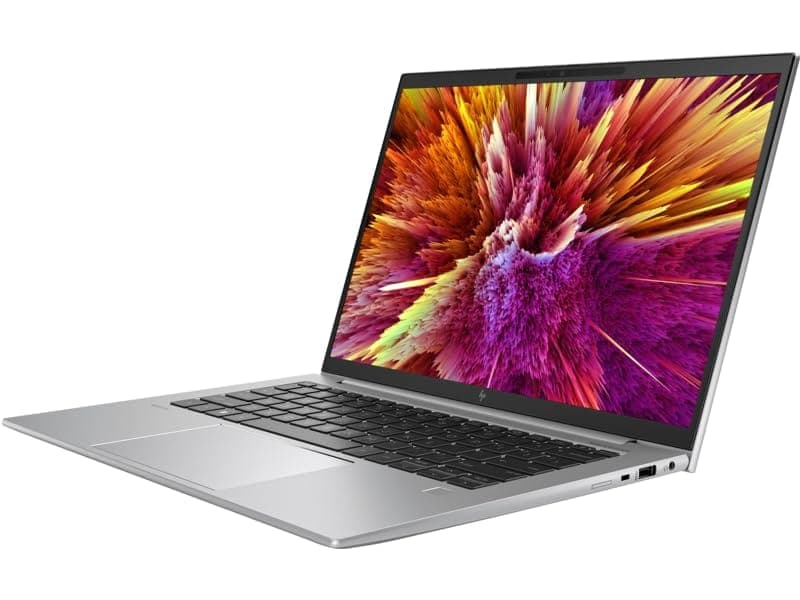
TL;DR The HP ZBook Firefly Z11 offers strong Windows ecosystem compatibility in 2026, making it a reliable enterprise workstation for professionals upgrading operating systems or purchasing refurbished hardware. Built around Intel Core Ultra architecture with modern security firmware and enterprise driver certification, the system runs Windows 11 Pro smoothly while maintaining backward compatibility with Windows 10 environments still common across Indian businesses. HP continues long lifecycle driver deployment through its enterprise support channels, ensuring stable GPU, chipset, Thunderbolt, and docking performance. For professionals using Microsoft 365, CAD tools, analytics platforms, or corporate VPN environments, compatibility remains excellent. However, users must still evaluate firmware updates, legacy software dependencies, and enterprise deployment policies before upgrading to newer Windows builds. Overall, the Firefly Z11 remains a future-ready workstation platform rather than a short-cycle consumer laptop.
Windows Version Support in 2026 (Windows 10 vs Windows 11 vs Future Updates)
The HP ZBook Firefly Z11 Workstation Laptop entered the market during Microsoft’s transition toward AI-optimized operating systems, making operating system compatibility a major purchasing factor in 2026. Systems based on Intel Core Ultra processors fully support Windows 11 Pro, including hardware-level requirements such as TPM 2.0, Secure Boot, virtualization extensions, and modern power scheduling frameworks. These features allow the Firefly Z11 to operate efficiently under hybrid-core CPU scheduling introduced in newer Windows releases.
Windows 10 compatibility technically remains possible for enterprise rollback environments; however, Microsoft’s official extended lifecycle places organizations increasingly toward Windows 11 adoption. In practical enterprise deployments, Windows 11 provides better thread management for performance cores and efficiency cores, improving multitasking responsiveness during analytics, development environments, and professional software usage. Users upgrading from older ZBook generations will notice smoother background task handling and improved battery-aware scheduling.
Future Windows builds expected beyond 2026 emphasize AI-assisted workflows, local Copilot processing, and enhanced security virtualization layers. Because the Firefly Z11 platform includes updated firmware architecture and enterprise chipset support, it remains well positioned for upcoming feature updates without requiring hardware replacement.
Windows Compatibility Overview
For refurbished buyers sourcing systems through platforms like Refurbo,this ensures long operational lifespan even after OS upgrades.
Official HP Driver Availability and Lifecycle Support
A major advantage highlighted in most HP ZBook Firefly Z11 Review discussions is HP’s enterprise-grade driver lifecycle management, which differs significantly from consumer laptops. ZBook systems receive extended driver validation cycles because they are deployed in corporate fleets running certified professional software environments.
HP distributes official drivers through HP Support Assistant and enterprise SoftPaq repositories, covering graphics drivers, chipset firmware, Thunderbolt controllers, audio systems, wireless modules, and workstation GPU stacks. Importantly, these drivers undergo ISV certification testing with professional applications such as AutoCAD, SolidWorks, and Adobe workflows, reducing compatibility failures after Windows updates.
In 2026, driver stability becomes increasingly critical as Windows updates introduce kernel security and AI acceleration frameworks. The Firefly Z11 benefits from continued BIOS-driver synchronization updates, ensuring that GPU acceleration, power management, and docking behavior remain predictable even after major OS revisions. This reduces a common enterprise issue where updates break display outputs or peripheral connectivity.
For Indian professionals purchasing Refurbished HP ZBook Firefly Z11, long driver availability significantly improves long-term usability compared to consumer notebooks that often lose official support after two or three years. HP’s workstation ecosystem typically maintains update availability well beyond standard retail cycles, making refurbished enterprise hardware a safer long-duration investment.
The result is consistent compatibility across productivity applications, enterprise VPN systems, and external workstation accessories even as Windows evolves through future releases.
BIOS Updates and Firmware Stability in 2026
Firmware stability plays a critical role in workstation longevity, and the HP ZBook Firefly Z11 benefits from HP’s enterprise BIOS ecosystem designed for long deployment cycles rather than short consumer refresh timelines. In 2026, BIOS updates are no longer limited to boot improvements; they directly influence Windows security compatibility, CPU scheduling efficiency, and device authentication frameworks.
HP continues delivering BIOS revisions through secured firmware channels that integrate with Windows Update and HP Support Assistant. These updates maintain compatibility with evolving Windows kernel security features such as virtualization-based security (VBS), memory integrity enforcement, and secure credential isolation. For enterprise users handling sensitive financial or organizational data, firmware maturity ensures consistent system behavior even after major OS upgrades.
Another important advantage is HP’s BIOS configurability. IT administrators can control boot access, device permissions, Thunderbolt security levels, and remote deployment settings through centralized management tools. This capability becomes essential in corporate environments transitioning toward hybrid work models across India, where remote system provisioning must remain secure yet manageable.
Firmware thermal tuning also contributes indirectly to compatibility. Updated BIOS versions refine power delivery between performance and efficiency cores, improving sustained performance under Windows 11 scheduling. Unlike many ultrabooks where firmware stagnates after release, ZBook platforms maintain longer update timelines, preserving system stability across multiple Windows generations.
For refurbished workstation buyers, this ongoing firmware support significantly extends usable lifespan, ensuring the Firefly Z11 remains reliable well into future enterprise software ecosystems.
Compatibility With Microsoft 365, Office, and Enterprise Applications
Modern professional workflows heavily depend on Microsoft’s productivity ecosystem, and HP ZBook Firefly Z11 Specs align closely with enterprise application requirements in 2026. Systems equipped with Core Ultra processors and DDR5 memory deliver strong responsiveness across Microsoft 365 workloads including Excel modeling, Power BI dashboards, Teams collaboration, and large Outlook database environments.
Windows 11 optimization improves thread allocation for multitasking scenarios where users simultaneously operate spreadsheets, browser dashboards, ERP portals, and video conferencing tools. Large Excel simulations involving financial forecasting or analytics modeling benefit from improved background task distribution, preventing interface slowdowns common on older platforms.
Enterprise application compatibility remains excellent because ZBook systems are validated for corporate deployment stacks including VPN clients, endpoint security platforms, accounting environments, and browser-based SaaS tools. Applications widely used in Indian business environments such as GST portals, Tally integrations, CRM dashboards, and cloud accounting platforms operate without driver conflicts.
Enterprise Software Compatibility Table
The Firefly Z11 therefore functions as a corporate-ready workstation, not merely a productivity laptop, ensuring long-term application stability across evolving Windows ecosystems.
Performance Optimization on Latest Windows Builds
Performance optimization under modern Windows versions increasingly depends on hardware-software cooperation rather than raw specifications alone. The HP ZBook Firefly Z11 Review frequently highlights how Intel’s hybrid architecture works alongside Windows 11’s updated scheduler to dynamically allocate workloads between performance and efficiency cores.
In real-world professional usage, this translates into smoother multitasking when background processes such as antivirus scans, synchronization services, or cloud backups run simultaneously with active workloads. Developers compiling projects, analysts running datasets, or consultants managing browser-heavy workflows experience fewer performance interruptions compared to older workstation generations.
Windows 11 also introduces improved GPU workload routing, allowing integrated graphics or optional discrete GPUs to activate selectively depending on application demand. This behavior improves battery efficiency without sacrificing responsiveness during visualization or presentation tasks. Updated DirectX and driver stacks further enhance compatibility with modern productivity and visualization software.
Storage optimization under newer Windows builds takes advantage of NVMe SSD queue management, reducing application launch latency and improving file indexing speeds. Combined with workstation-grade thermal tuning, sustained performance remains stable even during extended working sessions.
Proper optimization, however, requires periodic driver updates and firmware alignment. Users maintaining updated BIOS and graphics drivers typically achieve the best long-term performance outcomes. When configured correctly, the Firefly Z11 delivers consistent workstation responsiveness, ensuring that OS updates enhance productivity rather than degrade performance over time.
Limitations to Consider Before Upgrading to Latest Windows
While modern Windows updates bring improved security and performance optimizations, upgrading immediately is not always ideal for every professional workflow using the HP ZBook Firefly Z11. In 2026, one of the most important realities of enterprise computing is that stability often matters more than adopting the newest operating system version on day one.
Certain legacy engineering tools, proprietary enterprise software, and internally developed business applications may still rely on older driver frameworks originally optimized for Windows 10 environments. Although Windows 11 maintains strong backward compatibility, updates occasionally introduce permission-layer or virtualization conflicts affecting older plugins or database connectors.
Another limitation arises from security feature expansion. Windows 11 enables virtualization-based security and memory integrity by default on many systems. While these enhance protection, they can slightly reduce performance in CPU-heavy workflows such as compilation or simulation tasks. Professionals working with large datasets sometimes notice marginal performance overhead unless settings are carefully optimized.
Driver transition periods also matter. Newly released Windows builds occasionally ship before GPU or docking drivers receive full optimization updates. During these phases, users may encounter temporary display scaling inconsistencies or power-management irregularities until vendor updates stabilize the ecosystem.
For most professionals, the safest strategy in 2026 is controlled upgrading rather than immediate migration. Waiting for cumulative updates ensures enterprise drivers mature fully, allowing the Firefly Z11 to maintain workstation-grade reliability instead of behaving like a consumer test platform.
Security Updates and Long-Term Usability Outlook
Security longevity is one of the strongest advantages of enterprise workstation platforms, and HP ZBook Firefly Z11 Specs align well with modern cybersecurity expectations extending into the late 2020s. Unlike consumer laptops designed around short upgrade cycles, ZBook systems are engineered for multi-year organizational deployment.
Windows 11 security architecture integrates seamlessly with HP enterprise protections such as hardware-level encryption support, Secure Boot enforcement, TPM 2.0 modules, and BIOS-level authentication controls. These features collectively protect systems against firmware attacks, credential theft, and ransomware threats increasingly targeting professional users.
In India’s growing remote-work ecosystem, endpoint protection has become essential. Corporate employees accessing financial databases, healthcare records, or consulting platforms benefit from workstation-class isolation technologies that safeguard sensitive data even on unsecured networks. HP firmware validation ensures operating system updates do not compromise device trust chains.
Long-term usability also depends on update continuity. Microsoft’s extended Windows 11 support roadmap combined with HP driver lifecycle policies suggests that Firefly Z11 systems will remain fully secure for several future update cycles. Regular security patches continue arriving through Windows Update without requiring specialized enterprise infrastructure.
For refurbished buyers evaluating longevity, this translates into a highly practical outcome: the device remains secure, compliant, and enterprise-ready long after purchase. Proper maintenance allows the workstation to function safely across evolving digital compliance environments through 2028–2030 usage horizons.
Driver Support for External Devices and Docking Stations
Modern professional workflows rarely operate on standalone laptops. External monitors, docking stations, storage devices, and collaboration peripherals form the backbone of productivity environments, and the HP ZBook Firefly Z11 Workstation Laptop is specifically designed to support these ecosystems reliably.
Thunderbolt and USB-C connectivity provide extensive compatibility with professional docking solutions used across corporate offices and hybrid work setups. Through a single cable connection, users can drive multiple displays, connect wired networking, attach external SSD arrays, and power the system simultaneously. Updated Windows drivers ensure plug-and-play behavior without manual configuration in most enterprise scenarios.
Display driver maturity becomes particularly important for professionals running dual or triple-monitor setups. The Firefly Z11 maintains stable scaling behavior across mixed-resolution displays, preventing interface distortion often seen on consumer-grade systems. External GPUs and high-resolution monitors operate efficiently when supported drivers remain updated.
Peripheral compatibility also extends to specialized hardware including biometric authentication devices, smart card readers, presentation controllers, and professional audio equipment. HP maintains certified driver packages that minimize conflicts when new Windows updates are deployed.
For consultants, analysts, and engineers working between office desks and remote environments, reliable docking behavior dramatically improves workflow continuity. The Firefly Z11 therefore acts not only as a portable machine but as a full desktop replacement ecosystem, maintaining stable connectivity across modern enterprise hardware environments.
Who Should Upgrade and Who Should Stay on Current Windows Version
Deciding whether to upgrade Windows on the HP ZBook Firefly Z11 in 2026 depends less on hardware capability and more on workflow dependency and software environment stability. From a technical standpoint, the system comfortably supports modern Windows builds thanks to enterprise-grade firmware, TPM security modules, and updated processor platforms. However, professional users must evaluate upgrade timing strategically rather than automatically adopting the newest release.
Users working primarily with modern productivity ecosystems such as Microsoft 365, browser-based ERP tools, analytics dashboards, cloud collaboration platforms, and updated development environments benefit significantly from upgrading to Windows 11. The newer OS improves task scheduling efficiency, window management, power optimization, and hybrid-core utilization. Professionals conducting consulting work, MBA analytics, corporate reporting, or remote collaboration typically experience smoother multitasking and improved battery efficiency after upgrading.
Conversely, engineers, architects, or enterprise employees dependent on legacy applications may benefit from remaining on a stable Windows version temporarily. Older CAD plugins, proprietary accounting tools, internal VPN software, or custom enterprise utilities sometimes require validated compatibility cycles before functioning perfectly on newer builds. Organizations often delay upgrades intentionally to maintain operational continuity.
A practical 2026 approach involves phased migration. Users should upgrade once essential drivers and business applications confirm stability under cumulative updates. This ensures access to modern security improvements without risking productivity interruptions. In essence, upgrading should align with workflow readiness rather than operating system release timelines.
Final Recommendation And Decision Framework
The HP ZBook Firefly Z11 Review perspective in 2026 clearly positions the system as a highly stable Windows workstation designed for long-term professional usability rather than short consumer upgrade cycles. Its enterprise firmware ecosystem, structured driver availability, and consistent HP lifecycle support make it well suited for evolving Windows environments across multiple update generations.
For professionals prioritizing security, compatibility, and future software access, upgrading to Windows 11 provides measurable advantages. Improved memory handling, stronger virtualization security, and optimized hybrid processor scheduling enhance real-world responsiveness during multitasking, analytics workflows, and enterprise collaboration environments. When paired with updated drivers, the system maintains excellent stability even under demanding professional workloads.
However, users operating legacy enterprise environments should adopt a controlled upgrade strategy. Stability remains the defining advantage of workstation-class machines, and preserving validated workflows often outweighs early adoption benefits. Businesses relying on specialized applications should test updates before deployment while continuing routine security patch installation.
From a decision framework standpoint, the Firefly Z11 remains a future-ready refurbished workstation investment. Whether retained on a mature Windows build or migrated to newer versions, it continues delivering dependable professional performance in 2026 and beyond. The correct decision ultimately depends on whether workflow reliability or feature adoption carries greater operational importance for the user.
Frequently Asked Questions (FAQs)
Q. Does HP ZBook Firefly Z11 support Windows 11 officially?
A. Yes, supported configurations meet Windows 11 requirements including TPM 2.0, Secure Boot, and modern enterprise security standards.
Q. Is Windows 10 still usable in 2026 on the Firefly Z11?
A. Yes, Windows 10 remains functional for legacy workflows, though long-term security support favors Windows 11 adoption.
Q. Are drivers easily available for refurbished HP ZBook Firefly Z11 units?
A. Yes, HP continues providing official enterprise drivers through its commercial support and SoftPaq repositories.
Q. Will upgrading Windows reduce performance?
A. Generally no. Optimized Windows 11 builds often improve multitasking efficiency and power management.
Q. Can older business software run on Windows 11?
A. Most applications work normally, but legacy enterprise tools should be validated before upgrading.
Q. Is BIOS updating necessary before upgrading Windows?
A. Yes, updating BIOS improves firmware compatibility, stability, and upgrade reliability.
Q. Does docking station compatibility change after Windows upgrades?
A. No, HP-certified Thunderbolt and USB-C docking stations remain fully supported with updated drivers.
Q. Is the Firefly Z11 secure enough for corporate usage?
A. Yes, it supports enterprise security features including TPM, Secure Boot, encryption, and firmware protection.
Q. How long will Windows updates remain available for this workstation?
A. Security updates are expected for several years under Microsoft’s Windows 11 lifecycle roadmap.
Q. Is a refurbished HP ZBook Firefly Z11 safe for enterprise deployment?
A. Yes, when purchased from verified refurbishers, it remains a reliable and long-term professional workstation.
Ready to upgrade your tech?
Browse our collection of quality refurbished products at unbeatable prices.






