
HP ZBook Firefly Z11 Upgradeability in 2026: RAM Slots, SSD Slots, and Service Access
This guide explains HP ZBook Firefly Z11 upgradeability in 2026, covering RAM slots, SSD expansion, internal access, and practical considerations for professionals planning long-term workflows.

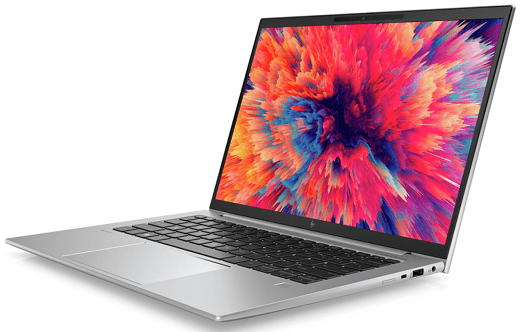
In 2026, upgradeability remains a key consideration for professionals, students, and small businesses investing in mobile workstations. Engineering applications, data analysis software, and simulation workloads continue to grow in complexity, demanding more memory and faster storage to maintain smooth performance over time. While some laptops lock users into fixed configurations, others prioritise ease of upgradeability to extend their useful lifespan.
The HP ZBook Firefly Z11 upgradeability story reflects its position as a thin and light mobile workstation with practical long-term value. Instead of soldering every component and leaving buyers with fixed hardware for life, HP provides selective service access and upgrade paths where it matters most. This comprehensive guide covers RAM slots, SSD expansion options, ease of servicing, and how these factors influence performance and longevity for engineers and professionals in 2026.
Introduction to ZBook Firefly Z11 Upgrade Paths
The HP ZBook Firefly Z11 is designed to balance portability with professional capability. Unlike thicker workstation models that prioritise maximum performance over upgrade flexibility, the Firefly Z11 aims to meet long-term needs without excessive weight or bulk.
Upgradeability in 2026 still matters. Engineers using CAD, MATLAB, simulation tools, data analysis, and research workflows benefit from systems that can grow with their requirements. Instead of becoming obsolete shortly after purchase, a well-designed upgrade path can prolong the relevance of the machine in fast evolving technical environments.
This blog explains how the Firefly Z11 addresses RAM and SSD expansion, how easy it is to access internal components, and what users should expect when servicing the laptop over its lifecycle.
RAM Upgradeability: Slots and Practical Considerations
Memory capacity is one of the most important determinants of sustained performance, especially in engineering and analytical software workflows.
In 2026, recommended baseline RAM sizes for professional use include:
- 16GB for light CAD and general engineering tasks
- 32GB for moderate simulation and multitasking
- 64GB for advanced workloads and data-heavy models
HP ZBook Firefly Z11 RAM configuration varies by model. Some configurations include upgradeable RAM slots, while others may use soldered memory modules. The exact design depends on the SKU and regional configuration, but engineers should check the following before purchase:
- Number of RAM Slots – Verify whether the particular model has one or two DIMM slots for memory expansion. Two slots provide flexibility for future upgrades.
- Maximum Supported Memory – Knowing the upper limit helps plan long-term workflows. If the system supports up to 64GB and comes factory loaded with 16GB or 32GB, there is headroom for growth.
- Memory Type and Speed – Firefly Z11 uses DDR5 memory in most configurations, which provides higher bandwidth and efficiency compared to older DDR4 systems.
If the laptop has soldered RAM with no free slots, users should prioritise purchasing a configuration with sufficient memory from the start. Engineers running large assemblies, simulations, and data analysis benefit significantly from higher memory capacity, and being unable to upgrade later can limit long-term value.
SSD Upgradeability: Slots, Replacement, and Expansion
Fast storage impacts everyday performance in engineering workflows. NVMe SSDs not only improve application responsiveness but also reduce project load and save times.
The Firefly Z11 typically includes one or more PCIe NVMe SSD slots. For professionals considering upgrade paths, the key considerations include:
- Number of SSD Slots – Check if the laptop has one or two M.2 slots. Dual slots allow users to run a larger primary drive while reserving a smaller cache or backup volume.
- Slot Type and Interface – NVMe PCIe Gen4 slots provide high bandwidth for both internal and external storage operations. Faster SSDs reduce bottlenecks during large file manipulation.
- Ease of Replacement – Being able to replace or upgrade the SSD without professional service is a practical advantage.
In many configurations, the Firefly Z11 provides a user accessible SSD slot under the service cover. This ease of access encourages upgrades and ensures that professionals can expand storage as projects grow without buying an entirely new system.
Internal Access And Ease of Service
Upgradeability is not only about having slots available. Ease of physical access to internal components determines whether upgrades can be done at home or require specialised servicing.
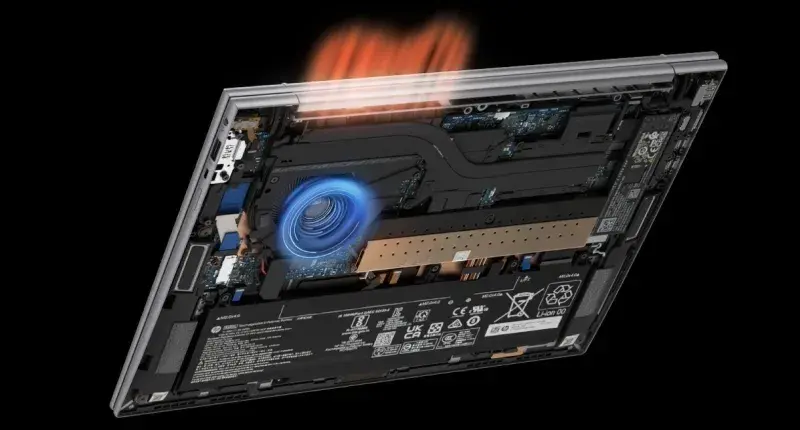
The Firefly Z11 typically offers service access through an easily removable bottom panel secured by standard screws. This means that:
- RAM and SSD slots can be reached with minimal disassembly
- Thermal modules can be inspected or cleaned without full teardown
- Users can replace batteries without complex disassembly
However, some components such as the CPU, GPU, and certain wireless modules may be soldered due to the thin chassis design. This is typical in modern thin and light workstations where space constraints influence component placement.
For teams and individuals without technical experience, professional service is still an option. HP authorised service centres can perform upgrades or replacements with certified parts and warranty support.
When Upgradeability Matters Most
Engineers and professionals benefit from upgradeable hardware in several real world scenarios:
- Growing Projects – Larger CAD assemblies, simulation datasets, and research data increase RAM and storage demands over time.
- Extended Lifecycle – A laptop that can be upgraded lives longer in active use before becoming obsolete.
- Changing Workloads – Users who transition from general tasks to specialised simulation or rendering benefit from expanded memory and storage.
Upgradeability bridges the gap between initial purchase cost and long term performance needs. A Firefly Z11 that can grow with user demands represents better value over its lifecycle compared to a sealed system that cannot expand.
Refurbished Units and Upgrade Paths
Many professionals opt for refurbished systems to manage costs. When buying refurbished Firefly Z11 laptops in 2026, inspect the internal configuration carefully:
- Confirm the actual number of RAM slots and total installed memory
- Verify the presence of spare DIMM slots for future upgrades
- Check the number of SSD slots and accessibility
- Review service photos or ask the seller for internal shots
If a refurbished unit has soldered RAM and limited SSD expansion, prioritise configurations that already meet your long term requirements rather than relying on future upgrades.
Limitations And Realistic Expectations
Despite offering upgradeability, the Firefly Z11 has realistic limitations. Modern thin and light designs often prioritise compactness over modularity, which means:
- CPU and GPU are typically soldered
- Some wireless modules may not be user replaceable
- Higher density configurations may leave no free slots
Understanding these limitations helps users set realistic expectations and choose configurations that best align with their workflows from the start.
Conclusion
In 2026, upgradeability remains a valuable factor for professionals investing in workstation laptops. The HP ZBook Firefly Z11 offers practical paths for RAM and SSD expansion, with internal access that supports upgrades without excessive complexity.
Before purchasing, verify whether your specific Z11 model includes free RAM slots and multiple SSD bays. Choose configurations that match your long-term needs to ensure the system adapts as workloads grow.
With thoughtful planning and proper configuration, a Firefly Z11 can deliver sustained professional performance, extending its useful life and providing both value and flexibility in demanding engineering and creative workflows.
Frequently Asked Questions
1. Does the HP ZBook Firefly Z11 support RAM upgrades?
Yes, some configurations include user accessible RAM slots. Verify the specific model’s slot availability before purchase.
2. How many SSD slots does the Firefly Z11 typically offer?
Most configurations offer one or two NVMe SSD slots. Confirm with the exact unit specs, especially when buying refurbished.
3. Can I upgrade internal components myself?
Basic upgrades like SSD and RAM (if slots are available) can be done with simple tools. Components like CPU and GPU are generally soldered.
4. Is professional service required for upgrades?
Not always. RAM and SSD upgrades are usually user friendly, but authorised service centres are recommended for complex replacements or warranty support.
5. Should I prioritise upgradeability when buying refurbished?
Yes. Check physical access, slot availability, and existing capacity to ensure the system meets both current and future needs.
Ready to upgrade your tech?
Browse our collection of quality refurbished products at unbeatable prices.






