
HP ZBook Firefly Z11 GPU Performance In 2026: Discrete RTX, CAD, 3D, And Studio Drivers
Complete guide to HP ZBook Firefly Z11 GPU performance in 2026 covering NVIDIA T500, T550, and RTX A500 for CAD, 3D modeling, rendering, and Studio drivers.

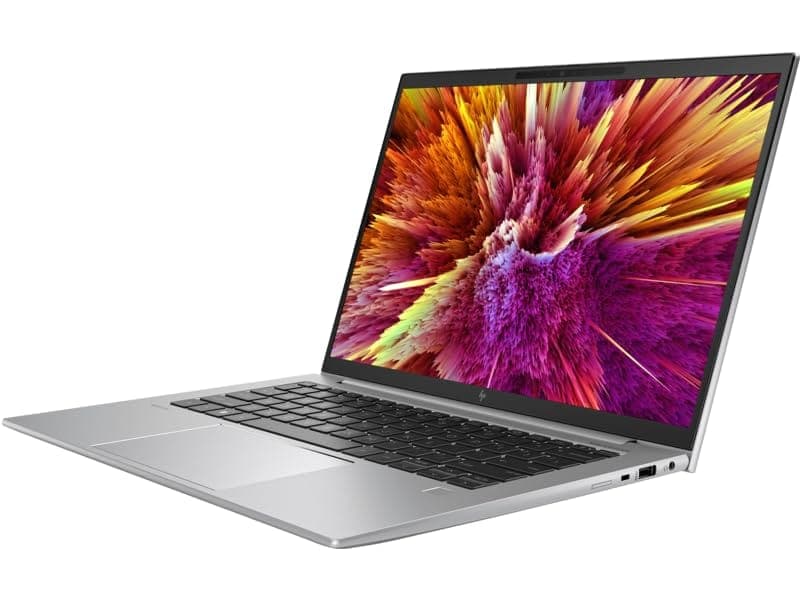
TL;DR The HP ZBook Firefly Z11 in 2026 remains a compact but capable mobile workstation, designed for professionals who need GPU-accelerated performance in CAD, 3D modeling, and light rendering. With options like the NVIDIA RTX A500 GPUs, this workstation balances portability, efficiency, and professional reliability. It is especially suited for engineers, architects, and small-scale creative studios seeking predictable GPU behavior and certified studio drivers without the bulk of a full desktop replacement. Battery life is stable under moderate GPU use, but for sustained Discrete RTX workloads, external power is recommended. Refurbished units offer significant value for cost-conscious buyers. For Indian professionals seeking a reliable GPU workstation, the Firefly Z11 remains a top choice in its class, supporting real-world CAD, 3D, and visualization workloads efficiently.
Introduction: Importance of GPU in Modern Workstations
In 2026, professional GPUs will become a core determinant of workstation performance. While CPUs manage computation and logic, GPUs accelerate graphics rendering, 3D simulations, and AI inference. For the HP ZBook Firefly Z11, the inclusion of professional-grade GPUs like the NVIDIA RTX A500 cards ensures that engineers, designers, and content creators can maintain smooth viewport interactions in AutoCAD, SolidWorks, and Blender, even with complex assemblies. Unlike consumer graphics, workstation GPUs come with optimized drivers that prioritize accuracy, stability, and certified application support over raw gaming performance.
The Firefly Z11 is positioned as a thin workstation, yet its GPU architecture supports demanding workloads. Small and medium studios in India often rely on such mobile workstations for project-based rendering or client demos. The GPU is particularly important when working with high-polygon 3D models, real-time simulations, or any application where visual feedback speed influences productivity. With hybrid CPU-GPU utilization, professionals can achieve faster results in rendering previews, ray tracing, and real-time engineering simulations.
For Indian buyers, cost-efficiency is critical. Platforms like Refurbo provide verified Firefly Z11 units with certified GPUs, maintaining full warranty and reliability. This allows professionals to access Discrete RTX or T-series GPUs at reduced cost without compromising long-term stability. With the right GPU selection, the Firefly Z11 delivers consistent professional results while remaining portable, a crucial factor for consultants, engineers, and remote design teams who travel between client sites.
HP ZBook Firefly Z11 GPU Options in 2026: Discrete RTX Series
The HP ZBook Firefly Z11 offers a range of GPU options, tailored to different professional workflows. Entry-level configurations feature the NVIDIA T500, an energy-efficient GPU that supports CAD acceleration, moderate 3D modeling, and certified professional drivers. The T500 is ideal for engineers handling 2D drafting, BIM models, and analytics workflows, providing stable viewport performance without excessive power draw, making it suitable for extended mobile sessions.
For slightly heavier workloads, the T550 GPU offers additional cores, improved memory bandwidth, and better support for small-scale GPU rendering. Professionals running SolidWorks or Revit benefit from the T550 when visualizing complex assemblies or performing light GPU-accelerated simulations. It strikes a balance between performance and thermal efficiency, making it a practical option for Indian offices or field work where mobility and battery life remain priorities.
The Discrete RTX-class GPU configurations elevate the Firefly Z11 into the creative and engineering space. These GPUs enable real-time ray tracing, accelerated viewport rendering, and small-scale AI inference. Designers working on Blender, Autodesk Maya, or Adobe Dimension gain tangible speed advantages in rendering previews and simulations. Discrete RTX GPUs also support NVIDIA Studio drivers, ensuring certified software stability and reduced crashes during intensive workloads. Professionals requiring GPU acceleration for 3D visualization or AI-assisted workflows will find Discrete RTX options most suitable, though continuous use may require external power to maintain peak performance due to the thin chassis design.
The choice between Discrete RTX configurations should be workflow-driven. For Indian small firms and independent consultants, often offers the best price-to-performance ratio, while studios performing heavier rendering or AI inference may justify the incremental investment in Discrete RTX Firefly Z11 units.
Studio Drivers vs Standard Drivers: What Professionals Should Know
Professional GPU performance is not determined only by hardware; the driver ecosystem plays a crucial role. The HP ZBook Firefly Z11 supports NVIDIA’s professional driver stack, which includes NVIDIA Studio Drivers and standard drivers. These two driver types serve different purposes and influence how the workstation performs in production environments.
Standard drivers are primarily optimized for rapid feature updates and general GPU compatibility. They work well for gaming workloads and casual GPU acceleration, but they are not always tested for stability with professional applications. Engineers working in AutoCAD, SolidWorks, CATIA, or Revit often require driver stability because even small graphical inconsistencies can disrupt modeling workflows. On a workstation like the Firefly Z11, relying on the correct driver configuration ensures that GPU acceleration remains predictable and reliable during large project sessions.
NVIDIA Studio Drivers, on the other hand, are designed specifically for professional workloads. They undergo certification testing with software vendors and are optimized for applications such as Blender, Autodesk Maya, Adobe Premiere Pro, and DaVinci Resolve. For users of the HP ZBook Firefly Z11, studio drivers ensure that GPU features like CUDA acceleration, ray tracing, and GPU-based rendering behave consistently without sudden crashes or driver conflicts. This is especially important in long rendering sessions or when multiple GPU-accelerated tools are running simultaneously.
Another advantage of studio drivers is long-term stability. Professional teams working on projects lasting several months cannot risk frequent driver updates introducing new bugs. Studio drivers prioritize reliability over rapid updates, which aligns well with the Firefly Z11’s enterprise workstation philosophy.
For professionals using the HP ZBook Firefly Z11, the best approach is usually to install Studio Drivers when running CAD, design, or rendering software.
Discrete RTX Acceleration in 3D Modeling and Rendering Tasks
The introduction of Discrete RTX GPU architecture transformed how mobile workstations handle complex rendering tasks. When configured with an Discrete RTX-class GPU, the HP ZBook Firefly Z11 can leverage hardware ray tracing and AI acceleration, dramatically improving the speed of 3D workflows.
In traditional rendering pipelines, scenes are processed primarily by the CPU. This method works but is often slow when dealing with complex lighting simulations. Discrete RTX GPUs introduce dedicated RT cores that calculate ray tracing operations directly in hardware. For professionals using Blender or Autodesk Maya, this means preview renders that previously took minutes can appear in seconds. Designers working on product visualization or architectural models benefit significantly because they can test lighting, reflections, and materials in real time.
Discrete RTX GPUs also include Tensor cores, which accelerate AI-driven tasks. In creative applications, these cores power features like AI denoising and smart rendering optimization. When rendering scenes on the HP ZBook Firefly Z11, AI denoising can reduce noise artifacts in preview images almost instantly. This allows artists to evaluate design changes quickly without waiting for full high-resolution renders.
Another area where Discrete RTX acceleration helps is viewport performance. Modern modeling software uses GPU acceleration for object manipulation, shading, and lighting previews. Discrete RTX-enabled Firefly configurations provide smoother navigation in complex scenes with thousands of polygons. For example, architects working with detailed building models in Blender or Unreal Engine experience fewer slowdowns when rotating or zooming within a scene.
Although the Firefly Z11 is a thin workstation rather than a heavy rendering system, Discrete RTX acceleration still provides noticeable benefits for creative professionals, product designers, and engineers who rely on fast visual feedback during design iterations.
Real-World CAD Performance Benchmarks on Firefly and ZBook Series
CAD performance is one of the most important evaluation criteria for professional workstations. The HP ZBook Firefly Z11 is designed to deliver reliable GPU acceleration for engineering tools, especially in applications that depend heavily on viewport rendering and geometry calculations.
In real-world scenarios, software like AutoCAD, SolidWorks, and Revit uses the GPU to handle graphical rendering, model shading, and viewport responsiveness. Systems equipped with the NVIDIA T500 or T550 GPUs typically perform well with medium-sized assemblies and architectural models. Engineers working with mechanical parts or structural designs can rotate, zoom, and edit models without significant lag, which improves workflow efficiency.
Benchmark comparisons within the ZBook lineup show that the Firefly series prioritizes mobility and efficiency rather than maximum raw performance. Larger models like the ZBook Power or Fury offer stronger GPUs but sacrifice portability. The Firefly Z11 focuses on delivering stable GPU acceleration in a lightweight chassis, making it more suitable for engineers and consultants who frequently travel.
Professional benchmark tools such as SPECviewperf simulate workloads from common CAD applications. Firefly-class GPUs typically deliver consistent results in these tests, particularly in workloads involving 2D drafting, light 3D assemblies, and BIM models.
These benchmarks indicate that the HP ZBook Firefly Z11 is best suited for professionals who require consistent CAD performance with mobility, rather than extreme workstation power.
Thermal Behavior and Sustained GPU Performance
Thermal performance plays a critical role in determining how effectively a mobile workstation can maintain GPU performance during prolonged workloads. The HP ZBook Firefly Z11 Workstation Laptop is engineered as a thin and lightweight professional device, which means thermal design must balance portability with sustained computational power. HP’s thermal architecture typically integrates dual heat pipes, smart fan algorithms, and vented chassis airflow to maintain stable GPU and CPU temperatures during heavy graphics workloads.
During GPU-intensive tasks such as 3D rendering, CAD simulations, or GPU-accelerated video encoding, thermal management determines whether the GPU can maintain its boost clock speeds. When temperatures rise too high, GPUs reduce clock speeds through thermal throttling to protect hardware. In the HP ZBook Firefly Z11, the cooling system is designed to maintain consistent GPU performance while keeping noise levels reasonable for office and studio environments. This design philosophy is important for professionals who run long sessions in applications like Autodesk Maya or Blender, where rendering tasks can last hours.
Another aspect of thermal behavior is how well the system sustains performance under continuous workloads. Thin workstations typically prioritize efficient sustained performance rather than short bursts of extreme power. The Firefly Z11 maintains stable GPU output over extended workloads by dynamically balancing CPU and GPU power consumption. HP’s firmware and BIOS optimization ensure that GPU resources are allocated efficiently without overheating the system.
Professionals working in CAD modeling, design visualization, or video editing benefit from this approach because their workflows involve prolonged periods of moderate GPU load rather than maximum stress benchmarks. As a result, the Firefly Z11 delivers a balanced experience where GPU performance remains stable without excessive thermal throttling.
For engineers or creators researching HP ZBook Firefly Z11 Specs or reading a HP ZBook Firefly Z11 Review, understanding thermal behavior is essential because sustained performance directly affects real-world productivity.
Battery Impact and Efficiency When Using Dedicated GPUs
Battery life is an important factor for mobile workstations, especially for professionals who frequently work away from a desk. The HP ZBook Firefly Z11 is designed to deliver strong efficiency while still providing dedicated GPU capabilities. However, running GPU-accelerated applications inevitably increases power consumption compared to integrated graphics.
Dedicated GPUs such as the NVIDIA RTX A500 draw significantly more power when active. When applications like Blender, Adobe Premiere Pro, or SolidWorks engage the GPU, the workstation must supply additional energy to both the graphics processor and the cooling system. This can reduce battery life substantially compared to light productivity tasks like web browsing or document editing.
To manage this challenge, the Firefly Z11 typically uses hybrid graphics switching technology. This system allows the laptop to switch between integrated graphics and the dedicated GPU depending on workload requirements. When performing everyday tasks, the system relies on integrated graphics to conserve battery power. Once a professional application requests GPU acceleration, the system activates the dedicated GPU automatically.
This intelligent switching helps extend battery life while still enabling high performance when necessary. For example, engineers working on-site may review CAD drawings or modify models without constantly running GPU-heavy simulations. In such cases, the workstation can maintain respectable battery endurance while remaining ready for demanding workloads.
Battery efficiency also depends on display brightness, background applications, and GPU utilization levels. Professionals evaluating HP ZBook Firefly Z11 Price in India or considering Refurbished HP ZBook Firefly Z11 systems should understand that battery performance will vary depending on how frequently GPU acceleration is used.
Ultimately, the Firefly Z11 provides a balanced solution where mobile productivity and GPU performance coexist, allowing professionals to work efficiently both in offices and remote environments.
Ideal GPU Configurations for Different Professional Workflows
Choosing the correct GPU configuration is crucial for maximizing the performance of a professional workstation. The HP ZBook Firefly Z11 offers multiple GPU options designed to support different professional workloads, ranging from engineering design to creative production. Understanding these configurations helps users select the right setup for their specific workflow requirements.
For professionals working primarily in 2D drafting and light 3D modeling, entry-level workstation GPUs such as the NVIDIA T500 are typically sufficient. Applications like AutoCAD or basic BIM modeling rely more heavily on CPU processing than GPU power. In such cases, the T500 offers smooth viewport performance without significantly increasing system cost or power consumption.
Engineers and designers working with larger assemblies or more complex visualizations may benefit from a stronger GPU such as the NVIDIA T550. This configuration offers improved graphical processing capability and higher CUDA core counts, enabling better performance in tasks like 3D modeling, simulation visualization, and moderate rendering workloads. For many professionals, this configuration provides the ideal balance between portability and graphical capability.
Creative professionals involved in video editing, rendering, and real-time visualization may prefer configurations with Discrete RTX-class GPUs if available. Discrete RTX acceleration enables hardware ray tracing and AI-powered rendering enhancements, significantly improving rendering speed in modern design software. Although the Firefly series prioritizes mobility over extreme GPU performance, Discrete RTX configurations still provide noticeable improvements in creative workflows.
Selecting the right GPU configuration ensures that the HP ZBook Firefly Z11 Workstation Laptop delivers optimal performance for professional workloads without unnecessary hardware costs.
Final recommendations and Who Should Buy Based on GPU Needs?
Choosing a workstation based on GPU capability requires understanding how different professional workloads utilize graphics processing. The HP ZBook Firefly Z11 Workstation Laptop is designed primarily for mobile professionals, engineers, analysts, and designers who require reliable GPU acceleration but do not necessarily need extremely high-end desktop replacement hardware. Its balance of portability, battery efficiency, and workstation-grade graphics makes it a practical choice for modern hybrid work environments.
Professionals working in CAD, product design, architecture, and engineering visualization will benefit significantly from the GPU options available in this model. GPUs like the NVIDIA RTX A500 are optimized for professional applications that rely on certified drivers and stable viewport performance. Software such as AutoCAD, SolidWorks, Revit, and Siemens NX depend on reliable GPU rendering for model navigation and visualization. The Firefly Z11 offers exactly this balance, ensuring that engineers can work smoothly with complex assemblies while maintaining portability.
Another group that can benefit from this workstation includes creative professionals and content creators who rely on GPU acceleration for video editing and 3D workflows. Applications like Adobe Premiere Pro, DaVinci Resolve, Blender, and Cinema 4D can use GPU cores for rendering, playback acceleration, and visual effects processing. While the Firefly series is not intended to replace heavy workstation models like the ZBook Fury, it still delivers strong GPU capabilities for professionals who require mobile editing and visualization.
Cost considerations also influence purchase decisions. When evaluating HP ZBook Firefly Z11 Price in India, professionals often compare new models with Refurbished HP ZBook Firefly Z11 systems available through certified sellers. Refurbished models can provide excellent value while still delivering workstation-grade GPU capabilities.
Overall, this workstation is ideal for users who want professional graphics performance in a lightweight workstation design without sacrificing reliability or portability.
Final Recommendation And Decision Framework
When evaluating mobile workstations in 2026, GPU capability remains one of the most critical factors influencing professional productivity. The HP ZBook Firefly Z11 Workstation Laptop demonstrates how modern mobile workstations are evolving to deliver powerful graphics acceleration while maintaining portability, thermal stability, and efficiency. For professionals working across engineering, design, and creative industries, this balance is particularly valuable.
One of the key strengths of the Firefly Z11 is its integration of NVIDIA professional GPUs with certified drivers. These GPUs are optimized specifically for workstation workloads such as CAD modeling, simulation visualization, and GPU-accelerated rendering. Unlike consumer gaming GPUs, professional workstation GPUs prioritize stability, driver certification, and predictable performance in enterprise software environments. This ensures that engineers and designers can rely on consistent performance across critical applications.
Another important factor is system efficiency. The Firefly series is known for its thin and lightweight workstation design, which makes it suitable for professionals who frequently move between offices, studios, and remote workspaces. Despite its portable design, the workstation maintains strong GPU capability through efficient cooling, intelligent power management, and optimized drivers.
For professionals researching HP ZBook Firefly Z11 Specs or reading a HP ZBook Firefly Z11 Review, the key decision factors typically include GPU requirements, thermal stability, portability, and price. Engineers working with complex CAD assemblies may prefer configurations with stronger GPUs such as the NVIDIA RTX A500, while designers and content creators may prioritize configurations with Discrete RTX-based acceleration for rendering workflows.
For professionals seeking reliable GPU acceleration in a portable workstation, the Firefly Z11 remains a compelling option in the ZBook lineup.
Frequently Asked Questions
Q. What GPU options are available in the HP ZBook Firefly Z11?
A. The HP ZBook Firefly Z11 typically includes NVIDIA T500, NVIDIA T550, and NVIDIA RTX A500 professional GPU configurations depending on the workstation setup.
Q. Is the HP ZBook Firefly Z11 suitable for CAD applications?
A. Yes. The workstation GPUs in the Firefly Z11 support AutoCAD, SolidWorks, Revit, and other engineering software with smooth viewport performance.
Q. Can the Firefly Z11 handle 3D rendering workloads?
A. The system can handle moderate 3D rendering and visualization tasks in applications like Blender or Cinema 4D, although heavier rendering is better suited to larger workstation models.
Q. What makes NVIDIA Studio drivers different from standard drivers?
A. NVIDIA Studio drivers are optimized and certified for professional creative applications, offering improved stability and predictable performance compared to standard drivers.
Q. Is the Firefly Z11 good for video editing workflows?
A. Yes. GPU acceleration improves timeline playback, rendering, and effects processing in video editing tools such as Adobe Premiere Pro and DaVinci Resolve.
Q. Does the dedicated GPU affect battery life?
A. Yes. Running GPU accelerated workloads increases power usage, although hybrid graphics switching helps conserve battery during lighter tasks.
Q. How does the Firefly Z11 compare with larger ZBook workstations?
A. The Firefly Z11 prioritizes portability and efficiency, while larger ZBook models such as Fury or Power focus on maximum GPU performance.
Q. What specifications should professionals check before buying the Firefly Z11?
A. Important specifications include GPU model, CPU generation, RAM capacity, SSD storage, and display configuration depending on workload needs.
Q. Is buying a refurbished HP ZBook Firefly Z11 a good option?
A. Yes. Certified refurbished units can offer significant cost savings while maintaining workstation grade reliability and performance.
Q. What is the typical HP ZBook Firefly Z11 price in India?
A. Pricing varies based on CPU, GPU, RAM, and storage configuration, but refurbished systems are generally much more affordable than new units.
Ready to upgrade your tech?
Browse our collection of quality refurbished products at unbeatable prices.






