
HP ZBook Firefly Z11 Best Config In 2026 India: CPU, GPU, RAM, SSD, Display Selection
Guide to choosing the best HP ZBook Firefly Z11 configuration in 2026 including CPU, GPU, RAM, SSD, and display options for professional workloads.

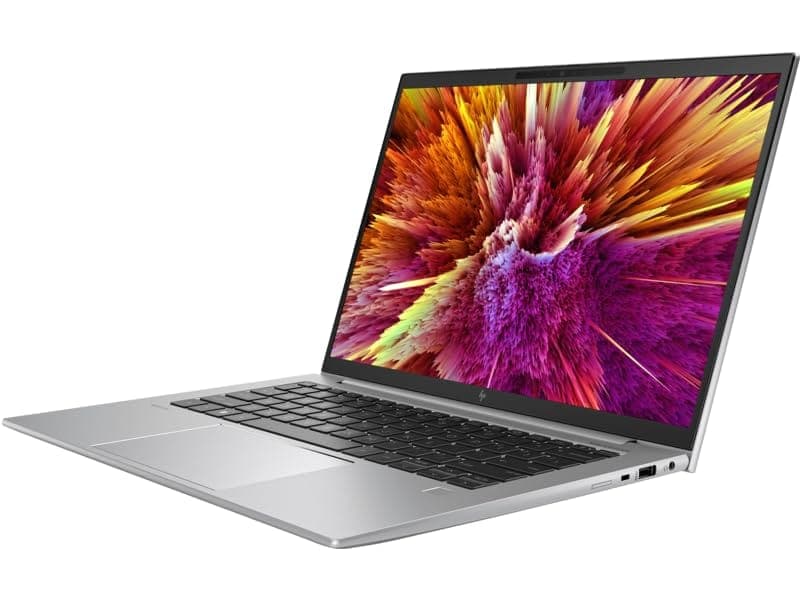
TL;DR The HP ZBook Firefly Z11 Workstation Laptop represents one of the most balanced thin mobile workstations available to professionals in 2026. Built around Intel Core Ultra architecture, modern DDR5 memory, and optional NVIDIA professional GPUs, it is designed for users who need workstation reliability in a portable 14-inch chassis. For Indian buyers evaluating configuration options, the key decision factors involve choosing the right CPU tier, selecting whether a dedicated GPU is necessary, and determining the ideal RAM and SSD capacity for long-term workloads. Choosing the correct configuration is particularly important because workstation laptops are typically used for long multi-year deployment cycles rather than frequent upgrades. Storage expandability, thermal stability, and display quality also influence long-term productivity. When selected carefully, the ZBook Firefly Z11 provides a strong platform for engineering, data analysis, consulting workflows, and hybrid office environments in 2026.
Introduction: Choosing the Right ZBook in 2026
Selecting a professional workstation in 2026 is no longer just about choosing the fastest processor. Professionals today require machines that balance performance, portability, and long-term reliability. The HP ZBook Firefly Z11 enters this environment as a lightweight workstation aimed at engineers, analysts, consultants, and technical professionals who need certified hardware without carrying bulky 16-inch workstations.
The ZBook lineup has historically been positioned as HP’s enterprise workstation family, offering ISV certification, durable chassis design, and stable driver ecosystems. The Firefly Z11 specifically targets users who require dependable workstation functionality while maintaining mobility. Unlike gaming laptops that emphasize peak benchmark scores, the Firefly series focuses on sustained productivity performance, battery efficiency, and enterprise deployment stability.
For Indian buyers comparing workstation models, exploring curated ZBook collections can provide perspective on available configurations and pricing. One reference point is the HP workstation lineup available at Refurbo which showcases multiple ZBook generations used by professionals across industries.
Choosing the right configuration is critical because the Firefly Z11 can be customized across multiple parameters including processor tier, RAM capacity, storage configuration, display panel type, and optional professional GPU. Each of these components influences how the laptop performs in workloads such as CAD drafting, data modeling, AI development, consulting presentations, and engineering documentation.
A well-selected configuration ensures that the machine remains capable for five or more years of professional usage, which is typical for enterprise workstation deployments.
CPU Options: Core i5, i7, i9, and Intel Core Ultra Comparisons
The HP ZBook Firefly Z11 introduces a new generation of processors built around Intel’s Core Ultra architecture, designed to improve performance efficiency while enabling modern AI-assisted computing tasks. Compared with previous Firefly generations, the processor options available in the Z11 provide better multi-thread performance, improved power management, and integrated AI acceleration hardware.
Most Z11 configurations rely on Intel Core Ultra 5 or Core Ultra 7 processors, which combine performance cores and efficiency cores to optimize different workloads. For office productivity, engineering documentation, and analytics workflows, this hybrid architecture allows the system to maintain strong responsiveness even when running multiple professional applications simultaneously.
Higher-tier configurations may include Core Ultra 9 processors, which provide additional threads and higher turbo frequencies. These variants are particularly useful for professionals running large spreadsheets, data simulations, software compilation workloads, or multi-tab analytical environments.
Below is a simplified comparison of CPU tiers commonly associated with ZBook Firefly Z11 configurations.
For most Indian professionals evaluating workstation configurations, Core Ultra 7 represents the most practical option. It offers significantly stronger multi-thread throughput than entry-level processors while maintaining reasonable thermals within the Firefly’s thin chassis.
Choosing a processor tier that aligns with actual workload requirements is important because CPU upgrades influence battery life, thermal behavior, and long-term reliability.
GPU Options: NVIDIA T500, T550, and RTX Variants
The HP ZBook Firefly Z11 Workstation Laptop is designed primarily as a thin professional workstation, which means its GPU options focus on reliability, certification support, and power efficiency rather than raw graphics performance. Unlike heavier mobile workstations that use RTX A-series GPUs, the Firefly Z11 typically offers integrated Intel graphics along with optional NVIDIA professional entry-level GPUs such as the NVIDIA T500 or T550 depending on configuration.
Integrated Intel Arc graphics available with modern Intel Core Ultra processors already deliver strong performance for everyday professional workloads. Applications like AutoCAD drafting, Excel financial modeling, web-based ERP platforms, and code development environments rely more on CPU throughput than GPU horsepower. In such workflows, the integrated GPU performs adequately while improving battery efficiency and reducing thermal load.
However, professionals working with 3D modeling software, viewport-heavy CAD environments, and light GPU rendering benefit from selecting a configuration that includes a dedicated GPU. The NVIDIA T500 and T550 provide certified drivers for professional applications and improve stability in software such as SolidWorks, Revit, Fusion 360, and Blender.
The table below summarizes the relative positioning of GPU options typically associated with Firefly configurations.
While these GPUs are capable for moderate workloads, they are not intended for heavy GPU rendering pipelines or deep learning model training. Professionals requiring that level of graphical performance usually choose larger workstation models with RTX-class GPUs.
For most mobile professionals, however, the T500 or T550 configuration provides the right balance between portability and professional graphics capability.
RAM Requirements: DDR5 vs DDR4, 16GB, 32GB, and 64GB Configurations
Memory configuration is one of the most important factors influencing the long-term usability of the HP ZBook Firefly Z11. Modern professional applications increasingly rely on large datasets, multi-tab workflows, and simultaneous software environments. As a result, selecting adequate RAM capacity ensures smoother performance and prevents the system from relying heavily on slower storage-based memory swapping.
The ZBook Firefly Z11 primarily uses DDR5 memory, which offers higher bandwidth and improved energy efficiency compared with previous DDR4 generations. DDR5 improves multitasking responsiveness, particularly when running multiple professional applications such as AutoCAD, Excel models, browser-based dashboards, and virtual machines simultaneously.
For professionals evaluating configuration options, the memory tiers typically look like the following:
A 16GB configuration is sufficient for everyday office productivity, including spreadsheet modeling, presentations, coding environments, and cloud-based software platforms. However, as datasets and applications grow larger, many professionals find that 16GB becomes restrictive after several years of use.
A 32GB configuration provides a comfortable margin for most workstation tasks. It supports complex spreadsheets, engineering tools, analytics platforms, and development environments without memory bottlenecks. For many buyers, this capacity represents the best balance between performance and cost.
Professionals working with virtual machines, simulation environments, or machine learning datasets may benefit from 64GB RAM configurations, which enable smoother multitasking across memory-intensive applications.
Selecting the correct RAM capacity early helps ensure that the workstation remains capable for long professional usage cycles.
SSD Selection: NVMe vs SATA, 512GB, 1TB, and Expansion Options
Storage configuration significantly influences the responsiveness and long-term usability of the HP ZBook Firefly Z11 Workstation Laptop. Modern workstation workflows involve handling large datasets, CAD project files, high-resolution media assets, and complex development environments. As a result, the type and capacity of the storage drive directly affect system boot speed, application loading times, and file transfer performance.
The Firefly Z11 primarily relies on NVMe SSD storage, which uses the PCIe interface to achieve significantly higher read and write speeds compared with older SATA-based SSDs. NVMe drives allow the operating system, applications, and large project files to load much faster, improving overall system responsiveness during daily professional usage.
Typical storage configurations available for ZBook workstations are summarized below.
A 512GB NVMe SSD is sufficient for operating system installation and core applications, but professionals dealing with multiple software tools, project files, and local datasets may find storage space filling quickly. As CAD libraries, project repositories, and development environments grow over time, limited storage capacity can become restrictive.
For most users, 1TB NVMe SSD configurations provide the best balance between capacity and cost. This allows sufficient space for project files, application installations, and cached datasets while maintaining strong performance.
Advanced users who work with large simulation datasets, design libraries, or machine learning datasets may prefer larger storage configurations or external storage solutions.
Selecting fast NVMe storage ensures that the workstation maintains consistent performance and efficient workflow responsiveness across demanding professional tasks.
Display Panel Selection: FHD, WUXGA, UHD, DreamColor Considerations
Display configuration plays a critical role in the usability of the HP ZBook Firefly Z11 Workstation Laptop, especially for professionals who spend long hours working with design files, financial models, engineering drawings, or media content. While performance components such as CPU and GPU determine computational capability, the display directly affects visual accuracy, eye comfort, and workspace productivity.
The Firefly Z11 typically offers several display panel options ranging from Full HD (1920×1080) and WUXGA (1920×1200) panels to higher-resolution variants depending on configuration. Modern workstation displays often use IPS technology, which improves viewing angles and maintains color consistency across the panel. This becomes particularly important when professionals work with CAD drawings, dashboards, spreadsheets, or graphical layouts that require accurate alignment and visual clarity.
Among the most notable display technologies associated with ZBook workstations is DreamColor, a premium panel option designed for color-critical workflows. DreamColor displays are engineered to deliver high color accuracy, wider color gamuts, and factory calibration, making them suitable for video editing, digital design, photography workflows, and UI/UX design tasks.
Higher resolution displays provide greater workspace density, allowing more content to fit on screen. However, they can also increase power consumption and slightly reduce battery life during extended mobile usage. For professionals focused on spreadsheets, documentation, coding environments, or CAD drafting, a WUXGA panel often represents the most balanced option.
The table below illustrates typical display choices.
Selecting the correct panel ensures the HP ZBook Firefly Z11 Review experience aligns with the user’s professional visual requirements.
Ideal Configuration for CAD and 2D Drafting Workflows, 3D Modeling and Rendering
Engineering professionals and architects often evaluate workstation laptops based on how effectively they run CAD and design software. Programs such as AutoCAD, SolidWorks, Revit, Fusion 360, and Inventor rely heavily on CPU performance, memory bandwidth, and stable GPU drivers rather than extreme graphics horsepower.
For 2D drafting workflows, the HP ZBook Firefly Z11 performs best when configured with a high-clock Intel Core Ultra processor, at least 32GB RAM, and fast NVMe storage. These workloads involve manipulating large drawings, maintaining multiple layers, and running calculations within the software environment. Strong CPU performance ensures smoother zooming, panning, and editing of complex project files.
When moving into 3D modeling environments, GPU performance becomes more important. Dedicated GPUs such as NVIDIA T500 or T550 improve viewport rendering performance, allowing smoother model rotation, shading, and object manipulation inside professional software.
However, it is important to note that thin workstation designs prioritize portability rather than heavy rendering capability. As a result, the Firefly Z11 handles model creation and visualization effectively, but large-scale rendering jobs may still be better suited for desktop workstations or cloud rendering solutions.
The following table shows an ideal configuration approach for design workloads.
With the correct configuration, the HP ZBook Firefly Z11 Specs allow professionals to handle engineering workflows efficiently while maintaining excellent portability.
Ideal Configuration for Simulation Tasks
Artificial intelligence workflows in 2026 often involve a combination of local development environments and cloud-based computation. While large-scale model training typically occurs on powerful GPU clusters, many professionals use mobile workstations like the HP ZBook Firefly Z11 for data preprocessing, experimentation, code development, and local inference testing.
Modern Intel Core Ultra processors bring improvements in integrated neural processing capabilities, enabling certain AI frameworks to run inference workloads efficiently on the CPU or integrated accelerator hardware. This means tasks such as data preparation, algorithm testing, and lightweight neural network experimentation can run smoothly even without a high-end GPU.
For developers working with TensorFlow, PyTorch, or machine learning libraries, memory capacity becomes particularly important. AI workflows frequently require large datasets to be loaded into memory for preprocessing and model evaluation. As a result, 32GB RAM is generally the practical minimum, while 64GB configurations provide greater flexibility for simulation environments and virtualized development setups.
GPU acceleration can also improve performance in machine learning pipelines. Configurations that include NVIDIA T500 or T550 GPUs support CUDA-based frameworks, enabling faster inference and limited GPU computation compared with integrated graphics.
However, professionals working on large neural networks, transformer models, or advanced computer vision systems usually rely on cloud platforms or dedicated GPU workstations for training. In such environments, the Firefly Z11 acts primarily as a development workstation rather than the primary training machine.
A balanced configuration for AI workflows therefore includes Core Ultra CPU, 32–64GB RAM, NVMe SSD storage, and optional professional GPU acceleration, ensuring the system remains responsive across development, testing, and simulation tasks.
Comparison of Recommended ZBook Configurations for Different Workloads
Selecting the right configuration for the HP ZBook Firefly Z11 Workstation Laptop depends heavily on the professional workload the system is expected to handle. While many buyers focus primarily on CPU model names or RAM capacity, real-world workstation performance is influenced by a balanced combination of processor power, memory bandwidth, storage speed, and display quality. In 2026, professionals using mobile workstations in India increasingly rely on systems capable of supporting multiple workflows simultaneously, including analytics, design software, browser-based tools, and collaboration platforms.
For general productivity tasks such as Excel modeling, documentation, coding environments, and ERP dashboards, the Firefly Z11 performs well with a Core Ultra processor, 16-32GB RAM, and a 512GB NVMe SSD. These workloads benefit from strong single-core CPU performance and fast storage rather than dedicated graphics. As a result, integrated graphics configurations remain sufficient for most office environments.
For engineering and technical design professionals working with AutoCAD, SolidWorks, Revit, or Fusion 360, a higher configuration becomes more practical. CAD workflows benefit from 32GB RAM, fast NVMe storage, and dedicated workstation GPUs like NVIDIA T500 or T550, which improve viewport rendering and maintain driver stability within professional software ecosystems.
More demanding workloads such as 3D visualization, machine learning experimentation, and simulation environments require larger memory pools and stronger graphics acceleration. In such cases, configurations with 64GB RAM, larger SSD capacity, and dedicated GPU options provide greater flexibility and longevity for professional workloads.
The following table summarizes configuration recommendations for different professional use cases.
This structured approach helps buyers evaluate the HP ZBook Firefly Z11 Price in India relative to their specific workflow needs rather than selecting specifications blindly.
HP ZBook Firefly Z11 Decision Framework
Choosing the best configuration for the HP ZBook Firefly Z11 ultimately depends on aligning hardware capabilities with real professional workloads rather than simply selecting the highest specification available. Mobile workstations like the Firefly series are designed to balance performance, portability, and reliability, making them particularly useful for professionals who require workstation-class stability while working across offices, campuses, or remote environments.
For the majority of professionals including consultants, engineers, financial analysts, developers, and MBA students, a configuration built around a Core Ultra processor with 32GB RAM and NVMe storage offers the most balanced experience. This configuration supports demanding multitasking environments involving spreadsheets, analytics tools, development platforms, and professional design applications without unnecessary cost increases.
Design-focused users who regularly work with CAD modeling or 3D visualization benefit from adding a dedicated NVIDIA workstation GPU such as the T500 or T550. These GPUs provide improved stability with certified drivers for professional software and help maintain smoother performance when manipulating complex design models.
Professionals working with AI experimentation, simulation environments, or heavy data processing should consider configurations with 64GB RAM and larger NVMe storage capacity. Larger memory pools allow complex datasets and development environments to run more efficiently, improving long-term system usability.
Ultimately, the decision framework for the Firefly Z11 can be summarized around three questions. First, determine whether your workload is CPU-dominant or GPU-dependent. Second, estimate realistic memory requirements for multitasking and data workloads. Third, prioritize display quality if your work depends on visual accuracy or extended daily usage.
When configured correctly, the Firefly Z11 provides a balanced professional workstation platform capable of supporting modern workflows in 2026 while maintaining portability and reliability expected from the ZBook series.
Frequently Asked Questions
Q. What processor options are available in the HP ZBook Firefly Z11?
A. Most configurations include Intel Core Ultra processors designed for hybrid workloads, improved efficiency, and strong multitasking performance.
Q. How much RAM should professionals choose for the Firefly Z11?
A. A configuration with 32 GB RAM is recommended for most professional workloads, while AI or simulation tasks may benefit from 64 GB.
Q. Is the HP ZBook Firefly Z11 suitable for CAD software?
A. Yes. With strong CPU performance and optional NVIDIA T500 or T550 GPUs, it runs software like AutoCAD, SolidWorks, and Revit smoothly.
Q. Can the Firefly Z11 handle machine learning workloads?
A. It is suitable for development, experimentation, and inference workflows, but large model training usually requires dedicated RTX GPU systems.
Q. What storage configuration is recommended for professional use?
A. A 1 TB NVMe SSD is recommended because it provides sufficient space for applications, datasets, and project files.
Q. Does the Firefly Z11 support high resolution displays?
A. Yes. The laptop offers IPS panels such as FHD and WUXGA, along with higher color accuracy options like DreamColor for visual workflows.
Q. Is the Firefly Z11 good for programmers and developers?
A. Yes. Its Core Ultra processors, fast NVMe storage, and high memory capacity make it suitable for development environments and virtualization.
Q. What industries commonly use ZBook Firefly workstations?
A. Industries such as engineering, architecture, consulting, analytics, software development, and finance commonly use ZBook Firefly systems.
Q. How portable is the HP ZBook Firefly Z11?
A. The lightweight 14 inch workstation design makes it easy to carry for professionals who travel frequently or work across multiple locations.
Q. Is the Firefly Z11 a long term workstation investment?
A. Yes. When configured with a capable processor, adequate RAM, and NVMe storage, it can support professional workloads for several years.
Ready to upgrade your tech?
Browse our collection of quality refurbished products at unbeatable prices.






