
HP ZBook Firefly vs ZBook Power vs ZBook Fury: What's the Difference?
Choosing between HP ZBook Firefly, Power, and Fury? Compare performance, graphics, portability, memory, and professional workloads to find the mobile workstation that fits your needs.

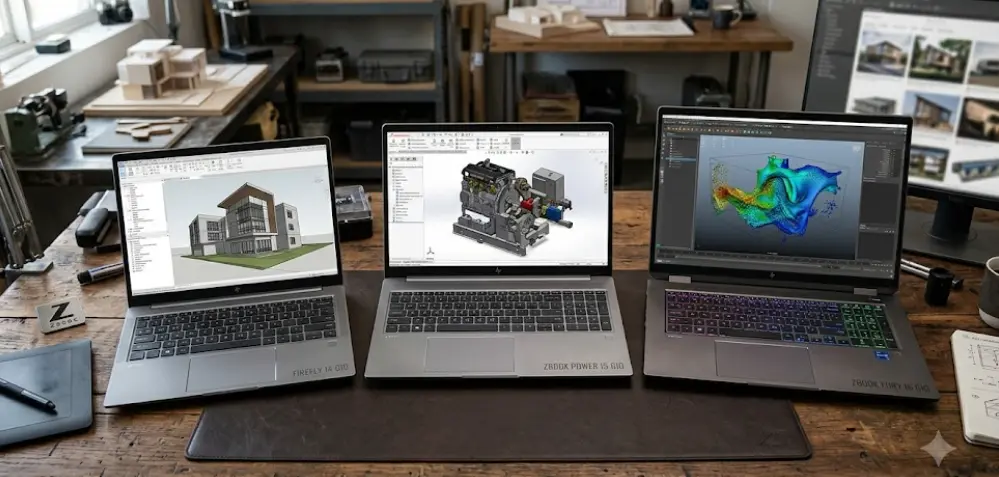
TL;DR: The HP ZBook Firefly, ZBook Power, and ZBook Fury are designed for different professional workloads. Firefly prioritizes portability and everyday professional productivity, Power balances performance with cost for users working with CAD, design, and content creation, while Fury targets demanding applications such as complex 3D rendering, engineering simulations, and large datasets. In HP's current naming, ZBook 8 is the successor family to Firefly, while ZBook X succeeds Power. Fury remains the high-performance option. The right choice depends on your software requirements, graphics needs, budget, and how often you carry your workstation.
Understanding The HP ZBook Workstation Series
HP's ZBook family is designed for professionals who need more than a conventional laptop can offer. Engineers, architects, designers, and technical teams often work with applications that demand substantial processing power, dedicated graphics, reliable memory capacity, and compatibility with professional software. Mobile workstations bring these capabilities into a portable system, allowing users to work across offices, project sites, studios, and client locations. However, not every professional needs the same level of performance, which is why HP offers different workstation families.
The distinction between Firefly, Power, and Fury comes down to how each system balances performance, portability, and expandability. Firefly is designed for professionals who value mobility and primarily handle lighter professional workloads. Power targets users who need stronger processing and graphics capabilities without moving to the most powerful workstation category. Fury is designed for intensive computing tasks where higher-end processors, professional GPUs, and extensive memory configurations can make a meaningful difference.
There is also an important naming detail for buyers in 2026. HP's current India workstation lineup describes ZBook 8 as the evolution of Firefly and ZBook X as the evolution of Power. ZBook Fury remains available as a separate performance-focused family. Older Firefly and Power laptops are still relevant in the used and refurbished markets, but their specifications should not be treated as identical to those of newer successor models.
How The Three Workstation Families Differ
The Firefly family prioritizes a manageable weight and dependable performance for daily professional work. Power moves toward more demanding applications, particularly when discrete graphics are needed for design and engineering software. Fury takes the performance-focused approach further, offering configurations intended for heavier graphics workloads, complex models, and applications that benefit from more memory and processing headroom.
| Feature | ZBook Firefly | ZBook Power | ZBook Fury |
|---|---|---|---|
| Primary focus | Portability | Balanced performance | Maximum workstation capability |
| Typical users | Consultants, designers, mobile professionals | Engineers, architects, creators | 3D specialists, simulation teams, technical professionals |
| Graphics | Integrated or entry-level discrete graphics, depending on model | Configuration-dependent professional graphics | Higher-end professional GPU options |
| Portability | Best suited to frequent travel | Middle ground | Generally heavier |
| Memory expansion | Depends on generation and configuration | Depends on generation and configuration | Many configurations offer extensive expansion |
| Best reason to choose it | Easier everyday mobility | Performance and cost balance | Demanding professional workloads |
HP ZBook Firefly: Portability For Everyday Professional Work
The HP ZBook Firefly is designed for people who need a professional laptop without carrying a bulky workstation everywhere. It is well suited to consultants, designers, business analysts, and field professionals who spend much of their time switching between meetings, presentations, documents, and moderately demanding creative applications. Depending on the generation, buyers can find 14-inch and 16-inch models, with the smaller versions particularly appealing to frequent travelers. Its main advantage is that professional features are available in a design that is easier to carry throughout a working day.
Performance varies significantly by generation and configuration. For example, HP's official specifications for a ZBook Firefly 14 G11 configuration list an Intel Core Ultra 5 135H processor, an NVIDIA RTX A500 Laptop GPU with 4GB of dedicated memory, 16GB of DDR5 memory, and a 512GB SSD. This example demonstrates that Firefly is not necessarily limited to integrated graphics. However, the presence of an entry-level professional GPU does not make every Firefly suitable for complex rendering or large simulations. Buyers should evaluate the exact processor, GPU, and memory configuration against their software requirements.
For everyday professional work, Firefly can be a sensible choice for handling office applications, large spreadsheets, presentations, photography, and lighter design tasks. It may also suit users who work with simpler CAD projects, depending on the software and project complexity. Its limitations become more relevant when sustained rendering, advanced 3D modelling, or large engineering simulations become routine. In those situations, a more powerful GPU and a workstation with greater thermal capacity may save considerable time. In HP's current lineup, the ZBook 8 carries forward the lightweight, mobility-focused role previously associated with Firefly.
Who Should Choose ZBook Firefly?
Firefly is the logical starting point if your priority is mobility rather than maximum computing power. It suits professionals who want workstation-oriented features for daily work but do not regularly run the heaviest applications. Before purchasing, check whether the selected model includes integrated graphics or a discrete GPU, as this distinction can affect performance in graphics-intensive software.
HP ZBook Power: A Balance Between Performance And Cost
The HP ZBook Power sits between portability-focused systems and the more powerful Fury family. It is intended for professionals who need meaningful CPU and GPU performance but do not necessarily require the highest-end workstation configuration. Architects, engineering students, technical consultants, and content creators may find this positioning attractive because their workloads can extend beyond office productivity into CAD, modelling, visualization, and video editing.
Depending on the generation, ZBook Power models have been available with Intel or AMD processors and discrete NVIDIA graphics. Memory capacity, GPU options, storage, and display specifications vary across models, so there is no single configuration that represents every Power laptop. A newer model may offer a different processor and graphics architecture from an older refurbished unit, even if both carry the ZBook Power name. This is particularly important when comparing a new workstation with a discounted previous-generation model.
Power makes sense when Firefly's graphics capabilities are insufficient but Fury would be more workstation than you actually need. For example, an architect working on building models and design documentation may benefit from a capable discrete GPU, while a video editor working primarily with 1080p footage may not need the highest-end graphics option. However, performance depends on project size, software optimization, cooling, and the selected hardware. In HP's current lineup, ZBook X is the successor family to Power and is positioned for advanced 3D modelling, rendering, simulation, and other demanding professional tasks.
Who Should Choose ZBook Power?
Choose Power when your regular workload involves professional applications that benefit from dedicated graphics and stronger processing performance, but you still need a practical balance of cost and portability. It is worth comparing the exact GPU, RAM capacity, upgrade options, and storage before deciding. If your work involves complex simulations or sustained high-end rendering, compare the available Fury configurations as well.
HP ZBook Fury: Built For Demanding Workstation Tasks
The HP ZBook Fury is designed for professionals who need substantially more computing capability than a lightweight business laptop can provide. Its target users include engineers handling complex simulations, 3D artists working with detailed scenes, visualization specialists, and technical teams processing large datasets. Depending on the generation, Fury configurations can combine high-performance processors, powerful professional GPUs, multiple memory slots, and extensive storage options. These capabilities are useful when the workload places sustained demands on several components at once.
HP's official specifications for one ZBook Fury 16 G11 configuration illustrate the difference. The listed system includes an Intel Core i7-14700HX processor, an NVIDIA RTX 5000 Ada Generation GPU with 16GB of dedicated graphics memory, 32GB of DDR5-5600 memory, and a 512GB PCIe Gen4 SSD. HP also lists four SO-DIMM memory slots for this configuration. These are specifications for a particular model, not universal specifications for every Fury laptop, but they demonstrate the level of hardware available in the family.
The trade-off is that high-performance hardware generally requires a larger chassis, more substantial cooling, and a suitable power supply. Fury is therefore less attractive for people whose main concern is carrying a laptop between meetings all day. It can also be unnecessarily expensive if the workload consists mainly of email, spreadsheets, presentations, and light editing. Its value becomes clearer when the hardware directly reduces rendering time, supports larger models, or enables professional applications to run comfortably. For demanding technical work, these gains can matter more than the weight difference.
Who Should Choose ZBook Fury?
Fury is the strongest candidate when your work consistently requires advanced graphics, extensive memory, or sustained computing performance. Before buying, check the GPU's capabilities, memory ceiling, storage expansion options, and the requirements of your professional software. Do not assume every Fury includes the same GPU or supports the same maximum memory, as these details depend on the generation and configuration.
HP ZBook Firefly Vs Power Vs Fury: Specifications Compared
A side-by-side comparison makes the product positioning easier to understand, but the distinction is about more than processor names or memory capacity. A Firefly with a discrete GPU may be more capable than its lightweight design suggests, while a Power configuration with limited memory may not suit every engineering workload. Similarly, Fury's potential for high-end performance depends on the particular processor and GPU installed. Comparing complete configurations is more useful than judging the three families by their names alone.
Memory and graphics deserve particular attention because they affect how well a workstation handles large projects. CAD drawings, 3D scenes, high-resolution video timelines, and simulation workloads can place very different demands on system memory and graphics memory. Storage also matters when projects involve large source files or several active applications. A workstation with an excellent GPU can still feel constrained if its memory or storage configuration is too limited for the workload.
The table below summarizes the broad differences. It deliberately avoids assigning one processor, GPU, weight, or memory limit to an entire family because specifications change by generation and configuration.
| Comparison | Firefly | Power | Fury |
|---|---|---|---|
| Processing needs | Everyday and moderate workloads | Moderate to demanding workloads | Highly demanding workloads |
| Graphics needs | Integrated or entry-level discrete GPU | Mid-range professional GPU options | Higher-end professional GPU options |
| Memory requirements | Moderate | Moderate to high | High to very high, depending on workload |
| Upgrade flexibility | Model-dependent | Model-dependent | Many models offer extensive expansion |
| Typical design priority | Mobility | Balanced capability | Performance and expandability |
| Main compromise | Less suited to heavy sustained workloads | Not always sufficient for the most demanding tasks | Weight, cost, and power requirements |
Which ZBook Is Best For Engineering, Design, And Editing?
The best ZBook depends on the applications you use and the complexity of your projects. A professional who mainly creates presentations, reviews design files, and manages spreadsheets may not benefit much from Fury's highest-end graphics options. Someone running large assemblies, complex simulations, or demanding 3D workloads may experience the opposite. The sensible approach is to identify the minimum recommended specifications for your primary software, then choose a workstation that provides enough headroom for the projects you expect to handle.
Engineering And CAD
Firefly can work well for lighter CAD tasks, drawings, and project documentation when its configuration meets the application's requirements. Power is worth considering for more frequent 3D modelling, architectural visualization, and engineering workflows that benefit from discrete graphics. Fury becomes more attractive when projects involve large assemblies, advanced simulation, or complex models that demand more GPU performance and memory. The final choice should be based on the requirements of applications such as AutoCAD, Revit, SOLIDWORKS, or other tools you actually use.
Graphic Design And Video Editing
For photography, graphic design, and lighter creative projects, Firefly may offer the best balance of portability and capability. Power is a more suitable candidate for regular video editing and heavier creative work when its GPU and memory configuration meet the application's needs. Fury is worth the additional cost when you frequently handle demanding timelines, complex visual effects, large 3D scenes, or other tasks that can use its higher-end hardware. Software requirements, display quality, color accuracy, and storage should all be considered alongside raw performance.
Professional Workload Recommendations
| Workload | Recommended Family | What To Check |
|---|---|---|
| Business productivity and travel | Firefly / ZBook 8 | Weight, battery, memory |
| Photography and graphic design | Firefly / ZBook 8 | Display quality, RAM, GPU |
| Architectural design and moderate CAD | Power / ZBook X | Discrete GPU, RAM, software compatibility |
| Regular video editing | Power / ZBook X | GPU, memory, SSD capacity |
| Complex 3D rendering and simulations | Fury | GPU performance, cooling, memory expansion |
| Large technical datasets | Power or Fury | RAM capacity, CPU, storage |
Pricing, Upgradeability, And Buying Considerations
There is no reliable single price for each ZBook family because the cost changes with processor generation, GPU, memory, storage, display, warranty, and seller. Newer successor models may also be priced differently from older Firefly and Power laptops still available through retailers or refurbished sellers. Instead of comparing family names alone, compare the complete specifications and warranty terms of the individual systems you are considering.
Upgradeability can make a significant difference to long-term value. Some Firefly and Power configurations support removable SO-DIMM memory, while others may differ by generation or model. Fury configurations can offer substantial memory expansion, as demonstrated by the four SO-DIMM slots on the cited Fury 16 G11 configuration. However, buyers should always confirm the maximum supported memory and available slots for the exact model. Storage expansion also varies, so check the service documentation before assuming you can add another SSD.
Warranty and professional support are worth considering alongside hardware. A workstation used for paid projects or business-critical tasks may justify a stronger support plan, particularly when downtime affects deadlines. Check whether the seller is authorized, whether the laptop is new or refurbished, and whether the warranty applies in your country. For refurbished systems, also inspect battery condition, display quality, ports, and the return policy. A well-priced workstation is only good value if its configuration and condition suit the work you need to complete.
Common Mistakes To Avoid When Choosing A ZBook
One common mistake is assuming that every laptop in a family has the same specifications. In reality, a ZBook Firefly, Power, or Fury can have several configurations with different processors, GPUs, memory capacities, and displays. The model generation matters too, particularly when comparing current successor families with older machines. Always use the full model name and product number to verify the manufacturer's specifications before making a purchase.
Another mistake is paying for more performance than your applications can use. A user who spends most of the day in office software and browser-based tools may not benefit from an expensive high-end workstation GPU. Conversely, choosing a lightweight system for a workload involving large simulations or complex rendering may create frustrating delays. The goal is not to buy the most powerful laptop available, but to avoid both unnecessary spending and insufficient hardware.
Finally, do not judge workstation suitability by graphics memory or RAM alone. Performance also depends on the processor, GPU architecture, cooling, software optimization, and the size of the files being processed. Check the professional application's official hardware recommendations and, where possible, confirm compatibility or certification for the exact workstation configuration. That extra step helps you choose a system that works reliably in your actual environment rather than one that merely looks impressive on a specification sheet.
Frequently Asked Questions
Q. What is the main difference between HP ZBook Firefly, Power, and Fury?
Firefly prioritizes portability, Power balances performance and cost, and Fury targets demanding professional workloads with higher-end hardware options. Exact capabilities depend on the model generation and configuration.
Q. Is HP ZBook Fury more powerful than ZBook Power?
Generally, Fury offers higher-end processor and graphics configurations and more expansion potential. However, the exact performance difference depends on the specifications of the two laptops being compared.
Q. Is ZBook Firefly suitable for engineering students?
Yes, for coursework, documentation, and lighter CAD tasks when the selected configuration meets the software requirements. Students working with complex 3D models or intensive simulations may benefit from Power or Fury.
Q. Can HP ZBook Firefly run AutoCAD?
Some Firefly configurations can run AutoCAD, but suitability depends on the processor, graphics, memory, and project complexity. Check the requirements for your version of AutoCAD before buying.
Q. Is ZBook Power good for video editing?
Yes, a suitably configured Power model can handle many video-editing workflows. For heavy effects, complex timelines, or demanding high-resolution projects, compare its GPU and memory with the software's recommended specifications.
Q. Why is HP ZBook Fury usually heavier?
Fury configurations are designed for higher performance and may use more powerful processors, professional GPUs, and larger cooling systems. These components can increase the laptop's size, weight, and power requirements.
Q. Can RAM be upgraded on HP ZBook laptops?
It depends on the exact model and generation. Some configurations offer removable SO-DIMM slots, while others may have different memory designs. Check the manufacturer's specifications and service documentation for the specific laptop.
Q. Which ZBook is best for 3D rendering?
Fury is generally the best starting point for demanding 3D rendering because it offers higher-end professional GPU options. Power may be sufficient for moderate projects, depending on the software and configuration.
Q. Are ZBook Firefly and ZBook Power still relevant in 2026?
Yes. Older models remain available in some markets and may offer value, particularly when refurbished. HP's current lineup identifies ZBook 8 as the evolution of Firefly and ZBook X as the evolution of Power, so compare generations carefully.
Q. How should I choose between ZBook Firefly, Power, and Fury?
Start with your main applications and their hardware requirements. Choose Firefly for mobility and lighter workloads, Power for a balance of professional performance and cost, and Fury for sustained, demanding computing tasks. Verify the exact configuration, upgrade options, and warranty before purchasing.
Final Recommendation
The HP ZBook Firefly, Power, and Fury serve different needs, so the best choice depends on how demanding your work is and how much portability matters. Firefly is the sensible option for mobile professionals who prioritize a lighter laptop for daily productivity, design, and moderate workloads. Power is the middle ground for users who regularly work with CAD, visualization, video editing, or other applications that benefit from stronger graphics and processing. Fury is the better fit when complex rendering, simulations, large datasets, or other intensive workloads justify its higher performance potential and typically larger design.
For buyers shopping in 2026, remember that HP's current naming has moved forward: ZBook 8 succeeds Firefly's role, while ZBook X succeeds Power's role. Older Firefly and Power models can still be worth considering, but compare their actual specifications with current alternatives rather than relying on the family name. Before making a decision, verify the exact processor, GPU, RAM, storage, upgrade options, software compatibility, and warranty. Choose Firefly for mobility, Power for balanced workstation performance, and Fury when your workload genuinely needs high-end computing capability.
Ready to upgrade your tech?
Browse our collection of quality refurbished products at unbeatable prices.






