
HP ZBook Firefly G9 Best Config In 2026 India: CPU, GPU, RAM, SSD, Display Selection
Guide to choosing the best HP ZBook Firefly G9 configuration in 2026 including CPU, GPU, RAM, SSD, and display options for CAD, analytics, and development workloads.

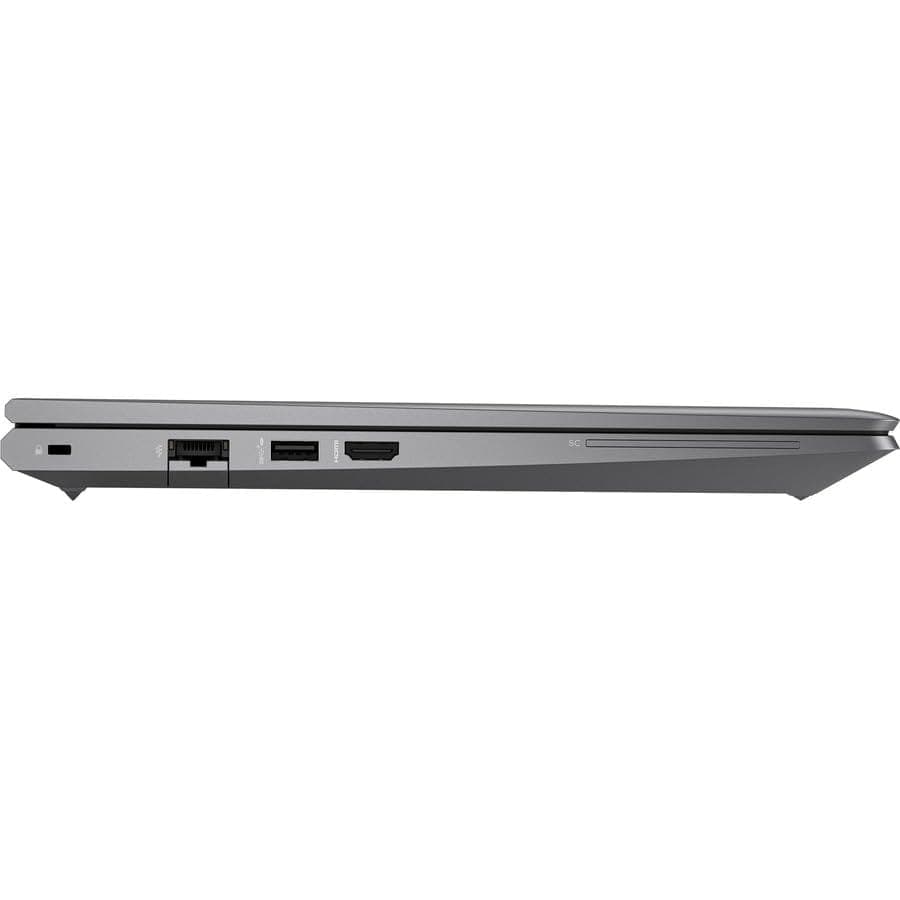
TL;DR The HP ZBook Firefly G9 remains one of the most balanced 14-inch mobile workstations available in 2026 for professionals who need portability without sacrificing enterprise performance. Configurations vary significantly depending on processor, GPU, memory, storage, and display selection. The best configuration for most Indian buyers typically includes an Intel Core i7 processor, 32 GB DDR5 RAM, 1 TB NVMe SSD, and optional NVIDIA T500 GPU, paired with a WUXGA 16:10 display for productivity. This setup provides strong multitasking performance for CAD drafting, analytics modeling, software development, and light 3D workflows while maintaining excellent battery efficiency and portability. Buyers exploring HP ZBook Firefly G9 units often receive better value compared with new ultrabooks because enterprise workstations prioritize durability, thermal stability, and certified drivers. Choosing the right configuration ensures that the HP ZBook Firefly G9 Workstation Laptop remains productive for several years without overspending on unnecessary hardware.
Introduction: Choosing the Right ZBook in 2026
The HP ZBook Firefly G9 represents HP’s approach to building thin enterprise workstations that combine mobility with professional reliability. In 2026, the demand for compact workstations has increased significantly as professionals work across hybrid environments such as corporate offices, home setups, and client locations. Unlike consumer ultrabooks, ZBook systems are engineered for sustained workloads, professional drivers, and long-term reliability.
For buyers researching HP ZBook Firefly G9 Specs, the biggest challenge is choosing the correct configuration rather than selecting the model itself. CPU generation, GPU options, RAM capacity, storage type, and display panel selection all influence real-world performance. A configuration suitable for financial modeling may be very different from one required for 3D modeling, AI workloads, or engineering design software. Understanding these component choices ensures that the laptop delivers consistent performance without unnecessary cost.
Many professionals in India are now turning to workstation platforms because they offer enterprise hardware at significantly lower prices. Platforms like Refurbo make it possible to purchase professionally tested workstation systems that retain the reliability of enterprise machines while staying within realistic budgets. For buyers researching HP ZBook Firefly G9 Price in India, refurbished configurations often provide better long-term value than consumer laptops marketed primarily for short upgrade cycles.
Selecting the right configuration ultimately means balancing performance requirements, workflow demands, and budget constraints. The following sections examine each major component so buyers can choose the most efficient setup for their professional workloads.
CPU Options: Core i5, i7, i9, and Intel Core Ultra Comparisons
Processor choice plays the most important role in determining overall performance in the HP ZBook Firefly G9. Most Firefly G9 configurations use 12th-generation Intel processors such as the Core i5-1245U or Core i7-1265U, which feature Intel’s hybrid architecture combining performance cores and efficiency cores. This design improves multitasking performance while maintaining battery efficiency, which is essential for mobile workstation users.
The Core i5 configuration is typically suitable for general productivity workloads including Excel modeling, browser-based ERP systems, office applications, and light coding environments. However, professionals working with larger datasets or multi-application workflows benefit significantly from the Core i7 variants, which offer higher clock speeds and additional cache memory. In real-world usage, this translates into smoother performance when running multiple IDEs, large spreadsheets, CAD viewers, or analytics tools simultaneously.
Although some workstation lines offer Core i9 processors, the Firefly G9 platform focuses primarily on energy-efficient workstation CPUs rather than extreme performance chips. Because the laptop prioritizes portability, thermal design limits the practical advantage of high-power CPUs. As a result, Core i7 configurations generally deliver the best performance-to-efficiency balance.
CPU Configuration Comparison
For most Indian buyers researching HP ZBook Firefly G9 Review and configuration options, the Core i7-1265U paired with 32 GB RAM remains the most balanced and future-proof option.
GPU Options: NVIDIA T500, T550, and RTX Variants
Graphics capability is an important consideration when configuring the HP ZBook Firefly G9. While the Firefly series prioritizes portability and efficiency, it still offers professional GPU options designed for CAD software, engineering applications, and creative workflows. Most configurations are available with either integrated Intel Iris Xe graphics or an optional NVIDIA T500 workstation GPU.
The Intel Iris Xe integrated GPU is surprisingly capable for many professional tasks. For users working primarily with 2D CAD drafting, financial modeling, data analysis, and software development, Iris Xe provides sufficient graphical performance while keeping power consumption low. It also supports hardware acceleration for video playback and light creative workloads such as Adobe Photoshop or Illustrator.
For professionals requiring stronger graphics capabilities, the NVIDIA T500 GPU is the recommended option. Based on NVIDIA’s Turing architecture, the T500 provides dedicated VRAM and certified drivers for applications such as AutoCAD, SolidWorks, Revit, and Adobe Creative Cloud. While it is not designed for heavy GPU rendering pipelines, it significantly improves viewport performance in 3D modeling software and enables CUDA-based acceleration for certain professional applications.
Unlike larger workstation models such as the ZBook Power or Fury series, the Firefly G9 generally does not include RTX-class GPUs because its thin chassis focuses on mobility rather than maximum graphics power. However, the T500 strikes a practical balance between GPU capability and thermal efficiency.
GPU Configuration Comparison
For most professionals evaluating HP ZBook Firefly G9, the NVIDIA T500 configuration offers the best balance of graphics capability and power efficiency.
RAM Requirements: DDR5 vs DDR4, 16GB, 32GB, and 64GB Configurations
Memory configuration significantly affects the responsiveness of the HP ZBook Firefly G9, especially in workloads involving large datasets, design software, or multitasking environments. The Firefly G9 platform typically supports DDR5 memory, which provides higher bandwidth compared with older DDR4 modules used in previous workstation generations.
The 16 GB RAM configuration is the minimum recommended setup for professional workloads in 2026. It works well for general office productivity, browser-based applications, coding environments, and moderate multitasking. However, users working with large Excel datasets, development environments, or multiple applications simultaneously may quickly reach memory limits with 16 GB.
The 32 GB RAM configuration is widely considered the optimal professional configuration. It allows engineers, analysts, and developers to run multiple professional tools simultaneously without performance bottlenecks. Tasks such as CAD drafting while referencing large datasets, running virtual machines, or using several browser tabs alongside office applications benefit significantly from this memory capacity.
Some enterprise configurations also support 64 GB RAM, which is typically used for heavier professional workflows such as virtualization environments, large simulation datasets, and advanced analytics pipelines. Although not necessary for most users, it ensures long-term scalability.
RAM Configuration Overview
For buyers researching HP ZBook Firefly G9 Specs, selecting 32 GB DDR5 RAM offers the best balance of performance and longevity for professional workloads.
SSD Selection: NVMe vs SATA, 512GB, 1TB, and Expansion Options
Storage configuration also plays a crucial role in the performance of the HP ZBook Firefly G9. Modern workstation laptops rely on NVMe solid-state drives, which provide significantly faster data transfer speeds than older SATA SSDs. In real-world workflows, faster storage improves boot times, software launch speeds, and file transfer performance.
Most Firefly G9 configurations use PCIe NVMe SSDs, which can deliver read speeds exceeding 3000 MB/s. This performance is particularly important for professionals working with large project files, datasets, design assets, or development repositories. NVMe storage also helps reduce loading times in CAD software and accelerates system responsiveness during multitasking.
The 512 GB SSD configuration is typically sufficient for general productivity workflows, particularly for users who rely on cloud storage services such as OneDrive or Google Drive. However, professionals working with design projects, video assets, or large datasets often require additional storage capacity.
For these users, a 1 TB NVMe SSD provides a much more comfortable storage environment. It allows professionals to store multiple projects locally while maintaining fast system performance. In some enterprise configurations, the Firefly G9 also supports SSD upgrades, enabling users to expand storage capacity later if required.
Storage Configuration Comparison
For most professionals researching HP ZBook Firefly G9 Price in India, a 1 TB NVMe SSD paired with 32 GB RAM creates a balanced configuration that delivers strong performance while maintaining reasonable cost.
Display Panel Selection: FHD, WUXGA, UHD, DreamColor Considerations
The display configuration of the HP ZBook Firefly G9 is crucial for professionals working in CAD, 3D modeling, and content creation. HP offers multiple panel options to suit different workflows, including FHD (1920x1080), WUXGA (1920x1200), UHD (3840x2160), and DreamColor displays. Each panel type has strengths and trade-offs, and the choice should align with the intended use case.
The FHD panel is the most common option, balancing portability, battery efficiency, and affordability. It is ideal for 2D drafting, office productivity, coding, and general CAD work. Professionals benefit from adequate pixel density and good color reproduction for standard engineering projects, while preserving longer battery life.
For users requiring slightly taller workspace in vertical applications such as spreadsheets or CAD toolbars, the WUXGA panel provides a 16:10 aspect ratio. This aspect ratio increases usable vertical space without increasing laptop footprint, improving efficiency in financial modeling, programming, and document-heavy tasks.
The UHD panel is targeted at professionals handling high-resolution visual projects, such as photo editing, video review, or detailed design work. While UHD offers excellent pixel density and visual clarity, it consumes more power, slightly reducing battery life, which is a consideration for mobile users.
The DreamColor panel is HP’s high-end color-accurate option. It is factory-calibrated and provides excellent sRGB, AdobeRGB, and DCI-P3 coverage, suitable for color-critical workflows like graphic design, animation, and visual content creation. Professionals working with color grading, print prepress, or HDR content will appreciate its accuracy.
Display Panel Comparison
For buyers exploring the HP ZBook Firefly G9, the WUXGA or DreamColor panel represents the best compromise between professional usability and visual fidelity.
Ideal Configuration for CAD and 2D Drafting Workflows
CAD and 2D drafting workloads demand stable CPU performance, sufficient RAM, and responsive storage, rather than high-end GPU power. The Firefly G9 is ideal for professionals in engineering, architecture, and manufacturing who rely on AutoCAD, SolidWorks 2D drafting, Revit (light models), and similar tools.
A recommended configuration for CAD-focused workflows includes Intel Core i7 or i5 processors, 32 GB DDR5 RAM, 1 TB NVMe SSD, and either the Intel Iris Xe or NVIDIA T500 GPU. While GPU acceleration improves viewport responsiveness, CAD software primarily relies on CPU for geometry calculations and file handling. Faster NVMe storage ensures rapid opening, saving, and file transfers of large drawing files.
The 32 GB RAM configuration is particularly important for multitasking with multiple design files, references, and background software. Professionals can work on large schematics without hitting memory limits. Additionally, the WUXGA or FHD display ensures a clear view of technical drawings with minimal scaling issues, while keeping battery consumption manageable.
HP ZBook Firefly G9 units are cost-effective for students or professionals seeking CAD capabilities without investing in a full-thickness, high-end workstation. The hybrid Alder Lake architecture of 12th/13th Gen Intel CPUs provides strong single-core and multi-threaded performance, which is vital for 2D workflows that often involve repetitive geometry calculations.
CAD Configuration Table
This configuration ensures smooth CAD operations for HP ZBook Firefly G9 buyers in India while maintaining portability and long-term usability.
Ideal Configuration for Simulation Tasks
Although the Firefly G9 is not designed for heavy deep learning workloads, it is capable of simulation tasks, particularly for professionals running models locally or experimenting with smaller datasets. Typical tasks include data preprocessing, inference testing, model evaluation, and light GPU-accelerated tasks.
For CPU-focused AI workflows, a configuration with Intel Core i7 CPU, 32–64 GB DDR5 RAM, and 1 TB NVMe SSD is recommended. Multi-threaded CPU performance aids in tasks such as feature engineering, data analytics, and parallel preprocessing. The inclusion of DDR5 memory ensures faster data access, which is crucial for moderately sized datasets.
For GPU-accelerated AI experiments, NVIDIA T500 allows small-scale training or inference using frameworks like PyTorch or TensorFlow. While it cannot compete with RTX A-series GPUs for large neural networks, it supports CUDA and OpenCL acceleration for testing lightweight models, making it suitable for developers or analytics teams experimenting with AI workflows without access to a full GPU workstation.
Professionals who plan to combine local computation with cloud-based training for heavier models benefit from this setup. Using Firefly G9 for development, inference testing, and proof-of-concept simulations allows for portable AI workstations that remain energy-efficient and mobile.
AI / Simulation Configuration Table
This configuration ensures that HP ZBook Firefly G9 buyers can experiment with simulations without investing in high-end Fury or Power series workstations.
Comparison of Recommended ZBook Configurations for Different Workloads
When selecting a HP ZBook Firefly G9, the ideal configuration depends heavily on your primary workload. For Indian professionals, balancing cost, performance, and portability is critical, and the Firefly G9 offers flexible options for CAD, 2D drafting, 3D modeling, and light AI or simulation workflows. To simplify decision-making, it’s helpful to compare CPU, GPU, RAM, storage, and display combinations across different use cases.
For 2D CAD and office productivity, a Core i5 or i7 with 16–32 GB DDR5 RAM and an FHD or WUXGA display is sufficient. The Intel Iris Xe or NVIDIA T500 GPU ensures responsive viewport performance without significant power draw. These configurations provide fast NVMe SSD storage, essential for opening large technical files and multitasking with office suites.
For 3D modeling and rendering, professionals benefit from the higher memory and GPU options. Configurations with 32 GB RAM, 1 TB NVMe SSD, and NVIDIA T500 or T550 provide smoother handling of 3D models in Blender, Fusion 360, or SolidWorks. The DreamColor or UHD panel is advantageous for color-critical designs or precise visual inspection of complex geometries.
For AI, machine learning, or simulation experiments, configurations with Core i7 or Core Ultra CPUs, 32–64 GB DDR5 RAM, 1 TB NVMe SSD, and the NVIDIA T500 GPU are recommended. While not meant for heavy RTX-class workloads, these setups allow inference, preprocessing, and proof-of-concept testing of ML models efficiently, particularly when combined with cloud-based GPU resources for heavier model training.
Recommended Configurations Table
This comparison clearly shows that HP ZBook Firefly G9 units can be optimized for different professional needs while maintaining affordability, portability, and certified enterprise reliability.
Final Recommendation and Decision Framework for Indian Buyers
The Firefly G9 should be evaluated against the primary bottleneck in your workflow: CPU, GPU, or display requirements. For professionals whose tasks are CPU-bound, such as CAD drafting, financial modeling, analytics, and 2D documentation, even entry-level Firefly G9 configurations deliver excellent efficiency, long battery life, and portability. units in this range provide exceptional value for Indian buyers looking to balance cost and performance.
For users engaged in moderate 3D modeling, rendering, or simulation, a mid-tier configuration with 32 GB RAM, NVIDIA T500, and a high-resolution display is optimal. This setup ensures smooth viewport handling, faster rendering previews, and efficient multitasking without requiring a larger, heavier workstation. HP ZBook Firefly G9 units in this category provide a strong balance of performance, portability, and enterprise-grade reliability, making them ideal for design students, architects, and engineers in India.
For professionals experimenting with light AI workflows or small-scale ML inference, the Firefly G9 offers sufficient CPU performance and GPU acceleration to run models locally. While it is not a replacement for full RTX-class AI workstations, this configuration allows proof-of-concept experimentation and cloud-based hybrid workflows without excessive upfront costs. The Refurbo HP ZBook Firefly G9 refurbished options ensure these configurations remain cost-effective, energy-efficient, and portable for frequent travel or client-side work.
Frequently Asked Questions
Q. What battery life can I expect from the HP ZBook Firefly G9 during CAD work?
A. Battery life typically ranges between 6 and 8 hours during moderate 2D CAD workflows depending on screen brightness and workload intensity.
Q. Can the Firefly G9 handle full 3D rendering tasks?
A. It can manage light 3D modeling and rendering tasks, but heavy GPU rendering workloads are better suited for larger RTX workstation models.
Q. Which GPU options are available for the Firefly G9?
A. Most configurations include Intel Iris Xe integrated graphics or the NVIDIA T500 workstation GPU, with some variants offering the T550.
Q. What RAM configuration is recommended for AI experimentation?
A. A configuration with 32 to 64 GB DDR5 RAM is recommended for machine learning experiments, inference testing, and data processing tasks.
Q. Are refurbished Firefly G9 units reliable for professional work?
A. Yes. Certified refurbished units that undergo professional testing can deliver reliable workstation performance for business and engineering workflows.
Q. Which display option is best for color critical work?
A. The DreamColor display panel is the best choice because it provides factory calibrated color accuracy for design and visual content work.
Q. Can RAM and storage be upgraded later?
A. Yes. Many Firefly G9 configurations allow RAM and NVMe SSD upgrades depending on the specific model configuration.
Q. How does the Firefly G9 compare with the Firefly G8?
A. The Firefly G9 introduces hybrid 12th generation processors, DDR5 memory support, and improved thermal efficiency compared with the G8.
Q. Is the Firefly G9 suitable for students in technical fields?
A. Yes. It is well suited for CAD coursework, programming, analytics, and engineering assignments due to its portability and workstation stability.
Q. How portable is the HP ZBook Firefly G9?
A. The lightweight 14 inch chassis and efficient battery design make it highly portable for professionals who travel or work across multiple locations.
Ready to upgrade your tech?
Browse our collection of quality refurbished products at unbeatable prices.






