
HP ZBook Firefly G11 Upgradeability In 2026: RAM Slots, SSD Slots, And Service Access
Discover HP ZBook Firefly G11 upgrade options in 2026 including RAM configuration, SSD expansion, battery replacement, and service accessibility. A complete guide for long term workstation ownership.

TL;DR The HP ZBook Firefly G11 remains one of the smartest refurbished mobile workstations in 2026 because it balances modern enterprise efficiency with practical long-term serviceability. While many configurations lock RAM through LPDDR5 or LPDDR5x memory, the laptop still delivers meaningful upgrade flexibility through fast NVMe SSD replacement, battery accessibility, cooling maintenance, and internal wireless serviceability. For engineering students, developers, designers, analysts, and professionals in India, the real long-term value lies in planning the right memory tier upfront and using storage plus service access as the primary lifecycle extension path.
Why Upgradeability Has Become a Core Buying Decision in 2026
In 2026, upgradeability is no longer a “nice to have” feature for professional laptops. It has become a strategic buying factor because workloads evolve much faster than ownership cycles. A laptop purchased today for office productivity may later need to support CAD environments, larger codebases, Docker containers, analytics dashboards, simulation tools, or large Adobe project libraries. When hardware cannot evolve with these needs, buyers are forced into early replacement cycles that dramatically increase total cost of ownership.
This is exactly why the HP ZBook Firefly G11 stands out in the refurbished workstation market. Unlike consumer ultrabooks that often sacrifice serviceability for thinness, the Firefly G11 follows an enterprise-first design philosophy. It prioritises internal access, storage flexibility, battery replacement, and long-term maintainability while still preserving the lightweight portability professionals expect from a mobile workstation. That balance makes it especially attractive for buyers who want a machine that can stay productive through 2028 and beyond.
The key mindset shift is simple: in 2026, the smartest laptop is not always the one with the newest processor. It is the one that can adapt to your workload growth with the lowest friction and ownership cost.
RAM Planning: The Most Important Decision You Must Make Before Buying
The biggest upgradeability caveat on the ZBook Firefly G11 is memory architecture. Many configurations use LPDDR5 or LPDDR5x memory soldered directly to the motherboard. This design improves efficiency, lowers latency, and supports the thinner premium workstation chassis, but it also removes the possibility of post-purchase RAM upgrades. For buyers, this means RAM selection is not a later optimisation. It is the most critical decision at the point of purchase.
This makes workload forecasting essential. A buyer who currently uses browser tabs, Office, dashboards, and light coding may feel comfortable with 16GB today. However, once workloads expand into CAD, VMs, container environments, data analysis notebooks, or multi-monitor professional setups, that baseline can quickly become restrictive. This is why 32GB is often the safest long-term recommendation for developers, engineering students, and design professionals buying refurbished units.
The practical rule is simple: because memory cannot usually be expanded later, buy the highest RAM tier your budget reasonably allows. This single decision will influence whether the laptop still feels “future-ready” two to three years from now.
Recommended RAM Planning Table
| Workload Type | Best RAM Tier |
|---|---|
| Office + browser workflows | 16GB |
| Coding + CAD + multitasking | 32GB |
| Simulation + heavy datasets | 32GB+ preferred |
| Long-term refurbished use | Highest available tier |
SSD Upgradeability: The Strongest Long-Term Flexibility Advantage
Storage upgradeability remains one of the biggest reasons the Firefly G11 is such a rational refurbished workstation buy. Most configurations include a fast M.2 NVMe PCIe SSD, and replacing this drive with a larger or newer-generation SSD remains straightforward. This gives buyers a highly practical long-term expansion path even when RAM is fixed.
For professional workflows, this matters more than many buyers initially realise. Large CAD assemblies, Adobe scratch files, simulation datasets, machine learning notebooks, Docker images, VMs, and client archives all grow rapidly over time. Starting with 512GB may feel sufficient today, but it can become restrictive surprisingly quickly once real project complexity increases. Upgrading to a 1TB or 2TB NVMe SSD dramatically improves workflow comfort and extends practical ownership life.
Another major advantage in the refurbished market is SSD health replacement. If a unit comes with a heavily used enterprise SSD, replacing it immediately gives buyers a clean storage foundation, faster performance, and stronger long-term reliability. This single upgrade often makes the biggest visible difference in how “fresh” a refurbished workstation feels.
Internal Serviceability: Why Enterprise Design Still Wins
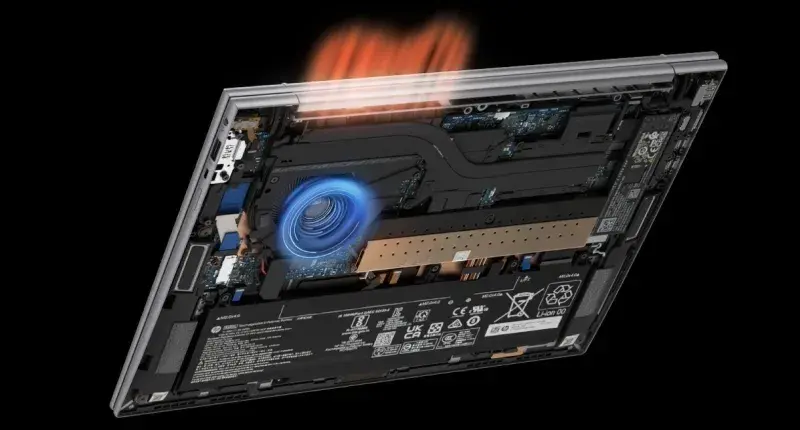
The Firefly G11 continues HP’s enterprise design philosophy by preserving clean internal access through a removable bottom panel secured with standard screws. Once opened, technicians can easily reach the SSD, battery, cooling system, Wi-Fi module, and serviceable internal components. In a world where many ultrabooks are increasingly sealed and hostile to maintenance, this remains a major professional advantage.
For refurbished ownership, this internal accessibility directly improves lifecycle confidence. Dust buildup can be removed, fans can be cleaned, thermal paste can be refreshed, batteries can be replaced, and wireless faults can be serviced without forcing expensive motherboard-level replacements. This is exactly the kind of serviceability that allows enterprise laptops to age gracefully over five-plus-year cycles.
This also improves resale and sustainability value. A laptop that can be maintained predictably remains attractive in secondary ownership cycles, which lowers the effective total cost of ownership for the first buyer as well.
Battery, Cooling, and Wireless Modules: The Hidden Upgrade Path
While buyers often focus only on RAM and SSDs, the real hidden strength of the Firefly G11 is lifecycle servicing. The internal battery remains accessible after removing the bottom panel, which means degraded refurbished units can regain near-original portability without replacing the whole system. In India’s refurbished market, this is one of the strongest long-term ownership advantages.
Cooling maintenance is equally important. Professional workloads such as simulations, CAD, rendering previews, or long coding builds depend on stable thermals. Dust buildup and old thermal paste can gradually reduce sustained performance. The Firefly’s accessible fan and heat sink layout makes periodic servicing simple, directly preserving workstation-grade responsiveness.
The Wi-Fi module is another underrated service point. Enterprise environments still benefit from replaceable wireless cards because network reliability issues can be fixed through targeted servicing instead of replacing the full board. This repair-friendly architecture is one of the clearest differences between workstation ownership and thin consumer ultrabook ownership.
Why It Still Beats Many Consumer Ultrabooks for Long-Term Ownership
The strongest reason the Firefly G11 remains such a smart 2026 buy is that it solves the exact ownership frustrations created by modern consumer laptops. Many ultrabooks now prioritise thinness and aesthetics at the cost of soldered storage, inaccessible batteries, sealed cooling systems, and limited service support. This creates a shorter lifecycle even when the processor itself remains capable.
The Firefly G11 takes a more professional route. Even with soldered memory in many variants, the presence of SSD upgrades, internal battery replacement, fan maintenance, and wireless serviceability creates far more meaningful long-term flexibility than most new consumer alternatives. For engineering students, analysts, developers, and design professionals, this dramatically lowers long-term ownership cost.
This is especially important in India, where refurbished buying decisions are often made with three-to-five-year ROI thinking rather than short retail replacement cycles.
The Smartest Upgrade Strategy for Refurbished Buyers
The smartest way to buy the Firefly G11 in 2026 is to treat upgradeability as a planned lifecycle strategy rather than a later reaction. Start by maximising RAM at purchase because that choice is usually permanent. Next, budget for an SSD upgrade if the installed capacity is below 1TB or if health diagnostics show heavy prior enterprise usage. Then plan battery and thermal servicing within the first ownership year to restore near-original mobility and sustained performance.
This staged upgrade framework creates a workstation that can comfortably scale from current workloads into heavier future use without forcing early replacement. For students moving into advanced engineering tools, developers building larger local environments, or analysts managing larger datasets, this strategy dramatically improves ownership economics.
The real conclusion is simple: the ZBook Firefly G11 is not just upgradeable in the traditional RAM sense. Its real strength lies in serviceable lifecycle optimisation, which is exactly what makes it one of the smartest refurbished workstation investments in 2026.
Frequently Asked Questions
Q. Is RAM upgradeable on every HP ZBook Firefly G11 model?
Not always. Many Firefly G11 configurations use LPDDR5 or LPDDR5x memory soldered directly onto the motherboard, which means RAM upgrades are typically not possible after purchase. This is why memory planning before buying is so important. If your workload may grow into CAD, container environments, data analysis, or multi-monitor multitasking, choosing 32GB upfront is usually the safer long-term decision.
Q. What is the best SSD upgrade size for long-term professional use?
For most professionals in 2026, 1TB is the practical sweet spot because it comfortably supports OS files, applications, project libraries, local datasets, and scratch storage without constant cleanup pressure. However, users handling simulations, media assets, VM images, or large codebases may find 2TB a much smarter long-term investment.
Q. Is the Firefly G11 easy to maintain as a refurbished laptop?
Yes, and this is one of its biggest strengths. The removable bottom panel allows access to the SSD, battery, cooling system, and wireless module, which makes cleaning, battery replacement, and thermal servicing far easier than most thin consumer laptops. This directly improves long-term reliability.
Q. Should refurbished buyers immediately replace the SSD or battery?
Not always immediately, but both should be checked early. SSD health diagnostics and battery cycle reports give a clear picture of remaining life. If the SSD has heavy wear or the battery has significantly degraded, replacing them early creates a much better long-term ownership baseline and reduces unexpected performance issues later.
Q. Who benefits the most from the Firefly G11’s upgrade path?
Engineering students, software developers, designers, analysts, and refurbished workstation buyers benefit the most because their workloads often grow over time. The ability to start with the right RAM tier and later optimise storage, battery, and thermals makes the laptop highly adaptable for multi-year professional use.
Ready to upgrade your tech?
Browse our collection of quality refurbished products at unbeatable prices.






