
HP ZBook Firefly G11 Ports In 2026: Thunderbolt, HDMI, USB-A, SD, And Docking
The HP ZBook Firefly G11 offers a balanced port selection in 2026 with Thunderbolt 4, HDMI 2.1, USB-A and SD card support. This guide explains how its docking and connectivity options improve workflow efficiency for engineers, students and hybrid professionals.

In 2026, engineering and professional workflows are no longer limited by processor performance alone. Connectivity plays an equally critical role. Designers connect to multiple monitors. Analysts transfer large datasets from external drives. Video editors import footage from SD cards. Engineers dock into structured office environments while maintaining mobility during travel.
The HP ZBook Firefly G11 ports configuration reflects this evolving requirement for versatile, high speed connectivity in a thin and light mobile workstation. Built as the successor to earlier Firefly generations, the G11 focuses on practical expansion rather than unnecessary bulk. It balances modern Thunderbolt bandwidth with legacy compatibility such as USB-A, ensuring professionals do not require adapters for common accessories.
This detailed guide explores Thunderbolt, HDMI, USB-A, SD card access, docking compatibility, and real world professional workflows in 2026.
Port Layout Overview Of HP ZBook Firefly G11

4
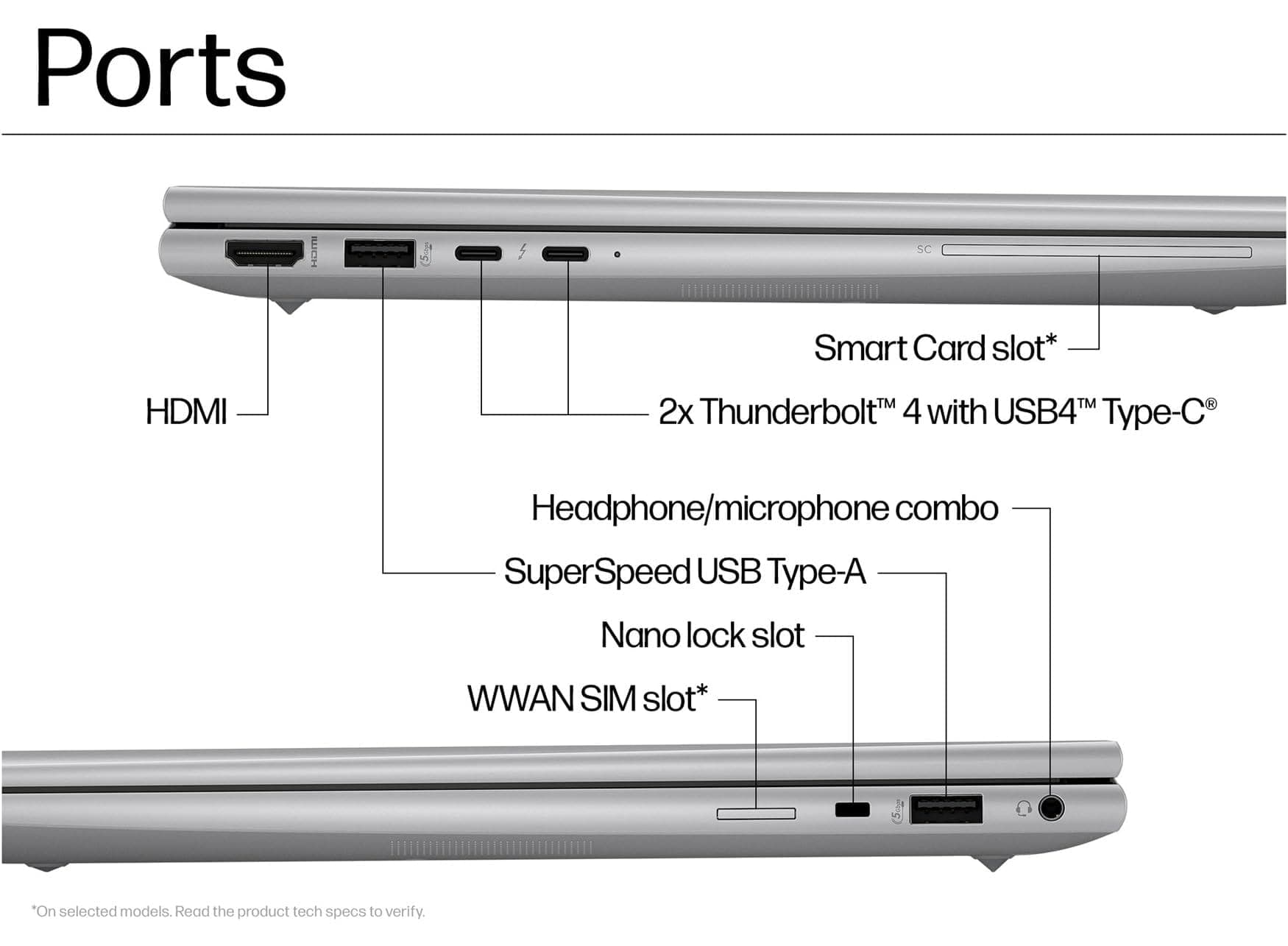
The HP ZBook Firefly G11 ports selection is designed to support hybrid professionals who shift between office desks, classrooms, field sites, and home setups. Instead of removing traditional ports in favour of minimalism, HP retains essential connectivity while integrating next generation bandwidth.
A typical configuration includes:
Thunderbolt 4 USB-C ports
USB-A ports
HDMI 2.1 output
SD card reader
3.5mm audio combo jack
Optional smart card reader in enterprise models
The port placement is distributed along both sides of the chassis, allowing cable management flexibility when docked or connected to peripherals.
For professionals who rely on multi device ecosystems, this balance prevents daily inconvenience caused by excessive adapters.
Thunderbolt 4 Connectivity In 2026
Thunderbolt remains one of the most important connectivity standards for mobile workstations. The HP ZBook Firefly G11 Thunderbolt 4 implementation provides up to 40Gbps bandwidth, enabling high speed data transfer and advanced display support.
Thunderbolt 4 supports:
Dual 4K external displays
Single 8K display output
High speed NVMe external storage
Professional docking stations
External GPU enclosures
For engineers working with simulation data, large CAD assemblies, or media assets, Thunderbolt 4 drastically reduces transfer times when using external SSDs. Instead of waiting minutes to move project files, large datasets can transfer within seconds.
Another advantage of Thunderbolt 4 is power delivery. The Firefly G11 can charge through its Thunderbolt port, reducing cable clutter. A single cable can deliver display output, storage connectivity, network access, and charging simultaneously when connected to a compatible dock.
In structured office environments, this one cable setup significantly improves desk efficiency.
HDMI 2.1 And External Display Support
Modern professionals require reliable external display connectivity. The HP ZBook Firefly G11 HDMI 2.1 port ensures direct monitor compatibility without requiring adapters.
HDMI 2.1 enables:
4K resolution at high refresh rates
Improved bandwidth compared to older HDMI standards
Reliable display connection for conference rooms
Compatibility with projectors and televisions
In engineering and design workflows, larger displays improve precision. Viewing detailed CAD models, code windows, or analytical dashboards on 27 inch or 32 inch monitors enhances productivity significantly.
Unlike USB-C display reliance alone, having a dedicated HDMI port ensures immediate compatibility in classrooms, meeting rooms, and presentation environments.
For professionals who frequently present designs or reports, this reduces friction during setup.
USB-A Compatibility For Legacy Devices
While many manufacturers remove legacy ports, HP retains USB-A connectivity in the Firefly G11. The HP ZBook Firefly G11 USB-A ports ensure compatibility with widely used accessories.
Common USB-A devices include:
Wireless mouse receivers
External hard drives
USB flash drives
Security keys
Printers and scanners
Measurement tools and lab equipment
In corporate and academic environments, many accessories still depend on USB-A. Removing it forces professionals to carry dongles. By keeping USB-A integrated, HP reduces dependency on adapters.
This decision is especially beneficial in Indian engineering colleges and professional offices where mixed generation peripherals remain common.
USB-A also provides reliable plug and play stability without requiring additional drivers in most cases.
SD Card Reader For Creators And Engineers

The HP ZBook Firefly G11 SD card reader adds direct media access for creators and technical professionals.
SD cards are frequently used in:
DSLR cameras
Drones
Field data logging devices
Embedded systems
Audio recording equipment
For video editors and field engineers, immediate SD card access simplifies workflow. Instead of using external card readers, professionals can directly insert storage media into the laptop.
This is especially valuable for journalists, content creators, and research engineers who collect field data on site.
Integrated SD support enhances mobility and eliminates small accessory dependencies.
Docking Capabilities For Office Environments
Docking compatibility transforms the Firefly G11 from a portable device into a full desktop workstation. The HP ZBook Firefly G11 docking support through Thunderbolt 4 enables structured office setups.
Compatible docking solutions such as the HP Thunderbolt Dock G4 allow:
Multiple monitor outputs
Wired Ethernet connectivity
Additional USB expansion
Peripheral consolidation
Single cable charging
For placement in corporate engineering offices or design studios, docking ensures a clean and professional desk setup.
Engineers can connect to dual or triple monitors, wired keyboards, network storage, and external drives instantly upon arrival at their desk.
This flexibility supports hybrid working models where professionals alternate between home and office.
Multi Monitor Engineering Productivity
Professional workflows in 2026 demand expanded screen real estate. The combination of Thunderbolt and HDMI allows the Firefly G11 to support multiple external displays.
Typical productivity setups include:
Primary CAD modelling monitor
Secondary documentation or code screen
Reference display for simulation outputs
With Thunderbolt docks, users can expand further depending on GPU configuration. This makes the Firefly G11 suitable for analysts, software developers, designers, and engineering researchers.
The ability to scale from portable mode to full workstation mode increases long term usability.
Data Transfer Speeds And Storage Workflows
Large project files define modern professional environments. High resolution media, CAD assemblies, BIM models, and research datasets require rapid storage access.
Thunderbolt 4 enables up to 40Gbps transfer speeds when paired with compatible NVMe external drives. Compared to older USB standards, this significantly reduces waiting time.
USB-A ports remain useful for moderate speed storage, backup drives, and compatibility devices.
For professionals who frequently handle terabytes of data, modern port bandwidth directly impacts daily productivity.
Networking And Enterprise Connectivity
Although the Firefly G11 maintains a slim design, enterprise models may support network expansion via docking or USB-C adapters.
Through docking solutions, users gain:
Wired Ethernet stability
Corporate network authentication
Enhanced security device support
Smart card integration in enterprise configurations
This makes the Firefly G11 suitable for corporate IT environments that require structured access control.
Hybrid professionals can operate wirelessly while mobile and transition to wired networks in office spaces.
Portability Without Sacrificing Connectivity
Weighing significantly less than traditional workstation laptops, the Firefly G11 remains portable without eliminating essential connectivity.
This matters for:
Engineering students travelling across campus
Consultants presenting at client offices
Field researchers collecting data
Corporate professionals shifting between departments
The thoughtful inclusion of HDMI and USB-A avoids the common frustration seen in ultra thin laptops that depend solely on USB-C.
In 2026, professionals expect flexibility, not compromise.
Refurbished Market Considerations In India
In India, refurbished workstation laptops are increasingly popular among engineering students and small businesses.
When purchasing a refurbished Firefly G11, verify:
Thunderbolt functionality
HDMI output stability
USB-A port health
SD card reader operation
Docking compatibility
Testing each port ensures long term usability. Connectivity reliability is just as important as CPU or RAM performance.
A well maintained refurbished unit provides enterprise grade connectivity at a significantly reduced investment.
Limitations To Consider
While the port selection is versatile, users should understand realistic boundaries.
The Firefly G11 does not include full size Ethernet on some configurations. High end display chains may require specific certified cables for optimal resolution. External GPU use through Thunderbolt is possible but limited by bandwidth compared to desktop PCIe slots.
Understanding these boundaries ensures informed purchasing decisions.
Who Benefits Most From This Port Configuration
The Firefly G11 port ecosystem suits:
Mechanical engineers using CAD
Electrical engineers running simulation tools
Video editors transferring SD footage
Software developers using multi monitor setups
Corporate professionals docking daily
Its balanced connectivity ensures compatibility across diverse professional environments.
Long Term Connectivity Relevance In 2026
Connectivity standards evolve rapidly. However, Thunderbolt 4 remains highly relevant due to its high bandwidth and display support.
HDMI 2.1 ensures compatibility with modern displays. USB-A preserves backward compatibility. SD card support benefits creators.
This balanced approach increases the lifespan of the device in professional ecosystems.
Conclusion
In 2026, ports define productivity as much as processors. The HP ZBook Firefly G11 offers a well balanced connectivity selection including Thunderbolt 4, HDMI 2.1, USB-A, SD card access, and advanced docking support.
It avoids extreme minimalism while maintaining portability. Professionals can transition from mobile usage to full workstation setups with minimal friction.
For engineers, creators, students, and corporate users, the Firefly G11 delivers practical and future ready connectivity without unnecessary compromise.
Frequently Asked Questions
1. How many Thunderbolt ports does the HP ZBook Firefly G11 have?
Most configurations include two Thunderbolt 4 ports supporting charging, display output, and high speed data transfer.
2. Does the Firefly G11 support dual external monitors?
Yes. Using Thunderbolt and HDMI together, the laptop can support multiple high resolution displays.
3. Is HDMI 2.1 useful for professionals?
Yes. HDMI 2.1 ensures compatibility with modern 4K displays and high bandwidth presentation setups.
4. Does the Firefly G11 still include USB-A ports?
Yes. USB-A ports are retained for compatibility with legacy peripherals and accessories.
5. Can the Firefly G11 connect to docking stations?
Yes. Thunderbolt 4 allows connection to enterprise docking stations such as the HP Thunderbolt Dock G4, enabling single cable workstation setups.
Ready to upgrade your tech?
Browse our collection of quality refurbished products at unbeatable prices.






