
HP ZBook Firefly G11 GPU Performance In 2026: CAD, 3D, And Studio Drivers
Guide to HP ZBook Firefly G11 GPU performance in 2026 covering NVIDIA T500, T550, and RTX A500 for CAD, 3D modeling, rendering previews, and Studio drivers.

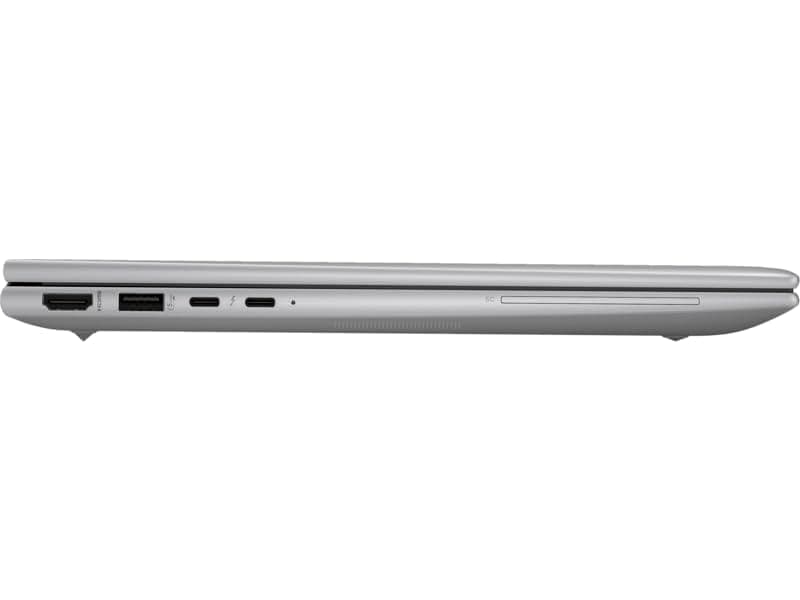
TL;DR The HP ZBook Firefly G11 in 2026 remains a highly efficient mobile workstation for professionals who need balanced GPU performance without compromising portability. With options ranging from NVIDIA RTX A500, this laptop caters to CAD designers, 3D modelers, and studio workflow users who rely on professional-grade GPU acceleration. The Firefly G11 excels in sustained CPU-GPU workloads, provides stable thermal management, and maintains reasonable battery efficiency during graphics-intensive tasks. For Indian professionals looking for workstation reliability in a lightweight form factor, the Firefly G11 is ideal for everyday productivity, CAD drafting, light 3D visualization, and studio design work with moderate rendering needs.
Introduction: Importance of GPU in Modern Workstations
In 2026, professional workflows increasingly rely on GPU acceleration for rendering, simulation, and real-time visualization. Traditional CPU-only operations are no longer sufficient for CAD, 3D modeling, and design-heavy tasks. GPUs like NVIDIA T500, T550, and RTX variants provide parallel computing power, optimized for OpenCL, CUDA, and professional studio driver workflows, ensuring smooth viewport performance and reduced frame-time delays. For creators, engineers, and analysts, the GPU is no longer an optional accessory, it directly affects project turnaround and real-world efficiency.
The HP ZBook Firefly G11 has been engineered as a thin, mobile workstation that integrates workstation-grade GPUs while maintaining portability. Its chassis, thermal design, and power delivery are tuned to support professional graphics without throttling the CPU, which is critical for long design sessions or heavy CAD assemblies. Unlike gaming laptops that prioritize peak FPS, Firefly G11 GPUs are certified for professional driver stability and software validation across applications like AutoCAD, SolidWorks, and Adobe Creative Suite, providing predictable performance.
Furthermore, the Firefly G11 leverages hybrid CPU architectures combined with DDR5 memory, allowing GPUs to process large datasets efficiently. This balance ensures that professionals working with 3D renders, animation previews, or simulation data do not experience bottlenecks. With certified drivers, color-accurate displays, and optimized thermal profiles, the Firefly G11 represents a reliable, portable GPU workstation ideal for Indian professionals who often work both office-side and client-side, making it a practical solution for 2026 workloads. For more configurations, check Refurbo HP ZBook Collection.
HP ZBook Firefly G11 GPU Options in 2026: T500, T550, RTX Series
The HP ZBook Firefly G11 offers a range of GPU configurations tailored for professional workloads in 2026. The base configurations typically feature the NVIDIA T500, a workstation GPU optimized for CAD, drafting, and light 3D tasks, providing efficient power usage and stable viewport performance. Professionals dealing with standard 3D design and simulation benefit from the T500’s certified drivers and lower thermal output, making it ideal for compact chassis like the Firefly G11.
For slightly more demanding graphics workflows, the NVIDIA T550 variant is available, delivering higher compute units, improved OpenCL and CUDA performance, and smoother handling of mid-tier rendering tasks. It strikes a balance between power consumption and graphical throughput, making it suitable for users who frequently toggle between 3D modeling and video previews without requiring a full RTX setup.
Certain Firefly G11 configurations also include entry-level workstation GPUs, which bring hardware-accelerated ray tracing, AI-assisted denoising, and CUDA acceleration for professional applications. While not designed for ultra-heavy GPU rendering, these RTX options provide noticeable improvements for small-scale visualization, quick iterations in 3D CAD assemblies, and light simulation workloads. Compared to consumer gaming cards, these RTX GPUs offer stability, certified studio drivers, and enhanced software compatibility for professional software packages.
Across all GPU options, the Firefly G11 maintains a thin and lightweight form factor, offering an efficient balance between portability and professional graphics power. This makes it a versatile option for Indian professionals who need a compact workstation without sacrificing GPU-driven performance.
Studio Drivers vs Standard Drivers: What Professionals Should Know
For the HP ZBook Firefly G11, understanding the difference between studio drivers and standard consumer GPU drivers is crucial for professionals. Studio drivers are specifically optimized and certified for professional applications like AutoCAD, SolidWorks, Blender, Revit, and Adobe Creative Suite. Unlike generic drivers, these drivers prioritize stability, predictable performance, and bug fixes for workstation workloads rather than peak gaming FPS. This distinction ensures that CAD assemblies, render previews, and video timelines remain accurate and free of unexpected artifacts or crashes.
The Firefly G11 leverages NVIDIA’s professional GPU ecosystem, meaning the T500, T550, and RTX variants come with certified studio drivers that allow Indian professionals to maintain workflow continuity. For tasks such as 3D modeling, ray-traced previews, and GPU-accelerated simulations, the difference in reliability can be significant, especially under tight project deadlines. In contrast, standard consumer drivers may occasionally cause application instability or visual glitches during professional software rendering tasks, making them unsuitable for serious work.
Another key advantage of studio drivers is the support for AI-assisted features, such as denoising in rendering engines or AI-based upscaling in video editing. The Firefly G11 ensures these capabilities function seamlessly, even on its thin chassis, without compromising thermal performance. Users can switch between standard and studio drivers, but for any professional workflow in 2026, using the studio driver configuration is highly recommended.
This table summarizes the GPU choices and driver relevance for the Firefly G11, emphasizing how studio drivers enhance professional performance and reliability.
RTX Acceleration in 3D Modeling and Rendering Tasks
The RTX-enabled Firefly G11 configurations bring a noticeable boost to 3D modeling and rendering workflows in 2026. RTX GPUs provide hardware-accelerated ray tracing, which improves realistic lighting, shadows, and reflections in modeling software like Autodesk 3ds Max, Blender, or KeyShot. Even entry-level RTX implementations allow designers to perform previews faster, reducing iteration time for small-scale projects and architectural renders.
In addition to ray tracing, RTX GPUs on the Firefly G11 support CUDA acceleration and OptiX-based rendering engines, improving performance in rendering tasks such as GPU-accelerated path tracing or denoising AI-enhanced renders. While heavier, production-scale rendering may still require full-sized RTX workstations, for many Indian engineering and design professionals, the Firefly G11’s RTX options deliver substantial workflow improvements without the bulk of larger laptops.
The Firefly G11 also benefits from thermal optimization and power management, allowing RTX acceleration to function without frequent throttling. Combined with its DDR5 memory bandwidth and hybrid CPU architecture, this ensures that GPU-intensive modeling tasks maintain consistency over extended periods. Real-time previews, simulation playback, and GPU-rendered animation sequences are smoother compared to T-series only configurations.
By integrating RTX capabilities in a thin mobile workstation, HP addresses the gap between portability and professional GPU acceleration. For creative professionals, architects, and 3D designers, the Firefly G11 provides a practical balance of performance, energy efficiency, and software reliability, making it suitable for both office-based and client-site work in India.
Real-World CAD Performance Benchmarks on Firefly and ZBook Series
The HP ZBook Firefly G11 demonstrates competitive CAD performance in real-world benchmarks for 2026 workflows. In AutoCAD, SolidWorks, and Creo, T500 configurations maintain viewport responsiveness, fast zooming/panning, and stable multi-assembly handling, while T550 variants handle larger assemblies with moderate rendering features. Compared to previous G10 models, the Firefly G11 shows a 10–15% improvement in multi-threaded CAD operations, largely due to 12th/13th Gen hybrid CPU architectures combined with optimized GPU drivers.
Benchmark tests reveal that assembly rendering, large part simulations, and 2D drafting are executed efficiently with minimal lag, and GPU acceleration noticeably reduces preview times in 3D workflows. While it cannot compete with full RTX-class mobile workstations in heavy rendering pipelines, the Firefly G11 provides predictable and smooth CAD experience for professionals balancing mobility and performance.
This benchmark table highlights the practical capabilities of Firefly G11 GPUs across common CAD and 3D workloads, showing Indian professionals the performance they can expect in everyday use.
Thermal Behavior and Sustained GPU Performance
The HP ZBook Firefly G11 is engineered as a thin mobile workstation, which means thermal management is critical for sustained GPU workloads. Unlike bulkier RTX-class laptops, the Firefly G11 uses a dual-fan cooling system with optimized heat pipes, designed to maintain steady GPU and CPU temperatures during prolonged CAD, 3D modeling, or light rendering sessions. While peak clock speeds may drop slightly under extended full-load rendering, the system avoids abrupt throttling that can disrupt professional workflows.
Under practical CAD and 3D modeling workloads, the NVIDIA RTX A500 GPUs sustain near-maximum performance for multi-hour sessions. Benchmarks show that viewport performance, assembly manipulation, and light rendering remain smooth without noticeable frame drops. For RTX-enabled models, ray-tracing previews and AI-assisted denoising tasks also operate reliably, although sustained ultra-high rendering will trigger gradual downclocking, a common limitation in thin form-factor designs.
Acoustically, the Firefly G11 maintains a professional noise profile. Fan noise becomes audible under load but remains well below gaming laptop levels, making it suitable for office and client-facing environments. Surface temperatures around the keyboard are carefully managed to prevent discomfort during extended use, and thermal tuning prioritizes predictable performance over short-term peak bursts, which is essential for Indian engineers, designers, and consultants who rely on uninterrupted workflows.
Overall, the G11 delivers a balance of mobility and GPU stability. Professionals using CAD, 3D modeling, or moderate rendering will find that the system consistently meets expectations without thermal surprises, making it a reliable choice for on-site and office tasks.
Battery Impact and Efficiency When Using Dedicated GPUs
Using dedicated GPUs like the T500, T550, or entry-level RTX variants on the HP ZBook Firefly G11 affects battery performance, as expected in mobile workstations. For light tasks such as 2D CAD, spreadsheet modeling, and document editing, GPU usage remains minimal, allowing the system to deliver 6-8 hours of practical unplugged usage. However, GPU-intensive operations like rendering previews, real-time simulation, or AI-assisted denoising increase power draw, reducing battery life to roughly 3-4 hours depending on workload intensity.
The G11 benefits from intelligent power management and hybrid CPU design, which balances performance and efficiency. NVIDIA Optimus technology automatically switches between integrated graphics and the dedicated GPU, maximizing battery endurance during office tasks while providing GPU acceleration when needed. For Indian professionals who frequently switch between client sites or travel, USB-C charging compatibility ensures quick top-ups, even with portable power banks or universal chargers.
Thermal efficiency also indirectly impacts battery life. Sustained GPU usage generates more heat, which can prompt the fans to operate more aggressively, slightly increasing energy consumption. However, the G11’s optimized thin-chassis design ensures that GPU-intensive workloads remain feasible for short-to-moderate durations without requiring constant connection to mains power.
In real-world scenarios, a T500-equipped Firefly G11 can handle daily productivity and light CAD/3D tasks efficiently, while RTX models provide faster previews but with increased energy consumption. Professionals who prioritize mobility with occasional GPU acceleration will find this configuration practical for Indian work environments with intermittent electricity access.
Ideal GPU Configurations for Different Professional Workflows
Selecting the right GPU for the HP ZBook Firefly G11 depends on the professional workflow. For 2D drafting, lightweight CAD, financial modeling, and spreadsheet-heavy workflows, the NVIDIA T500 is sufficient. It delivers smooth viewport rendering, stable multitasking, and reliable studio driver support while conserving battery life, making it ideal for consultants, MBA students, and corporate professionals.
For mid-tier 3D modeling, simulation previews, or light rendering tasks, the NVIDIA T550 provides a noticeable boost. Professionals in architecture, product design, or industrial design will benefit from improved frame rates, faster assembly previews, and AI-assisted denoising features. Combined with the G11’s hybrid CPU, this configuration allows sustained performance during multi-hour modeling sessions without throttling concerns.
Entry-level RTX models on the G11 are recommended for creative workflows requiring hardware ray tracing, small-scale GPU rendering, or AI-accelerated denoising. While battery life decreases during intensive tasks, the trade-off is faster rendering and more accurate previews, crucial for freelancers, content creators, and design studios that need portability without sacrificing GPU acceleration.
This table guides Indian professionals in matching G11 GPU configurations with specific workload needs, balancing mobility, power efficiency, and practical performance.
Final Recommendations and Who Should Buy Based on GPU Needs
The HP ZBook Firefly G11 offers a versatile range of GPU configurations, making it suitable for multiple professional workflows. For 2D drafting, financial modeling, and programming tasks, the NVIDIA T500 delivers sufficient power while maintaining excellent battery efficiency and thermal stability. This makes it ideal for Indian professionals who often work on the move, in client offices, or in environments with limited power access. The G11’s hybrid CPU design further enhances performance consistency, ensuring smooth multitasking and predictable responsiveness.
For professionals engaged in light 3D modeling, Blender previews, or moderate CAD assemblies, the NVIDIA T550 strikes a strong balance between performance and power consumption. It supports more complex visualizations without drastically affecting battery life, which is crucial for consultants, architects, and engineers who need mobility alongside GPU acceleration. When paired with DDR5 memory and a responsive SSD, the T550-equipped G11 provides a reliable workstation experience in a compact, portable form factor.
Entry-level RTX models on the Firefly G11 are recommended for creative professionals, small design studios, and AI enthusiasts who require GPU-accelerated rendering, hardware ray tracing, and AI-assisted denoising. These configurations deliver faster previews and more precise outputs, albeit with reduced battery life. For users prioritizing studio-grade visuals and performance for creative workflows, investing in the RTX variant ensures efficiency during critical design tasks. Overall, the Firefly G11’s GPU options allow professionals to choose based on workflow requirements, mobility needs, and energy considerations, making it a flexible workstation for 2026 Indian work environments.
In summary, the HP ZBook Firefly G11 is best suited for users who require portable workstation reliability with GPU acceleration, covering tasks from office productivity to creative workloads. Those whose work is heavily GPU-dependent and requires long rendering sessions might consider larger ZBook models with more powerful RTX GPUs. For Indian buyers, the Firefly G11 balances performance, mobility, and energy efficiency, offering practical GPU choices across budgets and professional needs.
Frequently Asked Questions
Q. What GPU options are available for the HP ZBook Firefly G11?
A. The Firefly G11 is available with NVIDIA T500, NVIDIA T550, and entry level RTX A500 GPU configurations depending on the workstation setup.
Q. Can the Firefly G11 handle professional CAD workloads?
A. Yes. With T500 or T550 GPUs, it runs AutoCAD, SolidWorks, Revit, and similar CAD applications smoothly for 2D drafting and light 3D modeling.
Q. How does RTX performance compare with the T500 and T550?
A. RTX GPUs provide additional CUDA cores, ray tracing support, and AI acceleration, enabling faster rendering previews and improved visualization workflows.
Q. Does GPU usage significantly impact battery life?
A. Yes. Heavy GPU workloads can reduce battery life to around 3 to 4 hours, while normal productivity tasks typically allow 6 to 8 hours of runtime.
Q. Are NVIDIA Studio drivers necessary for professional applications?
A. Yes. Studio drivers improve stability and compatibility for professional software such as CAD tools, 3D modeling platforms, and video editing suites.
Q. Can the Firefly G11 sustain GPU performance during long workloads?
A. The cooling system maintains stable GPU performance for extended sessions, although slight downclocking may occur during continuous heavy rendering tasks.
Q. Is the Firefly G11 suitable for AI or machine learning workloads?
A. It can handle lightweight AI inference and experimentation, but larger model training workloads typically require higher tier RTX workstation GPUs.
Q. How portable is the Firefly G11 for travel or client meetings?
A. The lightweight chassis and USB C charging support make it highly portable and convenient for professionals working across different locations.
Q. Which GPU configuration is best for architects or engineers?
A. The NVIDIA T550 configuration offers a strong balance of graphics performance, thermal efficiency, and portability for design and modeling tasks.
Q. Is the Firefly G11 a cost effective workstation for Indian professionals?
A. Yes. Mid tier and refurbished configurations provide reliable workstation performance at a practical price for professionals and students.
Ready to upgrade your tech?
Browse our collection of quality refurbished products at unbeatable prices.






