
HP ZBook Firefly G11 For Creators In 2026: Editing, Design, And Colour Workflows
HP ZBook Firefly G11 delivers reliable editing performance, DreamColor accuracy, RTX graphics stability, and mobile workstation productivity for creators.

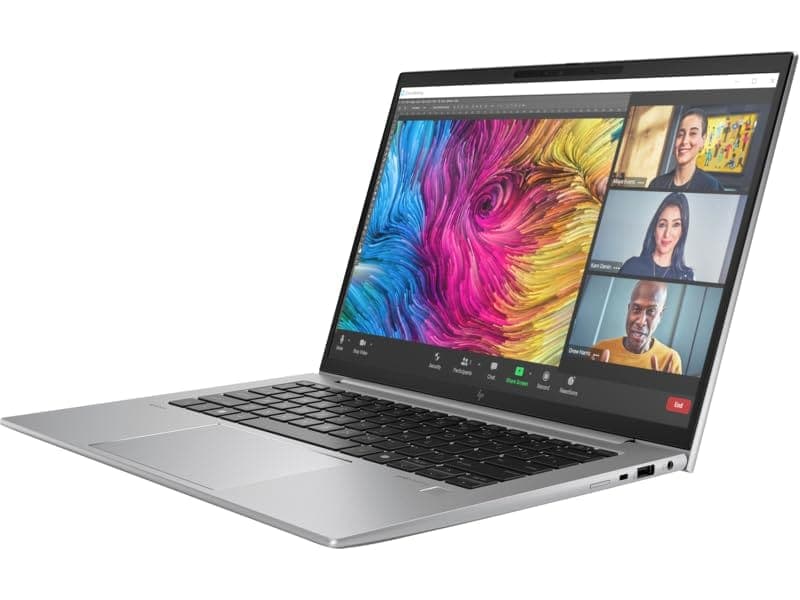
TL;DR The HP ZBook Firefly G11 represents HP’s transition toward AI-assisted creator workstations in 2026, combining Intel Core Ultra processors, professional-grade displays, and enterprise GPU stability within a lightweight chassis. Unlike gaming laptops optimized for burst performance, the Firefly G11 prioritizes sustained editing stability, color consistency, and mobility for photographers, designers, video editors, and digital consultants. Its calibrated IPS and optional DreamColor panels support accurate color workflows, while NVIDIA RTX A-series professional graphics enable reliable acceleration in Adobe, Autodesk, and 3D applications. For creators working across offices, studios, and remote setups, refurbished configurations deliver workstation-class reliability without premium new-device pricing, making the Firefly G11 a practical creative production machine rather than merely a portable laptop.
Overview of HP ZBook Firefly G11 for Creators in 2026
Creative workflows in 2026 increasingly demand mobility without sacrificing professional reliability. Designers, photographers, video editors, and digital content creators now work across hybrid environments where editing may begin on-site, continue during travel, and finalize in studio environments. The HP ZBook Firefly G11 Workstation Laptop is designed precisely for this evolving workflow model, positioning itself between ultra-portable business laptops and heavy desktop-replacement workstations.
Unlike consumer creator laptops that emphasize high refresh rates or gaming-oriented GPUs, the Firefly G11 focuses on certified drivers, predictable thermal behavior, and calibrated visual output. These characteristics matter significantly in professional design pipelines where color accuracy and export consistency directly affect deliverables. Applications such as Adobe Premiere Pro, Photoshop, After Effects, Blender, and CAD visualization tools benefit from workstation optimization rather than raw gaming performance alone.
For Indian creators evaluating long-term investments, refurbished enterprise workstations available through platforms such as Refurbo , provide access to professional hardware ecosystems typically deployed in corporate studios and engineering firms. Refurbished HP ZBook Firefly G11 units often retain factory display calibration quality and enterprise durability standards, making them particularly attractive for freelance creators, startup studios, and independent professionals managing budgets carefully.
In practical creative environments, the Firefly G11 aims to deliver stable timelines, accurate previews, and dependable export performance rather than benchmark-focused peak speeds, aligning closely with modern creator productivity needs.
HP ZBook Firefly G11 Specs Overview for Creative Workflows
The HP ZBook Firefly G11 Specs demonstrate a clear shift toward hybrid creator and AI-ready computing platforms. Built around Intel Core Ultra processors featuring performance cores, efficiency cores, and integrated AI acceleration engines, the system improves multitasking behavior during editing workflows where background rendering, media caching, and live previews operate simultaneously.
CPU configurations typically include Core Ultra 5 and Core Ultra 7 processors, offering improved multi-threaded efficiency compared to previous-generation U-series chips. For creative professionals, this translates into smoother timeline scrubbing, faster media indexing, and reduced lag when working with layered Photoshop or Illustrator projects. The integrated Neural Processing Unit further assists AI-powered tools increasingly embedded within modern creative software suites.
Graphics configurations include Intel Arc integrated graphics or optional NVIDIA RTX A500 professional GPUs. Unlike gaming GPUs, RTX A-series graphics prioritize driver stability and optimized acceleration for certified applications including Adobe Creative Cloud, Autodesk environments, and professional visualization tools. This ensures predictable rendering behavior during client work.
Memory scalability up to 64 GB DDR5 allows large RAW image libraries, 4K timelines, and complex design compositions to remain responsive without aggressive disk swapping. Combined with PCIe Gen4 NVMe SSD storage, file transfer speeds and project loading times remain consistently fast even with large creative assets.
Overall, the Firefly G11 configuration philosophy supports sustained professional creation workflows rather than short-duration performance bursts common in consumer laptops.
Resolution Options and Impact on Design Productivity (FHD vs WUXGA vs UHD)
Display resolution directly influences workflow efficiency for creators, especially those working with layered timelines, large canvases, or high-resolution assets. The HP ZBook Firefly G11 offers multiple panel configurations including Full HD (1920×1080), WUXGA (1920×1200), and higher-resolution UHD options depending on market configuration.
FHD panels remain practical for creators focused on mobility and battery longevity. Graphic designers working primarily in social media assets, presentations, UI layouts, or web graphics often find FHD sufficient because scaling remains comfortable while maintaining longer unplugged usage. However, timeline density becomes limited during video editing, requiring more scrolling when managing complex sequences.
WUXGA panels introduce a taller 16:10 aspect ratio, which significantly improves vertical workspace. Applications such as Adobe Photoshop, Illustrator, and Premiere Pro benefit from additional interface space, allowing larger preview windows while keeping tool panels visible simultaneously. For many creators in 2026, WUXGA represents the best balance between clarity, productivity, and power efficiency.
UHD panels provide superior pixel density suited for photographers and color professionals working with high-resolution RAW media or print workflows. Fine detail inspection becomes easier, though higher resolution increases GPU load and battery consumption during prolonged editing sessions.
In real production environments, WUXGA configurations are increasingly preferred because they enhance productivity without sacrificing portability or sustained performance.
Calibration Capabilities and Factory-Optimized Profiles
Professional creative work depends heavily on color reliability rather than brightness or visual vibrancy alone. The Firefly G11 incorporates factory calibration options, particularly in higher-tier IPS and DreamColor display variants, ensuring predictable color reproduction across devices.
Factory-calibrated panels typically target near-complete sRGB coverage and improved Delta-E accuracy levels suitable for commercial design workflows. This consistency becomes critical when creators deliver work intended for print media, advertising campaigns, or digital publishing platforms where mismatched colors can result in costly revisions.
Unlike consumer laptops that exaggerate saturation for visual appeal, workstation displays prioritize neutrality. Editors working in Adobe Lightroom or Capture One benefit from accurate tonal gradients, allowing shadow recovery and highlight adjustments without misleading contrast interpretation. This accuracy reduces dependence on constant external monitor correction during mobile workflows.
Calibration stability also supports collaborative production pipelines. Designers moving between studio monitors and mobile systems experience minimal color variance, improving workflow continuity. Many creators pair the Firefly G11 with calibrated external displays, using the laptop panel for preview verification during travel or onsite editing sessions.
In 2026, software-driven calibration tools combined with workstation display hardware allow creators to maintain consistent profiles across operating environments. This makes the Firefly G11 especially practical for freelance professionals handling multi-client deliverables where color trustworthiness directly impacts professional credibility.
Overall, calibration capability transforms the device from a productivity laptop into a reliable mobile creation platform suitable for professional visual work.
GPU Performance for Video Editing and 3D Design
Graphics acceleration plays a defining role in modern creator workflows. The Firefly G11 offers configurations with integrated Intel Arc graphics or discrete NVIDIA RTX A-series professional GPUs, fundamentally influencing editing and rendering performance.
Integrated graphics handle lightweight creative workloads efficiently, including photo editing, vector design, and basic 1080p video timelines. Hardware decoding improvements in modern Intel architectures enable smooth playback of compressed media formats commonly used in online content production.
However, creators working with complex timelines, effects layers, or GPU-accelerated plugins benefit substantially from NVIDIA RTX A500 configurations. Professional GPUs accelerate real-time playback, color grading previews, and rendering tasks inside applications such as Adobe Premiere Pro and After Effects. CUDA and hardware encoding engines reduce export times while maintaining stability during long renders.
In 3D workflows, GPU acceleration improves viewport responsiveness rather than final cinematic rendering capability. Modeling tasks in Blender or Autodesk environments remain smooth for moderate projects, though extremely heavy simulations still favor larger workstation GPUs.
The Firefly G11 therefore functions best as a mobile creator workstation capable of professional editing and moderate 3D production while maintaining portability essential for modern creative professionals.
CPU and RAM Considerations for Heavy Editing Software
Creative applications in 2026 increasingly rely on hybrid processing architectures that balance single-core responsiveness with multi-threaded computation. The HP ZBook Firefly G11 integrates Intel Core Ultra processors designed specifically for mixed productivity and creator workloads, combining performance cores, efficiency cores, and AI acceleration units.
For software such as Adobe Premiere Pro, After Effects, DaVinci Resolve, and Blender, CPU performance directly affects timeline responsiveness, preview rendering, encoding speed, and background processing stability. Single-core performance remains essential when scrubbing timelines or applying adjustments in Photoshop, while multi-core scaling becomes important during exports or batch processing operations.
RAM capacity plays an equally critical role. Modern editing workflows routinely exceed 16 GB usage once multiple applications run simultaneously. Designers often keep Photoshop, Illustrator, browsers, asset libraries, and collaboration tools active together. Insufficient memory forces disk swapping, dramatically slowing creative flow even when processor performance remains strong.
A 32 GB configuration represents the practical professional baseline in 2026. Video editors working with 4K timelines or large RAW image batches benefit noticeably from expanded memory buffers, reducing preview lag and improving multitasking stability. Higher RAM also supports AI-assisted editing features now integrated across creative software ecosystems.
Balanced CPU-RAM pairing ultimately determines whether a creator experiences uninterrupted workflow or constant performance bottlenecks.
Photo Editing and Color Grading Workflows (Lightroom, Capture One)
Photo editing workloads emphasize consistency and precision rather than raw computational bursts. The Firefly G11 performs particularly well in applications like Adobe Lightroom and Capture One because these environments depend heavily on sustained CPU performance, fast storage access, and accurate display reproduction.
RAW photo workflows involve importing large image libraries, generating previews, applying non-destructive edits, and exporting final assets. Modern Intel architectures inside the Firefly G11 accelerate preview rendering and batch exports, allowing photographers to process hundreds of high-resolution images without workflow interruption.
Color grading benefits from the workstation-class display pipeline combined with GPU-assisted adjustments. Exposure corrections, masking operations, gradient edits, and tone mapping remain responsive even when editing high-megapixel files from modern mirrorless cameras. The system maintains consistent performance during prolonged editing sessions typical in wedding, commercial, or studio photography workflows.
Another important advantage lies in thermal stability during sustained edits. Unlike consumer ultrabooks that throttle after extended workloads, workstation tuning enables predictable performance over long catalog-editing sessions. Creators working onsite or traveling can complete professional editing tasks without relying exclusively on desktop systems.
In collaborative creative environments, consistent color behavior across exported files becomes essential. The Firefly G11 supports accurate previewing before delivery, reducing revision cycles caused by display inconsistencies. For photographers, social media managers, and marketing professionals, this reliability translates into faster turnaround times and dependable visual output across devices.
Storage Speed and Workflow Efficiency: SSDs and NVMe Drives
Storage performance has become one of the most critical yet underestimated components of creator productivity. The Firefly G11 utilizes PCIe NVMe SSD storage, dramatically improving file access speed compared to older SATA-based systems still used in legacy workstations.
Creative workflows generate extremely large datasets. Video editors manage multi-gigabyte footage files, photographers maintain extensive RAW libraries, and designers handle layered project assets. Fast NVMe drives reduce loading delays when opening projects, switching timelines, or caching preview files during editing.
Scratch disk performance significantly impacts software responsiveness. Applications such as Premiere Pro and Photoshop constantly read and write temporary data during editing sessions. NVMe storage ensures these background operations occur without interrupting active creative tasks, maintaining smooth playback and real-time editing performance.
Expandable storage options also improve long-term usability. Creators frequently separate operating systems, project files, and archival storage across multiple drives to maintain performance consistency. The Firefly G11 supports professional workflow organization strategies typically associated with larger desktop workstations.
Efficient storage architecture allows creators to spend less time waiting for files and more time focusing on creative output, making NVMe implementation one of the most meaningful productivity upgrades in modern mobile workstations.
Portability vs Performance: Workstation Mobility for Creators
Modern creators increasingly work outside traditional studio environments. Freelancers edit from cafés, consultants finalize presentations during travel, and photographers process shoots onsite. The HP ZBook Firefly G11 is engineered specifically for this mobility-first professional workflow, balancing workstation reliability with ultralight portability.
Unlike traditional creator laptops weighing over 2.2–2.5 kg, the Firefly G11 remains close to the thin-and-light category while still maintaining ISV-certified workstation stability. This distinction becomes important for creators who carry systems daily between offices, universities, production locations, or client meetings. Reduced physical fatigue directly contributes to long-term usability, especially in Indian urban commuting environments.
Performance compromises inevitably exist in thin workstation designs. Sustained GPU rendering workloads cannot match thicker RTX-based machines because thermal headroom is limited by chassis size. However, for editing, design work, motion graphics preparation, and color workflows, sustained CPU performance remains stable enough to complete professional tasks reliably.
Battery efficiency further strengthens mobility advantages. Creators working in hybrid environments benefit from extended unplugged sessions while maintaining consistent application responsiveness. USB-C charging compatibility also allows charging through power banks or universal adapters during travel.
For creators prioritizing flexibility without abandoning professional-grade hardware reliability, mobility becomes a productivity multiplier rather than a limitation.
Who Should Buy Based on Creative Workflow Needs
The Firefly G11 aligns best with creators whose workflows depend on consistency, portability, and color reliability rather than extreme GPU horsepower. Graphic designers working across Adobe Illustrator, Photoshop, and Figma benefit from responsive CPU performance combined with accurate display options suitable for branding and marketing deliverables.
Photographers handling Lightroom or Capture One catalogs represent another strong user group. The system comfortably manages RAW editing pipelines, batch exports, and client previews while remaining portable enough for on-location editing. Wedding photographers, social media creators, and commercial editors particularly benefit from this balance between mobility and processing capability.
Video editors working with short-form content such as YouTube production, corporate videos, and marketing reels also find the Firefly G11 practical. Timeline playback remains smooth for optimized 4K workflows, especially when paired with adequate RAM and NVMe storage. However, full cinematic workflows involving heavy effects simulation or multi-layer 8K editing still favor larger RTX workstation platforms.
Design students, architects preparing presentations, MBA professionals managing visual analytics, and UI/UX designers represent an increasingly important category in India’s creator economy. These users require dependable performance across multiple applications rather than peak rendering output.
Creators whose income depends on mobility, collaboration, and fast turnaround times will extract maximum value from this workstation. Those whose workflow revolves around continuous GPU rendering farms should instead consider higher-tier workstation classes designed specifically for sustained graphical computation.
HP ZBook Firefly G11 Decision Framework
The HP ZBook Firefly G11 represents a shift in how professional creator laptops are evaluated in 2026. Instead of chasing maximum benchmark performance, modern workflows prioritize efficiency, reliability, portability, and intelligent hardware acceleration. The Firefly G11 succeeds because it aligns closely with these evolving professional requirements.
From a creative productivity standpoint, the system performs exceptionally well in design-heavy environments involving photo editing, branding work, UI development, corporate media production, and moderate video editing. Intel Core Ultra architecture improves multitasking efficiency while integrated AI acceleration prepares creators for emerging AI-assisted editing tools increasingly embedded in creative software ecosystems.
The most important purchasing decision depends on workload classification. Creators primarily engaged in editing, color correction, visual design, analytics visualization, or hybrid creative-business workflows will find the Firefly G11 highly efficient and future-ready. Its portability ensures productivity continuity across offices, studios, classrooms, and remote workspaces.
For buyers evaluating long-term value in India, refurbished enterprise workstations often deliver superior price-to-performance outcomes compared to consumer creator laptops. When properly configured with sufficient RAM and NVMe storage, the Firefly G11 becomes a dependable professional investment rather than a short lifecycle device.
The decision framework remains simple: choose the Firefly G11 if your workflow rewards stability, mobility, and sustained professional responsiveness. Upgrade to heavier GPU-focused workstations only when rendering workloads dominate daily production requirements.
Frequently Asked Questions (FAQs)
Q. Is HP ZBook Firefly G11 good for video editing in 2026?
A. Yes, with Core Ultra processors, RTX A500 GPU, and sufficient RAM, it handles 4K editing, YouTube production, and marketing workflows smoothly.
Q. Can HP ZBook Firefly G11 run Adobe Creative Cloud applications efficiently?
A. Yes, it runs Photoshop, Illustrator, Premiere Pro, Lightroom, and After Effects reliably due to workstation drivers and optimized hardware.
Q. Is RTX A500 necessary for creators on Firefly G11?
A. Integrated graphics are sufficient for photo editing and design, but RTX A500 significantly improves video editing, rendering, and 3D workflows.
Q. Is HP ZBook Firefly G11 suitable for photographers and colour grading?
A. Yes, DreamColor and calibrated IPS panels provide accurate colour reproduction suitable for Lightroom, Capture One, and professional editing.
Q. How much RAM is recommended for creators using Firefly G11?
A. 32 GB RAM is recommended for professional editing workflows, while 64 GB benefits heavy video editing and motion graphics.
Q. Does Firefly G11 support external colour-accurate monitors?
A. Yes, Thunderbolt and USB-C ports support professional calibrated external displays for studio workflows.
Q. Is refurbished HP ZBook Firefly G11 reliable for creative professionals?
A. Yes, enterprise workstation hardware ensures durability, and refurbished units offer excellent performance when sourced from trusted sellers.
Q. Is Firefly G11 good for Blender, CAD, and 3D design?
A. Yes, RTX A500 GPU supports moderate 3D modelling, viewport rendering, and CAD workflows efficiently.
Q. Is Firefly G11 portable enough for travelling creators?
A. Yes, its lightweight workstation design makes it ideal for freelancers, photographers, and professionals working across locations.
Q. Is HP ZBook Firefly G11 future-ready for AI-assisted creative tools?
A. Yes, Intel Core Ultra processors with integrated AI engines support emerging AI-based editing and creative workflows.






