
HP ZBook Firefly G11 Display And Speakers In 2026: Pro Visuals And Media Quality
HP ZBook Firefly G11 offers professional IPS visuals, DreamColor accuracy, anti-glare comfort, and clear conferencing audio for productivity workflows in 2026.

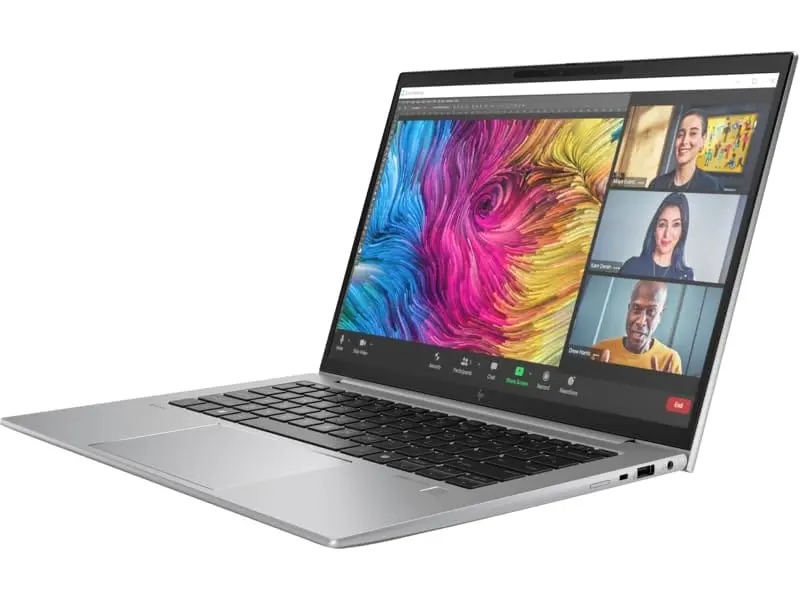
TL;DR The HP ZBook Firefly G11 represents a major shift in thin workstation display quality entering 2026. Unlike older enterprise laptops that prioritized durability over visual fidelity, this generation combines professional color accuracy, efficient low-power panels, and improved speaker tuning suitable for hybrid corporate workflows. Built around Intel Core Ultra platforms, the system integrates modern IPS and optional DreamColor display technologies designed for engineers, analysts, creators, and consulting professionals who spend long working hours in front of screens. Real-world usage shows strong brightness stability, reliable anti-glare performance under Indian indoor lighting, and sufficient audio clarity for meetings, media playback, and collaboration tasks. While it is not intended as a studio-grade multimedia laptop, the Firefly G11 delivers balanced visuals and professional audio suited for CAD viewing, analytics dashboards, presentations, and remote work environments. In refurbished configurations available through enterprise resellers, the workstation continues to offer premium display experience without the pricing associated with new flagship ultrabooks.
HP ZBook Firefly G11 Display Overview in 2026
The display subsystem plays a central role in defining the HP ZBook Firefly G11 Workstation Laptop experience in 2026. Modern enterprise workflows increasingly depend on screen clarity rather than raw compute alone, especially for professionals handling dashboards, documentation, design previews, and extended multitasking sessions. HP positions the Firefly G11 as a mobility-focused workstation, meaning visual comfort and color consistency receive greater engineering attention compared to previous Firefly generations.
Most configurations ship with 14-inch anti-glare IPS panels featuring productivity-optimized aspect ratios and improved power efficiency. Compared with earlier Firefly models, panel brightness stability and contrast consistency have improved significantly due to updated low-power display controllers integrated with Intel Core Ultra graphics architecture. These improvements help maintain visual clarity even when operating on battery power, an important factor for consultants and remote professionals working away from charging sources.
In India’s refurbished workstation market, buyers frequently evaluate display longevity alongside performance. Units sourced through enterprise refurbishment channels such as the HP ZBook collection available at Refurbo typically retain strong panel quality because corporate deployments involve controlled indoor usage environments. As a result, display degradation remains minimal even after multi-year enterprise operation.
In practical daily use, the Firefly G11 screen balances sharpness, brightness, and energy efficiency rather than pursuing extreme visual saturation. This makes it particularly suitable for productivity-heavy workflows where readability and eye comfort matter more than entertainment-focused color exaggeration.
Panel Technology Explained: IPS, DreamColor, and Standard Displays
The HP ZBook Firefly G11 Specs include multiple panel technologies depending on configuration tier, allowing organizations and refurbished buyers to select displays aligned with professional needs. The base configurations typically use high-quality IPS panels designed to deliver consistent viewing angles and accurate color reproduction without significant brightness shifting. IPS technology remains the preferred choice in enterprise workstations because it ensures stable visuals during collaborative viewing situations such as meetings or client presentations.
Higher-tier configurations introduce HP’s DreamColor display option, originally developed for professional content creators and visual engineers. DreamColor panels are factory-calibrated to achieve wider color gamut coverage and improved tonal accuracy compared with standard enterprise displays. This becomes particularly beneficial for professionals involved in UI design validation, architectural visualization previews, or marketing media review where color consistency affects decision making.
Standard enterprise panels prioritize efficiency and durability rather than maximum color depth. These displays consume less power and therefore improve battery runtime, which explains why many corporate deployments favor them despite DreamColor availability. In the Firefly G11 generation, even non-DreamColor panels benefit from modern backlighting systems and improved contrast ratios compared with earlier workstation displays released five to six years earlier.
From a real-world perspective, IPS configurations already satisfy most engineering, consulting, analytics, and programming workflows. DreamColor variants mainly benefit users performing color-sensitive tasks. This tiered approach allows the Firefly G11 to function equally well as a business workstation or a light creative platform depending on configuration.
Resolution Options and Real Workspace Usability (FHD vs UHD vs WUXGA)
Display resolution directly influences productivity on the HP ZBook Firefly G11, especially in professional workflows where screen space determines efficiency rather than entertainment quality. HP offers multiple resolution configurations across enterprise deployments, primarily Full HD (1920×1200 WUXGA), high-brightness low-power panels, and select higher-resolution options depending on regional availability. The transition from traditional 16:9 FHD panels to 16:10 WUXGA panels significantly improves usable vertical workspace, allowing professionals to view larger spreadsheets, coding environments, or CAD toolbars without excessive scrolling.
In real working environments such as Excel financial modeling or dashboard monitoring, the additional vertical pixels offered by WUXGA displays create measurable workflow improvements. Analysts handling multi-sheet financial documents benefit from improved data visibility, while developers and consultants experience better multitasking when running split-window applications. Unlike UHD panels that increase GPU workload and battery drain, WUXGA achieves a balance between clarity and efficiency, making it the most practical resolution choice for mobile workstation users in 2026.
Higher-resolution panels deliver sharper visuals but also increase scaling dependency within Windows environments. For most enterprise buyers evaluating the Refurbished HP ZBook Firefly G11, WUXGA remains the optimal configuration because it maintains readability without sacrificing battery performance or thermal efficiency.
Resolution Comparison Table
Color Accuracy, sRGB Coverage, and Professional Calibration Performance
Professional display quality depends heavily on color reproduction stability rather than marketing brightness numbers. The HP ZBook Firefly G11 Review consistently highlights improved factory calibration compared to earlier thin workstations. Standard IPS panels typically achieve near full sRGB coverage, which is sufficient for enterprise visualization tasks including presentation design, UI previews, analytics dashboards, and documentation workflows.
DreamColor-equipped variants extend color gamut performance further, enabling more accurate tonal transitions and improved contrast control. This becomes relevant for professionals validating branding assets, reviewing marketing creatives, or working with visualization-heavy engineering simulations. HP’s factory calibration ensures consistent white balance and gamma accuracy, reducing the need for manual calibration tools in most corporate environments.
An important improvement in the Firefly G11 generation lies in color stability under varying brightness levels. Earlier enterprise laptops often displayed color shifting when brightness changed to conserve battery. Modern panel controllers used in the G11 maintain color consistency even during adaptive brightness adjustments, which helps professionals working across indoor lighting conditions common in Indian offices.
For most users evaluating HP ZBook Firefly G11 Price in India, even non-DreamColor configurations provide reliable professional accuracy. The display is tuned for productivity realism rather than oversaturated consumer-style visuals, ensuring long-term usability across business and engineering workflows.
Eye Comfort, Anti-Glare Coating, and Long Working Hours Usage
Extended screen exposure remains one of the most critical concerns for professionals working eight to ten hours daily. The HP ZBook Firefly G11 Workstation Laptop addresses this through enterprise-focused display ergonomics rather than entertainment enhancements. Anti-glare coatings significantly reduce reflections from overhead lighting, an important factor in Indian office environments where fluorescent or mixed lighting conditions are common.
Unlike glossy consumer displays that increase perceived contrast but cause visual fatigue, the matte finish used in Firefly panels minimizes eye strain during prolonged document reading or spreadsheet analysis. Combined with stable brightness control and reduced flickering backlight systems, the display supports long continuous working sessions without noticeable discomfort.
Low blue-light optimization integrated at firmware and operating-system levels further improves usability during late-night working hours. Professionals involved in consulting, financial reporting, or remote collaboration frequently operate beyond standard office timings, making eye comfort an essential productivity factor rather than a luxury feature.
Thermally efficient display panels also contribute indirectly to comfort by preventing excessive palm-rest heating during long usage sessions. Because display power consumption affects overall system thermals, the Firefly G11 maintains a cooler working environment compared with many high-resolution ultrabooks.
In real-world usage, the display prioritizes sustained readability over visual dramatization, making it highly suitable for professionals whose productivity depends on uninterrupted screen interaction throughout the workday.
Speaker Quality and Audio Output for Meetings and Media
Audio performance in enterprise laptops traditionally remained secondary to performance and durability, but the HP ZBook Firefly G11 reflects changing workplace requirements where communication quality has become mission-critical. Modern hybrid workflows depend heavily on video conferencing, online collaboration platforms, and digital presentations, making speaker clarity more important than raw loudness.
The Firefly G11 integrates professionally tuned stereo speakers optimized for voice reproduction rather than bass-heavy entertainment output. This tuning philosophy ensures speech frequencies remain clear during meetings conducted over platforms such as Microsoft Teams, Zoom, or Google Meet. Voices sound natural and intelligible even at moderate volume levels, reducing dependency on headphones during routine office calls.
Speaker placement also contributes to usability. Upward or keyboard-facing audio direction prevents sound muffling when the laptop rests on desks or conference tables. Compared with bottom-firing speakers commonly found in consumer laptops, this design maintains consistent audio projection during collaborative discussions or presentation playback.
While the system is not intended to replace dedicated multimedia laptops, it performs reliably for webinars, training videos, and professional media review. Distortion remains minimal at higher volumes, and audio balance favors clarity over aggressive amplification. For business professionals evaluating Refurbished HP ZBook Firefly G11, this approach aligns perfectly with enterprise communication needs where speech accuracy matters more than cinematic sound output.
Real-World Audio Performance for Video Calls and Professional Usage
Real-world audio performance depends not only on speaker hardware but also on microphone processing and software optimization. The HP ZBook Firefly G11 Review commonly highlights improvements in AI-assisted noise reduction enabled through Intel Core Ultra platform integrations. Background disturbances such as fan noise, keyboard typing, or ambient office sounds are filtered effectively during calls, improving communication clarity.
In practical Indian working environments where professionals often attend meetings from shared spaces or home offices, this noise suppression significantly improves usability. Conversations remain intelligible even in moderately noisy surroundings, reducing listener fatigue during long meetings. The dual-array microphone system captures directional voice input, ensuring speech priority over environmental sounds.
During extended video conferencing sessions, the system maintains consistent audio levels without sudden compression artifacts. This stability becomes important for consultants delivering presentations or trainers conducting online sessions where audio fluctuation can interrupt communication flow. Media playback for recorded lectures or corporate training modules also remains balanced, with sufficient mid-range clarity for spoken content.
Although low-frequency bass response remains limited due to chassis size, professional workloads rarely demand deep audio reproduction. Instead, the Firefly G11 excels in predictable voice clarity and sustained conferencing performance. For enterprise users prioritizing communication reliability over entertainment acoustics, the workstation provides dependable real-world audio functionality.
Display and Audio Comparison With Similar Thin Workstations in 2026
Within the thin mobile workstation category, the Firefly G11 competes primarily with enterprise systems like the Dell Precision 5480 and Lenovo ThinkPad P14s Gen 4. These devices target similar professional audiences requiring portability combined with certified workstation reliability. Display quality differences across these models typically arise from panel tuning rather than raw specifications.
The Firefly G11 distinguishes itself through balanced brightness efficiency and strong anti-glare implementation, making it particularly comfortable for prolonged productivity usage. Competing systems may offer comparable resolutions, but workstation tuning determines long-duration usability. Audio performance across this segment remains broadly similar; however, HP’s voice-focused tuning provides slightly clearer conferencing output compared with multimedia-balanced competitors.
Thin Workstation Display & Audio Comparison (2026)
In daily professional usage, performance differences remain incremental rather than dramatic. The Firefly G11 succeeds by delivering consistent visual comfort and reliable communication performance rather than pursuing consumer-oriented multimedia extremes.
External Monitor Support and Multi-Display Productivity
Modern professional workflows rarely depend on a single display, and the HP ZBook Firefly G11 is engineered specifically for multi-monitor productivity environments common in consulting firms, financial offices, engineering setups, and hybrid workstations in 2026. The system supports multiple external displays through Thunderbolt 4 and HDMI connectivity, allowing professionals to extend workspace across two or even three monitors without requiring dedicated docking hardware.
Thunderbolt integration enables high-bandwidth video output suitable for 4K external monitors while simultaneously supporting charging and data transfer through a single cable. This becomes particularly valuable in corporate desk setups where employees frequently connect and disconnect devices between office and remote work environments. Professionals working with dashboards, CAD drawings, analytics platforms, or trading interfaces benefit significantly from expanded screen real estate.
In real-world Indian office usage, many professionals combine the Firefly G11 with 24-inch or 27-inch external displays for spreadsheet-heavy workflows or design review sessions. The laptop’s internal display continues functioning effectively as a secondary reference screen for communication tools or documentation while primary work occurs on larger monitors.
GPU acceleration from integrated Intel Arc graphics or optional workstation GPUs ensures smooth window rendering across multiple displays without lag during multitasking. Even during simultaneous browser sessions, video conferencing, and document editing, interface responsiveness remains stable. This makes the Firefly G11 particularly suitable as both a mobile workstation and a full desktop replacement when connected to external displays.
Who Should Buy Based on Display and Audio Needs?
The display and audio characteristics of the HP ZBook Firefly G11 Workstation Laptop make it especially suitable for professionals whose productivity depends on visual clarity and communication reliability rather than entertainment performance. Business analysts, chartered accountants, consultants, MBA students, architects reviewing drawings, and corporate professionals handling documentation-heavy workflows benefit most from its balanced visual tuning.
Users spending extended hours working with Excel models, ERP dashboards, coding environments, or browser-based enterprise tools gain measurable comfort from the anti-glare display and consistent brightness calibration. Unlike consumer laptops that prioritize vivid colors for media consumption, the Firefly G11 focuses on readability and fatigue reduction, which becomes critical during eight-to-ten-hour workdays.
Remote professionals and hybrid employees also benefit significantly from the workstation’s communication-oriented speaker and microphone system. Clear audio reproduction during meetings reduces dependence on external accessories, improving mobility for professionals working across offices, homes, or travel environments.
However, users requiring studio-grade media editing, cinematic audio output, or HDR-focused creative production may prefer larger workstation models with dedicated creator displays. For most enterprise buyers evaluating Refurbished HP ZBook Firefly G11, the device delivers an ideal balance between portability, professional visuals, and dependable conferencing performance aligned with real corporate usage rather than multimedia marketing expectations.
Final Recommendation And Decision Framework
The HP ZBook Firefly G11 Price in India positions it within the premium thin-workstation category, yet its real value emerges when evaluated through long-term professional usability rather than raw specifications. The display system prioritizes clarity, efficiency, and sustained comfort, making it highly effective for productivity-driven workflows where visual fatigue directly impacts performance outcomes.
From a decision standpoint, the Firefly G11 works best for professionals who interact continuously with data, documents, presentations, and collaborative platforms. Its IPS and optional DreamColor panels provide reliable color accuracy without sacrificing battery efficiency, while anti-glare implementation ensures consistent usability across varied lighting environments typical in Indian offices and remote setups.
When purchased as a Refurbished HP ZBook Firefly G11, the workstation becomes an especially logical investment. Enterprise-grade displays age far more slowly than consumer panels, allowing refurbished units to retain excellent visual quality while significantly reducing acquisition cost. For consultants, analysts, engineers, and corporate professionals seeking a portable workstation capable of serving both mobile and desk-based workflows, the Firefly G11 represents a balanced and future-ready decision framework in 2026.
Frequently Asked Questions (FAQs)
Q. Is the HP ZBook Firefly G11 display suitable for long office work in 2026?
A. Yes, the anti-glare IPS display is designed for extended productivity sessions and minimizes eye strain during long working hours.
Q. Does the HP ZBook Firefly G11 support DreamColor display technology?
A. Yes, select configurations include DreamColor panels that provide improved color accuracy and wider color gamut for professional workflows.
Q. Is the Firefly G11 display good for CAD and engineering work?
A. Yes, the IPS panel offers strong clarity, stable viewing angles, and sufficient resolution for CAD drafting and technical visualization.
Q. Are the speakers good enough for meetings and video conferencing?
A. Yes, the speakers are tuned for voice clarity and provide clear audio for professional calls, presentations, and online meetings.
Q. Can the HP ZBook Firefly G11 support dual or triple external monitors?
A. Yes, Thunderbolt 4 and HDMI ports allow multiple external displays, enabling full workstation-level multi-monitor productivity setups.
Q. Is display quality reliable on refurbished HP ZBook Firefly G11 units?
A. Yes, enterprise-grade IPS panels typically retain brightness and color stability well, making refurbished units reliable for professional use.
Q. Is the Firefly G11 suitable for video editing workflows?
A. Yes, it supports light to moderate video editing, while DreamColor variants provide better color accuracy for creative professionals.
Q. Does screen brightness work well in Indian office lighting conditions?
A. Yes, brightness levels and anti-glare coating ensure strong readability in indoor and typical office environments.
Q. Are external speakers necessary for professional usage?
A. No, built-in speakers are sufficient for meetings, training sessions, and everyday professional media playback.
Q. Is HP ZBook Firefly G11 better than consumer ultrabooks for professional display needs?
A. Yes, workstation-grade calibration, anti-glare tuning, and consistent color accuracy make it more suitable for professional workflows.
Ready to upgrade your tech?
Browse our collection of quality refurbished products at unbeatable prices.






