
HP ZBook Firefly G11 Best Config In 2026 India: CPU, GPU, RAM, SSD, Display Selection
Guide to selecting the best HP ZBook Firefly G11 configuration in 2026 including CPU, GPU, RAM, SSD, and display options for professional workloads.

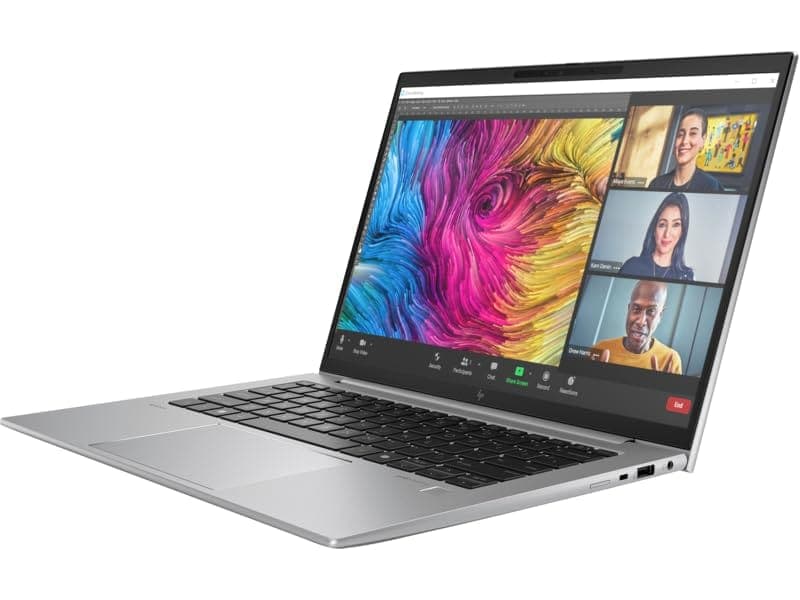
TL;DR The HP ZBook Firefly G11 in 2026 offers flexible CPU, GPU, RAM, SSD, and Display options tailored for Indian professionals, creators, and engineers. With configurations ranging from Core i5 to Intel Core Ultra, paired with NVIDIA T500/T550 GPUs, and memory up to 64 GB DDR5, it supports 2D drafting, CAD, 3D rendering, and AI workloads. Refurbished units available via Refurbo provide cost-effective performance without compromising enterprise-grade reliability. Ideal setups depend on workload type, balancing portability, battery life, and graphics needs.
Introduction: Choosing the Right ZBook in 2026
Selecting a professional workstation laptop in 2026 is about balancing performance, mobility, and cost. The HP ZBook Firefly G11 stands out because it integrates enterprise-grade reliability with configurable options, making it suitable for Indian professionals, students, and small business owners seeking a durable machine for CAD, design, and AI workloads. With multiple processor, RAM, and storage variants, buyers can optimize the laptop for specific needs without overspending.
HP ZBook Firefly G11 units on platforms like Refurbo offer additional advantages. These systems are factory-certified, ensuring battery health, display integrity, and thermal reliability, while providing up to 30–40% savings compared to new units. For cost-conscious buyers in India, this can be the deciding factor when building a long-term professional workstation.
Understanding the right combination of CPU, GPU, RAM, SSD, and display is critical. For example, designers relying on Adobe Suite benefit more from a higher-end GPU and DreamColor display, whereas accountants or MBA students may focus on DDR5 memory and fast NVMe SSDs for spreadsheet and reporting efficiency. This guide helps buyers understand what configuration aligns with their workflow, providing comparative tables for visual clarity.
CPU Options: Core i5, i7, i9, and Intel Core Ultra Comparisons
The HP ZBook Firefly G11 comes with multiple CPU tiers in 2026, including Intel Core i5, i7, i9, and the newer Intel Core Ultra series. Core i5 variants target light CAD, office productivity, and programming tasks. They generally feature 10–12 cores with hybrid architecture, supporting moderate multitasking while maintaining excellent battery life and thermal stability in a thin chassis.
Core i7 configurations are popular among professionals using 2D drafting, moderate 3D modeling, and video editing. They offer higher turbo frequencies and improved multithreaded performance, which helps when working with multiple applications simultaneously. DDR5 memory support ensures smoother execution in multitasking-heavy workflows.
Core i9 and Intel Core Ultra models target AI development, rendering, and simulation workflows. The Ultra series introduces higher core counts, improved power efficiency, and integrated acceleration for AI inference tasks, making them suitable for Indian designers and engineers looking for future-proof configurations.
CPU Comparison Table: HP ZBook Firefly G11
HP ZBook units with these CPUs can be sourced via Refurbo ZBook Firefly G11, making high-end configurations accessible to Indian buyers who need enterprise performance at a reduced cost.
GPU Options: NVIDIA T500, T550, and RTX Variants
The HP ZBook Firefly G11 offers several GPU options suitable for professional workloads in 2026. Entry-level configurations typically include Intel Iris Xe integrated graphics, which handle 2D drafting, basic CAD, and office productivity efficiently. However, for professionals working on 3D modeling, rendering, or GPU-accelerated AI tasks, discrete GPUs like NVIDIA T500 or T550 become essential. These GPUs are certified for workstation applications, offering better stability and driver support for AutoCAD, SolidWorks, Fusion 360, and Adobe Creative Cloud.
The NVIDIA T500 is an entry-tier professional GPU ideal for lightweight 3D workflows, visualization, and multitasking. It balances performance and power efficiency, maintaining longer battery life on thin chassis like the Firefly G11. The T550, slightly higher-end, offers improved CUDA cores and better viewport performance, making it suitable for medium-complexity modeling and rendering projects. For Indian users, this translates to smooth handling of client presentations, visualization tasks, and multi-application workflows without thermal throttling.
For extremely GPU-heavy workloads, some Firefly G11 variants offer RTX-class GPUs, though in a limited thin form factor. These are recommended only for users who run frequent GPU rendering, video editing, or AI inference workflows locally. It’s important to note that higher-end GPUs affect battery life and heat management, making it essential to balance GPU selection with workload and mobility needs.
GPU Comparison Table: HP ZBook Firefly G11
HP ZBook Firefly G11 GPUs are available, allowing cost-conscious buyers to access professional GPU performance without paying full retail price.
RAM Requirements: DDR5 vs DDR4, 16GB, 32GB, and 64GB Configurations
Memory plays a critical role in professional workflows on the HP ZBook Firefly G11. The laptop supports DDR5 and DDR4, though DDR5 is standard for 2026 configurations, offering higher bandwidth and improved latency. For office productivity, 16 GB is adequate, handling large spreadsheets, multiple browser tabs, and light multitasking. Indian professionals working with Excel, Tally, GST software, and documentation will find 16 GB sufficient for smooth operation.
For designers and engineers using 3D modeling or rendering software, 32 GB DDR5 RAM is recommended. This allows for larger assemblies in CAD, smoother viewport navigation, and concurrent execution of productivity apps. Professionals often multitask across Adobe Suite, AutoCAD, and analytics tools simultaneously, and 32 GB ensures minimal slowdowns.
High-demand workflows, including AI inference, simulation, and large-scale data processing, benefit from 64 GB configurations. While rare for mobile workstations, G11 units with 64 GB offer long-term value for Indian buyers who need future-proof systems without buying a larger workstation.
RAM Configuration Table: HP ZBook Firefly G11
Choosing the right RAM ensures that the HP ZBook Firefly G11 meets both immediate workflow needs and future professional requirements. These units provide high-capacity options at a fraction of new retail costs.
SSD Selection: NVMe vs SATA, 512GB, 1TB, and Expansion Options
Storage is a key factor in workstation performance. The HP ZBook Firefly G11 supports NVMe SSDs, which deliver superior read/write speeds compared to SATA drives. NVMe storage is crucial for rapid file access, large project handling, and fast boot times, directly impacting productivity in Indian office environments. Standard configurations start with 512 GB, sufficient for most office, CAD, and design workflows.
For power users dealing with large 3D models, video assets, or AI datasets, 1 TB NVMe SSDs are preferred. They reduce project loading times and allow for smooth caching during rendering or AI inference tasks. The Firefly G11 also supports storage expansion via M.2 slots, letting professionals upgrade without replacing existing drives, an important consideration for cost-conscious buyers.
SATA SSDs or traditional HDDs are available in certain budget or refurbished units. While cheaper, they offer slower throughput and are better suited for archival storage rather than active project work. Indian professionals often pair a smaller NVMe boot drive with a secondary SATA or external drive to balance speed and capacity cost-effectively.
SSD Options Table: HP ZBook Firefly G11
HP ZBook Firefly G11 with NVMe SSDs can be purchased, offering Indian buyers both high-speed storage and affordability.
Display Panel Selection: FHD, WUXGA, UHD, DreamColor Considerations
The HP ZBook Firefly G11 offers multiple display options in 2026, catering to different professional workflows. FHD (1920×1080) panels remain the baseline choice, providing excellent clarity for office work, 2D drafting, and general productivity. They are cost-effective, power-efficient, and lightweight, making them ideal for Indian professionals who prioritize portability and battery life during frequent travel or client visits.
For designers, engineers, and content creators, WUXGA (1920×1200) panels provide additional vertical workspace, which is particularly beneficial for CAD layouts, Excel dashboards, and complex spreadsheet analysis. This resolution enhances visibility for document-heavy workflows and improves productivity without substantially impacting battery endurance.
UHD (3840×2160) and DreamColor panels target color-sensitive tasks. DreamColor displays are factory-calibrated for wide sRGB and AdobeRGB coverage, offering exceptional color accuracy for photo editing, video post-production, and digital design. UHD panels improve sharpness for detailed visualization but consume more power and may slightly reduce battery backup in thin chassis configurations like the Firefly G11. Professionals handling 3D models, color grading, or client presentations in India will benefit significantly from these premium panels.
When selecting a display, users must balance portability, battery life, and visual fidelity. These options often provide DreamColor or UHD units at lower prices, making them an attractive choice for Indian buyers who require accurate visuals without paying full retail.
Ideal Configuration for CAD and 2D Drafting Workflows, 3D Modeling and Rendering
For CAD and 2D drafting workflows, the HP ZBook Firefly G11 performs optimally with Core i5/i7 CPUs, 16–32 GB DDR5 RAM, an NVIDIA T500 GPU, and 512 GB–1 TB NVMe SSD. This configuration provides fast viewport rendering, responsive CAD commands, and smooth multitasking across productivity apps. Indian engineers, architects, and consultants running AutoCAD, SolidWorks, Revit, or Inventor will find these specifications adequate for small-to-medium projects, client presentations, and remote work.
For 3D modeling and rendering, higher GPU and RAM configurations are recommended. A T550 or entry-level RTX GPU coupled with 32–64 GB RAM allows professionals to handle medium-complexity assemblies, animations, and simulations efficiently. UHD or DreamColor displays further enhance workflow precision by enabling color-accurate previews and finer details in CAD or 3D designs.
Professional Workflow Table: Firefly G11 CAD/3D
HP ZBook Firefly G11 units with these configurations are available, offering cost-effective performance for Indian creators.
Ideal Configuration Simulation Tasks
The HP ZBook Firefly G11 can serve as a compact workstation for workloads in 2026. While it is not a full-scale deep learning rig, configurations with Core i7/i9 or Intel Core Ultra CPUs, 32–64 GB DDR5 RAM, and NVIDIA T550 or RTX GPUs can handle lightweight inference, small-scale model training, and simulation tasks effectively. Professionals running Python-based analytics, TensorFlow, PyTorch, or edge AI experiments benefit from the combination of CPU and GPU acceleration.
NVMe SSDs improve data handling during model training, allowing faster read/write access for datasets and project files. For simulation experiments, 64 GB RAM ensures that datasets remain in memory, reducing the need for swapping and boosting performance. FHD or WUXGA displays suffice for coding, while UHD/DreamColor panels aid in visualization-heavy AI workflows, including image recognition and computer vision tasks.
Indian data analysts, and students can leverage Firefly G11 units to access entry-level GPU acceleration without investing in full desktop workstations. These configurations provide a portable, energy-efficient alternative for research, prototyping, and client demonstrations.
AI/Simulation Configuration Table: Firefly G11
HP ZBook Firefly G11 options allow Indian professionals to achieve balance between performance and cost-effectiveness for AI workflows.
Comparison of Recommended ZBook Configurations for Different Workloads
The HP ZBook Firefly G11 caters to a wide spectrum of professional workflows, and the right configuration depends heavily on task requirements. For general productivity, including office applications, documentation, and light multitasking, a Core i5 CPU, 16 GB DDR5 RAM, NVIDIA T500 GPU, and 512 GB NVMe SSD is sufficient. This configuration ensures responsive performance, excellent battery life, and portability for professionals who frequently travel or attend client meetings. FHD or WUXGA panels are recommended for this tier, balancing visual clarity and battery efficiency.
For design, 2D CAD, and moderate 3D modeling, upgrading to a Core i7 CPU, 32 GB RAM, and T500/T550 GPU enhances performance for Autodesk, SolidWorks, and similar applications. A 1 TB NVMe SSD ensures fast access to large project files, while WUXGA or UHD displays provide better workspace visibility. This configuration is ideal for Indian architects, engineers, and consultants who require mobility without compromising on workflow efficiency.
For AI, machine learning, or high-demand rendering, the Core i9 CPU paired with a T550 or RTX GPU, 64 GB RAM, and 1 TB NVMe SSD delivers the necessary throughput for inference, small-scale training, and complex 3D tasks. UHD or DreamColor displays allow precise color grading and visualization, critical for content creators, simulation specialists, and research professionals. These units in this tier provide a cost-effective alternative to full-scale workstations without compromising key performance metrics.
Comparison Table: Firefly G11 Recommended Configurations
This structured comparison allows Indian buyers to align purchase decisions with practical workload requirements while keeping cost-effectiveness in mind.
HP ZBook Firefly G11 Decision Framework for Indian Buyers
The HP ZBook Firefly G11 remains a versatile mobile workstation in 2026, providing a balance of performance, portability, and professional reliability. For Indian professionals seeking entry-to-mid-level CAD, 2D drafting, or general office productivity, the Core i5 with 16 GB RAM and T500 GPU configuration is ideal. It offers sufficient processing power while maintaining mobility and battery efficiency, making it suitable for frequent travel and client-facing roles.
For professionals who perform moderate 3D modeling, rendering, or design tasks, upgrading to Core i7 CPUs with 32 GB RAM and T500/T550 GPU is recommended. These units handle Autodesk, Revit, and Fusion 360 projects efficiently while retaining the portability required for on-site work or hybrid office scenarios. These units offer significant cost savings in India without sacrificing performance, making them the preferred choice for value-conscious buyers.
For AI, machine learning, simulation, or high-end visualization workloads, Core i9 paired with T550 or RTX GPUs and 64 GB RAM is the optimum choice. These configurations are best suited for data scientists, architects, simulation engineers, and content creators requiring compute-intensive performance. Choosing refurbished or lightly used Firefly G11 units ensures affordability while accessing high-tier hardware, a crucial consideration for Indian buyers aiming to maximize performance-per-rupee.
The decision framework is simple: determine whether your workload is primarily CPU-bound or GPU-bound, select RAM based on multitasking requirements, and choose the display resolution according to visual precision needs. HP ZBook Firefly G11 units provide the best balance of cost, performance, and portability for the Indian market.
Frequently Asked Questions
Q. What is the ideal HP ZBook Firefly G11 configuration for general office use?
A. A Core i5 processor with 16 GB DDR5 RAM, NVIDIA T500 GPU, 512 GB NVMe SSD, and an FHD or WUXGA display works well for office productivity.
Q. Can the Firefly G11 handle moderate 3D modeling and rendering tasks?
A. Yes. A Core i7 configuration with the NVIDIA T500 or T550 GPU and 32 GB RAM is suitable for small to medium 3D modeling projects.
Q. Is the Firefly G11 suitable for AI and machine learning workloads?
A. It can handle lightweight inference and small model experimentation, but large scale training workloads usually require higher tier RTX workstation GPUs.
Q. Are refurbished Firefly G11 units reliable for professional work?
A. Yes. Professionally refurbished units from trusted sellers are tested for reliability and often provide significant cost savings.
Q. Which display option is best for CAD and design work?
A. WUXGA displays provide extra vertical workspace for CAD tools, while UHD or DreamColor panels are better for color critical design workflows.
Q. Does the Firefly G11 support multiple external monitors?
A. Yes. Thunderbolt and USB C ports with DisplayPort support allow connection to multiple external monitors.
Q. How much RAM is recommended for AI or simulation tasks?
A. Most professionals should consider 32 to 64 GB DDR5 RAM depending on dataset size and multitasking requirements.
Q. Is NVMe storage necessary for professional workflows?
A. Yes. NVMe SSDs significantly improve application loading times, project file access, and overall system responsiveness.
Q. How portable is the HP ZBook Firefly G11?
A. The lightweight 14 inch chassis and efficient battery make it highly portable for travel and client site work.
Q. Where can professionals buy reliable Firefly G11 units in India?
A. Reliable units can be purchased through trusted refurbishers that offer tested devices and warranty backed systems.
Ready to upgrade your tech?
Browse our collection of quality refurbished products at unbeatable prices.






