
HP ZBook Firefly G10 Display And Speakers In 2026: Pro Visuals And Media Quality
HP ZBook Firefly G10 delivers IPS clarity, DreamColor accuracy, anti-glare comfort, and clear conferencing audio for professional productivity in 2026.

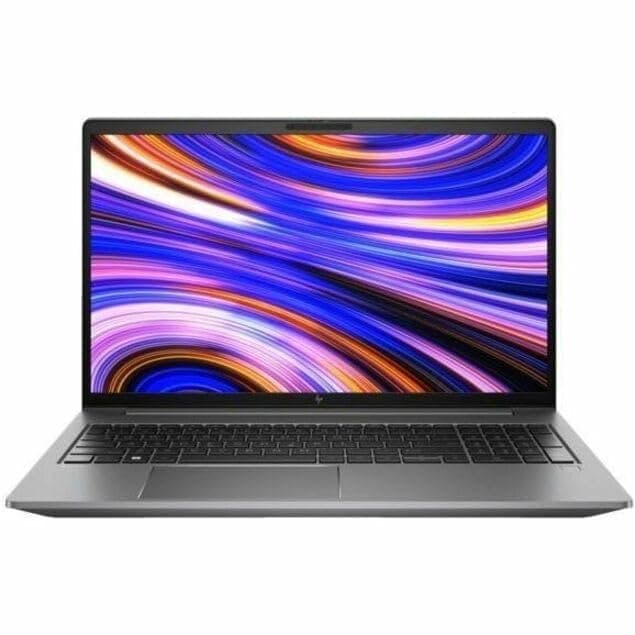
TL;DR The HP ZBook Firefly G10 delivers one of the most balanced professional display and audio experiences available in thin workstation laptops in 2026. Designed primarily for engineers, analysts, consultants, and business professionals rather than gaming audiences, the system focuses on color accuracy, anti-glare usability, and long-duration viewing comfort. Depending on configuration, users receive high-quality IPS or optional DreamColor panels offering strong brightness levels, reliable color reproduction, and enterprise-grade calibration stability. Speaker performance prioritizes voice clarity for meetings instead of entertainment-heavy bass output, making it ideal for hybrid work environments. For Indian professionals purchasing refurbished workstation systems, the Firefly G10 provides a dependable visual workspace suitable for CAD viewing, financial analytics, documentation, media consumption, and extended office usage without visual fatigue.
HP ZBook Firefly G10 Display Overview in 2026
In 2026, display quality has become one of the most important differentiators between consumer ultrabooks and professional workstation laptops. The HP ZBook Firefly G10 Workstation Laptop is engineered around productivity-focused visual performance rather than purely aesthetic specifications. HP equips this generation with 14-inch anti-glare panels designed for consistent brightness distribution, accurate color rendering, and stable viewing angles required in professional workflows.
Typical configurations include WUXGA (1920×1200) IPS displays with 16:10 aspect ratio, providing increased vertical workspace compared to older 16:9 panels. This additional screen height significantly improves usability during spreadsheet work, coding environments, documentation review, and CAD interface navigation. The taller layout reduces scrolling frequency, improving real productivity efficiency during long work sessions. Premium configurations further introduce low-power panels optimized for battery efficiency without sacrificing clarity.
For Indian buyers evaluating refurbished enterprise systems, availability through curated workstation platforms such as Refurbo, ensures access to professionally graded panels that maintain brightness consistency and minimal backlight degradation. Unlike many consumer laptops where display quality varies widely, enterprise ZBook panels are factory-calibrated for predictable output across deployments.
By 2026 standards, the Firefly G10 display remains competitive not because of extreme resolution numbers but due to usability stability, professional calibration support, and reduced long-term eye fatigue during daily productivity workloads.
Panel Technology Explained: IPS, DreamColor, and Standard Displays
The HP ZBook Firefly G10 Review frequently highlights HP’s continued reliance on IPS-based professional panels rather than OLED or high-refresh consumer displays. IPS technology remains preferred in workstation environments because it provides consistent color accuracy and wide viewing angles without brightness or color shifting when viewed from different positions. This becomes especially important during collaborative work sessions where multiple users analyze the same screen simultaneously.
Standard IPS panels available on most Firefly G10 configurations typically deliver brightness levels between 300 and 400 nits along with strong viewing stability. These panels are optimized for office productivity, business analytics, programming environments, and general professional workflows. Anti-glare coatings further enhance usability under office lighting common in Indian workplaces, preventing reflections that often reduce readability on glossy consumer displays.
Higher-end configurations may include HP DreamColor technology, originally developed for professional content creators and visualization specialists. DreamColor panels offer expanded color gamut coverage, factory calibration, and improved tonal consistency across brightness ranges. While not mandatory for finance or corporate workloads, DreamColor becomes valuable for designers, architects reviewing visual assets, or professionals performing color-sensitive media work.
Importantly, HP avoids oversaturated consumer-style tuning. Instead, Firefly G10 panels aim for accurate reproduction aligned with professional standards. This ensures that visuals displayed during CAD review, presentations, or client demonstrations appear consistent across external monitors and collaborative environments, reinforcing the workstation’s enterprise reliability focus.
Resolution Options and Real Workspace Usability (FHD vs UHD vs WUXGA)
The HP ZBook Firefly G10 is designed around productivity efficiency rather than resolution marketing alone. HP primarily offers WUXGA (1920×1200) panels, while select enterprise configurations may include higher-resolution options depending on regional availability. The transition from traditional Full HD 16:9 displays to a 16:10 aspect ratio represents one of the most meaningful usability upgrades in modern workstation design.
WUXGA resolution increases vertical screen space by roughly eleven percent compared to standard FHD panels. In practical workflows, this translates into more visible spreadsheet rows, longer coding windows, expanded timelines in editing tools, and improved CAD interface visibility. Professionals working with documentation-heavy environments immediately benefit from reduced scrolling and better multitasking ergonomics. For finance professionals or analysts handling large datasets, this improvement directly enhances productivity rather than merely improving visual sharpness.
Higher-resolution panels such as UHD theoretically offer sharper imagery but introduce scaling challenges in enterprise applications. Many engineering or legacy business tools used across Indian corporate environments remain optimized for 1080p-class resolutions. As a result, WUXGA often becomes the optimal balance between clarity, compatibility, and battery efficiency. Lower GPU strain also contributes to improved thermal behavior and longer runtime.
Display Resolution Comparison
In real-world usage, the Firefly G10’s WUXGA configuration remains the most practical professional choice in 2026.
Color Accuracy, sRGB Coverage, and Professional Calibration Performance
Professional workstation displays prioritize accuracy over vibrancy, and this philosophy strongly defines the HP ZBook Firefly G10 Specs. Standard IPS configurations typically deliver near full sRGB coverage, ensuring dependable color reproduction across business and technical applications. Unlike consumer laptops that intentionally oversaturate colors for entertainment appeal, Firefly panels maintain neutral tonal balance suitable for professional output consistency.
Accurate color reproduction becomes particularly important in workflows involving presentation design, architectural previews, dashboard visualization, or marketing material review. When professionals collaborate across teams using calibrated external monitors, consistent color output prevents mismatches between devices. HP factory calibration ensures predictable gamma response and white balance, allowing visuals to appear consistent during client demonstrations or collaborative meetings.
DreamColor-equipped variants further extend color precision through improved gamut coverage and tighter calibration tolerances. These panels are capable of handling creative workflows such as photo editing or digital media review while maintaining enterprise reliability standards. Even outside creative industries, improved color stability enhances readability and reduces visual strain caused by inaccurate contrast or excessive saturation.
In 2026 workflows increasingly involving hybrid dashboards, analytics visualization tools, and browser-based enterprise software, accurate display rendering plays a significant operational role. The Firefly G10’s calibration-focused approach ensures professionals see data, charts, and visuals exactly as intended, reinforcing its positioning as a true workstation rather than a multimedia-focused consumer notebook.
Eye Comfort, Anti-Glare Coating, and Long Working Hours Usage
Long-duration usability remains one of the defining strengths of the Firefly workstation series. The HP ZBook Firefly G10 Review consistently emphasizes its anti-glare display treatment, which significantly improves comfort during extended working sessions common in corporate and consulting environments. Unlike glossy panels found in many premium ultrabooks, matte coatings diffuse reflections from overhead lighting and sunlight.
Indian office environments frequently involve mixed lighting conditions, including fluorescent office lights, window glare, and shared workspace illumination. Anti-glare implementation allows text clarity to remain stable even under bright surroundings. This becomes particularly important for professionals spending eight to ten hours daily working with spreadsheets, documentation platforms, or coding environments.
The panel’s brightness range combined with adaptive brightness management helps reduce eye fatigue during prolonged usage. Stable backlight distribution prevents hotspots or uneven luminance that often cause visual strain over time. Additionally, IPS viewing stability allows users to maintain comfortable posture without color distortion when adjusting screen angles.
Modern productivity increasingly involves continuous screen exposure through meetings, analytics dashboards, and remote collaboration tools. The Firefly G10’s display tuning prioritizes readability rather than cinematic contrast, making it better suited for sustained professional usage. Over long working days, reduced reflections, balanced brightness, and consistent color temperature collectively contribute to lower eye fatigue, improving both comfort and long-term usability for workstation users in 2026.
Display and Audio Comparison With Similar Workstations in 2026
In the thin-and-light mobile workstation category, display and audio quality increasingly define usability because professionals now spend extended hours working across meetings, dashboards, CAD previews, and multimedia collaboration environments. The HP ZBook Firefly G10 positions itself competitively against similarly sized enterprise workstations such as the Dell Precision 3480 and Lenovo ThinkPad P14s Gen 4, particularly in balanced visual accuracy rather than peak brightness marketing numbers.
Compared with competing 14-inch workstations, the Firefly G10’s IPS and optional DreamColor panels deliver more consistent factory calibration. Many thin workstation panels prioritize battery efficiency over color stability, but HP continues to tune panels specifically for professional workflows. Reviews consistently note uniform brightness distribution and reduced color shift at viewing angles, which becomes important when presenting designs or reviewing analytics dashboards with clients. While OLED panels available on some competitors offer deeper contrast, they often introduce PWM flicker or higher power consumption, making Firefly G10 more suitable for long enterprise sessions.
Audio performance further differentiates the device. Bang & Olufsen-tuned stereo speakers provide clearer mid-range reproduction than most business laptops in this class, improving speech intelligibility during video calls. Competing workstations often deliver louder output but less clarity, especially in conference environments. For consultants, educators, and hybrid professionals in India relying heavily on Teams or Zoom meetings, clarity matters more than volume peaks.
Display & Audio Comparison Table (2026)
External Monitor Support and Multi-Display Productivity
Modern professional workflows rarely depend on a single display, and the HP ZBook Firefly G10 is engineered with multi-monitor productivity as a primary design consideration. Through Thunderbolt 4 connectivity integrated into Intel platform configurations, the workstation supports dual 4K external displays or a single 8K monitor depending on GPU configuration. This capability transforms the laptop into a desktop-replacement workstation when docked.
Professionals working in CAD review, finance dashboards, coding environments, or research workflows frequently operate across three-screen layouts consisting of spreadsheet models, communication tools, and visualization windows simultaneously. The Firefly G10 handles these scenarios efficiently because display output processing is partially offloaded to the integrated GPU or optional NVIDIA T500 discrete graphics. Unlike consumer ultrabooks, workstation drivers ensure stable external rendering performance without random signal drops or scaling inconsistencies.
Docking compatibility also improves enterprise usability. HP Thunderbolt docks allow power delivery, Ethernet, storage expansion, and multi-display output through a single cable connection. This is especially useful for Indian hybrid professionals transitioning between home offices and corporate environments daily. Even refurbished configurations maintain identical display output capability since this functionality is motherboard-level rather than dependent on cosmetic hardware upgrades.
From a productivity standpoint, connecting dual QHD monitors dramatically expands usable workspace compared to internal 14-inch displays. Analysts, architects, and developers benefit from reduced window switching and improved workflow continuity. As remote collaboration continues expanding in 2026, reliable external display handling has become just as important as CPU performance, and the Firefly G10 performs strongly within this expectation.
Who Should Buy Based on Display and Audio Needs?
The HP ZBook Firefly G10 is particularly suited for professionals whose daily productivity depends on accurate visuals combined with reliable communication quality rather than cinematic entertainment performance. Designers working with presentations, UI layouts, marketing assets, and document visualization benefit significantly from the panel consistency offered by DreamColor or high-quality IPS configurations. Unlike gaming laptops that emphasize saturation, the Firefly G10 prioritizes realistic color reproduction that aligns better with professional output standards.
Corporate consultants, MBA professionals, financial analysts, and remote managers represent another ideal user group. Their workflows revolve around prolonged spreadsheet analysis, presentation preparation, browser dashboards, and frequent virtual meetings. In such scenarios, eye comfort and speaker clarity directly influence work efficiency. Anti-glare coatings reduce fatigue during long sessions, while tuned speakers ensure voice clarity without external audio devices. This becomes especially valuable in Indian work environments where shared spaces or travel conditions may not always allow headphone usage.
Content reviewers, educators, and business trainers also gain advantages from the laptop’s balanced multimedia capabilities. While it is not positioned as a video editing studio machine, it comfortably handles media playback, client demonstrations, and collaborative review sessions. Users requiring HDR mastering or cinema-grade production may prefer higher-tier ZBook Studio or Fury models, but for mobility-focused professionals needing dependable visuals and meeting-ready audio, the Firefly G10 represents one of the most practical workstation choices available in 2026.
Final Recommendation And Decision Framework
The HP ZBook Firefly G10 should be evaluated primarily as a professional visual productivity device rather than a multimedia entertainment laptop. In 2026, workstation buyers increasingly prioritize long working comfort, display accuracy, and reliable communication performance over extreme specifications. The Firefly G10 succeeds because it balances portability with enterprise-grade display engineering. Its WUXGA 16:10 panel improves real workspace efficiency, while optional DreamColor configurations provide color reliability suitable for presentation design, analytics visualization, and client-facing workflows.
For Indian professionals purchasing refurbished systems, display longevity becomes an important decision factor. Enterprise ZBook panels are built for corporate deployment cycles and generally age better than consumer laptop displays. Even refurbished units maintain strong brightness consistency and viewing stability when sourced through verified workstation sellers such as Refurbo.This makes refurbished HP ZBook Firefly G10 configurations a financially practical alternative to new ultrabooks that may offer higher marketing specifications but weaker long-term usability.
The decision framework ultimately depends on workflow priorities. Professionals working extensively with spreadsheets, dashboards, documentation, CAD viewing, consulting presentations, and hybrid meetings will experience tangible benefits from the Firefly G10’s visual clarity and audio tuning. Users whose work depends on color reliability, reduced eye fatigue, and dependable meeting audio should strongly consider this model. Those requiring cinema-grade editing or heavy studio production may instead move toward thicker workstation classes. For most business, engineering, and consulting environments in 2026, however, the Firefly G10 represents one of the safest long-term workstation investments combining professional visuals, mobility, and consistent media performance.
Frequently Asked Questions (FAQs)
Q. Is the HP ZBook Firefly G10 display good for professional work in 2026?
A. Yes, IPS and optional DreamColor panels provide accurate color reproduction, stable brightness, and excellent usability for professional workflows.
Q. Does the HP ZBook Firefly G10 support DreamColor display?
A. Yes, selected configurations include DreamColor panels offering improved color accuracy and professional-grade calibration.
Q. Is WUXGA better than Full HD on HP ZBook Firefly G10?
A. Yes, WUXGA provides more vertical workspace with a 16:10 aspect ratio, improving productivity in spreadsheets, CAD, and documentation tasks.
Q. Is the display comfortable for long office usage?
A. Yes, the anti-glare IPS panel reduces reflections and eye strain, making it suitable for extended productivity sessions.
Q. Are the speakers good for meetings and conferencing?
A. Yes, Bang & Olufsen tuned speakers deliver clear voice output optimized for professional calls and video meetings.
Q. Can HP ZBook Firefly G10 support multiple external monitors?
A. Yes, it supports dual 4K external displays via Thunderbolt 4, enabling full workstation-level productivity setups.
Q. Is HP ZBook Firefly G10 suitable for designers and content creators?
A. Yes, it works well for light design, content review, and creative workflows, especially with DreamColor display configurations.
Q. How does refurbished HP ZBook Firefly G10 compare with new ultrabooks?
A. Refurbished workstation units often provide better display calibration, durability, and professional usability at lower cost.
Q. Is audio output loud enough for presentations and training sessions?
A. Yes, speaker tuning focuses on clarity, making it suitable for meetings, presentations, and professional media playback.
Q. Who benefits most from HP ZBook Firefly G10 display and audio quality?
A. Consultants, analysts, MBA students, engineers, and hybrid professionals benefit most from its productivity-focused visual and audio design.
Ready to upgrade your tech?
Browse our collection of quality refurbished products at unbeatable prices.






