
HP ZBook Firefly 14 Ports In 2026: Thunderbolt, HDMI, USB-A, SD, And Docking
Discover the complete port breakdown of the HP ZBook Firefly 14 in 2026. Learn about Thunderbolt, HDMI, USB-A, SD card support, docking compatibility, and how it fits modern professional workflows.


In 2026, performance alone is not enough. A professional laptop must integrate seamlessly into complex work environments that include multiple displays, external drives, wired networks, input devices, and secure enterprise systems. The HP ZBook Firefly 14 continues to stand out because it delivers serious workstation connectivity in a thin and portable chassis.
Whether you are a designer, analyst, architect, or hybrid worker, understanding its port ecosystem helps you maximise productivity and avoid unnecessary adapters.
Thunderbolt Ports: The Core Of Modern Workstations
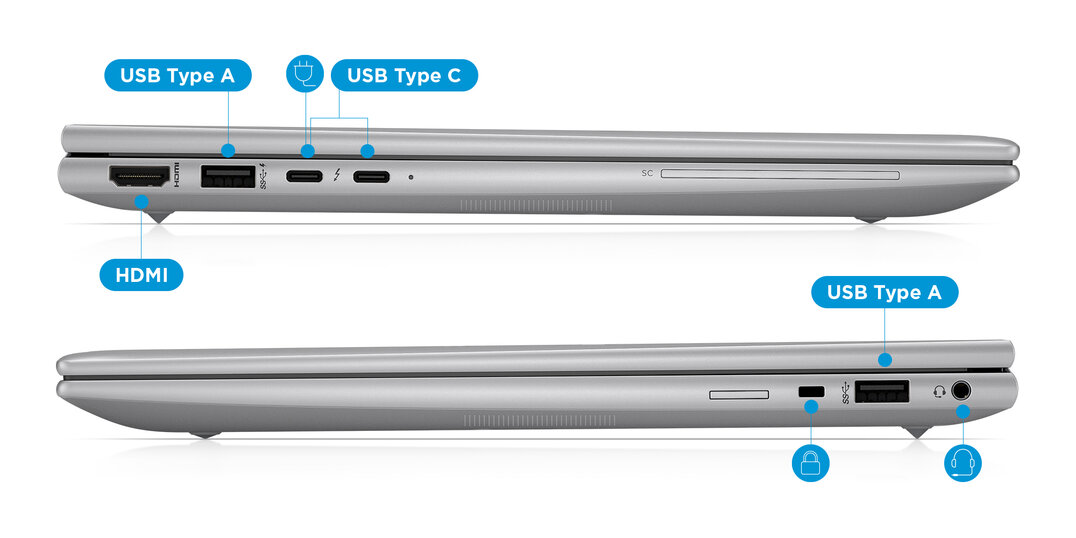
Most Firefly 14 models from G7 onwards include two Thunderbolt-enabled USB-C ports. These ports serve as the backbone of modern professional setups.
Thunderbolt supports:
- Data transfer speeds up to 40Gbps
- Dual 4K monitor output
- External GPU support in compatible environments
- High-speed NVMe SSD enclosures
- Single-cable docking and charging
G7 models typically feature Thunderbolt 3. G8 and G9 models include Thunderbolt 4, which ensures stricter bandwidth requirements and enhanced security features.
For professionals running multi-display desks, Thunderbolt makes cable management simple and efficient.
HDMI Port: Direct And Reliable Display Support
The inclusion of a full-size HDMI port is a major advantage in real-world scenarios.
You can:
- Connect to conference room projectors
- Extend your workspace to large monitors
- Mirror your screen to televisions
- Avoid USB-C adapters during presentations
Most configurations support HDMI 2.0, allowing 4K output at 60Hz. This ensures smooth display performance for design previews, video playback, and client demos.
USB-A Ports: Practical Compatibility
Despite the industry shift toward USB-C, USB-A devices remain common in offices and homes. The Firefly 14 usually includes two USB-A 3.x ports.
These are useful for:
- External storage devices
- Wireless mouse and keyboard receivers
- Printers and scanners
- Security dongles
- Legacy accessories
This backward compatibility makes the Firefly practical for mixed hardware environments.
SD Card Reader: Creator-Friendly Workflow

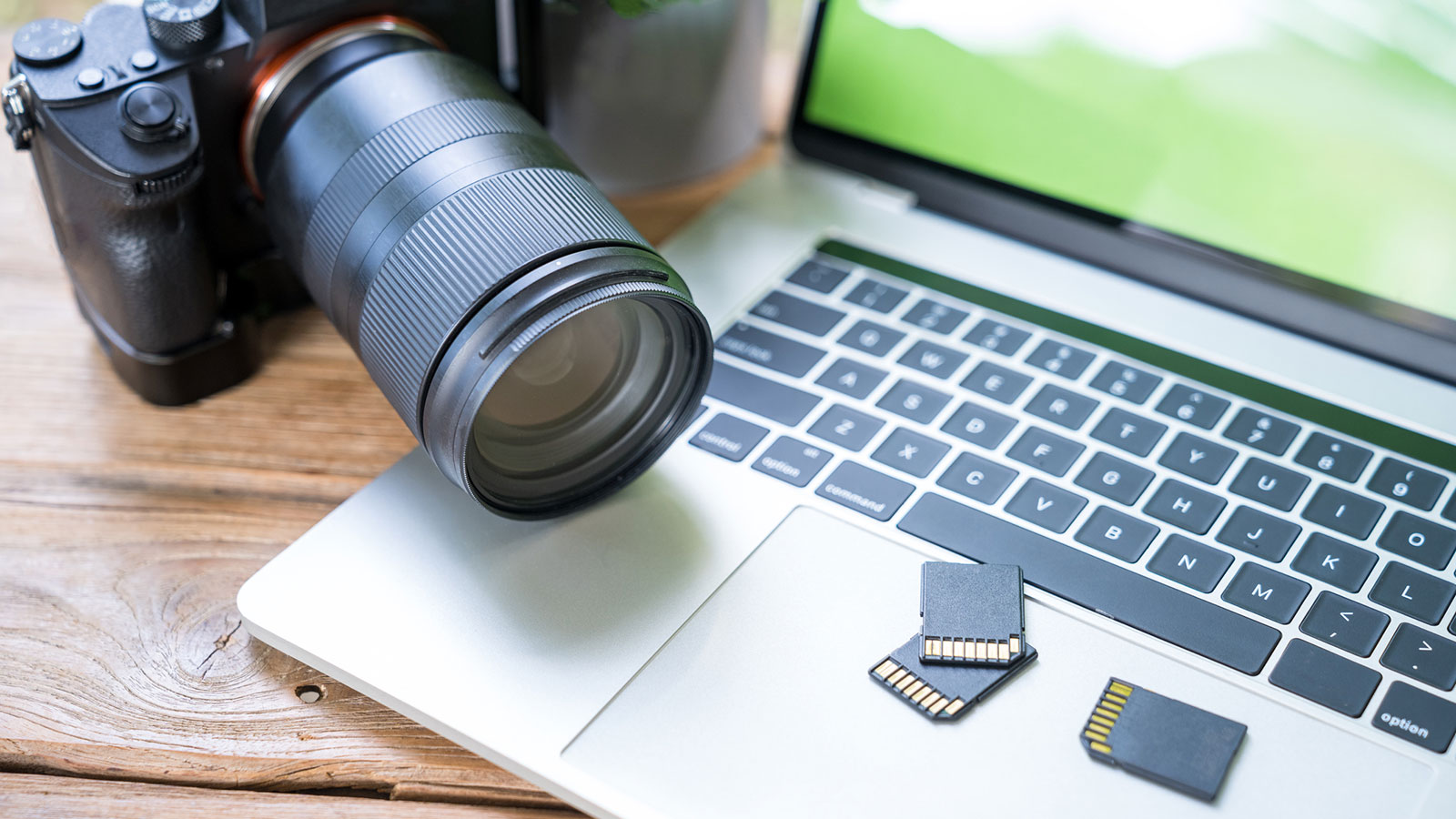
The built-in full-size SD card reader is especially valuable for creative professionals.
It allows:
- Direct image transfer from DSLR cameras
- Faster ingestion of video files
- Reduced dependency on external adapters
- Cleaner desk setup
For photographers, media students, and content creators, this small feature significantly improves workflow efficiency.
Docking And Multi-Monitor Setups
The Firefly 14 is built for docking environments. Through Thunderbolt or USB-C docks, it can transform into a powerful desktop replacement.
With a proper dock, you can connect:
- Two or three external monitors
- Wired Ethernet
- External RAID storage
- Audio interfaces
- Full desktop peripherals
A single cable can power the laptop while connecting all accessories. This makes it ideal for professionals working in hybrid office setups.
External GPU And Expansion Possibilities
Although primarily a thin workstation, certain Firefly configurations can work with external GPU enclosures via Thunderbolt.
This enables:
- Improved graphics performance for rendering
- Extended lifespan of the laptop
- Flexible upgrade path
While not common for every user, it adds versatility for advanced workflows.
Ethernet Connectivity In Modern Workspaces
Due to its slim profile, the Firefly 14 does not always include a built-in RJ45 Ethernet port. Wired connectivity is typically achieved through:
- Thunderbolt docking stations
- USB-C to Ethernet adapters
This approach is now standard in many enterprise environments where docking stations are already integrated into desks.
Audio, Security, And Enterprise Ports
The Firefly 14 includes a 3.5mm headphone and microphone combo jack, which is essential for:
- Video conferencing
- Online meetings
- Studio monitoring
Enterprise variants may also include:
- Kensington lock slot
- Smart card reader
- TPM security integration
These features ensure compliance with corporate IT security policies.
Port Placement And Ergonomics
Port placement affects daily usability. The Firefly 14 distributes ports across both sides of the chassis to reduce cable congestion.
Advantages include:
- Balanced cable management
- Easier docking access
- Reduced strain on connectors
- Cleaner workstation setup
When buying refurbished, inspect ports for looseness or physical damage, as heavy enterprise use can affect connector stability.
Power Delivery And Charging Flexibility
Thunderbolt and USB-C ports support power delivery, allowing:
- Charging through compatible docks
- Charging via USB-C adapters
- Reduced dependency on proprietary chargers
This flexibility is useful for professionals who travel frequently or work across multiple office locations.
Complete Port Summary
Here is a consolidated overview:
- 2x Thunderbolt USB-C ports
- 1x HDMI 2.0 port
- 2x USB-A 3.x ports
- 1x Full-size SD card reader
- 1x 3.5mm audio jack
- Ethernet via dock or adapter
- Optional enterprise security ports
Port configuration may vary slightly between G7, G8, and G9 models, so always verify the exact generation when purchasing.
What To Check When Buying Refurbished
Before finalising a refurbished unit, test:
- Thunderbolt functionality with external devices
- HDMI output at 4K resolution
- USB-A data transfer speeds
- SD card reader detection
- Audio jack clarity
- Dock compatibility
Loose ports, inconsistent detection, or power delivery issues should be considered warning signs.
Why Port Variety Still Matters In 2026
Many ultra-thin consumer laptops now rely heavily on USB-C only designs. While minimalism looks clean, it often increases dependency on adapters.
The Firefly 14 avoids this limitation by offering a balanced mix of modern and legacy ports. This ensures:
- Better adaptability in enterprise environments
- Reduced accessory costs
- Greater workflow flexibility
- Long-term usability
For professionals who depend on reliability rather than trends, this balance makes a significant difference.
Conclusion
In 2026, the HP ZBook Firefly 14 remains one of the most practical thin and light workstations for professionals who value connectivity. Its combination of Thunderbolt performance, HDMI convenience, USB-A compatibility, SD card support, and seamless docking capability makes it adaptable across industries.
Whether you are buying new or refurbished, the Firefly 14 delivers a port selection that supports real-world productivity without forcing you into a dongle-dependent setup. For hybrid professionals and enterprise users alike, that versatility continues to make it a smart and dependable choice.Built For Real Professional Workflows, Not Just Thin Design
The HP ZBook Firefly 14 continues to justify its relevance in 2026 because its connectivity design is built around real workstation workflows rather than consumer minimalism. In practical professional environments, ports are not just convenience features. They directly affect how efficiently you can connect displays, docks, external SSDs, secure office networks, audio devices, and presentation systems throughout the day. The Firefly 14 succeeds because it balances modern Thunderbolt versatility with legacy compatibility, allowing it to slot naturally into both hybrid desks and mobile client-facing workflows.
For designers, architects, analysts, developers, and corporate professionals, this balance reduces friction in ways that directly improve productivity. Dual Thunderbolt support simplifies docking and multi-monitor setups, HDMI avoids adapter dependency during presentations, USB-A keeps older accessories relevant, and the SD card reader continues to serve creator workflows efficiently. Over time, this mixed port ecosystem extends the laptop’s usefulness far beyond trend-driven ultra-thin machines that rely only on USB-C.
The bigger long-term value lies in workflow flexibility and lower accessory dependency. A laptop that already includes the right connectivity reduces the need for hubs, minimises desk clutter, lowers total setup cost, and remains easier to use across offices, studios, campuses, and travel environments. Whether purchased new or refurbished, the HP ZBook Firefly 14 remains one of the smartest thin workstation choices for professionals who need portability without sacrificing practical connectivity.
Frequently Asked Questions
Q. Does the HP ZBook Firefly 14 support dual external monitors?
Yes. Through Thunderbolt and HDMI, most G7, G8, and G9 models can comfortably support dual 4K external monitors, especially when paired with a proper dock.
Q. Is Thunderbolt really useful for professionals?
Absolutely. Thunderbolt enables fast SSD transfers, docking, charging, high-resolution displays, and even external GPU support in compatible workflows.
Q. Does the Firefly 14 still include USB-A ports?
Yes. Most configurations include two USB-A ports, which are extremely useful for legacy storage devices, wireless dongles, printers, and office accessories.
Q. Is the HDMI port important in 2026?
Very much so. It remains one of the easiest ways to connect to meeting room projectors, TVs, monitors, and conference room displays without carrying adapters.
Q. Does every Firefly 14 model include an SD card slot?
Many professional and creator-oriented variants do, but it can vary slightly by generation and region, so always verify the exact model before purchase.
Q. Can I use the Firefly 14 with a docking station?
Yes. It is one of the best use cases for this laptop. A Thunderbolt dock can turn it into a full desktop replacement with monitors, Ethernet, audio, storage, and charging through one cable.
Q. Does it have built-in Ethernet?
Usually no, due to the slim chassis. Ethernet is commonly handled through Thunderbolt docks or USB-C to Ethernet adapters.
Q. Is port quality important when buying refurbished?
Yes. Always test Thunderbolt stability, HDMI output, SD card detection, and USB-A transfer speeds because enterprise-used units may show connector wear.
Q. Why is this better than USB-C only ultrabooks?
Because it reduces adapter dependency and works better in mixed office environments where HDMI, USB-A, SD cards, and secure peripherals are still widely used.
Q. Who benefits the most from this port setup?
Hybrid professionals, architects, analysts, content creators, consultants, and enterprise users benefit the most because their workflows rely on multiple accessories and displays every day.
Ready to upgrade your tech?
Browse our collection of quality refurbished products at unbeatable prices.






