
HP ZBook Firefly 14 G9 Refurbished Buying Guide: Complete Inspection Checklist Before You Buy
Planning to buy a refurbished HP ZBook Firefly 14 G9 in 2026? This detailed checklist explains how to verify GPU performance, battery health, warranty coverage, SSD condition, thermals, and physical integrity before purchase.

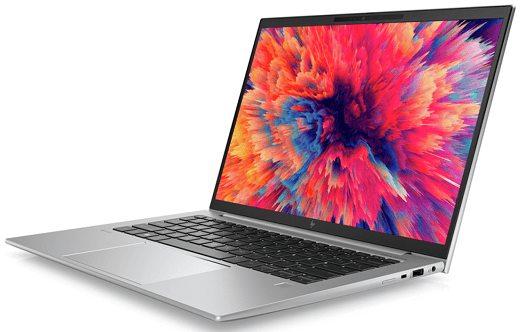
TL;DR The HP ZBook Firefly 14 G9 is one of the most capable thin-and-light mobile workstations available in the refurbished laptop market. With 12th Gen Intel processors, optional NVIDIA T500 professional graphics, enterprise-grade durability, and excellent portability, it offers exceptional value for engineers, architects, designers, programmers, and business professionals. However, the quality of refurbished units can vary significantly between sellers. A proper inspection covering graphics performance, battery health, storage condition, thermal behavior, display quality, firmware integrity, and warranty coverage is essential before making a purchase decision.
Why The HP ZBook Firefly 14 G9 Remains A Strong Refurbished Workstation
The HP ZBook Firefly 14 G9 occupies a unique position in the professional laptop market because it successfully combines workstation capabilities with ultrabook portability. Unlike traditional mobile workstations that prioritize raw performance at the expense of mobility, the Firefly series focuses on delivering professional-grade computing power in a lightweight and travel-friendly form factor.
For professionals who frequently move between offices, client sites, classrooms, and remote work environments, portability becomes just as important as performance. The Firefly 14 G9 addresses this challenge by offering modern Intel hybrid-core processors, enterprise security features, and optional professional graphics without the bulk typically associated with workstation-class laptops.
The refurbished market makes the Firefly 14 G9 particularly attractive because buyers can access enterprise-grade hardware at a significantly lower cost than purchasing a new workstation. However, since many refurbished units originate from corporate fleets, understanding how to properly evaluate condition and reliability becomes critical before completing a purchase.
GPU And Graphics Verification Should Be Your First Priority
Graphics hardware plays a major role in determining the long-term value of a refurbished Firefly 14 G9. Depending on the configuration, the laptop may include Intel Iris Xe integrated graphics or the dedicated NVIDIA T500 professional GPU. While both options are suitable for everyday productivity, the NVIDIA configuration provides a substantial advantage for CAD applications, engineering software, architecture workflows, and creative workloads.
Before purchasing, buyers should verify the exact GPU configuration rather than relying solely on product titles. Sellers occasionally use generic descriptions that fail to specify whether a dedicated graphics card is included. Requesting screenshots of Device Manager, system specifications, or BIOS hardware information can help confirm the actual graphics configuration before purchase.
After receiving the laptop, running a GPU stress test is strongly recommended. Benchmarking utilities can help identify thermal issues, driver instability, visual artifacts, or hardware failures that may not be immediately obvious during normal usage. A healthy Firefly G9 should maintain stable performance under sustained graphical workloads without unexpected crashes, display corruption, or excessive throttling.
Professional Software Validation
If the laptop will be used for engineering, architecture, or design work, testing software such as AutoCAD, Revit, SketchUp, or SolidWorks is highly recommended. Smooth viewport performance and stable rendering behavior provide a much more accurate indication of real-world reliability than synthetic benchmarks alone.
Battery Health Is One Of The Most Important Refurbishment Indicators
Battery condition often reveals how heavily a refurbished laptop was used during its previous lifecycle. Corporate laptops can spend years connected to chargers, which may affect long-term battery health even when overall system performance remains excellent.
Generating a battery health report should be one of the first diagnostic procedures performed after receiving the device. Reviewing design capacity, current full-charge capacity, cycle count, and overall battery health percentage provides valuable insight into expected battery longevity. Ideally, a refurbished Firefly G9 should retain at least 80 percent of its original battery capacity.
Real-world testing is equally important because battery reports do not always tell the entire story. Running productivity workloads such as browser usage, Microsoft Office applications, video conferencing, and document editing can help verify whether battery performance aligns with the reported health metrics. Significant battery drain during light workloads may indicate deeper battery degradation than diagnostic tools suggest.
Charging System Verification
Charging performance should also be tested thoroughly. The system should charge consistently to full capacity without interruptions, excessive heat, or power delivery fluctuations. If Thunderbolt charging is supported by the configuration, those ports should be validated as well.
Physical Inspection Reveals How Well The Laptop Was Maintained
A thorough physical inspection often provides valuable information about the laptop's history. The HP ZBook Firefly 14 G9 uses a premium magnesium and aluminum chassis that is designed to withstand professional environments, but even durable business laptops can accumulate damage over years of usage.
Inspecting the chassis for dents, cracks, bent corners, or structural damage should be one of the first steps during evaluation. Minor cosmetic wear is generally expected in refurbished devices, but significant structural damage may indicate previous drops or improper handling that could affect long-term reliability.
Special attention should be given to hinge quality and lid stability. Opening and closing the display multiple times helps identify hinge wear, unusual resistance, or creaking noises. Enterprise laptops are designed for thousands of hinge cycles, so excessive looseness or instability may suggest abnormal wear.
Port And Connector Testing
Every port should be tested individually, including USB-A, Thunderbolt, HDMI, audio, and SD card slots. Faulty ports are among the most common issues found in heavily used enterprise laptops and can be expensive to repair after purchase.
Display Quality Directly Impacts Daily Productivity
The display is one of the most expensive components to replace in a professional laptop. Even if the system performs perfectly, display defects can significantly affect usability, especially for professionals who spend long hours working on visual tasks.
Dead pixels, stuck pixels, uneven brightness, color inconsistencies, and backlight bleed should all be checked carefully. Running solid color backgrounds across the entire display helps reveal issues that may not be visible during everyday usage.
For architects, designers, photographers, and engineers, display quality becomes even more important. Verifying panel resolution, color reproduction, and viewing angles ensures the laptop can support professional workflows without introducing visual inaccuracies.
The Firefly lineup often includes high-quality display options, making panel verification especially important because display specifications can vary significantly between configurations.
Storage Health And Memory Configuration Should Never Be Ignored
Storage devices are among the few laptop components that experience constant wear throughout their lifespan. Even if a refurbished SSD appears functional, reviewing its health metrics can help identify potential reliability concerns before they become major problems.
Checking SMART data provides visibility into drive health, total bytes written, and potential warning indicators. A healthy SSD should report no critical warnings and maintain strong overall health percentages. Any signs of degradation should be factored into the purchase decision.
Memory configuration is equally important because certain Firefly G9 models use soldered LPDDR5 memory. Since soldered memory cannot be upgraded later, buyers should verify RAM capacity before purchasing and ensure it aligns with both current and future workload requirements.
For professionals working with virtual machines, engineering software, large spreadsheets, or creative applications, insufficient memory can become a long-term limitation that cannot be resolved through future upgrades.
Thermal Performance Determines Long-Term Reliability
Modern 12th Gen Intel processors deliver excellent performance, but they also generate significant heat under sustained workloads. Evaluating thermal behavior is therefore essential when purchasing a refurbished workstation.
Running CPU stress tests for extended periods helps identify thermal throttling, cooling deficiencies, or degraded thermal paste. Temperatures should remain within expected operating ranges while maintaining stable performance throughout the test period.
Fan behavior provides additional insight into overall system condition. Healthy cooling systems should ramp up smoothly under load and remain free from grinding noises, rattling sounds, or abnormal vibration. Unusual fan behavior often indicates wear, dust accumulation, or pending hardware issues.
Strong thermal performance not only improves immediate usability but also contributes significantly to long-term reliability by reducing component stress during heavy workloads.
Firmware, Security, And Enterprise Feature Validation
Enterprise laptops frequently include additional firmware features that consumer laptops do not. While these capabilities improve security and manageability, they can occasionally introduce complications when purchasing refurbished devices.
The BIOS should be updated, free from administrative locks, and fully accessible to the new owner. A locked BIOS can significantly restrict future configuration changes and reduce overall ownership flexibility.
Security components such as TPM functionality should also be verified because many modern operating systems and enterprise applications depend on them. Confirming a clean operating system installation and the removal of any previous corporate accounts helps ensure a smooth setup process after purchase.
A complete factory reset before acceptance is strongly recommended to eliminate potential software-related complications.
Warranty Coverage Can Be More Important Than Specifications
Even the most thorough inspection cannot eliminate every potential risk associated with refurbished hardware. This is why warranty coverage remains one of the most important factors when evaluating a refurbished Firefly G9.
Reputable refurbishers typically provide transparent warranty terms, detailed grading information, and clearly defined return policies. Buyers should fully understand which components are covered, whether labor costs are included, and how warranty claims are processed.
A minimum warranty period of three months should generally be considered acceptable, while six- to twelve-month coverage offers significantly stronger protection. Sellers unwilling to provide diagnostic evidence, warranty details, or return policies should be approached cautiously.
In many cases, strong warranty support can be more valuable than slightly better specifications because it provides protection against unexpected hardware failures after purchase.
Final Verdict
The HP ZBook Firefly 14 G9 remains one of the strongest refurbished workstation options for professionals who need portability without sacrificing performance. Its combination of modern Intel processors, enterprise-grade durability, professional graphics options, strong connectivity, and premium construction allows it to remain highly relevant for engineering, architecture, programming, business, and creative workloads.
However, the quality of refurbished units varies significantly depending on the seller, refurbishment process, and previous usage history. Buyers who carefully evaluate graphics performance, battery condition, thermal behavior, storage health, display quality, firmware status, and warranty coverage are far more likely to receive a reliable machine that delivers years of dependable service.
A properly refurbished Firefly 14 G9 can offer workstation-class productivity at a fraction of the cost of a new professional laptop, making it one of the most compelling value propositions in the enterprise refurbished laptop market.
Frequently Asked Questions
Is the HP ZBook Firefly 14 G9 suitable for professional workloads?
Yes. Configurations equipped with 12th Gen Intel processors and NVIDIA T500 graphics are capable of handling CAD software, design applications, programming environments, data analysis, and other professional workloads effectively.
How can I verify that the GPU is functioning properly in a refurbished unit?
Running GPU stress tests, monitoring temperatures, checking for visual artifacts, and testing professional applications such as AutoCAD or SolidWorks can help confirm graphics stability and reliability.
What battery health percentage is acceptable in a refurbished Firefly G9?
A battery retaining at least 80 percent of its original design capacity is generally considered healthy. Batteries below 70 percent may require replacement sooner and should affect pricing decisions.
Is RAM upgradeable in all HP ZBook Firefly 14 G9 configurations?
No. Some models use soldered LPDDR5 memory, making upgrades impossible after purchase. Buyers should confirm RAM specifications before completing a purchase.
What warranty period should I expect from a refurbished Firefly G9?
A minimum three-month warranty is recommended. Certified refurbishers often provide six to twelve months of coverage, offering stronger protection and greater peace of mind.
Ready to upgrade your tech?
Browse our collection of quality refurbished products at unbeatable prices.






