
HP ZBook Firefly 14 Battery Life In 2026: Health, Backup, And Charging Real Life Usage
HP ZBook Firefly 14 delivers reliable 6 to 8 hours battery life for productivity, remote work, and professional mobility in 2026.

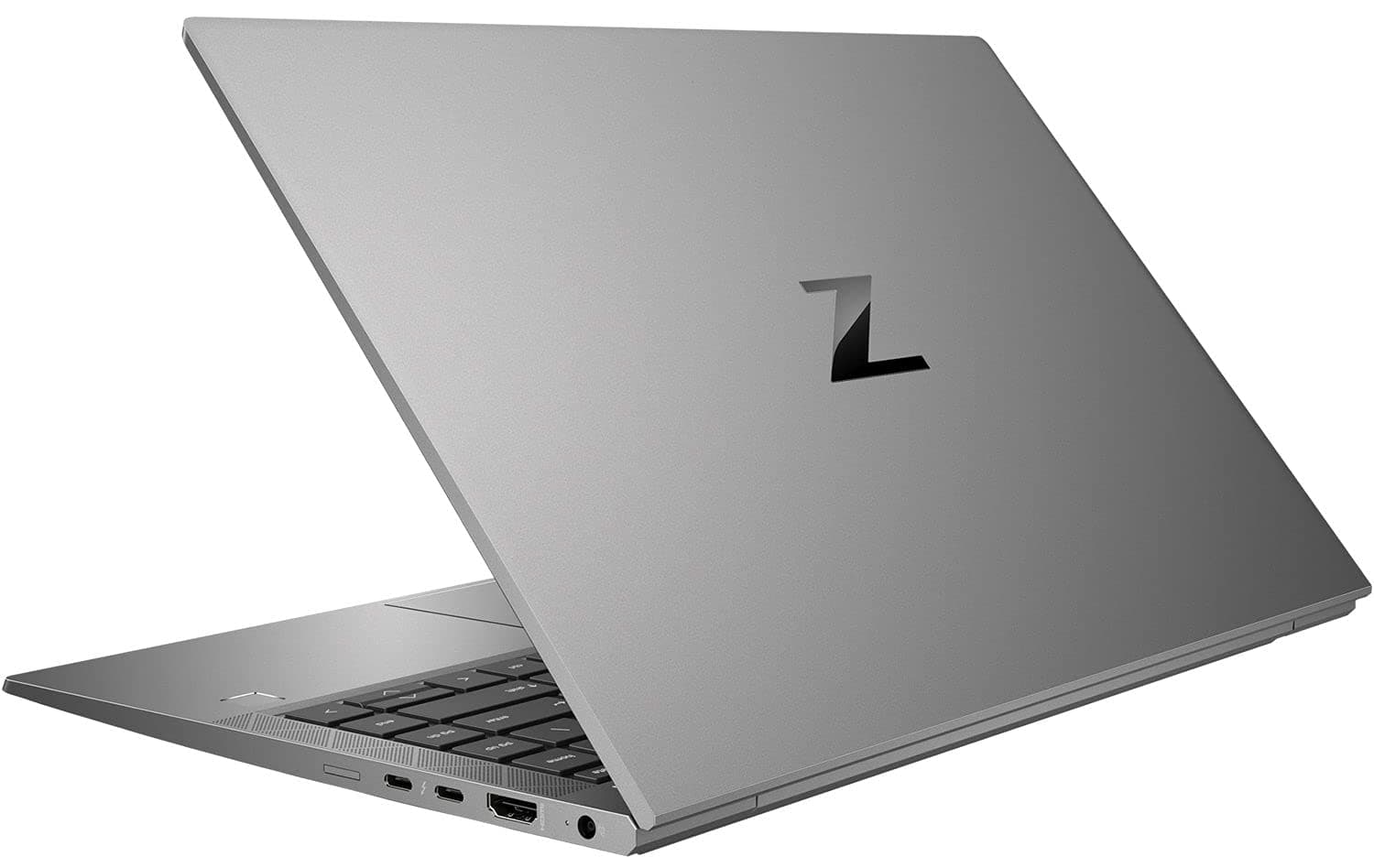
TL;DR In 2026, the HP ZBook Firefly 14 continues to offer strong battery efficiency compared to traditional mobile workstations. Whether you choose Intel or HP ZBook Firefly 14 AMD Ryzen configurations, the system is engineered for professional mobility rather than gaming-level power draw. With battery capacities ranging from approximately 51Wh to 76Wh depending on configuration and generation, real-world backup typically ranges between 5 to 9 hours under productivity workloads. Charging through USB-C Power Delivery remains a major advantage, especially in Indian work environments where portability matters. For buyers considering Refurbished HP ZBook Firefly 14 units, battery health becomes a key evaluation factor, but overall, the Firefly 14 remains one of the most balanced thin-and-light workstation options in terms of efficiency versus performance.
HP ZBook Firefly 14 Battery Life Overview in 2026
In 2026, the HP ZBook Firefly 14 sits in the thin workstation category rather than full-scale performance workstations like the ZBook Fury series. The Firefly line was designed specifically for professionals who require certified GPU acceleration and ISV support but still need strong portability and battery efficiency. Compared to heavier workstation models, the Firefly 14 prioritizes power-efficient CPUs such as Intel U-series, P-series, or HP ZBook Firefly 14 AMD Ryzen Pro processors, depending on generation.
Most configurations of the HP ZBook Firefly 14 offer balanced real-world battery backup under moderate loads such as Excel modeling, browser-based ERP tools, documentation, and remote meetings. Under normal office usage, users can expect between 6–8 hours of backup on well-maintained units. On older or Refurbished HP ZBook Firefly 14 systems, this depends heavily on battery cycle count and health percentage. Buyers in India often compare newer ultrabooks against workstation-grade machines, and the Firefly remains competitive due to its efficiency-focused architecture.
For buyers exploring options, especially refurbished models, platforms such as Refurbo allow access to professionally tested ZBook systems. Evaluating battery health reports before purchase is critical in 2026, particularly because many Firefly 14 units in the Indian market are now 2 to 4 years old.
HP ZBook Firefly 14 Battery Specifications and Capacity Breakdown
The HP ZBook Firefly 14 Specs vary depending on generation (G7, G8, G9, G10) and processor family. Most units feature a 3-cell lithium-ion polymer battery, typically rated around 51Wh or 53Wh in Intel U-series configurations. Some higher-end variants, especially those with discrete NVIDIA T500 graphics, may include larger battery options closer to 76Wh in specific configurations.
The HP ZBook Firefly 14 AMD Ryzen models typically use similar battery capacities but may show slightly different power efficiency depending on workload type. Ryzen Pro processors have historically demonstrated competitive idle efficiency, while Intel variants may show better optimization in certain enterprise environments depending on firmware tuning.
Charging is handled via USB-C with Power Delivery support, usually through a 65W or 90W adapter. This is a major advantage because it allows charging through compatible USB-C chargers and even power banks (if rated sufficiently). From 0 to 50 percent, charging generally takes approximately 30–40 minutes under standard conditions. Full charge typically completes within 90–120 minutes.
When evaluating HP ZBook Firefly 14 Review data across generations, battery performance consistency is one of its strengths. Unlike heavier workstation models with high-wattage GPUs, the Firefly line maintains moderate discharge rates. However, battery health degradation over time depends on usage cycles, storage conditions, and thermal exposure. This is especially important when considering HP ZBook Firefly 14 Price in India for refurbished units, where a healthy battery can significantly influence long-term usability.
Standby Time, Idle Drain, and Background Power Consumption
One of the most important but overlooked aspects of workstation mobility is idle efficiency. The HP ZBook Firefly 14, especially Intel 11th–13th Gen and HP ZBook Firefly 14 AMD Ryzen Pro variants, is engineered for business-class power management rather than constant peak performance draw. In 2026, when most units in circulation are between 2–4 years old, standby drain will become a critical factor for professionals who frequently move between meetings or travel.
In practical terms, a healthy HP ZBook Firefly 14 with 85–95% battery health typically loses only 2–4% charge over 8 hours of modern standby if Wi-Fi remains connected. However, older BIOS versions or background-heavy corporate software stacks (VPN clients, endpoint security tools, auto-sync cloud drives) can increase idle drain to 6–8% overnight. Compared to thicker workstations with H-series CPUs and higher TDP GPUs, the Firefly’s lower base wattage architecture helps maintain better standby endurance.
Idle power draw usually sits between 3W–6W during light desktop activity (browser tabs + Office apps open). Once discrete NVIDIA T500 graphics activate, consumption rises significantly, which affects runtime. For business users evaluating Refurbished HP ZBook Firefly 14 units, checking sleep behavior and BIOS updates is essential, as firmware optimization directly impacts idle efficiency.
Estimated Idle & Standby Power Behavior (Healthy Battery Unit)
For Indian professionals using the HP ZBook Firefly 14 Specs in office conditions, efficient idle behavior remains one of its strongest advantages over performance-heavy mobile workstations.
Real Backup During Heavy Excel, Tally, GST, and Business Workloads
In India, battery performance is rarely judged through synthetic benchmarks. Instead, it is evaluated through Excel financial modeling, Tally ERP usage, GST portal filing, browser-based CRM dashboards, Power BI viewing, and continuous PDF documentation work. The HP ZBook Firefly 14 performs efficiently in these scenarios because these tasks primarily rely on CPU bursts rather than sustained GPU draw.
Under heavy Excel usage involving pivot tables, macros, and large datasets (50,000+ rows), power consumption typically averages 8W–12W depending on processor variant. This translates into approximately 5–7 hours of consistent real-world usage on a healthy 51Wh–53Wh battery unit. HP ZBook Firefly 14 AMD Ryzen variants may show slightly smoother power scaling under multi-threaded spreadsheet tasks due to Ryzen Pro efficiency tuning.
When paired with external Wi-Fi, Bluetooth mouse, and moderate screen brightness (60–70%), battery drain increases by approximately 10–15%. However, compared to larger workstation-class machines with 45W CPUs, the Firefly 14 remains noticeably more portable for accounting professionals, consultants, and business analysts.
For those evaluating HP ZBook Firefly 14 Review insights in 2026, the key takeaway is that this model was never intended for all-day rendering but excels in sustained office productivity. Buyers considering HP ZBook Firefly 14 Price in India should evaluate whether their daily workload is productivity-heavy rather than graphics-heavy because that is where this system delivers the best battery balance.
Suitability for Remote Work in Areas with Unstable Wi-Fi and Electricity
Remote work conditions across India differ sharply between metro cities like Mumbai, Bengaluru, and Delhi and tier-two or tier-three regions where voltage fluctuation, short power cuts, or unstable broadband connectivity are more common. In such environments, battery behavior is not merely about how many hours a laptop can run; it directly affects workflow continuity. The HP ZBook Firefly 14, built as an enterprise mobility workstation, is designed to deliver consistent performance transitions between AC power and battery without sudden drops in responsiveness. Unlike many consumer or gaming laptops that sharply reduce CPU clock speeds once unplugged to conserve power, the Firefly 14 maintains relatively stable processor behavior under balanced power profiles. This ensures that spreadsheets, accounting software, design previews, and browser-based ERP systems continue running smoothly even when electricity supply is interrupted unexpectedly.
For professionals attending live meetings over platforms such as Zoom or Google Meet, seamless power transition is critical. In real remote work scenarios involving two hours of video conferencing combined with browser research, email handling, and document editing, a healthy HP ZBook Firefly 14 typically sustains between four to six hours of total runtime depending on brightness level and network strength. Wi-Fi instability itself does not drastically increase battery drain, but weak signals can slightly elevate power consumption due to higher wireless adapter activity. Even so, the system’s overall efficiency profile remains stable under mixed usage conditions.
Enabling Windows battery saver mode extends runtime by approximately forty-five minutes to an hour by limiting background synchronization, reducing display brightness, and optimizing CPU behavior. Many configurations listed under HP ZBook Firefly 14 Specs also support BIOS-level battery health management features that allow users to cap maximum charge levels. This function is particularly beneficial for remote professionals who keep their systems plugged in for extended periods but rely on battery backup during unpredictable outages. By combining steady performance scaling, moderate power draw, and enterprise-grade firmware management, the Firefly 14 proves suitable for remote work conditions where both electricity and connectivity can be inconsistent.
For buyers exploring Refurbished HP ZBook Firefly 14 units in 2026, remote-work readiness should include:
Battery health percentage above 80%
Original 65W/90W charger availability
Updated BIOS and firmware
Overall, among thin professional workstations, the Firefly 14 remains one of the more practical models for hybrid Indian work environments.
Battery Life Comparison With Similar Workstations in 2026
In 2026, the HP ZBook Firefly 14 competes in the thin-and-light workstation category rather than full-performance mobile workstation territory. Its closest comparisons include models like the Dell Precision 5470, Lenovo ThinkPad P14s, and HP ZBook Power G9. While these systems vary in GPU configuration and processor wattage, battery efficiency remains a key differentiator.
The HP ZBook Firefly 14 typically uses 51Wh–53Wh batteries (some configurations higher), while competitors like the Precision 5470 use larger battery options around 72Wh. However, larger batteries are often paired with higher-wattage CPUs and GPUs, which reduce real-world differences. In balanced productivity workloads, the Firefly 14 remains competitive due to its lower baseline power draw.
For Indian professionals comparing HP ZBook Firefly 14 Review data before purchase, the advantage lies in efficiency-per-weight ratio. Heavier workstations may offer stronger GPU performance, but they also consume more power under light loads, reducing practical unplugged time.
2026 Workstation Battery Comparison
Cost and Availability of Genuine HP Battery Replacements in India
Battery replacement becomes a major concern in 2026 because most HP ZBook Firefly 14 units in circulation are 3 to 5 years old. Lithium-ion batteries typically retain 70–85% health after 500+ charge cycles, depending on usage patterns. Therefore, buyers researching HP ZBook Firefly 14 Price in India must factor in potential battery replacement costs.
In India, genuine HP replacement batteries for Firefly models typically range between ₹6,000–₹12,000 depending on generation and supplier. Pricing varies based on whether the battery is sourced directly through HP-authorized service centers or third-party enterprise parts vendors. Availability is generally stable in metro cities but may require ordering in tier-2 or tier-3 locations.
Refurbished sellers sometimes provide units with 80%+ battery health rather than replacing them with new cells. For buyers considering Refurbished HP ZBook Firefly 14 systems, requesting a battery health report (via HP diagnostics or Windows battery report) is essential.
Estimated Battery Replacement Cost in India (2026)
While third-party batteries may reduce cost, genuine replacements ensure better longevity and firmware compatibility.
Who Should Buy Based on Battery Needs?
The HP ZBook Firefly 14 is best suited for professionals who need a genuine workstation-class machine but cannot compromise on portability and consistent battery behaviour. In the Indian context, this includes chartered accountants handling long Excel sheets during audit season, GST practitioners working across client offices, financial analysts running moderately heavy spreadsheets, MBA students attending back-to-back lectures, and corporate professionals who split time between home, office, and travel. For these users, battery life is not about achieving unrealistic 12-hour marketing numbers; it is about stable, predictable 6–8 hours of real productivity usage without aggressive throttling. When workloads revolve around Excel modeling, browser-based ERP platforms, Tally, documentation, PowerPoint preparation, PDF review, and video conferencing, the Firefly 14 delivers dependable unplugged performance without sudden battery drops or overheating spikes.
It is particularly well-suited for consultants and business owners who frequently travel within cities or between tier-one and tier-two locations. In India, mobility often means working from client offices, co-working spaces, trains, or areas with inconsistent power supply. A healthy battery in the Firefly 14 comfortably supports half-day working sessions, making it practical for meetings, presentations, and field coordination without constantly searching for charging ports. The added advantage of USB-C charging support improves flexibility, as compatible power adapters and docking setups are widely available. This reduces dependency on proprietary chargers and makes travel logistics simpler.
However, professionals whose daily workflow includes sustained rendering, architectural 3D visualization, complex CAD simulations, or continuous GPU-heavy processing should not expect long unplugged endurance. Under such high-load scenarios, battery drain accelerates significantly, as with most thin workstations. In those cases, larger performance-focused workstation models with higher-capacity batteries are more appropriate. For most business-centric Indian buyers comparing Intel and HP ZBook Firefly 14 AMD Ryzen configurations, the battery profile aligns strongly with productivity-driven use cases rather than prolonged high-performance computing on battery power.
Why the HP ZBook Firefly 14 Still Remains One of the Most Dependable Thin Workstations for Battery Life in 2026 India
The strongest closing takeaway is simple: the HP ZBook Firefly 14 continues to justify its position in 2026 because it solves one of the biggest compromises in professional laptops, workstation reliability without workstation-level battery anxiety. For chartered accountants, consultants, MBA students, analysts, remote professionals, and business users working across client offices, airports, coworking spaces, and hybrid setups, the Firefly 14 delivers the kind of predictable 6 to 8 hour unplugged productivity that matters far more than unrealistic marketing claims. This balance between ISV-grade reliability and real mobility is exactly why it still remains one of the safest thin-workstation choices in India.
What makes it especially relevant in the 2026 market is workload realism. Most buyers in this category are not pushing sustained CAD renders or GPU-heavy simulations on battery. Their daily usage revolves around Excel financial models, browser-based ERP dashboards, Tally, GST portals, Power BI review, documentation, PowerPoint decks, and back-to-back video calls. In these scenarios, the Firefly 14’s lower baseline power draw, enterprise firmware tuning, and USB-C charging flexibility create a far more dependable ownership experience than larger workstation-class machines that sacrifice portability for brute-force performance.
The smartest buying framework is to align the Firefly 14 with productivity-heavy mobility rather than graphics-heavy expectations. If your workflow depends on stable office performance, predictable battery behavior, quick USB-C top-ups, and smooth transitions between AC and battery in Indian hybrid work environments, it remains one of the most rational workstation investments heading into 2027. For professionals who value mobility-first reliability, this machine still remains one of the safest long-term buys in the refurbished and thin-workstation segment.
Frequently Asked Questions
Q. What battery backup should I realistically expect from the HP ZBook Firefly 14 in 2026?
For real-world office workloads such as Excel, browser tabs, Tally, GST filing, Power BI viewing, PDF review, and video meetings, a healthy battery unit typically delivers around 6 to 8 hours. Refurbished units with lower battery health may trend closer to 5 to 6 hours.
Q. Does the AMD Ryzen Firefly 14 offer better battery life than Intel?
The difference is usually workload-dependent rather than dramatic. Ryzen Pro variants can feel slightly more efficient under multi-threaded spreadsheet and office workflows, while Intel variants may benefit from stronger enterprise firmware optimisation. In practice, battery health and background software stack matter more than processor brand.
Q. Is USB-C charging actually useful for Indian professionals?
Yes, this is one of the Firefly 14’s biggest ownership advantages. USB-C Power Delivery allows charging through compatible 65W or 90W chargers, docking stations, and even high-output power banks, which is extremely useful during travel, client meetings, and areas with unstable electricity.
Q. How much should I budget for battery replacement in India?
A genuine replacement usually falls between ₹6,000 and ₹12,000 depending on generation and whether you choose an HP authorised service centre or enterprise parts distributor. For refurbished buyers, this cost should always be factored into the long-term ownership decision.
Q. Who should buy the HP ZBook Firefly 14 primarily for battery life?
It is ideal for chartered accountants, consultants, business analysts, MBA students, GST practitioners, and hybrid professionals whose daily workflow revolves around spreadsheets, browser dashboards, documents, and meetings rather than sustained GPU-heavy work.
Ready to upgrade your tech?
Browse our collection of quality refurbished products at unbeatable prices.






