HP ProBook 450 vs EliteBook 840: What Do You Get for the Extra Money?
The HP ProBook 450 offers strong value and a larger screen, while the EliteBook 840 adds premium design, displays, security, and enterprise features. Here is what the extra money really gets you.

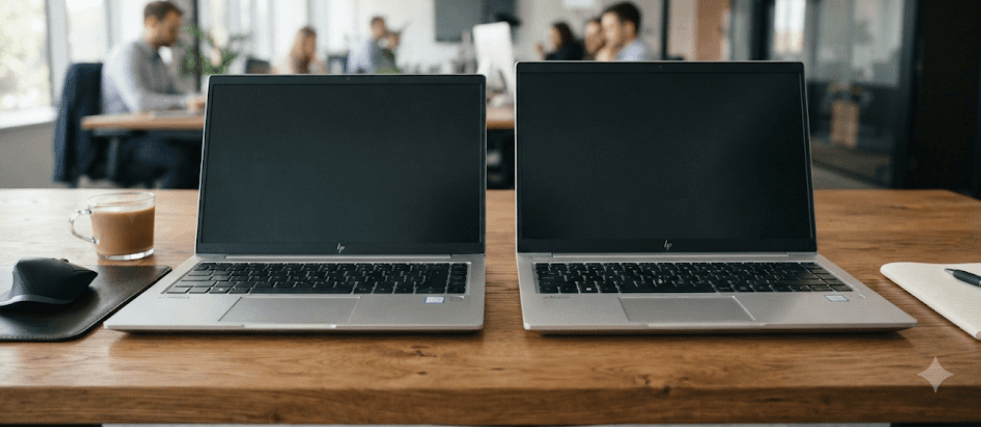
TL;DR: The HP ProBook 450 and HP EliteBook 840 are both business laptops, but they target slightly different buyers. The ProBook 450 G10 gives you a larger 15.6-inch screen, a more spacious chassis, upgradeable memory and storage, and strong everyday performance at a generally lower price. The EliteBook 840 G10 costs more, but the extra money goes toward a more premium and portable design, better display options, stronger conferencing hardware, additional enterprise security and manageability features, and a more refined business experience. For students, professionals, and small businesses focused on value, the ProBook 450 is often the smarter buy. For frequent travelers, executives, and organizations that need stronger enterprise features, the EliteBook 840 can justify its premium.
ProBook 450 Vs EliteBook 840: At A Glance
The easiest way to understand these two laptops is to look beyond their names. Both belong to HP's business-focused portfolio, but the EliteBook 840 sits higher in HP's lineup. That does not mean the ProBook 450 is a weak or basic laptop. In fact, the ProBook 450 G10 offers commercial-grade features, upgradeable memory and storage, optional discrete graphics, and durability testing aimed at business users.
The biggest immediate difference is size. The ProBook 450 G10 has a 15.6-inch display, while the EliteBook 840 G10 uses a more compact 14-inch design. The ProBook starts at around 1.74 kg with its smaller battery configuration and 1.79 kg with the larger battery, while the EliteBook is designed as the more portable option.
That difference changes who each laptop makes sense for. The ProBook is easier to recommend if you spend most of your time at a desk and want more screen space for spreadsheets, documents, and multitasking. The EliteBook becomes more attractive when portability, premium construction, conferencing, security, and enterprise management matter more than getting the biggest screen for your money.
| Feature | HP ProBook 450 G10 | HP EliteBook 840 G10 |
|---|---|---|
| Display size | 15.6 inches | 14 inches |
| Typical display resolution | FHD, with higher-end options available | WUXGA or higher-end WQXGA options |
| Processor options | 13th Gen Intel Core options | 13th Gen Intel Core options |
| RAM | Up to 32 GB DDR4 in supported configurations | Up to 64 GB DDR5 |
| Storage | Up to 1 TB SSD in listed configurations | Up to 2 TB SSD |
| Graphics | Integrated options; RTX 2050 available on select configurations | Integrated Intel graphics |
| Camera | HD camera options; higher-end configurations vary | 5 MP camera, IR available on select models |
| Ports | USB-C, USB-A, HDMI, RJ-45 | Thunderbolt 4, USB-A, HDMI |
| Best suited for | Value-focused business users | Premium business and enterprise users |
Design And Portability
The ProBook 450 takes a practical approach to design. Its 15.6-inch chassis gives you more physical room for the keyboard, display, and ports, and HP designed the model to remain serviceable and upgradeable. That makes it a sensible choice for an office worker who values practicality over having the thinnest possible laptop.
The EliteBook 840 is more focused on mobility. Its 14-inch footprint is easier to carry between meetings, classrooms, offices, and home. HP also positions the EliteBook range as a premium business family, with features such as a spill-resistant premium keyboard, optional backlighting, and a more extensive set of enterprise-oriented technologies.
This is where the extra money can become noticeable in everyday use. If your laptop spends most of its life on a desk, the ProBook's larger body is not necessarily a disadvantage. But if you regularly put your laptop into a backpack, travel for work, or move between meeting rooms, the smaller EliteBook format makes more sense.
Which One Feels More Practical?
Choose the ProBook 450 if you prefer a larger working area and do not mind carrying a slightly bigger machine. Its 15.6-inch display is especially useful for spreadsheets and side-by-side windows.
Choose the EliteBook 840 if portability is part of your daily routine. The 14-inch form factor gives you a more compact business laptop without dropping to an ultra-small screen.
Display And Everyday Productivity
The ProBook 450's 15.6-inch screen is its most obvious advantage. HP offered the G10 with several panel configurations, including Full HD options and higher-quality panels on selected configurations. This means buyers should check the exact SKU rather than assuming every ProBook 450 has the same screen.
The EliteBook 840 offers a wider selection of premium display options. Depending on configuration, the G10 can be found with a 14-inch WUXGA panel, higher-resolution WQXGA display, touch options, brighter panels, and 100% sRGB options. That makes the EliteBook more appealing to professionals who care about display quality rather than simply screen size.
For ordinary office work, both can handle documents, presentations, browser tabs, spreadsheets, video calls, and general multitasking. The decision therefore comes down to priorities. A larger ProBook screen can make desk-based work more comfortable, while a well-configured EliteBook display can deliver a more premium viewing experience.
| Display Consideration | Better Choice |
|---|---|
| Larger working area | ProBook 450 |
| Compact design | EliteBook 840 |
| Premium display options | EliteBook 840 |
| Basic office productivity | Both |
| Spreadsheet-heavy desk work | ProBook 450 |
| Color-sensitive work | EliteBook 840, with the right panel |
Performance And Graphics
Performance is more configuration-dependent than the model name suggests. Both laptops can be configured with Intel Core processors suitable for office applications, business software, browser-heavy workflows, and multitasking. A higher-spec ProBook can therefore outperform a lower-spec EliteBook in some workloads.
The ProBook 450 has another interesting advantage: selected configurations can include NVIDIA GeForce RTX 2050 discrete graphics. That is not a standard feature across the entire range, but it gives certain ProBook configurations more graphics headroom than the integrated graphics found in typical EliteBook 840 G10 configurations.
The EliteBook's focus is different. It prioritizes a balanced business platform rather than dedicated graphics. For presentations, spreadsheets, programming, office software, communication tools, and normal productivity, integrated graphics are generally sufficient. If you actually need GPU acceleration, however, check the exact ProBook configuration before spending extra on an EliteBook.
What About RAM And Storage?
The ProBook 450 G10 supports upgradeable memory and storage, which is valuable for buyers who want to extend the laptop's useful life. HP lists DDR4 memory configurations and SSD storage options, depending on the specific model.
The EliteBook 840 G10 moves to DDR5 memory and supports up to 64 GB in supported configurations. HP also lists SSD options reaching up to 2 TB.
This is one area where the EliteBook's higher positioning is easier to justify for demanding professional users. However, a ProBook with sufficient RAM and a fast SSD can still be an excellent productivity machine without paying for specifications you may never use.
Camera, Audio And Hybrid Work
Video conferencing has become a standard part of business computing, and this is another area where the EliteBook pulls ahead. The EliteBook 840 G10 can be configured with a 5 MP camera and IR camera options, along with dual microphones enhanced by AI noise reduction and Poly Studio audio hardware.
The ProBook 450 G10 also has camera options designed for hybrid work, and HP highlights features such as lighting adjustment and higher-resolution camera configurations. However, the exact camera depends on the configuration you purchase.
If you attend occasional Zoom or Microsoft Teams meetings, either machine can do the job. If your day is filled with client calls, presentations, interviews, and virtual meetings, the EliteBook's conferencing hardware becomes a more meaningful reason to pay extra.
Ports And Connectivity
The ProBook 450 is particularly practical for office setups. Its port selection includes USB-C, USB-A, HDMI, and an RJ-45 Ethernet connection, with optional WWAN depending on configuration. That built-in Ethernet port can be useful in offices where wired networking is still common.
The EliteBook 840 G10 takes a more modern approach, with two Thunderbolt 4 USB-C ports, two USB-A ports, HDMI 2.1, and optional cellular connectivity. Thunderbolt 4 is especially useful for users who connect docks, high-speed storage, external displays, or other professional peripherals.
Neither laptop is poorly equipped, but the EliteBook's connectivity is more attractive for a modern desk setup built around a Thunderbolt dock. The ProBook, meanwhile, wins some points for straightforward practicality, particularly if you still use Ethernet or a wide range of conventional USB accessories.
Security And Enterprise Features
This is one of the biggest reasons an organization might choose an EliteBook instead of simply buying the cheapest business laptop available. The EliteBook 840 G10 includes a broad collection of HP security and manageability technologies, including TPM 2.0, HP Sure Start, HP Sure Click, HP Sure Sense, HP Sure Recover, BIOS-level protection, and optional fingerprint and smart-card features depending on configuration.
The ProBook 450 is not defenseless. HP also gives it commercial-grade security features and positions it as a business laptop with multilayered endpoint protection. The G10 also includes features such as TPM 2.0 and HP's security software ecosystem, depending on configuration.
The difference is more about depth and enterprise positioning than basic security. For an individual professional, the ProBook's security package may already be more than enough. For a company managing dozens or hundreds of laptops, the EliteBook's additional manageability and enterprise-oriented features can make the higher purchase price easier to justify.
Price: Is The EliteBook Premium Worth It?
Price is the trickiest part of this comparison because HP sells both ranges in many configurations, and Indian retail pricing can vary significantly by processor, RAM, storage, operating system, warranty, and seller. For example, HP's India store previously listed a ProBook 450 G10 configuration at ₹73,499, while current market listings can differ considerably depending on configuration and availability.
The important point is not to compare a low-end ProBook with a fully equipped EliteBook and conclude that the latter is simply overpriced. Compare machines with similar RAM, storage, processor class, operating system, warranty, and display quality. Otherwise, the apparent price difference can be misleading.
The EliteBook premium makes the most sense when you will actually use its advantages. Better display options, a more compact design, enhanced conferencing hardware, Thunderbolt connectivity, higher memory support, and deeper enterprise security can matter to a business professional. If your needs stop at documents, spreadsheets, web applications, and video calls, the ProBook can deliver better value.
Which Laptop Should You Buy?
The HP ProBook 450 is the better choice for buyers who want maximum practicality. Its larger 15.6-inch screen, upgradeability, conventional connectivity, and optional discrete graphics make it versatile. It is particularly appealing for students, professionals, small businesses, and home-office users who want business-class features without moving too far up the price ladder.
The HP EliteBook 840 is the better choice when portability and premium business features are priorities. Its 14-inch design, stronger display options, higher memory ceiling, better conferencing hardware, Thunderbolt 4 connectivity, and broader enterprise security package make it more appropriate for frequent travelers and corporate users.
The important takeaway is that the EliteBook is not simply "faster" because it costs more. The extra money primarily buys a more premium overall business experience and access to features that are valuable in professional environments. If those features do not matter to you, the ProBook 450 may actually be the more sensible purchase.
Final Recommendation And Decision Framework
For most value-conscious buyers, the HP ProBook 450 is the better value. It provides the larger screen, solid business-focused performance, upgradeability, useful connectivity, and optional graphics capability without requiring you to pay for features you may never use.
The EliteBook 840 is worth the extra money when your work depends on portability, frequent video conferencing, premium display options, Thunderbolt connectivity, stronger enterprise management, or higher memory capacity. Those are tangible advantages, particularly when the laptop is being deployed as a long-term business tool rather than purchased simply for everyday computing.
Before buying either one, compare the exact SKU rather than the series name. Check the processor, RAM type and capacity, SSD, display brightness and color coverage, camera, operating system, warranty, and battery configuration. If a ProBook 450 and EliteBook 840 are similarly configured and the EliteBook costs only modestly more, the EliteBook may be worth considering. If the price gap is substantial and your workload is straightforward, save the money and choose the ProBook.
Frequently Asked Questions
Q. Which is better, HP ProBook 450 or EliteBook 840?
The EliteBook 840 is the more premium option, with a more portable design, better display options, stronger conferencing hardware, and broader enterprise features. The ProBook 450 offers better value for users who prioritize a larger screen and practical business features.
Q. Is the HP EliteBook 840 worth the extra money?
It can be, especially for frequent travelers, corporate users, and professionals who need better displays, Thunderbolt 4 connectivity, advanced security, and stronger video-conferencing features. For basic office work, the ProBook 450 may offer better value.
Q. Which has the bigger display, ProBook 450 or EliteBook 840?
The ProBook 450 G10 has a 15.6-inch display, while the EliteBook 840 G10 has a 14-inch display. The ProBook is therefore better suited to users who prefer a larger workspace.
Q. Which laptop is more portable?
The EliteBook 840 is more portable because of its smaller 14-inch form factor and premium business-oriented design. It is better suited to people who regularly travel or carry their laptop between locations.
Q. Does the ProBook 450 have better performance than the EliteBook 840?
Not necessarily. Performance depends on the exact processor, RAM, storage, and graphics configuration. A higher-spec ProBook can outperform a lower-spec EliteBook, so comparing individual configurations is more useful than comparing the series names alone.
Q. Which laptop is better for students?
The ProBook 450 is generally the better value for students who need a laptop for research, presentations, spreadsheets, online classes, and everyday productivity. Its larger screen can also be useful for multitasking.
Q. Which is better for business professionals?
The EliteBook 840 is generally better for professionals who travel frequently or need advanced conferencing, security, connectivity, and enterprise-management features. The ProBook 450 remains a strong choice for standard office workloads.
Q. Does the HP ProBook 450 have upgradeable RAM and storage?
Yes. Supported ProBook 450 G10 configurations provide upgradeable memory and storage, although the exact upgrade options depend on the specific model. Buyers should check the service documentation for their particular SKU.
Q. Which has better security, ProBook 450 or EliteBook 840?
Both provide business-oriented security features, including TPM 2.0 and HP security technologies. The EliteBook 840 generally offers a broader set of premium enterprise security and manageability features, making it more suitable for larger organizations.
Q. Should I buy the ProBook 450 or EliteBook 840?
Choose the ProBook 450 if you want a larger screen and strong business features at a lower overall cost. Choose the EliteBook 840 if portability, premium displays, conferencing, Thunderbolt connectivity, and enterprise features justify the additional spending.
Ready to upgrade your tech?
Browse our collection of quality refurbished products at unbeatable prices.