
How to Spot a Fake or "High Copy" PS4 and PS5 Controller
Learn how to identify fake or high-copy PS4 and PS5 controllers. Discover the warning signs in packaging, build quality, serial numbers, buttons, analog sticks, and performance before buying a controller.

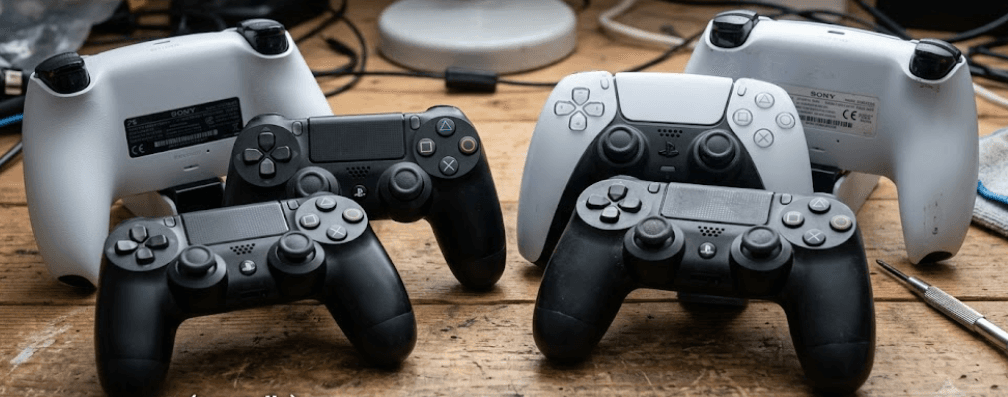
TL;DR: Fake PS4 and PS5 controllers can look almost identical to original Sony products, especially when sellers advertise them as "high copy" or premium replicas. To identify a potentially fake controller, inspect the packaging, build quality, buttons, analog sticks, charging port, model number, and overall performance. Test it on a compatible console and check features such as the DualSense adaptive triggers and haptic feedback on supported PS5 games. However, no single visual clue or successful connection proves authenticity. Check the seller's reputation, request a purchase receipt, compare the controller with official PlayStation product information, and buy from authorized retailers whenever possible.
What Does "High Copy" Mean In PS4 And PS5 Controllers?
The term "high copy" is commonly used by sellers to describe imitation products designed to resemble genuine branded accessories. In the gaming market, a high-copy controller may reproduce the shape, colour, button layout, logos, and packaging of an original PlayStation controller. These products are not necessarily manufactured or approved by Sony, even when their appearance closely resembles the genuine version.
Not every third-party controller is counterfeit, though. Some manufacturers legally produce compatible controllers under their own brands, while others sell replacement shells or refurbished original controllers. The important distinction is whether the seller is honestly describing the product. A controller advertised as a genuine Sony DualSense or DUALSHOCK 4 should not turn out to be an imitation or an unrelated third-party accessory.
The difficulty is that counterfeit controllers can look convincing in product photographs and even perform basic gaming functions. Some connect wirelessly, respond to button presses, and support vibration. Therefore, checking only the appearance or whether the controller works is not enough. A more reliable assessment combines physical inspection, feature testing, product identification, and verification of the seller's claims.
1. Check The Packaging And Product Details
Look For Printing And Labelling Inconsistencies
Start by examining the retail box, including its printing quality, logos, product images, and labels. Genuine PlayStation packaging should match the product and edition being sold. Blurry text, spelling errors, poorly aligned graphics, unusual fonts, or inconsistent branding can indicate a counterfeit product.
Check the product name and the controller shown on the box. A PS5 DualSense controller and a PS4 DUALSHOCK 4 controller have different designs and features. If the packaging describes one model but the controller has another model's layout, investigate before purchasing. For limited editions, compare the colours and artwork with official PlayStation product images.
Do Not Trust A Box By Itself
Packaging is a useful starting point, but it is not definitive proof of authenticity. Counterfeiters can reproduce packaging, while genuine used controllers may come in replacement boxes or have no original packaging at all. A missing box is not, by itself, evidence that a controller is fake.
If you are buying a new controller, ask for a clear photograph of the actual product, its packaging, and any available proof of purchase. Avoid relying entirely on stock images. If the seller refuses to show the item or provides photographs that appear inconsistent, consider it a reason to investigate further.
2. Inspect The Build Quality And Physical Design
Examine The Buttons, Shell, And Finish
A genuine controller should have a consistent finish and a well-assembled shell. Examine the seams between the plastic panels, the alignment of the buttons, the touchpad, and the overall shape. Uneven gaps, rough plastic edges, loose components, or poorly fitted buttons may indicate an imitation or a badly repaired controller.
Check the button symbols and printed markings, too. On a PS4 DUALSHOCK 4, inspect the familiar PlayStation button layout, touchpad, and light bar. On a PS5 DualSense, examine the integrated touchpad, Create button, central PlayStation button, and dedicated microphone mute button. Compare these details with official images of the exact model.
However, do not treat every cosmetic difference as proof of counterfeiting. Genuine controllers are available in different colors and special editions, and used products can show wear. Refurbished controllers may also contain replacement shells or buttons. Physical inspection helps identify inconsistencies, but it cannot establish authenticity on its own.
Feel The Buttons And Analog Sticks
Press every face button, directional button, shoulder button, and trigger. They should respond consistently without sticking, catching, or feeling unusually loose. Move both analog sticks through their full range and check whether they return smoothly toward the center when released.
Also examine the triggers for uneven resistance, grinding, or inconsistent movement. Excessive looseness, unusual creaking, or inconsistent button travel can indicate poor manufacturing or wear. These problems do not automatically mean the controller is counterfeit, since genuine controllers can develop faults over time.
3. Verify The Model Number And Serial Number
Check The Identifiers On The Back
Product identifiers provide another useful verification step. On a PS5 DualSense controller, the model number is printed on the back above the QR code, while the 17-character alphanumeric serial number appears below it. Sony also provides instructions for viewing the connected controller's serial number through the PS5 console settings.
For a PS4 DUALSHOCK 4 controller, the serial number is located on the back below the barcode, and the model number is printed above the barcode. Sony states that the serial number contains 14 alphanumeric characters. These details can help you determine whether the markings match the controller type being advertised.
| Check | PS4 DUALSHOCK 4 | PS5 DualSense |
|---|---|---|
| Product identifier | Model number on the back | Model number on the back above the QR code |
| Serial number | Below the barcode | Below the QR code |
| Serial number format | 14 alphanumeric characters | 17 alphanumeric characters |
| Additional check | Compare the model with official documentation | Compare the model and console-displayed serial number |
Why A Serial Number Is Not Enough
A printed serial number or scannable QR code does not automatically prove that a controller is genuine. Counterfeit products may copy identifiers from legitimate products, and a QR code can simply encode information without authenticating the item.
Check whether the markings are clear and consistent with the relevant model, and compare the information with Sony's official support guidance. If something looks suspicious, contact PlayStation Support for advice rather than assuming that a matching number guarantees authenticity.
4. Test The Controller On A PS4 Or PS5 Console
Check Basic Connectivity And Controls
Whenever possible, test the controller before paying for it. Connect it to the appropriate console and check whether it pairs correctly, remains connected, and responds to inputs. Test every button, the directional pad, both analog sticks, the shoulder buttons, and the triggers.
Check whether the controller charges through its port and whether its battery level behaves reasonably during use. A controller that repeatedly disconnects, charges inconsistently, or registers unexpected inputs may have a fault. These symptoms are not exclusive to counterfeits, but they are good reasons to avoid buying the device without further inspection.
Remember that basic connectivity is not proof of originality. Some imitation controllers can connect to a console and operate normally for simple games. Compatibility, responsiveness, and overall build quality must be considered together.
Test Features Specific To The PS5 DualSense
The DualSense offers features beyond standard button inputs. These include haptic feedback, adaptive triggers, a built-in microphone, a dedicated mute button, and an integrated speaker. Test these functions where possible, using a compatible PS5 game and the appropriate settings.
Adaptive triggers can provide varying resistance, while haptic feedback produces more detailed physical sensations than conventional rumble. However, their behavior depends on the game and its settings. A feature that is not active in a particular game does not necessarily indicate a fake controller.
A convincing imitation may reproduce some functions while omitting others. Test several features rather than relying on one demonstration. If the seller claims that the controller is a genuine DualSense but important advertised functions consistently fail in a compatible game, ask for an explanation and consider seeking professional verification.
5. Check The Analog Sticks For Drift And Inconsistent Inputs
What Is Stick Drift?
Stick drift occurs when an analog stick registers movement even though you are not touching it. For example, a character may slowly walk across the screen or a camera may rotate without input. Drift can result from worn components, dirt, physical damage, or other hardware problems.
To check for it, connect the controller to a compatible game and leave the analog sticks untouched. Observe whether the character, cursor, or camera moves unexpectedly. Then move each stick in different directions and check whether the response is smooth and consistent.
You can also use a reputable controller-testing tool where supported. Test the controller in more than one game or application if possible. A single unusual input may be caused by game settings or software behavior rather than the controller itself.
Does Stick Drift Mean The Controller Is Fake?
No. Both genuine and counterfeit controllers can develop stick drift. A brand-new controller that shows drift may be defective, while a used original controller may develop the problem after extensive use.
Treat drift primarily as a condition and quality issue, not an authentication test. If you are buying a used controller, ask about its repair history and test it before paying. If it is advertised as new, unexpected drift is a reason to request a replacement or use the seller's return policy.
6. Compare The Price With The Seller's Claims
Be Careful With Unusually Low Prices
Price is one of the easiest warning signs to overlook. If a seller offers a supposedly brand-new, genuine PS5 DualSense controller for a fraction of the normal retail price, investigate before buying. The same applies to a PS4 controller advertised as original but priced unusually low without a convincing explanation.
There may be legitimate reasons for discounts, including clearance sales, promotions, or used-product pricing. However, a low price combined with vague descriptions, poor photographs, or no return policy increases the risk of receiving a counterfeit or misrepresented product.
Evaluate The Seller And Purchase Terms
Check the seller's ratings, transaction history, return conditions, and willingness to provide proof of purchase. On marketplaces, read reviews carefully rather than relying only on the overall rating. Repeated complaints about fake products, missing accessories, or misleading descriptions deserve attention.
For a new controller, buying from an authorized retailer is the safer option. Sony's PlayStation buying guide recommends authorized retailers for new products and advises buyers of used products to inspect the item and request evidence of its functionality. This approach reduces the risk of paying the price of an original controller for an imitation.
7. Understand The Risks Of Buying A High-Copy Controller
A counterfeit controller may appear to offer the same experience at a lower price, but the actual performance can vary considerably. Some imitate the basic controls reasonably well, while others have inconsistent inputs, poor-quality analog sticks, weak vibration, or unreliable wireless connectivity. Features may also be missing or implemented differently from the original.
Durability is another concern. Poorly made buttons, charging ports, batteries, and internal components may wear out sooner than expected. A controller that fails shortly after purchase can cost more in the long run if it cannot be repaired or returned. The quality of imitation products varies, so it is not accurate to assume that every copy will fail in the same way.
There is also a difference between a counterfeit product and an openly advertised third-party controller. A legitimate third-party controller may be suitable for your needs if its manufacturer clearly identifies the brand, compatibility, and limitations. The problem is paying for an alleged original Sony product when the item is actually an imitation.
Final Recommendation And Decision Framework
When buying a PS4 or PS5 controller, do not make your decision based on appearance alone. Examine the packaging, physical construction, model and serial markings, connectivity, buttons, analog sticks, and available features. Check the seller's reputation and ask for a purchase receipt or other credible evidence of the product's origin. Treat unusual pricing and inconsistent product details as reasons to investigate, rather than as conclusive proof that a controller is fake.
If you are purchasing in person, test the controller on a compatible console before completing the transaction. For a PS5 DualSense, check adaptive triggers and haptic feedback in a supported game. For either model, test the analog sticks for drift and verify that the buttons, charging, and wireless connection work consistently. If the controller is being sold as new, ask about the return policy and warranty coverage.
The safest choice for a buyer who specifically wants an original Sony controller is to purchase from an authorized retailer. If you are considering a used controller, inspect its condition and request a demonstration. If the seller advertises a product as a genuine Sony controller but cannot substantiate the claim, walk away rather than relying on a QR scan, a convincing box, or a low price.
Frequently Asked Questions
Q. What does "high copy" mean for a PS4 or PS5 controller?
"High copy" generally refers to an imitation designed to look like the original product. It is not an official Sony product category and does not guarantee any particular level of quality.
Q. Can a fake PS5 controller connect to the console?
Yes. Some counterfeit controllers can connect and support basic gameplay. Successful pairing alone does not establish authenticity.
Q. How can I check whether a PS5 DualSense controller is original?
Inspect the physical design, check the model and serial markings, test its functions, review the seller's proof of purchase, and compare the product with official PlayStation information. No single check guarantees authenticity.
Q. How do I identify a fake PS4 DUALSHOCK 4 controller?
Look for inconsistent branding, poor construction, unusual button behavior, and suspicious product markings. Test the controller on a compatible PS4 and evaluate the seller's claims before purchasing.
Q. Does scanning the controller's QR code prove that it is genuine?
No. A QR code can display a serial number, but scanning it does not independently authenticate the controller.
Q. Do fake PS5 controllers support adaptive triggers?
Some imitation controllers may reproduce certain functions, but feature support varies. Test adaptive triggers in a compatible game and do not treat one working feature as definitive proof of originality.
Q. Is stick drift a sign of a fake controller?
No. Stick drift can affect genuine controllers as well as counterfeit ones. It is primarily a sign of a potential hardware or calibration problem.
Q. Are all third-party PS4 and PS5 controllers fake?
No. Legitimate third-party manufacturers sell their own controllers. A clearly labeled third-party product is different from a counterfeit falsely advertised as an original Sony controller.
Q. Why are high-copy controllers cheaper than original Sony controllers?
They may use different components, manufacturing processes, or feature sets. However, price alone does not establish whether a controller is counterfeit, so check the product and seller carefully.
Q. Where should I buy an original PS4 or PS5 controller?
Buy from Sony or an authorized PlayStation retailer. If you choose a used controller, check its condition, test its functions, review the seller's reputation, and confirm the return terms before paying.
Ready to upgrade your tech?
Browse our collection of quality refurbished products at unbeatable prices.






