How to Check Laptop Warranty Status Online (Dell, HP, Lenovo)
Check your Dell, HP, or Lenovo laptop warranty online using its Service Tag or serial number. Learn where to find the right identifier, verify coverage, and handle incorrect warranty information.

TL;DR: Checking your laptop warranty online is usually a quick process if you have the correct serial number or manufacturer-specific product identifier. Dell uses a Service Tag, HP primarily uses a serial number, and Lenovo uses a serial number or other product details through its Warranty Lookup tool. The official support websites can show whether your laptop is covered, the warranty end date, and available support or service options. If the information does not match your purchase records, keep your invoice ready and contact the manufacturer's support team rather than assuming the warranty has expired.
Why Check Your Laptop Warranty Status?
Knowing your laptop's warranty status becomes important when something stops working unexpectedly. A faulty keyboard, charging issue, display problem, battery-related fault, or other hardware problem can potentially be covered by the manufacturer's warranty, depending on the terms of your specific device. Checking the status before paying for a repair can help you understand what support options may be available.
Warranty information can also be useful when buying or selling a used laptop. A buyer may want to know how much official coverage remains, while a seller can use the manufacturer's website to provide more confidence about the device's history. The online status is generally more useful than relying only on a seller's statement because it comes from the manufacturer's support system.
It is worth remembering that warranty status and warranty coverage are not exactly the same thing. A laptop can show an active warranty while a particular type of damage may still be excluded under its terms. Accidental damage, unauthorized repairs, software problems, and normal wear can be treated differently depending on the warranty or service plan. Always check the coverage details rather than looking only at the expiration date.
What You Need Before Checking
The most important thing you need is the laptop's correct identification number. The terminology differs between manufacturers, so do not be surprised if Dell asks for a Service Tag while HP and Lenovo use a serial number. Entering the wrong number can return an incorrect result or prevent the website from identifying the laptop.
You should also keep your purchase invoice, receipt, or order confirmation nearby, especially if the laptop is relatively new. The manufacturer's system may calculate or display warranty dates based on information associated with the product, while your purchase documentation can help resolve discrepancies. This is particularly useful for laptops purchased through retailers or resellers.
Finally, use the manufacturer's official support website rather than an unrelated warranty-checking website. You are entering a unique device identifier, so there is little reason to hand that information to an unknown third-party service. The official websites also provide the most relevant route for requesting repairs or correcting warranty information.
| Brand | Main Identifier | Official Warranty Tool |
|---|---|---|
| Dell | Service Tag | Dell Support / Support Services & Warranty |
| HP | Serial Number | HP Product Warranty Check |
| Lenovo | Serial Number | Lenovo Warranty Lookup |
How To Check Dell Laptop Warranty
Find Your Dell Service Tag
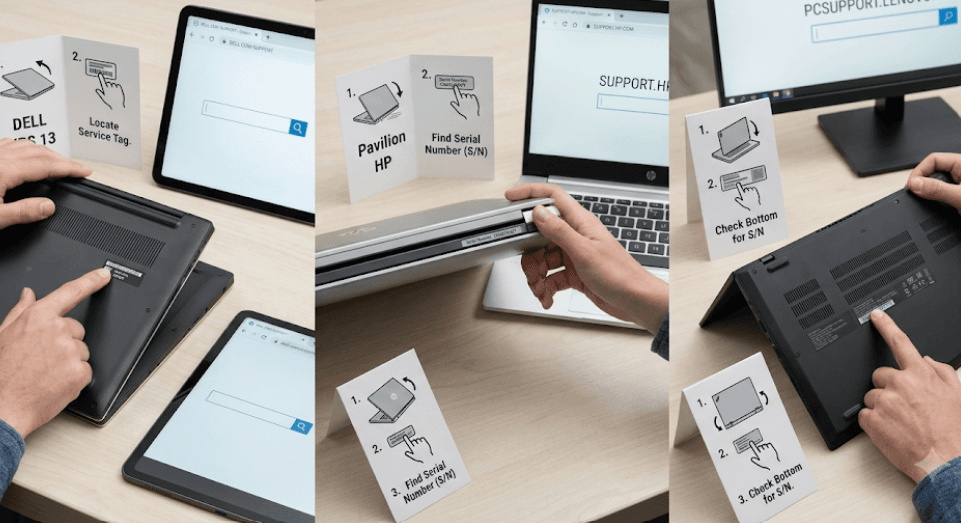
Dell laptops use a Service Tag as the primary identifier for support and warranty lookup. On many Dell laptops, you can find it on a label on the bottom of the device. If the physical label is difficult to read, Dell also provides ways to identify the computer through its support tools and software.
If your Dell laptop is working, you can also use Dell's support environment to identify the device. Depending on the system, SupportAssist can automatically detect the product. This can be helpful when the Service Tag is difficult to locate or you simply want to avoid typing a long identifier incorrectly.
Once you have the Service Tag, go to Dell's official Support website and enter it into the product identification or support field. Dell's current support pages can also offer an automatic detection option on supported systems, allowing the website to identify the device without manually entering the Service Tag.
View Dell Warranty Details
After the laptop has been identified, look for the support or warranty section. Dell's warranty information can show details such as the service type, coverage status, and warranty start and end dates. The exact services displayed depend on the product and the support plan associated with it.
If the laptop is still covered, the support page can help you understand what service options are available. If the warranty has expired, Dell may still show paid support, repair, diagnostic, or other service options depending on the product and region.
If the result does not match your purchase records, do not immediately assume that the retailer or manufacturer has made a mistake. Check the Service Tag again and compare the product information displayed online with the laptop in your possession. If the dates are still inconsistent, keep your original invoice and contact Dell support for assistance.
How To Check HP Laptop Warranty
Find Your HP Serial Number
HP's official warranty checker primarily asks for the laptop's serial number and the country or region where the product was purchased. On many HP laptops, the serial number can be found on the bottom of the device or on the original packaging.
There is also a convenient way to find the serial number directly from many HP laptops. On supported systems, pressing Fn + Esc can open the HP System Information window, where product information including the serial number may be displayed. This can save you from turning the laptop over when the label is difficult to read.
Write the serial number carefully before entering it into HP's warranty checker. Characters such as letters and numbers can be easy to confuse, especially on older labels. If the website cannot identify the product using the serial number alone, HP may ask for an additional product number.
Use HP's Warranty Check Page
Go to HP's official Product Warranty Check page and select the country or region where the laptop was purchased. Enter the serial number and submit the request. The result can provide information about the current warranty status and warranty end date.
HP's warranty checker can also indicate the category or type of warranty service associated with the product. This is more useful than simply knowing that a laptop is “under warranty” because different service arrangements can provide different levels of support.
If HP asks for a product number in addition to the serial number, locate that information on the laptop or its documentation and enter it as requested. If the displayed information still appears incorrect, retain your purchase invoice and contact HP support rather than relying on an estimated warranty date from a third-party website.
How To Check Lenovo Laptop Warranty
Locate Your Lenovo Serial Number
Lenovo's warranty lookup system uses the laptop's serial number to identify the device. On Lenovo laptops, the serial number can typically be found on the product label or through the device's system information. If you cannot locate it physically, Lenovo's support tools provide options to help identify the product.
Go to Lenovo Support and use the product identification or warranty section. Depending on the page and device, Lenovo may allow you to enter the serial number or use a product-detection option. Lenovo's support site also provides a way to select a product when you do not have the identifier immediately available.
Make sure the device shown after identification matches your actual laptop. This is especially important when dealing with multiple Lenovo devices or when buying a used laptop. The model, product family, and serial number should correspond to the machine you are checking.
Check Lenovo Warranty Coverage
Once Lenovo identifies the laptop, open the warranty or services section to see the available warranty information. Lenovo's warranty pages can show the device's warranty status and related service information, although the exact details can vary by product and region.
Lenovo states that warranty coverage varies by product and region. Some devices include a standard warranty, while other models can come with longer coverage or additional service arrangements. Therefore, it is better to check the individual laptop rather than assuming that every Lenovo laptop has the same warranty period.
If Lenovo's online information does not match your purchase documentation, look for the site's options relating to incorrect warranty information or contact Lenovo support. Keep your invoice or proof of purchase available because it can help establish when and where the laptop was purchased.
What To Do If Warranty Information Is Wrong
Sometimes the warranty date displayed online may not appear to match the date you purchased the laptop. This does not necessarily mean that the laptop has no warranty. Warranty records can depend on the product's registration, purchase information, region, and the manufacturer's records.
Start by checking the product identifier again. A single incorrect character in a Service Tag or serial number can lead to a different result. Confirm that the model shown on the manufacturer's website matches your physical laptop. If the product itself is different, stop there and re-enter the correct identifier.
If the information is still inconsistent, gather your purchase invoice, order confirmation, serial number or Service Tag, and retailer information. Then contact the manufacturer's support team and ask them to review the warranty record. Avoid paying for a repair simply because an online page appears to show an expired warranty until you have confirmed the situation with the manufacturer.
What Warranty Status Actually Tells You
An “active” or “in warranty” status generally means the laptop has some form of manufacturer support or warranty coverage available during the displayed coverage period. It does not mean every repair or type of damage will automatically be covered. The actual terms of the warranty determine what is included and what is excluded.
For example, normal hardware failures may be handled differently from accidental physical damage. Similarly, software-related problems, unauthorized modifications, or repairs performed by non-authorized parties may have different coverage implications depending on the manufacturer's terms and service plan.
The warranty page is therefore a starting point, not a substitute for reading the applicable warranty terms. If you are dealing with a specific problem, describe the issue to the manufacturer's support team and ask whether it falls under your particular coverage before arranging a paid repair.
| Information | Why It Matters |
|---|---|
| Warranty status | Shows whether coverage is currently active |
| Start date | Helps establish when the recorded coverage began |
| End date | Shows the recorded warranty expiration |
| Service type | Indicates the type of support associated with the device |
| Serial number / Service Tag | Identifies the exact laptop |
| Purchase invoice | Helps resolve discrepancies in warranty dates |
Why You Should Use Official Warranty Checkers
The safest approach is to check warranty status directly through Dell, HP, or Lenovo. These manufacturers maintain their own product-support systems and can connect warranty information with the specific device identifier you provide.
Official support pages can also take you beyond a simple “yes” or “no” warranty result. Depending on the manufacturer and product, you may be able to access troubleshooting tools, service requests, repair information, support contacts, or options for additional services.
Be cautious of websites that promise to reveal warranty information in exchange for unnecessary personal details or payment. A warranty check itself should start with the manufacturer's own support system. If a third-party seller gives you a warranty date, verify it independently before relying on that information.
Final Recommendation And Decision Framework
Checking a laptop warranty online takes only a few minutes, but using the correct manufacturer-specific identifier makes the process much smoother. For Dell, start with the Service Tag; for HP, use the serial number and purchase region; and for Lenovo, use the serial number through its Warranty Lookup or support system. These details are enough to identify most laptops and retrieve their current support information.
If you are checking a laptop before buying it second-hand, do not stop at the warranty date. Verify that the online result matches the physical device, compare the model and serial information, inspect the laptop for physical damage, and ask the seller for the original invoice when available. A laptop with several months of warranty remaining can be more attractive than an otherwise similar device with no manufacturer coverage.
For an existing laptop with a hardware problem, check the warranty before visiting a local repair shop or purchasing replacement parts. If the device is still covered, contacting the manufacturer first can help you avoid unnecessary repair costs and preserve access to official service. When the online record looks incorrect, use your purchase documentation to request a warranty correction rather than assuming the coverage is lost.
Frequently Asked Questions
Q. How can I check my Dell laptop warranty online?
Go to Dell Support and enter your laptop's Service Tag. The support page can display the warranty status, coverage information, and warranty dates associated with the device.
Q. How can I check my HP laptop warranty online?
Use HP's Product Warranty Check page, select the country or region where the laptop was purchased, and enter its serial number. HP may request the product number as well.
Q. How can I check my Lenovo laptop warranty online?
Use Lenovo's Warranty Lookup or support website and enter the laptop's serial number. Lenovo can then identify the device and display available warranty information.
Q. Where can I find my laptop's serial number?
The location varies by manufacturer, but it may be printed on the bottom of the laptop, shown in system information, or included on the original packaging.
Q. Is a laptop serial number the same as its model number?
No. A serial number identifies an individual laptop, while a model or product number generally identifies a particular model or product configuration.
Q. Can I check my laptop warranty without an invoice?
Usually, you can check the manufacturer's online warranty record using the device identifier. However, an invoice or proof of purchase can be important if the manufacturer's recorded warranty dates are incorrect.
Q. What if the manufacturer's website says my laptop warranty has expired?
First, confirm that you entered the correct Service Tag or serial number. If the result still appears incorrect, compare it with your purchase documents and contact the manufacturer's support team.
Q. Does an active warranty cover every laptop problem?
No. Warranty coverage depends on the specific warranty terms. Certain types of accidental damage, software issues, normal wear, or unauthorized repairs may not be covered.
Q. Can I check the warranty of a used laptop?
Yes. If you have the correct product identifier, you can generally check its warranty status through the manufacturer's official support website. Verify that the displayed product matches the physical laptop.
Q. Can I extend my laptop warranty after checking its status?
Some manufacturers offer warranty extensions or additional service plans for eligible products. Availability depends on the laptop, current coverage, age, region, and applicable terms.
Ready to upgrade your tech?
Browse our collection of quality refurbished products at unbeatable prices.