
How to Check IMEI and Blacklist Status Before Buying a Used Phone in India
Buying a second-hand phone in India? Learn how to check its 15-digit IMEI, verify blacklist status through Sanchar Saathi, identify warning signs, and protect yourself from stolen or counterfeit devices.

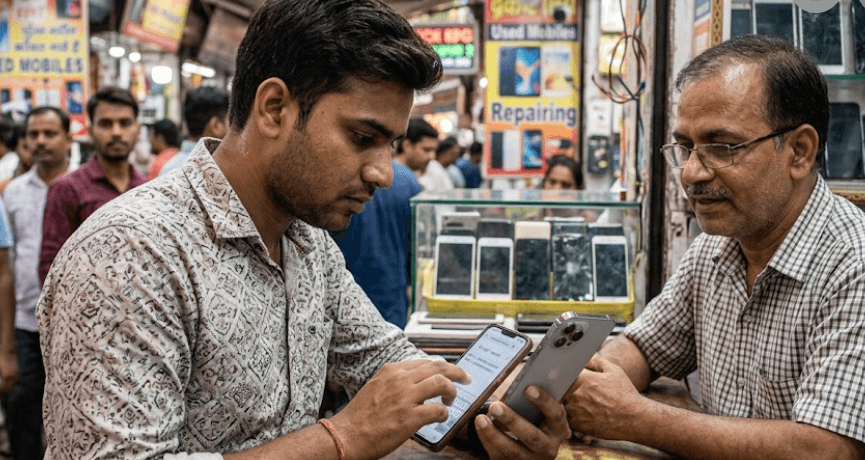
TL;DR: Before buying a used phone in India, check its 15-digit IMEI using the official Sanchar Saathi or CEIR portal, or send an SMS in the format KYM <15-digit IMEI> to 14422. Compare the displayed manufacturer and model details with the actual handset, check every IMEI on a dual-SIM phone, and avoid devices reported as blacklisted, duplicate, or already in use. However, a clean IMEI result alone does not guarantee that a phone is legally owned, free from financing disputes, or in good working condition. Always inspect the device, verify the seller's ownership, test your SIM, and obtain a written bill or receipt before paying.
Why IMEI Verification Matters Before Buying A Used Phone
Buying a second-hand smartphone can help you save money on a premium device, but a low price does not always mean a good deal. A handset may have hidden faults, an incorrect device identity, or a history of being reported lost or stolen. If its IMEI is blacklisted, it may be blocked from accessing Indian mobile networks even when the phone looks perfectly normal and switches on without any problem. Checking the IMEI before paying helps you identify these risks while you can still walk away from the deal.
The International Mobile Equipment Identity, or IMEI, is a unique 15-digit identifier assigned to a mobile device. It identifies the handset rather than the person using it or the mobile number inserted into it. India's Department of Telecommunications (DoT) provides the Know Your Mobile (KYM) facility through the official Sanchar Saathi and CEIR portal. This service lets buyers verify device details and identify warning statuses before purchasing a phone.
An IMEI check is particularly useful when buying from an individual seller, an online classified listing, or a local second-hand phone shop. It can help identify a mismatch between the advertised model and the device being offered. However, it should form part of a broader inspection rather than replace it. A phone can return matching IMEI details and still have a damaged battery, a faulty display, an activation lock, or an ownership dispute. Combining identity verification with a physical inspection and proof of purchase gives you a much stronger basis for making a decision.
What Does An IMEI Number Tell You?
The official IMEI verification service can provide information such as the manufacturer's name, device type, brand, and model number. These details help you confirm whether the handset matches the seller's description. The IMEI is also used by mobile networks to identify devices, and blacklisting systems can restrict network access to reported lost or stolen handsets.
How To Find The IMEI Number On A Used Phone
The easiest way to find a phone's IMEI is to open its dialer and enter *#06#. On a supported handset, the IMEI information appears on the screen without requiring you to make a call. Write down the displayed 15-digit number and check that it matches the information available in the phone's settings, on its original box, and on any available purchase invoice. If the device has been reset or the seller cannot provide its packaging, you can still retrieve the number directly from the handset.
You can also find the IMEI in the device settings. On many Android phones, open Settings and look under About Phone or About Device. On an iPhone, open Settings, select General, and then About. The precise menu names can vary by manufacturer and software version. The original retail box and purchase invoice may also display the IMEI, but treat these as supporting evidence rather than proof that the seller owns the handset.
Pay special attention to dual-SIM phones. These devices commonly have two IMEI numbers because each SIM slot has its own device identifier. Check both numbers rather than assuming that a clean result for IMEI 1 automatically clears IMEI 2. If the phone has two identifiers, record each one and verify both before completing the purchase. The official CEIR guidance confirms that an IMEI is associated with each SIM slot.
Where To Find The IMEI
| Method | What To Do | What To Check |
|---|---|---|
| Dialer | Enter *#06# | Record all displayed IMEI numbers |
| Android settings | Open About Phone | Compare the number with the dialer |
| iPhone settings | Open General, then About | Confirm the displayed IMEI |
| Original box or invoice | Read the printed identifier | Check it against the actual handset |
How To Check IMEI And Blacklist Status Online
The official Sanchar Saathi portal is the recommended starting point for checking a used phone's IMEI in India. Open the CEIR portal and locate the option for verifying the genuineness of a mobile handset. The verification process may require your mobile number, CAPTCHA, and OTP authentication before you can enter the handset's IMEI. Use the official government website rather than unfamiliar third-party IMEI-checking services, particularly when the result could determine whether you proceed with an expensive purchase.
Enter the complete 15-digit IMEI carefully and submit the verification request. Review the result and compare the returned manufacturer, brand, and model information with the phone in front of you. If the details do not match, the number appears invalid, or the result indicates that the device is blacklisted or duplicated, do not proceed with the purchase. The Department of Telecommunications specifically advises buyers to avoid handsets whose IMEI status is blacklisted, duplicate, or already in use.
You can also use the official SMS-based KYM facility. Type KYM followed by a space and the 15-digit IMEI number, then send it to 14422. The service returns device verification information. If the phone has two IMEIs, check both separately. Save the results and complete your physical inspection before paying. Remember that a successful verification confirms only the information available through that check at that time. It does not establish the complete ownership history of the handset or guarantee that no later report or dispute will arise.
Official IMEI Verification Methods
| Method | Steps | Best Use |
|---|---|---|
| Sanchar Saathi / CEIR | Open the official portal and complete verification | Reviewing device identity and status |
| SMS-based KYM | Send KYM <15-digit IMEI> to 14422 | A quick alternative when online access is inconvenient |
| Phone settings | Compare the displayed IMEI with the verification result | Identifying mismatches before purchase |
How To Understand IMEI Blacklist Results
An IMEI blacklist is used to restrict identified mobile devices from accessing cellular networks. In India, the Central Equipment Identity Register (CEIR) helps coordinate the blocking of reported lost or stolen handsets across participating networks. This means replacing the SIM card does not necessarily solve the problem: the restriction is associated with the device identifier, not simply with the original SIM. A blacklisted handset may still power on and allow some offline functions, but cellular connectivity can be restricted.
The verification result should guide your next step. A blacklisted status is a clear reason to stop the transaction unless the matter has been officially resolved and the device's status can be verified again. A duplicate or invalid IMEI is also a serious warning sign because the identifier may not reliably represent the handset. If the result says the phone is already in use, do not assume this automatically proves criminal activity. Pause the purchase, clarify the discrepancy with the seller, and seek confirmation through the official service before making a decision.
A result that shows matching device details and no warning is encouraging, but it is not an absolute guarantee of safety. A handset may still be subject to a later theft report, an unresolved ownership dispute, a manufacturer account lock, or a financing agreement. If the result is unclear or the verification service is unavailable, delay payment rather than relying on the seller's assurance. A legitimate seller should be willing to let you verify the device and provide reasonable proof of ownership.
What Different Results Mean
| Result Or Warning | What It Means For The Buyer |
|---|---|
| Details match the handset | A positive sign, but further checks are necessary |
| Blacklisted | Do not buy unless the status is officially resolved and reverified |
| Duplicate IMEI | Stop and investigate the discrepancy |
| Invalid IMEI | Do not proceed until the identifier is verified |
| Model or brand mismatch | Treat it as a serious warning sign |
| Verification unavailable | Retry through an official channel before paying |
What Else To Check Before Paying For A Used Phone
IMEI verification checks device identity, not every aspect of ownership or condition. Ask the seller for the original invoice, purchase details, and any available warranty documentation. The name on an invoice may not always match a second-hand seller because the phone could have been transferred legitimately, but the seller should be able to explain the ownership history convincingly. Be cautious if the seller refuses to identify themselves, pressures you to pay immediately, or offers a price that seems unusually low without a credible explanation.
Next, inspect the handset and test its essential functions. Insert your own SIM card, make a call, use mobile data, and check Wi-Fi, Bluetooth, cameras, microphones, speakers, charging, buttons, and biometric unlocking where applicable. Look for signs of liquid damage, screen replacement, loose ports, swelling, and unexpected shutdowns. On an iPhone, confirm that Activation Lock has been removed and that the seller can sign out of their Apple Account. On Android, check that the seller has removed their Google account and that the device can be set up without requesting the previous owner's credentials.
Before paying, ask for a written receipt recording the date, amount, seller details, phone model, and IMEI number or numbers. Use a traceable payment method where possible, and avoid paying a deposit simply because the seller claims other buyers are waiting. If the phone is sold by a refurbished-device business, check its return policy, warranty terms, and inspection standards. These precautions do not eliminate every risk, but they create a clearer record of the transaction and make it easier to raise a dispute if a problem emerges later.
Common Mistakes To Avoid When Checking IMEI
One common mistake is checking only the number printed on the box. Packaging can be swapped, and an invoice or sticker does not independently prove that the handset is genuine or legally owned. Always retrieve the IMEI from the actual phone and compare it with the available documents. On dual-SIM devices, check every IMEI shown by the handset. A mismatch between the physical device, its settings, and its paperwork should be resolved before any money changes hands.
Another mistake is treating successful network connectivity as proof that a phone is clean. A handset may connect to a network at the time of inspection but later be reported lost or stolen. Likewise, a matching IMEI result cannot guarantee that the phone is free from an account lock, unpaid financing obligations, or hardware defects. That is why a proper purchase process combines official verification, seller checks, account-lock removal, and functional testing instead of relying on one test alone.
Finally, avoid sharing unnecessary personal information or using unofficial websites that promise a complete ownership history from an IMEI. Use the official government portal for verification, and do not hand over OTPs to a seller or stranger. If the result raises concerns, walk away rather than accepting explanations that cannot be independently confirmed. A small discount is not worth the potential cost of a handset that cannot be used normally or whose ownership is disputed.
Frequently Asked Questions
Q. How can I check the IMEI number of a used phone in India?
Dial *#06# on the handset to display its IMEI. You can also find it in the phone's settings and compare it with the box or invoice.
Q. How do I check whether a used phone is blacklisted?
Use the official Sanchar Saathi CEIR portal and follow the IMEI verification process. Do not buy the device if it is reported as blacklisted.
Q. Can I check an IMEI without an internet connection?
Yes. The official KYM service supports SMS verification. Send KYM followed by a space and the 15-digit IMEI to 14422. Standard SMS charges or service availability may depend on your operator and plan.
Q. Is the IMEI number the same as the phone's serial number?
No. The IMEI identifies the mobile equipment for cellular network purposes, while the serial number is a separate identifier assigned by the manufacturer.
Q. Why does my dual-SIM phone show two IMEI numbers?
Each SIM slot generally has its own IMEI. Check both identifiers before buying the phone because the status of one does not automatically establish the status of the other.
Q. What should I do if a used phone has a blacklisted IMEI?
Do not complete the purchase. Ask the seller to resolve the issue through the appropriate official process, then verify the status again independently before reconsidering the device.
Q. Does a clean IMEI result guarantee that a phone is not stolen?
No. It is a useful verification step, not a complete ownership-history check. Ask for proof of purchase, inspect the seller's credibility, and retain a written receipt.
Q. Can a blacklisted phone work with a different SIM card?
Changing the SIM does not remove an IMEI-based network restriction. A blacklisted device may remain unable to access cellular networks even when another SIM is inserted.
Q. Can I check the IMEI before meeting the seller?
Yes, if the seller shares the IMEI in advance. However, verify the number again on the actual handset in person because the supplied number may not belong to the device being offered.
Q. Should I buy a used phone if the IMEI verification website is unavailable?
It is safer to postpone payment until you can verify the handset through an official channel. Do not rely only on screenshots, the seller's assurances, or a successful test call.
Final Recommendation
Before buying a used phone in India, make IMEI verification a non-negotiable part of your inspection. Retrieve the identifier directly from the handset, check every IMEI through the official Sanchar Saathi or CEIR service, and confirm that the displayed device details match the phone you intend to purchase. Treat blacklisted, duplicate, invalid, or mismatched identifiers as reasons to stop the transaction until the issue has been independently resolved.
Just as importantly, verify the seller's ownership, test the phone with your SIM, check account locks and hardware condition, and obtain a written receipt. A clean IMEI result is a valuable first step, but a safe second-hand purchase depends on more than one number. If you cannot verify the device's identity and ownership confidently, walk away, even if the price looks attractive.
Ready to upgrade your tech?
Browse our collection of quality refurbished products at unbeatable prices.






