Googlebook Explained: Google's Android Laptops vs Chromebook
Googlebook is Google's new premium laptop platform built on Android technology and ChromeOS foundations. Here's how it compares with Chromebooks on AI, hardware, Android integration, price, and everyday use.

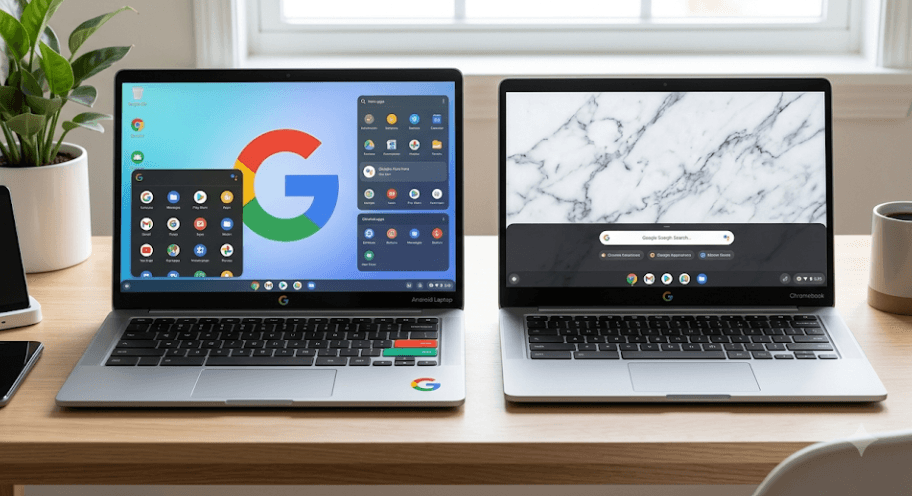
TL;DR: Googlebook is Google's new generation of premium laptops built around Gemini Intelligence, Android technology, and the desktop foundations of ChromeOS. Unlike traditional Chromebooks, Googlebook is designed to bring Android apps, deeper Android phone integration, built-in AI tools, and more powerful hardware together in one laptop experience. Chromebooks are not disappearing overnight, either. Existing ChromeOS devices will continue receiving updates through their supported lifetimes, while Googlebook represents Google's newer direction for personal computing. For users deciding between the two, the choice largely comes down to budget, hardware requirements, Android integration, AI features, and how much they value the simpler Chromebook experience.
What Is Googlebook?
Googlebook is Google's new category of laptops designed around what the company calls Gemini Intelligence. Google first introduced the concept in May 2026 and later revealed the first hardware lineup in September. Unlike the name might suggest, Googlebook is not simply a Chromebook with a new logo. It combines parts of Google's Android technology stack with the desktop foundations that made ChromeOS popular.
The idea is fairly straightforward: Google wants a laptop that feels more naturally connected to the Android ecosystem. Instead of treating the phone and laptop as two separate devices, Googlebook is designed to let users move between them more smoothly. Google has highlighted features such as phone app access, file sharing, task continuity, and other cross-device capabilities as major parts of the experience.
Googlebook is also positioned as a more premium product than the typical Chromebook. The first lineup includes hardware from Acer, ASUS, Dell, HP, and Lenovo, with models using processors from Intel, Qualcomm, and MediaTek. Google says the launch portfolio starts at $899, with 16GB of RAM as the baseline and some models offering up to 32GB.
Googlebook vs Chromebook: What Changed?
The biggest difference is the underlying direction. Traditional Chromebooks run ChromeOS, an operating system designed around speed, security, web applications, cloud services, and straightforward device management. Googlebook OS, meanwhile, is being developed on the Android technology stack while retaining important desktop foundations and principles from ChromeOS.
That does not mean the Chromebook experience suddenly becomes obsolete. Google says existing ChromeOS devices will continue receiving updates for their supported lifetimes, and Chromebooks remain available for schools and businesses. Google has also stated that many newer Chromebook models may eventually be eligible for Googlebook OS, although specific migration paths and device eligibility are being announced separately.
For everyday users, the difference is therefore less about one device being “old” and the other being “new” and more about the experience Google is building around each platform. Chromebooks remain attractive for straightforward web-based work and education, while Googlebook targets users looking for stronger hardware, deeper Android integration, and a more AI-focused desktop experience.
| Feature | Googlebook | Traditional Chromebook |
|---|---|---|
| Operating system | Googlebook OS | ChromeOS |
| Technology foundation | Android tech stack with ChromeOS desktop foundations | ChromeOS |
| Android integration | Deep, built-in ecosystem integration | Android apps on supported models |
| AI focus | Built around Gemini Intelligence | AI features available on supported devices |
| Hardware positioning | Premium | Budget to premium |
| Starting price | $899 for initial lineup in the U.S. | Varies widely by model |
| Phone integration | Designed for seamless Android connectivity | Phone Hub and other supported features |
| Existing devices | New Googlebook hardware | Existing ChromeOS hardware continues to be supported |
How Googlebook Uses Android
One of Google's biggest changes is bringing Android much closer to the laptop experience. Traditional Chromebooks can already run Android apps on supported devices through the Google Play Store. However, Googlebook is being designed with the Android technology stack at its foundation rather than treating Android app support as an additional capability.
This matters because Android has a massive app ecosystem. Google says Googlebook combines the full desktop Chrome browser with the Play Store, allowing users to work with web applications as well as Android applications. Google has also highlighted support for large-screen Android apps and mouse-and-keyboard input, making the experience more laptop-oriented than simply stretching a phone application onto a larger display.
The Android connection also extends beyond applications. Googlebook is designed to work closely with Android phones, making it easier to move information between devices and continue tasks. Features such as Cast My Apps can allow users to stream and interact with phone apps in a desktop window, while other cross-device tools are designed to reduce the constant switching between phone and laptop.
Googlebook's Gemini AI Features
AI is probably the biggest reason Google wants people to think of Googlebook as something different from a Chromebook. Google has designed the platform around Gemini Intelligence rather than simply adding an AI chatbot to an existing laptop interface. The company says Gemini can help users with tasks based on what is happening on their screen and within their workflow.
One standout feature is Magic Pointer. Instead of opening a separate AI window every time you need help, you can interact with content on the screen using the cursor and bring up contextual Gemini assistance. Google gives examples such as pointing at a date in an email to help arrange a meeting or working with images directly on the screen.
Another feature is Rambler, which is aimed at people who think faster than they type. You can speak naturally, including with imperfect phrasing, and Rambler can turn that stream of thoughts into more organized writing. Google says the feature can structure notes, action items, and other spoken ideas, including multilingual speech.
Create My Widget
Googlebook also introduces Create My Widget, which lets users describe the type of information they want on their desktop and have Gemini create a personalized widget. For example, a user could create a dashboard for travel plans, schedules, reminders, or other information without manually assembling every element.
This is an interesting change because it moves AI beyond the traditional chatbot format. Instead of simply asking Gemini a question, users can ask it to shape parts of their desktop environment around their needs. Google is effectively treating the desktop as something that can adapt to the user.
Googlebook Hardware Is More Premium
Chromebooks have never been limited to cheap laptops. There are premium Chromebook models as well, but Googlebook is being positioned specifically as a premium laptop category. The first Googlebook lineup includes models from major manufacturers and uses higher-end materials, processors, displays, and other components.
Google says the initial portfolio starts at $899 in the U.S. and includes a minimum of 16GB of RAM, while some configurations offer 32GB. Depending on the model, processors include Intel Core Ultra Series 3 and Snapdragon X Elite chips, with NPUs capable of more than 45 TOPS of on-device AI processing.
Battery life is another area Google is emphasizing. The company states that Googlebook models can reach up to 14 hours of video playback and up to 16 hours of web browsing, although actual battery life will vary by model, workload, settings, and usage. This is an important distinction when comparing laptops because a manufacturer's maximum battery figure should never be treated as a guaranteed real-world result.
What Happens To Existing Chromebooks?
If you already own a Chromebook, there is no reason to panic. Google has explicitly said that current ChromeOS devices will continue receiving updates according to their supported lifetimes. Google also says Chromebooks remain available for education and enterprise deployments.
Google's current policy provides Chromebooks with up to 10 years of automatic updates, depending on the device. Users can check their specific model's update schedule directly through ChromeOS settings. This includes security updates, bug fixes, and new features during the supported period.
There is also a potential upgrade path. Google says many newer Chromebook models will be capable of transitioning to Googlebook OS, although exact eligibility and migration details are being provided separately. So, if you have recently purchased a Chromebook, the announcement does not automatically mean you need to replace it.
Chromebook Still Makes Sense
For many people, a Chromebook remains the more sensible choice. If your daily work revolves around Chrome, Google Docs, Sheets, Slides, Gmail, YouTube, online classes, video calls, and other web-based tools, ChromeOS can already handle these tasks comfortably. Google has also continued adding AI and productivity features to newer Chromebook devices.
Chromebooks can also work offline. Google supports offline versions of applications such as Gmail, Google Docs, Sheets, and Slides, allowing users to continue working when an internet connection is unavailable. The exact capabilities naturally depend on the application and whether the necessary content has been made available offline.
Price is another major advantage. Googlebook's initial $899 starting point places it firmly in a different segment from many entry-level Chromebooks. If you are a student or casual user who mainly needs a reliable machine for browsing, assignments, documents, streaming, and video calls, paying extra for Googlebook's premium hardware and AI features may not make much sense.
Who Should Buy Googlebook?
Googlebook makes the most sense for someone already invested in the Android ecosystem and looking for a premium laptop that works naturally with their phone. If you regularly move files between your phone and laptop, use Android applications, or want a more integrated multi-device workflow, Googlebook is designed specifically around those habits.
It is also worth considering if AI-assisted productivity is becoming part of your daily workflow. Features such as Magic Pointer, Rambler, Create My Widget, Gemini integration, and background task processing are intended to make AI part of the desktop rather than something you open only when you have a specific question.
Creators, developers, professionals, and heavier multitaskers may also find the hardware more appealing than a basic Chromebook. Googlebook's higher RAM configurations, modern processors, premium displays, and Linux development environment make it more versatile than the entry-level Chromebook experience. Still, users should check the exact software compatibility they need before replacing a Windows or macOS machine.
Who Should Stick With A Chromebook?
A Chromebook remains a strong choice for students, casual users, families, and people whose work is primarily browser-based. You do not need a premium laptop simply because a newer category exists. If your current Chromebook handles your documents, browsing, video calls, streaming, and schoolwork without problems, upgrading may provide little practical benefit.
Chromebooks also remain appealing for organizations that prioritize simple management, security, and predictable deployment. Google says existing ChromeOS devices retain their management capabilities and support, while comprehensive Googlebook management for schools and businesses is being developed on a multi-year timeline, with broader management capabilities planned to begin rolling out in the second half of 2027.
The important takeaway is that Googlebook is not replacing every Chromebook overnight. Think of it as Google's next-generation direction for laptops, while ChromeOS continues to serve the enormous existing Chromebook ecosystem. For many buyers, the lower-cost Chromebook will still be the more practical option.
Googlebook vs Chromebook: Which One Wins?
| Category | Better Choice | Why |
|---|---|---|
| Budget | Chromebook | More affordable models are widely available |
| Android integration | Googlebook | Designed around deeper Android connectivity |
| Premium hardware | Googlebook | Higher-end materials and components |
| Simple schoolwork | Chromebook | ChromeOS is straightforward and widely used |
| AI-focused workflows | Googlebook | Gemini Intelligence is central to the experience |
| Basic browsing | Chromebook | More than sufficient for web-based tasks |
| Heavy multitasking | Googlebook | Higher memory and processor configurations |
| Existing Chromebook owner | Chromebook | Current devices continue receiving support |
| Android phone owner | Googlebook | Built specifically for cross-device workflows |
| Enterprise deployment today | Chromebook | Mature ChromeOS management remains established |
Final Recommendation And Decision Framework
Googlebook is best understood as Google's next-generation laptop platform, not simply a Chromebook with Android apps. Its Android-based foundation, ChromeOS desktop heritage, premium hardware, deeper phone integration, and Gemini-focused features make it a meaningful evolution of Google's laptop strategy.
If you are buying a laptop from scratch and already use an Android phone heavily, Googlebook is worth considering, particularly if you want premium hardware and AI features. The $899 starting price, however, means it should not be treated as the default choice for everyone. A capable Chromebook can still deliver excellent value for everyday browsing, productivity, education, and entertainment.
For existing Chromebook owners, there is even less reason to rush into an upgrade. Google continues to support ChromeOS devices through their supported lifetimes, and many newer Chromebooks may eventually be eligible for Googlebook OS. In simple terms: buy Googlebook for a premium, Android-connected, AI-first laptop experience; buy a Chromebook when affordability, simplicity, and web-based productivity matter more.
Ready to upgrade your tech?
Browse our collection of quality refurbished products at unbeatable prices.