
Google TV vs Apple TV vs Amazon Fire stick: What's the Difference?
Compare Google TV, Apple TV 4K, and Amazon Fire TV Stick by picture quality, apps, voice assistants, smart-home features, connectivity, and price to find the right streaming device for your TV.

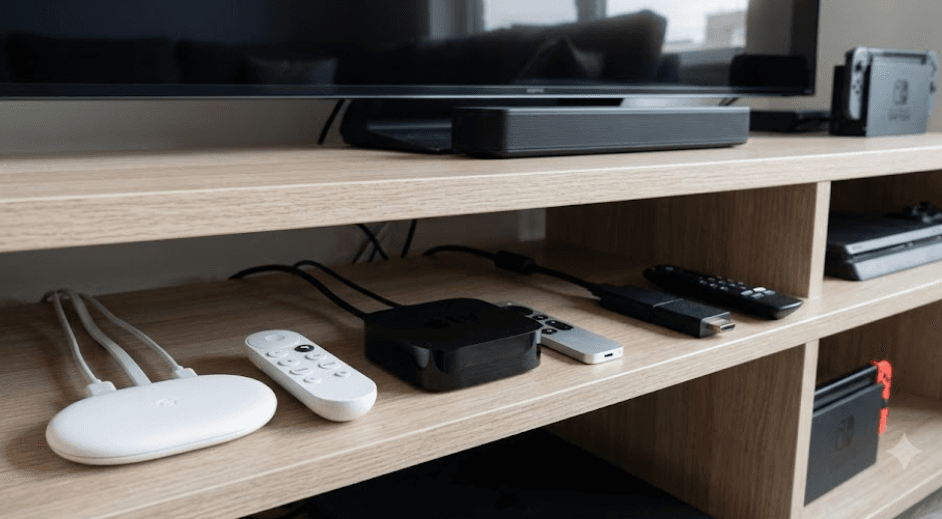
TL;DR: Google TV, Apple TV 4K, and Amazon Fire TV Stick all make it easier to stream movies, TV shows, and other content, but they offer different experiences. Google TV is ideal for discovering content across streaming services and works well with Google Home and Android devices. Apple TV 4K is a premium option for people who value smooth performance and integration with the Apple ecosystem. Amazon Fire TV Stick is a convenient, compact choice with Alexa voice control and a range of budget-friendly options. Before choosing, compare the device's features, app availability, picture quality, connectivity, and total cost. Remember that supported features vary by model, and a streaming device cannot improve your TV's native display resolution.
What Are Google TV, Apple TV, And Amazon Fire TV?
Google TV: A Content-First Streaming Experience
Google TV is a smart-TV interface that brings recommendations, installed apps, and content discovery together in one place. It is available on compatible smart TVs and streaming devices, including the Google TV Streamer. Rather than opening every streaming app separately to find something to watch, you can browse recommendations and search for content across supported services. The available recommendations depend on your region, connected services, account settings, and viewing activity.
Apple TV: A Premium Streaming Ecosystem
Apple TV can refer to Apple's physical streaming device, the Apple TV 4K, or the Apple TV app and Apple TV subscription service. The Apple TV 4K connects to a television through HDMI and runs tvOS, Apple's television operating system. It provides access to compatible streaming apps, Apple services, games, and other entertainment features. Its appeal extends beyond video streaming, particularly for people who already use an iPhone, iPad, HomePod, or other Apple devices.
Amazon Fire TV Stick: Simple Streaming With Alexa
Amazon Fire TV is a streaming platform available on Fire TV Sticks, selected televisions, and other compatible devices. A Fire TV Stick plugs into an HDMI port and connects to your Wi-Fi network, giving a compatible television access to streaming apps and Alexa voice search. Several models are available, ranging from HD-focused options to 4K models with additional connectivity and picture-quality features. The interface also promotes content and services, including Amazon's own entertainment offerings.
Google TV vs Apple TV vs Fire TV Stick: Quick Comparison
The most noticeable difference between these options is how they combine hardware, software, and services. Google TV emphasizes content discovery, Apple TV 4K focuses on a polished experience within Apple's ecosystem, and Fire TV Stick combines affordable streaming hardware with Alexa and Amazon services. However, the exact experience depends on the device generation and software version.
| Feature | Google TV Streamer | Apple TV 4K | Amazon Fire TV Stick |
|---|---|---|---|
| Device type | Streaming box | Streaming box | Compact HDMI stick |
| Operating system | Android TV OS with Google TV interface | tvOS | Fire TV operating system |
| Maximum resolution | Up to 4K HDR | Up to 4K HDR | HD or 4K, depending on model |
| Voice assistant | Google Assistant | Siri | Alexa |
| Content discovery | Personalized recommendations across supported services | Apple-centered interface and supported app content | Recommendations across supported services |
| Smart-home integration | Google Home, Matter, and Thread on Google TV Streamer | Apple Home and compatible Matter accessories | Alexa and compatible smart-home devices |
| Phone integration | Strong with Android and Google services | Strong with iPhone and other Apple devices | Works with compatible Android and iOS devices |
| Best suited for | Google users and content discovery | Apple users and premium streaming | Budget-conscious buyers and Alexa users |
Specifications describe the general product categories. Features such as resolution, HDR formats, storage, networking, and smart-home connectivity depend on the specific model. A 4K streaming device also requires a compatible TV and supported content to deliver 4K playback.
1. Design And Ease Of Use
Google TV: Easy Content Discovery
Google TV Streamer uses a compact box that connects to your television through HDMI. Its interface combines installed apps, recommendations, and watchlists, helping you discover shows without repeatedly switching between services. If you use YouTube, Google services, or an Android phone, the experience may feel familiar. The recommendations can also reflect your selected streaming services and viewing activity.
Apple TV 4K: A Refined Interface
Apple TV 4K is a separate streaming box controlled with the Siri Remote. Its tvOS interface is designed around apps, libraries, and entertainment services, with navigation that feels familiar to users of Apple's ecosystem. You can also access features such as AirPlay and supported Apple services. The overall experience is polished, although buyers who simply want an inexpensive way to stream may not need all the additional capabilities.
Amazon Fire TV Stick: Compact And Convenient
A Fire TV Stick plugs directly into an available HDMI port, keeping the main device out of sight. Setup generally involves connecting power, selecting the correct TV input, joining Wi-Fi, and signing in to an Amazon account. Alexa voice search makes it easier to find content without typing long titles with a remote. However, the home screen includes promotional content and recommendations, which may not suit people who prefer a minimal interface.
2. Picture Quality And Audio Performance
Google TV: Strong 4K HDR Support
The Google TV Streamer supports resolutions up to 4K at 60 frames per second, along with Dolby Vision, HDR10, HDR10+, and HLG. It also supports Dolby Atmos audio. These formats can improve picture contrast, color reproduction, and sound immersion when the TV, audio equipment, streaming service, and content support them. Not every television or streaming title supports every format, so check compatibility before purchasing.
Apple TV 4K: A Premium Home Theater Option
Apple TV 4K supports high-resolution streaming and advanced HDR formats, including Dolby Vision and HDR10+, on compatible hardware. It also supports Dolby Atmos audio for compatible content and sound systems. These features make it a strong choice for viewers with a capable 4K television and a soundbar or home theater setup. Its picture quality will still depend on the source video, display capabilities, internet connection, and streaming service.
Amazon Fire TV Stick: Good Options Across Budgets
Amazon offers different Fire TV Stick models for different needs. HD models are suitable for compatible Full HD televisions, while selected 4K models support Dolby Vision, HDR10+, and Dolby Atmos. Some models also offer newer Wi-Fi standards for improved wireless connectivity. Before buying, check the exact model's specifications: not every Fire TV Stick supports 4K, Dolby Vision, or the same wireless features.
| Picture Or Audio Feature | Google TV Streamer | Apple TV 4K | Fire TV Stick |
|---|---|---|---|
| 4K playback | Yes | Yes | Selected models |
| Dolby Vision | Yes | Supported models | Selected models |
| HDR10+ | Yes | Supported models | Selected models |
| Dolby Atmos | Supported | Supported | Selected models |
| Requirements | Compatible TV and content | Compatible TV and content | Compatible TV and content |
3. Apps, Streaming Services, And Content Availability
Google TV: A Broad Selection Of Apps
Google TV supports compatible apps from streaming services and other entertainment providers. Its interface can display recommendations across supported services, although not every app integrates equally with content discovery. Android users may also appreciate the ability to cast content from compatible apps on a phone or tablet. Availability varies by country, so check whether your preferred streaming services are supported in your market.
Apple TV 4K: Strong Integration With Apple Services
Apple TV 4K supports the Apple TV app, Apple TV subscription content, and compatible third-party streaming apps. It also offers access to the App Store and supported games. AirPlay lets you stream or mirror compatible content from Apple devices, which is useful for sharing photos, presentations, and videos on a larger screen. However, Apple TV 4K does not require you to subscribe to Apple TV's streaming service to use other supported streaming apps.
Amazon Fire TV Stick: Streaming And Amazon Integration
Fire TV Stick provides access to compatible apps through Amazon's app ecosystem. Depending on the model and region, you can install services such as Prime Video, Netflix, YouTube, and other supported streaming applications. Alexa can help search for movies, launch apps, and control compatible smart-home devices. Some services require separate subscriptions, and app availability can differ by country and device generation.
Remember that buying a streaming device does not automatically provide paid movies, live sports, or premium streaming subscriptions. Check each service's pricing and supported features before choosing a platform.
4. Smart-Home Features And Voice Control
Google TV: A Natural Fit For Google Home
The Google TV Streamer offers smart-home integration through Google Home and Matter, along with a built-in Thread border router. This can make it useful beyond streaming if you already use compatible smart lights, plugs, sensors, and other devices. Google Assistant voice controls can help you search for content and perform supported tasks. Smart-home capabilities differ between the Google TV interface and individual hardware models, so do not assume every Google TV television includes the Streamer's hub features.
Apple TV 4K: Designed For Apple Home
Apple TV 4K can function as a home hub for compatible Apple Home features and accessories. It works with supported Matter devices, and the Ethernet-equipped version of the older hardware generation includes Thread networking. This can help users control accessories, create automations, and manage compatible devices through Apple's Home ecosystem. The available features depend on hardware generation, software, region, and accessory compatibility.
Fire TV Stick: Alexa And Compatible Devices
Fire TV Stick integrates with Alexa through its voice remote. You can use voice commands to search for shows, open supported apps, and control compatible smart-home devices. Some compatible configurations also allow you to view supported security camera feeds on your TV. However, smart-home controls and camera integrations vary by model, service, and connected device. A Fire TV Stick is not automatically a complete smart-home hub simply because it supports Alexa.
5. Price, Value, And Ongoing Costs
Google TV: Choose The Right Hardware
Google TV is available on televisions and streaming devices at different price points, so the platform itself does not have one universal purchase price. The Google TV Streamer is a more capable standalone box with 4K support, additional storage, and smart-home features. Older Chromecast with Google TV devices may still be available through retailers, but buyers should check stock, software support, and whether the price makes sense compared with newer products.
Apple TV 4K: Higher Initial Investment
Apple TV 4K is positioned as a premium streaming device. Its hardware, performance, app ecosystem, and integration with Apple products may justify the price for users who value those features. However, it can be more than some households need if their main goal is to watch a few streaming services. Compare the current model, included accessories, and local price before making a purchase.
Amazon Fire TV Stick: Options For Different Budgets
Fire TV Stick models often appeal to buyers looking for an affordable way to upgrade an older television. HD and 4K models serve different needs, and sales can make the price difference between models smaller. Check whether the device includes the required power adapter, what the remote supports, and whether its Wi-Fi and HDR capabilities match your setup.
| Cost Factor | What To Consider |
|---|---|
| Device price | Compare current local prices and model generations |
| Streaming subscriptions | Most paid services charge separately |
| Internet plan | Stable broadband is important for reliable streaming |
| Accessories | HDMI cables, adapters, or Ethernet accessories may cost extra |
| Long-term value | Consider performance, app support, and software updates |
Prices and availability change by country, retailer, and sale period. Compare current prices in your market instead of relying on launch prices or prices from another country.
6. Compatibility, Connectivity, And Performance
Google TV: Useful For Google And Android Users
Google TV Streamer connects through HDMI and supports Wi-Fi, Bluetooth, and built-in Ethernet. Its wired network option can be useful if your Wi-Fi signal is unreliable. Casting from a compatible phone or tablet is convenient, particularly when you use supported apps and keep both devices on the same Wi-Fi network. Make sure your TV has an available HDMI port and that the device's power requirements can be met.
Apple TV 4K: Convenient Within Apple's Ecosystem
Apple TV 4K connects to a compatible television through HDMI and requires an internet connection for streaming. Depending on the model, it offers Wi-Fi or Ethernet connectivity. AirPlay and Apple device integration can make it especially convenient for households with iPhones and iPads. An HDMI cable is generally purchased separately, so include that cost when comparing the total setup price.
Fire TV Stick: An Easy Upgrade For Older TVs
A Fire TV Stick can add streaming functionality to a television that has an available HDMI port, even if the TV is not a smart TV. Internet access is still required for most streaming services. Wi-Fi standards and Ethernet support depend on the model and accessories. If your router is far from the television, check signal strength before assuming that the streaming stick itself is responsible for buffering or playback problems.
Final Recommendation And Decision Framework
There is no single winner for every household. The best option depends on the television you own, the services you watch, your other devices, and the amount you want to spend. All three can provide a capable streaming experience, but their software, remotes, smart-home features, and hardware differ.
Choose Google TV if you want an interface built around content discovery, use Google services regularly, or want the additional smart-home capabilities of the Google TV Streamer. Choose Apple TV 4K if you already use Apple devices, value AirPlay and Apple Home integration, and want a premium streaming box. Choose Amazon Fire TV Stick if you want a compact device, Alexa voice control, and a choice of models at different price points.
Before buying, check the exact model rather than comparing brand names alone. Confirm 4K and HDR compatibility, supported streaming apps, Wi-Fi performance, required cables, and local pricing. If you only need basic streaming on a Full HD television, an affordable HD model may be enough. If you have a high-end 4K television and compatible audio equipment, compare the advanced models to decide which offers the best combination of features and value.
The bottom line: Google TV is a strong all-round choice for content discovery, Apple TV 4K is particularly appealing to Apple users, and Amazon Fire TV Stick is a practical option for budget-conscious streaming. Match the device to your actual needs rather than paying for features you are unlikely to use.
Frequently Asked Questions
Q. Is Google TV better than Apple TV?
Google TV may suit users who prefer content recommendations and Google Home integration, while Apple TV 4K is particularly convenient for people who use Apple devices. The better choice depends on your ecosystem, budget, and preferred features.
Q. Is Amazon Fire TV Stick better than Google TV?
Fire TV Stick is a compact hardware option with Alexa, while Google TV is a software interface available on compatible televisions and streaming devices. Compare a specific Fire TV Stick with a specific Google TV device for a fair comparison.
Q. Do Google TV, Apple TV, and Fire TV Stick support 4K?
Yes, their compatible 4K devices support 4K streaming. However, some Fire TV Stick models are HD-only, and 4K playback also requires a compatible television, supported content, and adequate internet bandwidth.
Q. Do I need a smart TV to use these devices?
No. A television with an available HDMI port can generally use a compatible streaming device, even if it does not have built-in smart features. The maximum resolution remains limited by the television.
Q. Can I watch Netflix on Google TV, Apple TV, and Fire TV Stick?
Netflix is available on compatible devices and in supported regions. Check the relevant app store and device compatibility before purchasing, particularly if you are considering an older model.
Q. Do these streaming devices require monthly subscriptions?
The devices themselves generally do not require a monthly hardware fee, but paid streaming services may require separate subscriptions. Some apps offer free content, and the available options depend on the service and region.
Q. Can I use an iPhone with Google TV or Fire TV Stick?
Yes, compatible apps and casting or streaming features can work with an iPhone. However, AirPlay integration is a particular advantage of Apple TV 4K, while Google TV and Fire TV have their own supported connection methods.
Q. Which streaming device has the best picture quality?
There is no universal winner. Compatible 4K models from all three platforms can deliver excellent picture quality. Results depend on HDR support, the television, the streaming source, and the specific device model.
Q. Can I control smart-home devices through these streaming platforms?
Yes, but supported devices and capabilities vary. Google TV Streamer integrates with Google Home and Matter, Apple TV 4K supports Apple Home features, and compatible Fire TV devices work with Alexa-enabled smart-home products.
Q. Which streaming device offers the best value for money?
Fire TV Stick can be attractive for budget-conscious buyers, Google TV offers options across different hardware categories, and Apple TV 4K may justify its higher cost for users who value Apple's ecosystem. Compare current local prices and features before deciding.
Ready to upgrade your tech?
Browse our collection of quality refurbished products at unbeatable prices.






