

Google Find Hub Network Explained: How It Competes With Apple's Find My
Google Find Hub turns Android devices into a crowdsourced network for finding lost phones, trackers, and accessories. Here is how its offline finding, privacy, compatibility, and features compare with Apple's Find My.

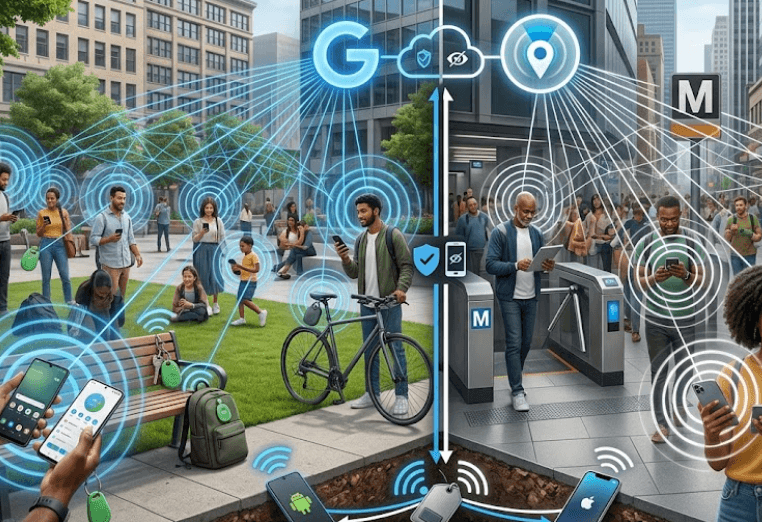
TL;DR: Google Find Hub is Android's crowdsourced device-finding network that helps users locate compatible phones, tablets, headphones, tracker tags, and other items even when they are offline. Nearby Android devices can use Bluetooth to detect a lost device or accessory and securely relay its location through the network. Google says the location information used for offline finding is end-to-end encrypted and not visible to Google. Apple's Find My works on a similar basic principle, using nearby Apple devices to detect Bluetooth signals from missing devices or AirTags and report their approximate location to the owner. The biggest difference is the ecosystem each network serves: Find Hub is designed around Android, while Find My is deeply integrated with Apple's hardware and accessories.
What Is Google Find Hub?
Google Find Hub is the current Android system for locating lost devices and compatible belongings. It brings together device finding, accessory tracking, and location sharing in one service. Depending on the device and feature, users can see a product on a map, make it play a sound, secure it remotely, or erase it. Google also supports finding compatible devices when they are offline, which is where the Find Hub network becomes more interesting than a basic "find my phone" feature.
The network works by turning participating Android devices into potential helpers for other users. When a compatible lost device or tracker is nearby, participating Android phones can detect its Bluetooth signal. The detecting device can then securely send information about where the item was detected to Find Hub. This means the owner does not necessarily need their lost device to have an active mobile connection at the moment it is located. The usefulness of the system therefore depends partly on the number and distribution of participating Android devices around the missing item.
Find Hub is also broader than smartphones. Google says the service can work with phones, tablets, Wear OS watches, Android XR devices, headphones, and compatible Bluetooth tracker tags. Compatible tags can be used for belongings such as keys and luggage, while supported combinations of phones and tags can also provide UWB-based distance and directional guidance. However, UWB availability depends on the specific phone and tracker, so buyers should not assume that every Find Hub-compatible product supports precision finding.
Find Hub At A Glance
| Feature | Google Find Hub |
|---|---|
| Primary ecosystem | Android |
| Offline finding | Yes, on supported devices and settings |
| Crowdsourced network | Android devices |
| Nearby detection | Bluetooth |
| Precision finding | UWB on supported phone and tag combinations |
| Lost-device actions | Ring, locate, secure, erase |
| Tracker support | Compatible Bluetooth tags |
| Location data for network finding | Encrypted |
How The Find Hub Network Works?
The easiest way to understand Find Hub is to imagine a lost tracker in a busy railway station. The tracker does not need to maintain its own internet connection to be useful. Instead, nearby participating Android devices can detect its Bluetooth signal. Those devices can then help relay the location information through Google's network, allowing the owner to see an updated location. Google describes this as a crowdsourced network, meaning its effectiveness comes from many devices collectively helping locate items.
Privacy is built into the way Google says this offline finding works. Google states that location information associated with the Find Hub network is encrypted, and its current product information says this location data is not visible even to Google. Android devices can store encrypted recent locations, while participating devices securely send location information when they detect another user's lost item. This approach is important because a crowdsourced finding network needs to balance useful location reporting with the privacy of the people whose phones are helping detect items.
There are also different offline-finding settings. Depending on the device, users can choose not to participate in the network, use stored encrypted recent locations without network participation, or allow network-based finding in busy places or everywhere. Google also says some supported devices, including Pixel 8 series devices, can remain findable for several hours after being powered off. This is not a universal feature across every Android phone, so the exact offline and powered-off capabilities depend on the hardware and settings.
What Happens When An Item Goes Missing?
| Stage | What Happens |
|---|---|
| Item is lost | The device or tracker may become disconnected |
| Bluetooth detection | Nearby participating Android devices scan for compatible signals |
| Location relay | The detecting device securely sends location information |
| Network processing | Find Hub makes the information available to the owner |
| Owner searches | The owner views the item's location through Find Hub |
| Nearby search | Supported UWB combinations can provide direction and distance |
Google Find Hub Vs Apple Find My
Google Find Hub and Apple's Find My network are built around a remarkably similar idea: a lost item can be located with help from nearby devices belonging to other people. Apple says its Find My network uses Bluetooth to detect the signal from an AirTag or another compatible device and report its approximate location back to the owner. Google similarly uses Bluetooth scanning by participating Android devices to help locate offline items. The fundamental concept is therefore not that one company invented a completely different method, but that both companies have built large ecosystem-based networks around offline device finding.
The major difference is ecosystem integration. Apple's Find My is tightly connected to iPhone, iPad, Mac, Apple Watch, AirPods, AirTag, and compatible third-party products. Apple also supports Find My network accessories through its accessory program. Google takes a more Android-centered approach, with Find Hub supporting compatible Android devices, Wear OS products, headphones, and tracker tags carrying the "Works with Android" compatibility designation. In both cases, the exact capabilities can vary by product, operating system, and hardware.
Apple also has a mature precision-finding experience for supported devices. Apple says an iPhone with Ultra Wideband can use Find Nearby to show distance and direction to compatible AirTags and supported AirPods. Google also offers UWB-based distance and directional guidance, but only when both the phone and tracker support UWB. This means the underlying technology is similar, while the actual experience depends heavily on the hardware ecosystem you already own.
Find Hub Vs Find My
| Feature | Google Find Hub | Apple Find My |
|---|---|---|
| Ecosystem | Android | Apple |
| Offline network | Android devices | Apple devices |
| Bluetooth-based finding | Yes | Yes |
| Tracker ecosystem | Compatible Android tags | AirTag and Find My accessories |
| UWB precision | Supported combinations | Supported iPhones and compatible items |
| Remote device security | Secure and erase supported devices | Lost Mode and erase supported devices |
| Location privacy | Encrypted for network offline finding | Designed with end-to-end encryption and privacy protections |
Privacy And Safety Features
Privacy is one of the most important parts of any crowdsourced tracking network because other people's phones are effectively helping locate your belongings. Google says Find Hub's offline network uses end-to-end encrypted location information, and its current Android documentation says the encrypted location data is not visible to Google. Android devices participating in the network therefore help locate lost items without simply exposing their own location history to the owner of the lost item.
Google has also built controls around unknown trackers. Its Android Find Hub information says Bluetooth-enabled Android phones can send unknown tracker alerts when they detect an unfamiliar Bluetooth tag traveling with the user. This is an important safety feature because the same technology that makes it easy to find your luggage or keys can potentially be misused for unwanted tracking. The existence of detection and alert systems is therefore a core part of making these networks safer to use.
Apple has taken a similar approach with Find My and AirTag. Apple says Find My was designed with privacy and safety protections, including alerts intended to discourage unwanted tracking. Apple also states that its Find My network uses privacy protections and encryption, while its current AirTag system continues to support finding compatible belongings through the network. Both platforms therefore treat anti-stalking protections as an essential part of the technology rather than an optional extra.
Privacy Features Compared
| Area | Google Find Hub | Apple Find My |
|---|---|---|
| Offline location encryption | Yes | Yes |
| Unknown tracker alerts | Yes on supported Android devices | Yes |
| Remote locking | Yes | Yes |
| Remote erasing | Yes | Yes |
| Lost mode | Secure device options | Lost Mode |
| User control | Offline finding settings | Find My settings |
Compatibility And Everyday Use
Compatibility is where the choice between Find Hub and Find My becomes straightforward for most buyers. If you primarily use Android devices, Find Hub is the natural option because it is designed to locate supported Android phones and accessories within that ecosystem. Google says the Find Hub network requires Android phones running Android 9 or later, while the Find Hub app itself can be used on Android 6 and later. Feature availability can still vary by market, device, and hardware.
Apple's ecosystem works in much the same way. Find My can locate Apple devices and compatible accessories, while AirTag and supported third-party products can use the Find My network. Apple says AirTag and Find My network accessories can be located through the Find My app on iPhone, iPad, and Mac, with supported Apple Watch functionality as well. This creates a particularly seamless experience if your everyday devices are already tied to one Apple Account.
For everyday buyers, the practical question is therefore not simply which network has more features. It is which network has better coverage for the devices you already own and the accessories you intend to buy. Someone carrying a Pixel phone, using Wear OS, and buying Android-compatible tracker tags has little reason to move into Apple's ecosystem purely for item tracking. Likewise, an iPhone user with AirPods and AirTag will generally get the most convenient experience by staying inside Find My.
Which Network Is Better In 2026?
There is no universal winner because the two networks are closely tied to their respective ecosystems. Find Hub is now a serious Android alternative to Find My, with offline finding, Bluetooth-based crowdsourced detection, compatible tracker support, UWB precision on supported hardware, remote security features, and unknown tracker alerts. Google's network is especially relevant for Android users who want to track more than just their smartphone and prefer keeping those devices inside one system.
Apple Find My still has a major advantage for users already invested in Apple's hardware. The network covers a wide range of Apple devices and compatible accessories, while AirTag benefits from the established Find My ecosystem. Apple's current documentation also supports offline finding for supported iPhones and other products, while compatible iPhones can use UWB for precise nearby finding. The experience is particularly compelling when several Apple products are already part of the same household.
Find Hub, however, should not be dismissed as simply an Android copy of Find My. Its network has matured into a broader Android finding platform, and Google continues to expand the types of devices and accessories that can participate. For consumers, the most important improvement is that losing a phone, pair of headphones, or luggage tag no longer necessarily means relying on that item having an active internet connection. The surrounding device ecosystem can provide the missing link.
Frequently Asked Questions
Q. What is Google Find Hub?
Google Find Hub is Google's Android device and item-finding service. It can locate compatible phones, tablets, headphones, watches, tracker tags, and other supported accessories, including some devices when they are offline.
Q. How does the Find Hub network find offline devices?
Participating Android devices use Bluetooth to detect nearby compatible lost devices or items. The detecting device can then securely relay location information through the Find Hub network.
Q. Is Google Find Hub the same as Apple's Find My?
They are not the same service, but they use a similar crowdsourced approach. Both networks use nearby devices to help locate missing items when the item itself is offline. Find Hub is built for Android, while Find My is Apple's ecosystem.
Q. Can Find Hub locate a phone when it is offline?
Yes, supported Android devices can be located using offline-finding features. The exact capability depends on the device, settings, and whether it participates in the Find Hub network.
Q. Can Find Hub locate a phone after it is turned off?
Some supported devices can remain findable for several hours after being powered off. Google specifically lists supported devices such as the Pixel 8 series, but this capability is not available on every Android phone.
Q. Does Google see my location through Find Hub?
Google says location data used by the Find Hub crowdsourced offline network is encrypted and not visible even to Google. This applies specifically to the encrypted location data used for offline network finding.
Q. Does Find Hub support Bluetooth tracker tags?
Yes. Compatible Bluetooth tracker tags can be added to Find Hub and used to locate belongings such as keys and luggage. Buyers should check for the "Works with Android" compatibility designation.
Q. Does Find Hub support UWB precision finding?
Yes, but UWB precision finding requires both a compatible phone and compatible tracker. It provides distance and directional guidance when the necessary hardware is supported.
Q. Is Find Hub available on all Android phones?
The Find Hub app supports Android phones from Android 6 onward, while the Find Hub network requires Android 9 or later. Individual features can still vary according to the device, region, and hardware.
Q. Should Android users choose Find Hub over Apple Find My?
For an Android user, Find Hub is the more practical choice because it is designed around Android devices and compatible accessories. Apple Find My is generally the better fit for someone already invested in an iPhone, AirPods, AirTag, Mac, and other Apple hardware.
Final Recommendation
Google Find Hub has become a credible competitor to Apple's Find My because it uses the same basic idea of turning an ecosystem of nearby devices into a crowdsourced finding network. Its combination of offline finding, Bluetooth detection, compatible tracker tags, UWB precision on supported hardware, remote security, and unknown tracker alerts makes it useful for more than simply locating a misplaced Android phone.
For Android users, Find Hub is the obvious choice because it works with the devices and accessories already built around the Android ecosystem. For Apple users, Find My remains the more natural option because it is deeply integrated with Apple's hardware and accessories. The important takeaway is that neither service needs to be judged in isolation. Their real strength comes from the size, compatibility, and density of the device ecosystem around you.
If you are buying a new Android phone or tracker in 2026, Find Hub is now a feature worth considering alongside battery life, camera quality, performance, and software support. It may not make a phone better at everyday tasks, but when a device or bag genuinely goes missing, having an entire network working in the background can make the difference between seeing a last-known location and actually finding the item.
Ready to upgrade your tech?
Browse our collection of quality refurbished products at unbeatable prices.






