
Exposure Triangle Explained: Aperture, Shutter Speed and ISO in Plain English
Understand the exposure triangle in plain English. Learn how aperture, shutter speed, and ISO affect brightness, background blur, motion, and image quality, with practical camera settings for beginners.

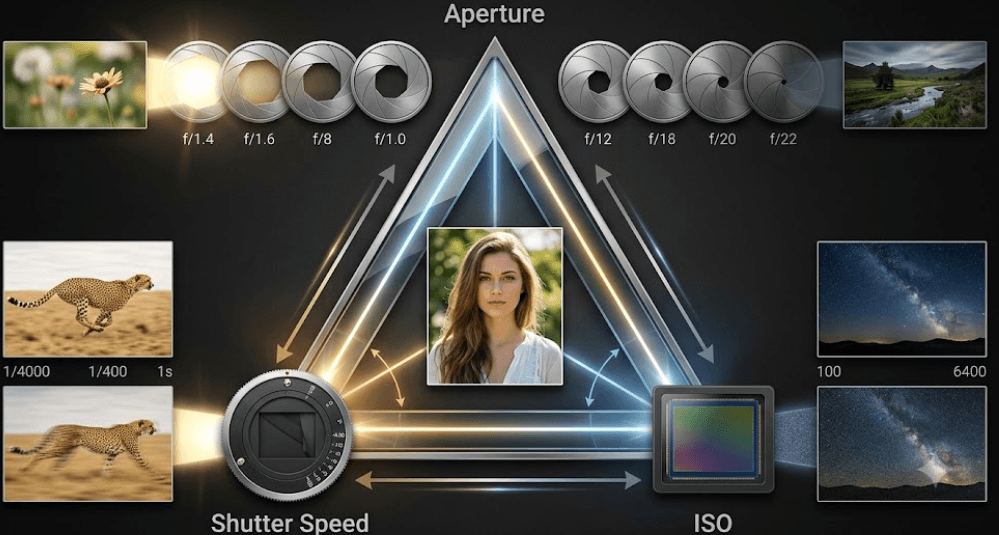
TL;DR: The exposure triangle explains how aperture, shutter speed, and ISO work together to control the brightness and appearance of a photograph. Aperture determines how much light enters through the lens and influences background blur, shutter speed controls how motion appears, and ISO affects the brightness of the captured image and the amount of visible noise. Learning to balance these three settings helps you take sharper portraits, freeze moving subjects, photograph landscapes, and capture better images in low light. You do not need expensive equipment to get started. You simply need to understand which setting to adjust first and how the other two can help you achieve the result you want.
What Is The Exposure Triangle?
The exposure triangle is a photography concept that describes the relationship between three camera settings: aperture, shutter speed, and ISO. Together, these settings determine the exposure of an image, or how bright or dark it appears. Think of taking a photograph as collecting light. Your lens controls how much light enters, your shutter determines how long the sensor is exposed, and ISO influences how the captured signal is rendered in the final image. When these settings work together, you can capture a well-exposed photograph without losing important details in bright or dark areas.
The triangle is useful because changing one setting often creates a reason to adjust another. For example, increasing shutter speed helps freeze a moving subject, but it reduces the time available to capture light. You might compensate by opening the aperture or increasing ISO. Similarly, choosing a smaller aperture to keep more of a landscape in focus reduces the light entering the camera, which may require a slower shutter speed or higher ISO. Understanding these trade-offs gives you more control than relying entirely on automatic settings.
However, the goal is not to make every photograph equally bright. A sunset may look better slightly darker, while a portrait in soft window light may need a brighter exposure. The exposure triangle helps you make those decisions intentionally rather than changing settings at random. As explained in Adobe's guide to the exposure triangle, each setting affects both exposure and the visual qualities of a photograph.
The Three Settings At A Glance
| Camera Setting | Primary Function | Main Creative Effect |
|---|---|---|
| Aperture | Controls the lens opening | Depth of field and background blur |
| Shutter Speed | Controls exposure duration | Freezes or blurs motion |
| ISO | Controls signal amplification and output brightness | Image noise and detail quality |
Aperture Explained: Light And Background Blur
Aperture is the adjustable opening inside a camera lens that allows light to reach the sensor. It is measured in f-stops, such as f/1.8, f/4, f/8, and f/16. The part that often confuses beginners is that a smaller f-number means a wider opening, while a larger f-number means a narrower opening. For example, f/2 lets in more light than f/8 when other conditions remain the same. This makes a wide aperture useful when photographing indoors, shooting portraits, or working in dim lighting.
Aperture also influences depth of field, which describes how much of the scene appears acceptably sharp. A wide aperture, such as f/1.8, can produce a shallow depth of field, helping separate a person from a blurred background. A narrower aperture, such as f/8, generally keeps more of the scene in focus, making it useful for landscapes, architecture, and group photographs. The exact result also depends on factors such as focal length, subject distance, and sensor size, so aperture alone does not determine how blurred a background will look.
Choosing an aperture is therefore about balancing brightness with the appearance you want. If you photograph a person against a busy street, a wider aperture may help make the subject stand out. If you photograph a mountain range and want foreground rocks and distant peaks to appear sharp, a narrower aperture may be more suitable. Remember that extremely narrow apertures can introduce diffraction, which reduces fine detail. Start with the visual result you want, then select an aperture that suits the scene and the available light.
When Should You Change Aperture?
For portraits, try a wide aperture supported by your lens, such as f/1.8 to f/2.8, when you want a softer background. For landscapes, f/8 is a useful starting point when you want more of the scene in focus. Product photography may benefit from f/4 to f/8, depending on how much of the product needs to remain sharp. These are starting points rather than fixed rules because lenses, distances, lighting, and creative preferences vary.
Shutter Speed Explained: Freezing Or Blurring Motion
Shutter speed determines how long the camera exposes its sensor to light for a photograph. It is usually displayed in seconds or fractions of a second, such as 1/1000, 1/250, 1/60, or 1 second. A fast shutter speed allows less time for light to reach the sensor, but it can freeze quick movement. This is why sports photographers often use fast shutter speeds to capture athletes in action, while wildlife photographers use them to record birds or animals without motion blur.
A slower shutter speed allows more light to be collected over a longer period, but movement becomes more visible. This can create attractive effects when photographing flowing waterfalls, moving traffic, or people walking through a busy street. The trade-off is that camera shake can also make the entire photograph look blurred. A tripod helps when using long exposures, while image stabilization can reduce the effect of small movements in supported situations. Neither can freeze a moving subject if the shutter remains open too long.
The right shutter speed depends on how quickly your subject moves and whether you want to freeze or emphasize that movement. For a stationary subject in good light, 1/125 second may be a reasonable starting point for handheld photography. For running children or active pets, you may need 1/500 second or faster. Night photography and light trails may require exposures lasting several seconds, often with a tripod. These values are guides, not guarantees, because camera movement, focal length, subject speed, and stabilization all affect the outcome.
Practical Shutter Speed Starting Points
| Photography Situation | Suggested Starting Point |
|---|---|
| Stationary subject, handheld | 1/125 sec |
| Walking people | 1/250 sec |
| Running children or pets | 1/500 sec |
| Fast sports or wildlife | 1/1000 sec or faster |
| Waterfall motion effect | Around 1/2 sec or longer |
| Night sky or light trails | Several seconds, depending on conditions |
ISO Explained: Brightness And Image Noise
ISO is a setting that controls how the camera processes and amplifies the signal captured by its sensor. In practical terms, raising ISO allows you to produce a brighter image without changing aperture or shutter speed, which is especially useful when light is limited. Common settings include ISO 100, ISO 400, ISO 800, and ISO 3200. A lower ISO generally provides cleaner image quality, while a higher ISO can help you photograph a moving subject in dim conditions without resorting to a shutter speed that is too slow.
The trade-off is image noise, which can appear as grain-like texture or unwanted color speckles, particularly in darker areas. Higher ISO settings can also reduce the amount of fine detail you retain, depending on the sensor, exposure, and image processing. However, high ISO is not automatically bad. Modern cameras often handle higher ISO values better than older models, and the practical result depends on the camera, image size, lighting, and how the photograph will be used.
The most useful approach is to keep ISO as low as practical while still achieving the shutter speed and aperture you need. In bright daylight, ISO 100 or 200 is often a good starting point. Indoors, ISO 800 or 1600 may help you capture a sharp image without flash. For night scenes, you may need a higher value. If you are photographing a moving subject, accepting some noise is often better than getting a blurry photograph. You can also review the image at full size to decide whether the noise is noticeable enough to matter.
Recommended ISO Starting Points
| Lighting Condition | Suggested ISO |
|---|---|
| Bright sunlight | 100–200 |
| Cloudy daylight | 200–400 |
| Bright indoor lighting | 400–800 |
| Dim indoor environment | 800–1600 |
| Night photography | 1600 or higher, as needed |
These values are general starting points. The best ISO depends on the camera, lens, available light, and your chosen shutter speed and aperture.
How Aperture, Shutter Speed And ISO Work Together
The three settings are connected because each affects the final exposure. Suppose you are photographing a person indoors and your image looks too dark. You could open the aperture to let in more light, slow the shutter to increase exposure time, or raise ISO to brighten the result. Each solution has a different consequence: a wider aperture changes depth of field, a slower shutter increases the risk of motion blur, and higher ISO can introduce more noise. The best adjustment depends on which visual quality matters most for that photograph.
Photographers often describe exposure changes in stops. One stop represents a doubling or halving of light in the exposure relationship. For example, changing shutter speed from 1/250 second to 1/125 second doubles the exposure time. Moving from f/4 to f/2.8 also allows approximately twice as much light through the lens, assuming the same lens transmission and other conditions. If you make one change that adds a stop of exposure, you can compensate with another setting to maintain a similar brightness.
This is where the triangle becomes practical. If you need to freeze a moving subject, prioritize shutter speed, then adjust aperture and ISO to get the brightness you need. If you want a blurred portrait background, choose aperture first and balance the other settings around it. For a landscape, decide how much of the scene needs to remain in focus, then consider shutter speed and ISO. A light meter, exposure scale, and histogram can help you judge the result, but the final choice should also reflect the image you intend to create.
Example: Balancing Exposure
| Situation | First Priority | Possible Adjustment |
|---|---|---|
| Portrait with blurred background | Aperture | Use a wide aperture and adjust shutter speed or ISO |
| Fast-moving subject | Shutter speed | Use a fast shutter and raise ISO if needed |
| Landscape with broad focus | Aperture | Choose a narrower aperture and use a tripod if necessary |
| Indoor event | Motion and brightness | Choose a suitable shutter speed, then balance aperture and ISO |
| Night scene on a tripod | Low noise and detail | Use a low ISO and longer exposure when the scene allows |
Common Exposure Triangle Mistakes To Avoid
One common mistake is assuming that a low ISO always produces the best photograph. While lower ISO often helps reduce noise, it does not help if your shutter speed becomes so slow that the subject blurs. Another mistake is believing that a wider aperture always makes a photograph better. Background blur can be attractive in portraits, but it may leave important parts of a group or product out of focus. The settings must serve the subject, not simply follow a rule.
Beginners also tend to change all three settings at once without checking what each adjustment does. This makes it difficult to learn from the result. Instead, take a photograph, review it, and change one setting at a time when practical. Use the camera's exposure meter and histogram to check whether highlights or shadows are losing detail. A histogram is not a guarantee of a perfect image, but it can reveal exposure problems that are difficult to spot on a bright camera screen.
Finally, do not assume that the exposure triangle eliminates the need for good technique or suitable equipment. A fast lens can help in low light, a tripod can support long exposures, and good focus is essential for sharp results. Exposure settings cannot fix missed focus, poor composition, or a subject that is moving faster than your shutter can capture. Learning the triangle gives you better control, but practice and careful observation remain just as important.
Final Recommendation
The best way to learn the exposure triangle is to practice one setting at a time. Start with aperture and photograph the same subject at different f-numbers to see how brightness and background blur change. Next, experiment with shutter speed to freeze movement and create motion blur. Finally, take photographs at different ISO values and compare how noise appears in darker areas. Keep the lighting and framing as consistent as possible so you can understand the effect of each adjustment.
When you are ready to combine all three, choose the setting that matters most for the photograph. Prioritize aperture for depth of field, shutter speed for motion, and ISO for the exposure you can achieve in the available light. Use the camera's meter and histogram as guides, then review the image rather than relying only on the screen preview. With regular practice, these decisions become easier, and you will spend less time guessing and more time creating the photograph you intended.
You do not need to master every camera setting in a single day. Learn the relationship between light, movement, and image quality first. Once the exposure triangle makes sense, moving beyond Auto mode becomes far less intimidating, whether you are taking everyday photos, portraits, travel pictures, or creative long exposures.
Frequently Asked Questions
Q. What is the exposure triangle in photography?
The exposure triangle describes how aperture, shutter speed, and ISO work together to control image exposure. Each setting affects brightness and has a different creative or image-quality consequence.
Q. Which setting controls background blur?
Aperture is a major factor in background blur. A wider aperture, such as f/1.8, can create a shallower depth of field, although focal length, subject distance, and sensor size also matter.
Q. What is the best ISO setting for beginners?
ISO 100 or 200 is a useful starting point in bright daylight. In dimmer conditions, you may need ISO 800, 1600, or higher to achieve a suitable exposure.
Q. Does a higher ISO make a photo brighter?
Increasing ISO generally makes the resulting image brighter without changing aperture or shutter speed. It can also increase visible image noise and reduce detail quality.
Q. What shutter speed should I use for moving subjects?
Try 1/500 second for running children or pets and 1/1000 second or faster for fast sports or wildlife. The right setting depends on subject speed and how much motion you want to freeze.
Q. What is a good aperture for portrait photography?
A wide aperture such as f/1.8 to f/2.8 can separate a person from the background. A narrower aperture may be more suitable for group portraits or when more of the subject needs to remain in focus.
Q. Why do my photos look grainy at night?
Grain-like image noise can become more noticeable when ISO is raised in low light. Try adding light, using a wider aperture, or using a tripod and a slower shutter when your subject is stationary.
Q. Can I change one exposure setting without changing the others?
Yes, but the image brightness may change. If you want to maintain a similar exposure, you can compensate with another setting, provided the desired depth of field, motion rendering, and image quality remain acceptable.
Q. Is a lower ISO always better?
Lower ISO generally reduces noise, but it is not always the best choice. If it forces a shutter speed that causes motion blur, increasing ISO may produce a more useful photograph.
Q. Should beginners use Manual mode to learn the exposure triangle?
Manual mode is useful for understanding how the settings interact, but it is not compulsory. Aperture Priority and Shutter Priority modes also let you learn one setting at a time while the camera adjusts another automatically.
Ready to upgrade your tech?
Browse our collection of quality refurbished products at unbeatable prices.






