
ECC vs Non-ECC RAM in Dell Precision Laptops Explained
ECC and non-ECC RAM serve different purposes in Dell Precision laptops. Learn how error correction, compatibility, performance, and upgradeability affect your workstation choice.

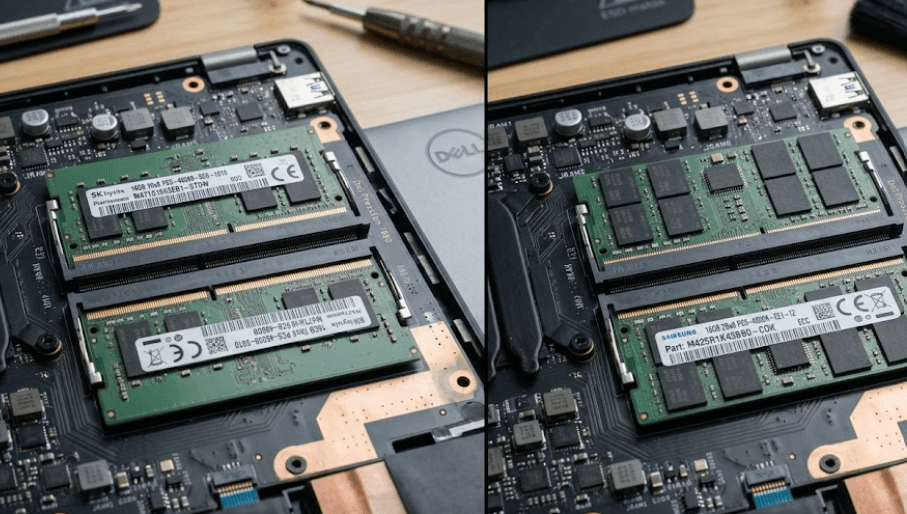
TL;DR ECC and non-ECC RAM are designed for different priorities, and the right choice in a Dell Precision laptop depends largely on your workload and the specific Precision model. ECC memory can detect and correct certain memory errors, making it useful for professional workloads where data integrity and system stability matter. Non-ECC RAM does not provide the same error-correction capability, but it is widely used in mainstream laptops and workstations where capacity, speed, and cost are the bigger considerations. Dell's Precision range includes models with different memory designs, so you cannot assume every Precision laptop supports ECC. For example, the Precision 7680 and 7780 support both ECC and non-ECC DDR5 SODIMM configurations, while the Precision 5690 uses integrated LPDDR5x memory that is not replaceable or upgradeable.
What Is ECC RAM?
ECC stands for Error-Correcting Code, and ECC RAM is designed to detect and correct certain memory errors while the system is operating. This matters because RAM stores information that the processor needs constantly, and an undetected memory error can potentially affect calculations or application data. ECC adds additional error-checking information to the memory system so supported hardware can identify and correct certain single-bit errors. That does not mean ECC makes a computer immune to crashes or data loss, but it provides another layer of protection for workloads where memory reliability is particularly important.
Dell includes ECC memory options in parts of its Precision workstation family because these machines are designed for professional workloads such as engineering, architecture, scientific computing, content creation, and other applications that can place sustained demands on system memory. The exact ECC implementation depends on the Precision model, processor, memory type, and configuration. For example, Dell lists ECC and non-ECC DDR5 SODIMM options for the Precision 7680 and Precision 7780. This is an important distinction because ECC is not simply a feature that can be enabled on any laptop by installing a particular memory module. The platform must support it.
ECC also should not be confused with higher RAM capacity. A 32GB ECC configuration does not automatically perform better than a 32GB non-ECC configuration. ECC's main purpose is error detection and correction rather than increasing memory capacity or making applications automatically run faster. For a professional user working with CAD models, simulations, large datasets, or other sensitive workloads, the reliability benefit may be more relevant than a small difference in memory specifications. For everyday office work, browsing, media, and general productivity, the additional error-correction capability may not be a deciding factor.
How ECC Memory Works
ECC memory uses additional information alongside the stored data to check for certain errors. When supported hardware detects a correctable memory error, it can correct that error without requiring the user to intervene. This is particularly useful in systems that run continuously or perform lengthy calculations, because a memory error occurring during a long task can otherwise potentially cause instability or incorrect results.
| Feature | ECC RAM |
|---|---|
| Error correction | Yes, for supported correctable errors |
| Primary purpose | Memory reliability |
| Performance goal | Stable professional workloads |
| Availability | Model and platform dependent |
| Typical use | Workstations and professional systems |
The important point for Dell Precision buyers is that ECC support is a platform-level feature. Dell's Precision 7680 documentation, for example, lists 16GB, 32GB, and 64GB ECC SODIMM configurations alongside non-ECC options. The same documentation also shows that CAMM configurations listed for that model are non-ECC, which demonstrates why buyers need to check the exact memory configuration rather than relying only on the Precision brand name.
What Is Non-ECC RAM?
Non-ECC RAM is the more common type of system memory used in laptops and many desktop computers. It does not provide the same error-correction mechanism as ECC memory, which allows manufacturers to use a simpler memory design for systems where maximum memory reliability is not the primary requirement. Non-ECC memory is widely used for everyday computing, gaming, productivity, content consumption, and many professional applications.
The absence of ECC does not mean non-ECC RAM is unreliable or unsuitable for demanding work. A non-ECC system can be perfectly capable for professional applications when the workload and platform do not require memory error correction. Dell itself lists non-ECC DDR5 configurations across Precision systems. For example, the Precision 7680 supports multiple non-ECC SODIMM configurations, including dual-channel 32GB and 64GB setups, alongside ECC options.
The bigger difference is what happens when certain memory errors occur. Non-ECC memory does not have the same ability to correct supported memory errors, so users who require additional memory integrity for specialized workloads may prefer an ECC-capable workstation. However, buying ECC simply because it sounds more professional is not always necessary. The processor, GPU, storage, cooling system, memory capacity, and software requirements can have a much larger effect on the actual experience.
Non-ECC Memory In Precision Laptops
Dell's Precision range demonstrates that non-ECC memory can exist alongside ECC memory within the same workstation family. The Precision 7680 and 7780, for instance, list both ECC and non-ECC SODIMM configurations. Dell also specifies that memory speed and maximum capacity vary according to the particular configuration and processor.
| Feature | Non-ECC RAM |
|---|---|
| Error correction | No ECC correction |
| Primary purpose | General performance and capacity |
| Cost | Typically simpler and more widely available |
| Common workloads | Productivity, creative work, general professional use |
| Precision support | Depends on model and configuration |
This makes non-ECC a practical choice when your applications do not specifically require ECC and when the laptop configuration offers the capacity and performance you need. The important thing is to verify the exact Dell configuration rather than assuming that all Precision laptops use the same memory technology.
ECC Vs Non-ECC RAM
The most important difference between ECC and non-ECC RAM is memory error handling. ECC is designed to detect and correct certain errors, while non-ECC memory does not provide that same correction capability. This difference becomes more relevant as workloads become longer, more complex, and more sensitive to memory integrity. A workstation rendering a project or processing a large dataset for hours may have different reliability priorities from a laptop mainly used for documents, web applications, and meetings.
Performance should also be viewed carefully. ECC is not automatically faster, and non-ECC is not automatically faster either. Actual performance depends on memory speed, memory channels, latency, CPU architecture, workload, and the specific system design. Dell's Precision documentation shows that supported memory speeds can vary with the processor and memory configuration, so comparing ECC versus non-ECC purely by the word "ECC" can give you an incomplete picture.
Cost and availability can also influence the decision. If a professional application requires ECC, paying for a compatible ECC configuration may be justified by the workload. If the software does not need ECC, spending more on error-correcting memory may not provide a noticeable improvement in everyday responsiveness. In both cases, compatibility should come first because ECC and non-ECC modules cannot simply be treated as interchangeable options across every Precision laptop.
ECC And Non-ECC Comparison
| Factor | ECC RAM | Non-ECC RAM |
|---|---|---|
| Error correction | Supported for certain correctable errors | Not supported |
| General performance | Depends on platform | Depends on platform |
| Professional workstation use | Useful for reliability-sensitive workloads | Suitable for many professional workloads |
| Upgradeability | Depends on Precision model | Depends on Precision model |
| Compatibility | Requires supported platform | Requires supported platform |
| Best consideration | Data integrity and reliability | Capacity, performance, and value |
The choice therefore comes down to the workload rather than the label alone. Dell's Precision 7680 and 7780 are useful examples because both provide configurations with ECC and non-ECC SODIMM memory, giving buyers a genuine choice depending on their requirements.
ECC Support In Dell Precision Laptops
Dell Precision laptops are not a single hardware platform, so ECC support varies significantly between generations and models. The Precision 7680 and 7780 are examples of larger mobile workstations that support DDR5 SODIMM memory in both ECC and non-ECC configurations. Dell lists up to 64GB using SODIMM memory and up to 128GB using CAMM on these models, although the exact supported configurations differ by memory interface and processor.
By comparison, the Precision 5690 takes a different approach. Dell specifies that its memory is integrated on the system board and uses dual-channel LPDDR5x at 7467 MT/s, with configurations of 16GB, 32GB, and 64GB. Dell also explicitly states that the memory is not replaceable or upgradeable. That means you cannot approach the 5690's memory choice in the same way as a Precision laptop with removable SODIMMs.
This difference is particularly important when buying a refurbished Dell Precision laptop. Two Precision models can have very different memory architectures, and a buyer who assumes that every Precision can accept an ECC SODIMM could end up with the wrong configuration. Always check the exact model's Dell service manual or technical specifications before purchasing or planning a memory upgrade.
Precision Memory Options
| Dell Precision Model | Memory Type | ECC Support | Upgradeability |
|---|---|---|---|
| Precision 5690 | LPDDR5x integrated | Not listed as ECC | Not upgradeable |
| Precision 5680 | LPDDR5 integrated | Not listed as ECC | Not upgradeable |
| Precision 7680 | DDR5 CAMM/SODIMM | ECC and non-ECC SODIMM | Yes, configuration dependent |
| Precision 7780 | DDR5 CAMM/SODIMM | ECC and non-ECC SODIMM | Yes, configuration dependent |
Dell's specifications confirm that the 5680 also uses memory integrated on the system board and is not designed for user memory replacement or upgrades. This makes model-specific research essential when comparing Precision laptops.
Which RAM Should You Choose?
ECC RAM makes the most sense when memory integrity is a meaningful part of your professional workload. Engineers, scientists, architects, and other professionals working with demanding applications may value the additional error-correction capability, particularly when long-running calculations or large datasets are involved. Dell positions Precision workstations for professional workloads including engineering, animation, photography, graphic design, and heavy compute applications, which helps explain why ECC options appear on selected models.
Non-ECC RAM is more appropriate when your workload does not specifically require ECC and you want to focus on practical performance, capacity, and configuration value. A Precision laptop with 32GB or 64GB of non-ECC memory can still be a powerful professional machine when paired with an appropriate processor, GPU, SSD, and cooling system. The absence of ECC should not be interpreted as meaning that the entire laptop is unsuitable for professional work.
For refurbished buyers, the decision becomes even more configuration-focused. A machine with 64GB of compatible non-ECC memory can be more useful than a lower-capacity ECC configuration if your applications are primarily limited by available RAM rather than memory-error handling. Conversely, if your professional workflow specifically benefits from ECC, buying a model that supports ECC from the beginning is preferable to assuming you can add it later.
Choosing Based On Workload
| Workload | Memory Consideration |
|---|---|
| Office work and browsing | Non-ECC is generally sufficient |
| Photo and video editing | Capacity and system performance are important |
| CAD and 3D work | Check application and workstation requirements |
| Scientific computing | ECC can be valuable where supported |
| Long-running professional calculations | ECC may provide an additional reliability layer |
| General productivity | Non-ECC is usually adequate |
The key is to match the memory technology to the application rather than paying for specifications you do not need. Dell's Precision lineup gives buyers several different approaches, from integrated LPDDR memory in thinner systems to expandable ECC and non-ECC DDR5 configurations in larger mobile workstations.
Common ECC RAM Buying Mistakes
One common mistake is assuming that every Dell Precision laptop supports ECC RAM. The Precision name identifies a workstation family, not one universal memory architecture. The Precision 5690, for example, has integrated LPDDR5x memory that Dell says is not replaceable or upgradeable, while the Precision 7680 and 7780 offer ECC and non-ECC SODIMM configurations. Checking the exact model number before purchasing is therefore essential.
Another mistake is assuming that ECC automatically means better overall performance. ECC is primarily about memory error handling and reliability. It does not automatically increase CPU performance, GPU performance, SSD speed, or application responsiveness. If your workload is limited by GPU rendering performance or insufficient RAM capacity, switching from non-ECC to ECC alone will not solve that bottleneck.
A third mistake is buying memory based only on capacity or memory generation. DDR5 does not automatically mean that every DDR5 module will work in every Precision laptop. Dell's specifications show differences between SODIMM, CAMM, and integrated LPDDR configurations, along with processor-specific speed limitations. A compatible 32GB configuration is therefore more important than simply buying the cheapest 32GB module you can find.
Frequently Asked Questions
Q. What is ECC RAM in a Dell Precision laptop?
ECC RAM is memory designed to detect and correct certain memory errors when the supporting system hardware is configured for ECC. It is intended to add a layer of memory reliability for supported professional workloads.
Q. What is non-ECC RAM?
Non-ECC RAM does not provide the same error-correction capability as ECC memory. It is widely used in laptops and workstations where capacity, speed, compatibility, and cost are the primary considerations.
Q. Is ECC RAM faster than non-ECC RAM?
Not necessarily. ECC and non-ECC describe memory error handling rather than a guaranteed performance level. Actual performance depends on the laptop's processor, memory speed, configuration, and workload.
Q. Do all Dell Precision laptops support ECC RAM?
No. ECC support varies by model and configuration. Dell's Precision 7680 and 7780 support ECC and non-ECC SODIMM configurations, while the Precision 5690 uses integrated LPDDR5x memory and does not provide user-replaceable memory.
Q. Can I upgrade non-ECC RAM to ECC RAM later?
Only if the specific Precision model and its supported hardware configuration allow ECC memory. ECC cannot simply be enabled through software, and a laptop with integrated memory cannot be converted into an ECC system through a normal RAM upgrade.
Q. Is ECC RAM worth it for CAD work?
It can be useful for professional workloads where memory reliability matters, but the requirement depends on the application and workstation configuration. CAD performance also depends heavily on the processor, professional GPU, memory capacity, and software optimization.
Q. Is 32GB non-ECC RAM enough for a Dell Precision laptop?
For many professional workloads, 32GB can provide substantial working capacity. Whether it is enough depends on the applications, project size, multitasking requirements, and whether the laptop supports future memory upgrades.
Q. Which Dell Precision laptops have upgradeable RAM?
Models with removable SODIMM or CAMM memory can provide upgrade options, depending on the configuration. Dell's Precision 7680 and 7780 specifications list SODIMM and CAMM interfaces, while the Precision 5690 and 5680 use integrated memory that is not replaceable or upgradeable.
Q. Does ECC RAM prevent all memory-related crashes?
No. ECC is designed to detect and correct certain memory errors, but it does not make a computer immune to crashes, hardware failures, software bugs, or every possible type of memory fault.
Q. Should I choose ECC or non-ECC RAM for a refurbished Dell Precision?
Start by checking the exact Precision model, supported memory type, workload, and required capacity. ECC can be valuable for reliability-sensitive professional workloads, while non-ECC can be entirely appropriate for many productivity and creative workloads.
Final Recommendation
ECC and non-ECC RAM are not competing versions where one is universally better than the other. ECC is primarily about adding memory error correction, while non-ECC memory is a practical choice for systems where that additional correction capability is not required. For a Dell Precision buyer, the most important step is to identify the exact model and check its supported memory configuration before making a decision.
For professional workloads where memory integrity matters, a Precision model with supported ECC memory can provide an additional reliability layer. For general productivity, creative work, and many professional applications, a properly configured non-ECC Precision can still deliver excellent performance. Capacity, memory speed, processor, GPU, storage, and cooling should all be considered alongside ECC support.
For refurbished Dell Precision laptops, do not choose based on the word "ECC" alone. Check whether the memory is integrated, SODIMM, or CAMM, confirm the maximum supported capacity, verify processor compatibility, and then match the configuration to your workload. Dell's Precision 7680 and 7780 show that ECC and non-ECC can coexist within the same workstation platform, while models such as the 5690 demonstrate that some Precision laptops use integrated memory instead. That model-specific approach is the safest way to choose the right Precision configuration.






