
Dual Card Slots on Cameras: Do You Really Need Them?
Discover how dual card slots work, compare backup and overflow recording, and find out whether two memory card slots are worth the investment for professional photographers, videographers, and hobbyists.

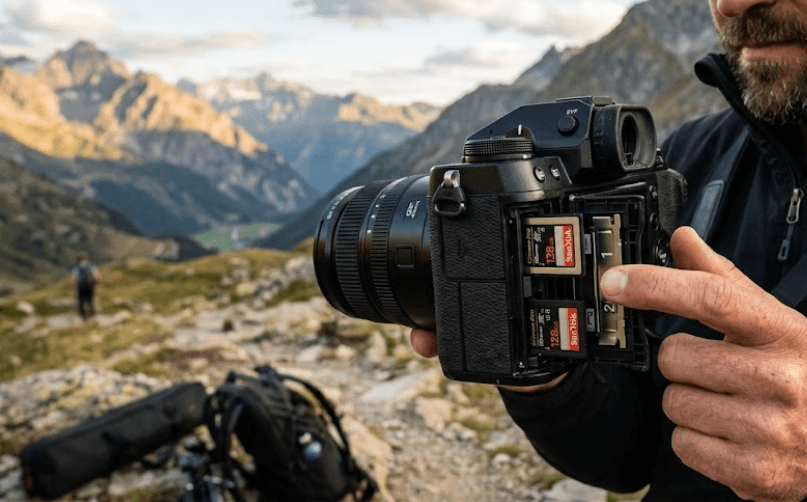
TL;DR: Dual card slots allow a camera to use two memory cards for backup recording, additional storage, or separate file types, depending on the model. They are particularly valuable for wedding photographers, event professionals, sports photographers, and anyone capturing unrepeatable moments. However, not every photographer needs this feature. If you primarily shoot casual travel photos, personal projects, or content that can easily be recreated, a single card slot may be sufficient. The right choice depends on how important your files are, how you work, and whether the additional cost fits your photography needs.
What Are Dual Card Slots In A Camera?
Dual card slots are two separate memory card slots built into a camera body. Instead of relying on a single card to store every photograph or video, compatible cameras can use both slots according to their available recording settings. Depending on the model, you might find two SD card slots or a combination of different formats, such as SD and CFexpress. The supported card types and their speeds vary between cameras.
The main advantage is flexibility. Some cameras can save identical files to both cards simultaneously, creating an in-camera backup while you shoot. Others allow you to use the second card when the first becomes full, or save different file types to separate cards. Certain hybrid cameras also support separating photographs and videos between cards. These options can simplify file management and help photographers adapt their storage workflow to different assignments.
However, having two card slots does not automatically mean that a camera is recording a backup. The recording mode must be configured correctly, and the camera must support the intended function. If the camera is set to use the second card only after the first fills up, for example, you will not have two copies of each photograph. Understanding these differences is essential before deciding whether dual card slots are worth paying extra for.
How Do Dual Card Slots Work?
Backup Recording
Backup recording writes the same photograph to both memory cards when the image is captured. If one card later becomes unreadable, the second may still contain a usable copy of the photograph. This is particularly useful during weddings, corporate events, paid portrait sessions, and other assignments where losing an important image could affect your client or business.
For example, a wedding photographer can configure a compatible camera to save each photograph to two cards simultaneously. If one card develops a problem, the photographer may be able to recover the corresponding images from the other. However, this is not a complete guarantee against data loss. Both cards remain inside the same camera, so theft, physical damage, or certain camera failures could affect both copies.
Overflow Recording
Overflow recording, sometimes called sequential or relay recording, uses the second card as additional storage when the first card fills up. Rather than creating duplicate files, the camera continues recording to the next card according to its configured sequence. This can be useful for sports photography, wildlife shoots, travel assignments, and long video sessions where replacing cards frequently would interrupt the workflow.
The important distinction is that overflow recording extends available recording capacity but does not provide an immediate duplicate of every file. If the first card fails before the camera switches to the second, files stored on the first card may still be lost. Photographers who need both additional capacity and redundancy should check whether their camera supports the desired recording modes and choose the appropriate setting.
Separate File Types
Some cameras allow photographers to save RAW files to one card and JPEG files to another. RAW files preserve more data for extensive editing, while JPEG files are processed in-camera and are often easier to share quickly. Keeping them separate can simplify a workflow in which the photographer edits RAW files but sends JPEG previews to a client or team.
Supported options vary by camera. Some models also allow still photographs and videos to be saved to different cards, while others provide more limited file-separation settings. Do not assume that every dual-slot camera supports every combination. Check the manual for your specific model before choosing a workflow.
Why Dual Card Slots Matter For Professional Photographers
For wedding photographers, event coverage, and commercial assignments, many important moments cannot simply be recreated. A missed photograph during a ceremony, an important corporate announcement, or a once-in-a-lifetime family event can have consequences beyond the cost of replacing a memory card. Simultaneous backup recording reduces the risk associated with a single card failing during the shoot.
Dual card slots can also help photographers manage large assignments. Sports and wildlife photographers may capture hundreds or thousands of images in a session, while videographers can generate substantial amounts of footage. Overflow recording can reduce interruptions caused by full cards, while supported file-separation modes can make post-production more organized.
For professionals who deliver photographs under tight deadlines, a second card can also support a more efficient handoff process. JPEG files may be available for quick previews while RAW files remain available for detailed editing, provided the camera supports that recording configuration. Nevertheless, dual slots should be treated as one part of a broader data-management process rather than a substitute for transferring files and maintaining independent backups.
Dual Card Slots Vs. A Single Card Slot
The biggest difference between single-slot and dual-slot cameras is not necessarily image quality. A camera with one card slot can still produce excellent photographs, provided its sensor, lens, autofocus, exposure performance, and other capabilities meet your requirements. Dual slots primarily affect recording flexibility, redundancy, and storage management rather than making the captured image inherently better.
A single-slot camera can be a sensible choice for beginners, hobbyists, students, and creators working on projects that can be recreated. It may also be a practical option when budget is limited and you already have a reliable process for transferring files to a computer or external storage. The key is to understand the risk of keeping the only copy of important files on one memory card.
Dual-slot cameras offer greater flexibility, but they can also cost more. Some models use different card formats in each slot, meaning you may need to purchase compatible cards with different capacities or performance specifications. Compare the overall cost of the camera and storage accessories rather than judging the feature in isolation.
| Feature | Single Card Slot | Dual Card Slots |
|---|---|---|
| Image quality | Depends on the camera | Depends on the camera |
| Simultaneous in-camera backup | Not available through a second slot | Available on supported models |
| Additional recording capacity | Requires replacing or transferring cards | May support overflow recording |
| Separate file storage | Depends on camera features | Available on supported models |
| Card compatibility | One supported slot type | May support one or two card formats |
| Initial storage cost | Usually lower | May require purchasing two cards |
| Best suited for | Casual and budget-conscious shooting | Professional and data-sensitive workflows |
What To Consider Before Buying A Dual-Slot Camera
Your Photography Requirements
Start by considering what you photograph and how costly it would be to lose the files. A wedding photographer, paid event shooter, or commercial photographer working with non-repeatable moments has a stronger reason to prioritize simultaneous backup recording than someone photographing everyday activities. If your work depends on delivering specific images to clients, redundancy can be worth the additional expense.
Next, think about the duration and volume of your shoots. Long events, wildlife sessions, and extended video recordings can benefit from overflow recording, provided the camera supports it. If you regularly separate RAW files, JPEG previews, photographs, and videos, check whether the camera's recording options fit your workflow.
Finally, consider your backup habits. Even a dual-slot camera requires you to transfer files safely and maintain independent copies. If you already use a disciplined system involving a computer and external drives, a second card adds another layer of protection, but it does not eliminate every storage risk.
Card Compatibility And Performance
Before buying a camera, confirm which card formats each slot supports. Two slots do not necessarily accept the same type of card. For example, a camera may combine an SD slot with a CFexpress Type B slot, requiring you to purchase the correct card for each. Always consult the manufacturer's specifications rather than assuming that an existing card will fit both slots.
Card speed also matters, especially for high-resolution video, continuous shooting, and demanding burst photography. A card that works for ordinary still photographs may not meet the sustained write-speed requirements of a particular video mode. Check the camera's recommended card specifications and ensure that both cards meet the requirements of the recording configuration you intend to use.
Also consider capacity and cost. If you plan to record identical files to both cards, you need enough capacity on each card for the assignment. If you use different card formats, compare their prices and availability before committing to a camera system. Choosing compatible, reliable cards is more important than simply buying the largest capacity available.
Common Mistakes To Avoid With Dual Card Slots
One common mistake is assuming that inserting two cards automatically creates a backup. Many cameras allow different configurations, including overflow recording, separate file storage, and simultaneous backup. Check the recording settings before an important assignment and confirm that the camera is using the intended mode. A quick test can help prevent an unpleasant surprise later.
Another mistake is treating two cards as a complete backup strategy. If both cards remain in the camera, they can still be lost together through theft, accidental damage, or certain equipment failures. Once practical, transfer the files to a computer or external storage device and verify that the copies are accessible. For important assignments, maintain additional copies on separate storage devices, with an off-site or secure cloud copy where appropriate.
Finally, avoid removing cards while the camera is writing data. Wait for the card-access indicator to stop and follow the manufacturer's instructions before removing or replacing a card. Use compatible cards, format them in the camera when appropriate after safely transferring existing files, and replace cards that show repeated errors. Good handling and a reliable backup routine remain essential regardless of how many slots your camera has.
Final Recommendation And Decision Framework
Dual card slots are a valuable feature for photographers who cannot afford to lose important images. Wedding photographers, professional event shooters, commercial photographers, and other creators handling irreplaceable footage should strongly consider a camera that supports simultaneous backup recording. The ability to maintain two copies during capture can reduce the risk associated with relying on a single memory card.
For hobbyists, students, casual travelers, and photographers working on repeatable projects, a single-slot camera can still be an excellent choice. You may get better overall value by prioritizing autofocus, image quality, lens compatibility, ergonomics, or video capabilities rather than paying extra for a second slot you rarely use. A well-managed single-card workflow can be perfectly reasonable for many everyday photography needs.
Before making your decision, check the exact camera model's supported card formats and recording modes. Confirm whether it can record identical files to both cards, whether overflow recording is available, and whether different file types can be separated. Most importantly, maintain an independent backup routine. Dual card slots add protection at the moment of capture, but careful file management is what helps keep your photographs safe over the long term.
Frequently Asked Questions
Q. What are dual card slots on a camera?
Dual card slots are two memory card slots built into a camera. Depending on the model and settings, they can provide simultaneous backup recording, additional storage, or separate file storage.
Q. Do dual card slots improve image quality?
No. They primarily improve recording flexibility and data redundancy. Image quality depends on factors such as the sensor, lens, exposure settings, and image processing.
Q. Are dual card slots necessary for wedding photography?
They are strongly recommended for photographers covering weddings because many moments cannot be recreated. Simultaneous recording provides an additional copy if one card fails, although it cannot prevent every type of data loss.
Q. Can both memory cards record the same photograph?
Yes, if the camera supports simultaneous backup recording and the appropriate setting is enabled. Not every dual-slot camera offers identical recording options.
Q. What is the difference between backup and overflow recording?
Backup recording saves duplicate files to both cards. Overflow recording uses the second card when the first becomes full, increasing available recording capacity without duplicating every file.
Q. Can I use different memory card types in a dual-slot camera?
Some cameras support different formats in each slot, such as SD and CFexpress. Others use two slots of the same type. Check the specifications for your camera before purchasing cards.
Q. Can I record RAW files on one card and JPEG files on another?
Some dual-slot cameras support this option. Availability depends on the camera model, image-quality settings, and supported recording modes.
Q. Do dual card slots mean I no longer need external backups?
No. Both cards can be lost or damaged together while inside the camera. Transfer your files to separate storage devices and maintain additional copies for important assignments.
Q. Is a dual-slot camera better for video recording?
It can be, particularly when the camera supports simultaneous video backup or other useful recording options. However, card speed, capacity, resolution, and frame-rate requirements remain important.
Q. Should beginners buy a camera with dual card slots?
Not necessarily. Beginners can often start with a single-slot camera and a reliable backup routine. Dual slots become more valuable as assignments become less repeatable and the consequences of losing files increase.
Ready to upgrade your tech?
Browse our collection of quality refurbished products at unbeatable prices.






