
DIY Product Photography at Home: A Simple Lighting Setup for Small Sellers
Create professional-looking product photos at home with a smartphone, window light, and DIY reflectors. Learn simple lighting techniques, camera tips, and editing basics to help small sellers create clear, consistent online listings.

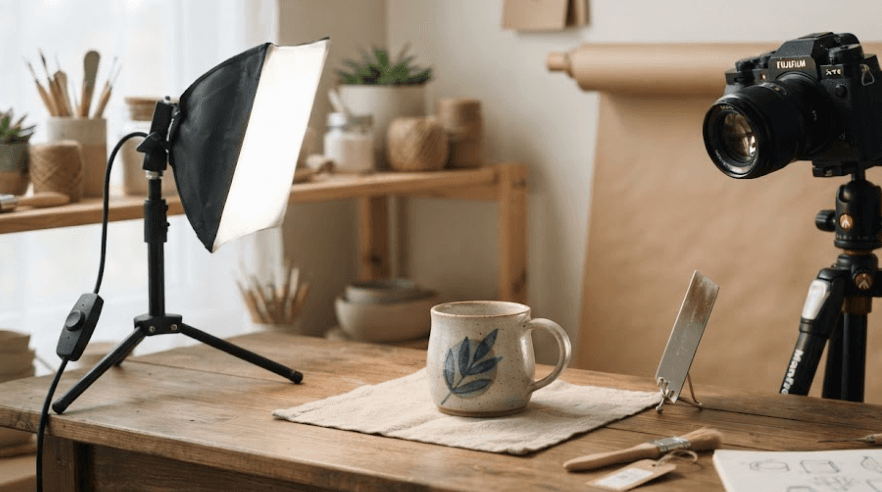
TL;DR: You don't need an expensive camera or a professional studio to create attractive product photos for your online store. A smartphone, a window, a clean background, and a homemade reflector can help you capture clear, well-lit images at home. The key is to use soft, consistent lighting, position your product carefully, and keep colours as close to the actual item as possible. This guide explains how to build an affordable lighting setup, photograph different types of products, and prepare images for online listings.
Why Product Photography Matters For Small Sellers
Product photos are often the first thing customers notice when browsing an online store. Unlike shopping in person, buying online doesn't let customers touch a fabric, inspect a finish, or check the actual size of an item. Clear photographs help bridge that gap by showing the product's appearance, texture, features, and details before someone decides to buy it.
For small sellers, professional photography can be expensive, especially when launching a new business or listing several products at once. Fortunately, you can create useful, attractive product images with equipment you already own. A smartphone, a table near a window, and a few inexpensive materials can provide a practical starting point without requiring a dedicated photography studio.
Good product photography is about more than making an item look attractive. Your images should represent the product honestly, maintain consistent lighting, and help customers understand what they're purchasing. A carefully lit photograph can highlight important details without changing the item's actual colour, shape, or finish. This balance between visual appeal and accuracy is essential for building customer confidence.
What You Need For A DIY Product Photography Setup
Essential Equipment On A Budget
Start with a smartphone that has a working camera, a stable surface, and enough space to arrange your product. You don't need a professional DSLR or mirrorless camera to begin. A modern smartphone can produce suitable images for many online listings when you use good lighting, keep the camera steady, and focus carefully.
For the lighting setup, choose a window that provides indirect daylight. You'll also need white poster board or foam board, a plain background, and some tape to secure the materials. A basic phone stand or tripod is helpful for keeping the camera in the same position throughout the shoot, especially when photographing multiple products.
Before buying additional equipment, test what you already have. White printer paper can work as a small reflector, while a clean bedsheet or large sheet of paper may serve as a background. If you eventually need more control over lighting or frequently photograph products, you can consider investing in a diffuser, a softbox, or dedicated continuous lighting.
| Equipment | Purpose | Budget-Friendly Alternative |
|---|---|---|
| Smartphone | Captures product images | Any suitable phone camera |
| Window | Provides natural light | A large, shaded doorway |
| White background | Keeps attention on the product | Poster paper or a clean sheet |
| Reflector | Softens shadows | White cardboard or printer paper |
| Phone tripod | Keeps framing steady | A stable phone stand |
| Tape or clips | Secures the setup | Existing stationery or clamps |
Step 1: Choose The Right Location And Background
Set Up Near A Window
Find a location with a large window that provides plenty of indirect daylight. Place a table near the window, leaving enough room to position the product and a reflector. Begin with the window to one side of the product rather than directly behind the camera. Side lighting helps reveal shape and texture while creating natural-looking shadows.
Avoid direct sunlight falling onto the product, particularly when photographing clothing, cosmetics, or objects with glossy surfaces. Strong sunlight can create harsh shadows, bright highlights, and uneven exposure. If the light is too intense, move the setup farther from the window or use a suitable diffuser to soften it. Never attach flammable materials to hot lamps or place improvised diffusers where they could create a fire hazard.
Keep the surrounding lighting consistent during the shoot. If you're using daylight, turn off nearby room lights that introduce noticeably different colour tones. Mixing daylight with warm household bulbs can make white backgrounds look yellow, or products appear different from their actual colours. A consistent light source makes it easier to achieve a natural, balanced result.
Create A Clean Background
Use a plain white, grey, or neutral-coloured background that complements the product. For small items, place a sheet of poster board on the table and curve the remaining portion upward against a wall. This creates a seamless background without a visible corner or distracting line behind the product.
Secure the background with tape or clips so it doesn't move between shots. Check for wrinkles, dust, fingerprints, and marks before photographing the item. If you're selling colourful products, a neutral background can help their details stand out without competing for attention.
White is a popular choice for catalog images, but it isn't always the best option for every product. A white object may blend into a white background, while a dark product can look more defined against a lighter grey surface. Choose a background that makes the item's edges easy to see, and check the image requirements of your selling platform before finalizing your setup.
Step 2: Build A Simple One-Light Setup
Use Window Light As Your Main Source
The easiest lighting arrangement uses a window as the main light source. Place your product near the window and position your camera in front of it, slightly to the side if necessary. Start with the light coming from approximately 45 degrees to one side of the product, then adjust the angle until the shape, texture, and important details are clearly visible.
The exact distance depends on the window, product, and available space. Moving closer to a large window can produce softer light relative to the subject, while moving farther away can change the light's intensity and the way shadows appear. Take a few test photographs before settling on a position.
Once you find an arrangement that works, keep it consistent throughout the shoot. Photograph similar products under the same lighting conditions whenever possible. This makes the images easier to compare and helps your online store maintain a cohesive appearance across different product listings.
Add A DIY Reflector
Place a white foam board or piece of cardboard on the side opposite the window. The board reflects some of the incoming light back onto the darker side of the product, reducing harsh shadows without requiring another lamp. Adjust its distance and angle until the shadows look balanced, but the product still retains its natural shape.
A reflector is particularly useful for photographing small accessories, skincare packaging, stationery, and other tabletop products. If the shadow remains too dark, move the board closer. If the image begins to look flat, move it farther away or angle it slightly so that less light returns to the subject.
You can also use a black card when you want more contrast around reflective or pale products. Unlike a white reflector, a black card absorbs light and can create a darker edge that separates the object from its surroundings. Experiment with white and black cards to see which treatment best represents the product.
| Lighting Element | Placement | Result |
|---|---|---|
| Window | To one side of the product | Main light and natural shadows |
| White reflector | Opposite the window | Softer, brighter shadows |
| Black card | Near the shadow side | Deeper contrast and clearer edges |
| Camera | In front of the product | Captures the final composition |
Step 3: Position Your Product And Camera
Place the product on the background and remove dust, fingerprints, loose threads, and packaging marks. Straighten labels, arrange fabric carefully, and make sure the item looks the way a customer would expect to receive it. Small imperfections can become more noticeable in close-up images, so preparation is worth the extra time.
Position your smartphone on a stable stand and keep the lens clean. Use the rear camera if it provides better image quality, and tap the product on the screen to focus when needed. Avoid digital zoom where possible because cropping or enlarging the image can reduce visible detail. Instead, move the phone closer while maintaining an appropriate distance for the camera to focus.
Take photographs from several useful angles rather than relying on a single image. A front view shows the overall design, a side view helps communicate shape, and a close-up can reveal texture, labels, stitching, or other important features. For clothing and accessories, include details that help customers understand the material and finish. For electronics, photograph ports, buttons, and included accessories when relevant.
Step 4: Adjust Camera Settings And Check Image Quality
Keep Exposure And Colour Consistent
Most smartphone cameras automatically adjust brightness and colour, which is convenient for beginners. However, automatic settings may change between photographs, especially when the background or lighting varies. If your camera app allows exposure adjustment, make small changes to prevent bright areas from losing detail or darker areas from becoming difficult to see.
White balance also affects how colours appear in a photograph. If a white background looks noticeably yellow or blue, check the lighting and camera settings before editing the image. Using one consistent light source can reduce unwanted colour shifts. For more demanding work, a neutral grey card can help you assess and correct white balance.
Keep the camera steady and review your test shots at full size. Check whether labels are readable, edges are sharp, and important details remain visible. If the image looks soft, clean the lens, improve the lighting, stabilize the phone, and refocus before taking another photograph.
Use Editing To Improve Accuracy
Basic editing can improve brightness, contrast, white balance, and cropping. Make small adjustments that help the product appear clear and natural rather than applying strong filters that change its appearance. Compare the edited image with the actual item to ensure that colours, patterns, and surface details remain believable.
Crop images consistently so that similar products occupy a comparable amount of space in the frame. Export them in a format and size suitable for your online store, and follow the marketplace's current image requirements. JPEG is widely supported for product photography, while other formats may be appropriate when a platform supports them and transparency or additional image quality is needed.
Avoid removing product defects, changing the appearance of materials, or editing out features that customers should know about. You can clean up dust on the background, but the finished image should still represent the item accurately. Honest images help customers make informed decisions and reduce confusion after delivery.
Step 5: Adapt The Lighting For Different Products
Different materials respond to light in different ways. Clothing benefits from even illumination that reveals colour and texture, while jewellry and glass can produce unwanted reflections. Cosmetics packaging may need carefully controlled highlights so that labels remain readable. Adjust the setup to suit the product rather than expecting one lighting arrangement to work equally well for everything.
For shiny products, use a larger diffused light source where possible and experiment with the angle of the product and camera. Reflective surfaces show the environment around them, including windows, furniture, and the photographer. White cards can create cleaner reflections, while black cards can add definition. Small adjustments often make a noticeable difference.
For transparent products, such as glass bottles, try placing the light to the side or behind the item while checking the visibility of its edges and label. For dark products, use a lighter background and enough fill light to preserve details. For white products, consider a grey background or carefully controlled shadows to prevent the item from disappearing into the background.
Common Product Photography Mistakes To Avoid
One common mistake is using the phone's flash or placing a product under a harsh overhead light. These light sources can create strong reflections, deep shadows, and uneven brightness. Another is photographing beside a window without checking whether direct sunlight is falling on the product. Test the setup first and soften the light when necessary.
Inconsistent backgrounds, changing camera angles, and mixed lighting can also make a product catalog look disorganized. If you photograph several products for the same store, keep the table, background, camera position, and lighting arrangement as consistent as possible. A repeatable setup saves time and makes new listings easier to match with existing ones.
Finally, avoid excessive editing, cluttered props, and photographs that hide important product details. Props can help communicate scale or show an item in use, but they should not distract from the product itself. Before publishing, review each image on a phone and computer screen to check that the product is easy to identify and the important details remain visible.
| Common Mistake | Why It Matters | How To Fix It |
|---|---|---|
| Harsh direct sunlight | Creates strong shadows and highlights | Diffuse the light or change the position |
| Mixed light sources | Can cause inconsistent color | Use one consistent light source |
| Shaky camera | Produces blurred images | Use a stable stand or tripod |
| Busy background | Distracts from the product | Choose a simple, clean backdrop |
| Heavy editing | Can misrepresent the item | Make restrained, accurate adjustments |
| Inconsistent framing | Makes the catalog look uneven | Keep camera placement and cropping consistent |
Final Recommendation
DIY product photography is a practical starting point for small sellers who want attractive product images without investing in a full studio. A smartphone, indirect window light, a plain background, and a white reflector provide a simple setup that can work well for many small products. The biggest improvements often come from controlling the light, preparing the product, and keeping the camera steady rather than purchasing expensive equipment.
Start with one product and experiment with the position of the window, reflector, and camera. Take test shots, compare the results, and record the arrangement that works best. Once you have a reliable setup, use it to photograph the rest of your inventory and maintain consistent lighting, framing, and editing across your listings.
As your business grows, consider additional equipment only when you can identify a specific need. A tripod, diffuser, or continuous light can make repeat shoots easier, especially when daylight changes. Whatever equipment you use, prioritize clear details, accurate colours, and honest representation. Your product photographs should help customers understand exactly what they are buying while presenting your store in a professional and consistent way.
Frequently Asked Questions
Q. Can I take product photos at home with my phone?
Yes. A smartphone can capture suitable product photos for many online listings. Use good lighting, a clean background, a steady camera, and careful focusing to improve image quality.
Q. What is the best lighting for product photography at home?
Soft, diffused light is a good starting point. Indirect window light works well for many products, while a softbox or diffused continuous light can provide more control and consistency.
Q. Do I need a ring light for product photography?
No. A ring light is optional. Window light, a white reflector, and a stable phone can be enough for basic product photography. The best choice depends on the product and the lighting effect you want.
Q. How do I make product photos look professional?
Use consistent lighting, a clean background, sharp focus, balanced exposure, and simple compositions. Photograph useful angles and edit carefully without changing the product's actual appearance.
Q. Can I use white chart paper as a product photography background?
Yes. White chart paper or poster board works well for many small products. Secure it in place and curve it upward behind the product to create a seamless background.
Q. How do I avoid harsh shadows in product photos?
Use indirect or diffused light and place a white reflector opposite the main light source. Adjust the reflector's distance and angle until the shadows are softer without making the product look flat.
Q. How do I photograph shiny products without glare?
Use a larger diffused light source, adjust the camera and product angles, and place white or black cards around the product to control reflections. Highly reflective objects may need more advanced lighting techniques.
Q. Should I edit product photos before uploading them?
Basic editing can improve exposure, white balance, and cropping. Keep adjustments realistic so that colors, textures, and product details remain accurate.
Q. What background color is best for product photography?
White and neutral gray backgrounds work well for many products because they reduce distractions. Choose a background that separates the product's edges clearly and meets the requirements of your selling platform.
Q. How can small sellers keep product photos consistent?
Use the same lighting arrangement, background, camera position, and editing approach for similar products. Photographing several items in one session can also help maintain consistent results.
Ready to upgrade your tech?
Browse our collection of quality refurbished products at unbeatable prices.






