
Dell Precision vs Lenovo ThinkPad P-Series: Which Mobile Workstation Wins?
Dell Precision and Lenovo ThinkPad P-Series workstations target demanding professional workloads. Here is how their performance, displays, graphics, upgradeability, and portability compare in 2026.

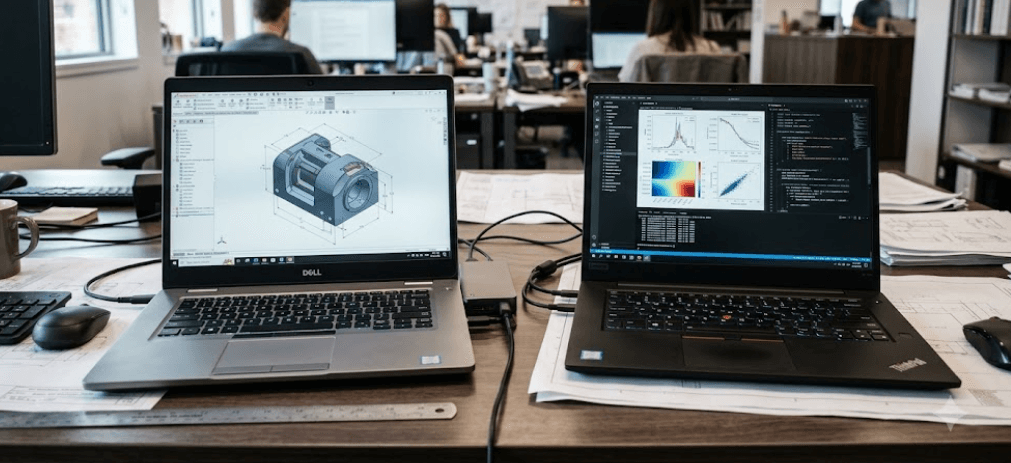
TL;DR Dell Precision and Lenovo ThinkPad P-Series mobile workstations are designed for professional workloads such as CAD, 3D modeling, engineering, content creation, simulation, and data-heavy applications. In 2026, the comparison is slightly more complicated because Dell is transitioning its workstation branding toward the Pro Max family, while Precision models remain listed in Dell's catalog. Lenovo continues to position the ThinkPad P-Series as its dedicated mobile workstation range. The right choice depends less on brand and more on the exact processor, professional GPU, memory configuration, display, storage, and portability you need.
Dell Precision And ThinkPad P-Series Explained
Dell Precision and Lenovo ThinkPad P-Series occupy the professional end of the laptop market. Unlike mainstream business laptops, these machines are designed around demanding applications that can benefit from professional graphics, higher memory capacities, stronger cooling, and workstation-oriented certifications. Lenovo specifically describes its ThinkPad P-Series as mobile workstations with ISV certification for major professional applications, while Dell positions Precision and its newer Pro Max workstation models around professional and power-user workloads.
The biggest difference is not simply the logo on the lid. Dell's Precision range has historically covered several classes of mobile workstations, including thinner models such as the Precision 5690 and larger performance-focused machines such as the Precision 7680. In 2026, Dell's newer Pro Max lineup is taking over much of that workstation positioning. The Pro Max 16, for example, can be configured with NVIDIA RTX PRO Blackwell graphics, while the Pro Max 16 Plus goes considerably further with higher-end RTX PRO options and large-memory configurations.
Lenovo's current ThinkPad P-Series is similarly divided by workload and size. The ThinkPad P1 is aimed at users who want workstation capability in a relatively portable design, while the ThinkPad P16 is built around heavier performance and expansion. The current P1 Gen 9 can use up to 96GB of LPCAMM2 memory, while the P16 Gen 3 uses conventional DDR5 SODIMM configurations and is designed for heavier workstation workloads.
The Current Workstation Lineup
| Brand | Workstation Family | Example Model | Positioning |
|---|---|---|---|
| Dell | Precision | Precision 7680 | Performance-focused mobile workstation |
| Dell | Pro Max | Pro Max 16 | Current professional workstation family |
| Dell | Pro Max Plus | Pro Max 16 Plus | Higher-end workstation performance |
| Lenovo | ThinkPad P-Series | ThinkPad P1 Gen 9 | Portable professional workstation |
| Lenovo | ThinkPad P-Series | ThinkPad P16 Gen 3 | High-performance mobile workstation |
Performance And Professional Graphics
Processor and GPU selection matter more on a workstation than they do on a conventional office laptop. A professional user running CAD, engineering simulation, 3D rendering, scientific applications, or professional video software may benefit from workstation-class hardware rather than simply choosing the highest consumer CPU available. Dell's current Pro Max 16 offers Intel Core Ultra processors and NVIDIA RTX PRO 500, 1000, and 2000 Blackwell graphics, while Lenovo's P-Series includes newer Core Ultra processors paired with professional RTX PRO GPUs.
The ThinkPad P16 Gen 3 is particularly performance-oriented. Lenovo lists an Intel Core Ultra 7 255HX processor with 20 cores and a maximum turbo frequency of 5.2GHz in one configuration, alongside an NVIDIA RTX PRO 2000 Blackwell GPU with 8GB of GDDR7 memory. That combination is intended for demanding professional workloads rather than casual productivity.
Dell has a similarly broad range. The older Precision 7680 supports 13th-generation Intel HX processors and professional NVIDIA graphics up to RTX 5000-class configurations, while the newer Pro Max 16 uses current-generation Core Ultra processors and RTX PRO Blackwell graphics. This means buyers should not compare "Precision" against "ThinkPad P-Series" as if either were one fixed configuration. The exact CPU and GPU can change the performance level dramatically.
Workstation Hardware At A Glance
| Feature | Dell Pro Max 16 | Lenovo ThinkPad P1 Gen 9 | Lenovo ThinkPad P16 Gen 3 |
|---|---|---|---|
| Processor examples | Core Ultra 5/7/9 H-series | Core Ultra 7 356H | Core Ultra 7 255HX |
| Professional GPU examples | RTX PRO 500/1000/2000 | RTX PRO 1000 Blackwell | RTX PRO 2000 Blackwell |
| Maximum listed RAM | Up to 64GB in listed Pro Max 16 configurations | Up to 96GB LPCAMM2 | Up to higher-capacity workstation configurations |
| Storage | Up to 2TB in listed Pro Max 16 configurations | Up to two M.2 drives | Multiple M.2 storage options |
| Primary use | Professional productivity and workstation workloads | Portable workstation use | Heavy workstation workloads |
Displays And Portability
Display quality is another area where the models separate themselves. The Dell Precision 5690, for example, offers either a 16-inch FHD+ 500-nit panel with 100% DCI-P3 or a 16-inch UHD+ OLED touchscreen with 100% DCI-P3. The older Precision 7680 similarly offers FHD+ and UHD+ OLED choices, including a 100% DCI-P3 option.
Lenovo gives the ThinkPad P-Series a similarly professional display focus. The P1 Gen 9 listed by Lenovo uses a 16-inch WUXGA IPS display with 500 nits, 100% sRGB, and a 60Hz refresh rate in the cited configuration. Other P1 configurations can offer higher-resolution displays, so buyers should always check the exact SKU rather than assuming every P1 has the same panel.
Portability is where the smaller workstation designs become more attractive. Dell's Precision 5690 starts at around 2.01kg, while the Precision 7680 starts around 2.60kg depending on configuration. The ThinkPad P1 Gen 9 starts at about 1.82kg, making it considerably easier to carry than the larger P16-class machines. The P16 is designed more around sustained workstation performance than minimum weight.
Display And Weight Comparison
| Model | Display Example | Starting Weight |
|---|---|---|
| Dell Precision 5690 | 16-inch FHD+ or UHD+ OLED | 2.01kg |
| Dell Precision 7680 | 16-inch FHD+ or UHD+ OLED | 2.60kg |
| ThinkPad P1 Gen 9 | 16-inch WUXGA IPS example | 1.82kg |
| ThinkPad P16 Gen 3 | 16-inch workstation display options | Higher than P1 class |
RAM, Storage, And Upgradeability
RAM is particularly important when buying a workstation because professional workloads can consume memory quickly. Large CAD assemblies, virtual machines, 3D projects, datasets, and high-resolution media files can all push beyond the limits of a basic 16GB configuration. Lenovo's ThinkPad P1 Gen 9 uses LPCAMM2 memory and supports configurations up to 96GB in Lenovo's specifications, giving it a useful upgrade path compared with laptops that permanently solder all memory to the motherboard.
The ThinkPad P16 Gen 3 takes a more traditional route with DDR5 SODIMM memory. A Lenovo-listed configuration uses two 16GB DDR5-5600 modules, while the platform is designed around replaceable memory. That makes the P16 particularly relevant to professionals who know they may need to expand memory later rather than buying their maximum capacity on day one.
Dell's workstation approach also gives buyers multiple memory technologies depending on the generation and model. The Precision 7680 supports both CAMM and SODIMM configurations, with Dell documenting capacities up to 128GB using CAMM and up to 64GB using SODIMM in that model. Newer Dell Pro Max Plus systems move further into CAMM2, with Dell listing configurations up to 256GB in specific configurations.
Upgradeability At A Glance
| Feature | Dell Precision 7680 | ThinkPad P1 Gen 9 | ThinkPad P16 Gen 3 |
|---|---|---|---|
| Memory type | CAMM or SODIMM | LPCAMM2 | DDR5 SODIMM |
| Maximum listed memory | Up to 128GB CAMM | Up to 96GB | High-capacity expandable design |
| SSD | M.2 NVMe | Two M.2 slots | Multiple M.2 options |
| Upgrade focus | High-capacity workstation configurations | Portable upgradeable workstation | Maximum expansion and serviceability |
Connectivity, Build, And Daily Use
Workstation buyers often overlook ports until they start connecting external displays, storage drives, wired networks, docking stations, and specialized peripherals. The Dell Pro Max 16 includes two Thunderbolt 4 ports, HDMI 2.1, USB connectivity, RJ45 Ethernet, and optional mobile broadband, giving it a broad connectivity mix for office and professional environments.
Lenovo takes a similarly practical approach with the ThinkPad P-Series. The P1 Gen 9 and P16 families are built for professional environments where docking, external displays, storage, and other peripherals are common. The P16 is particularly suited to users who prioritize workstation connectivity and expansion over keeping the chassis as thin as possible. Lenovo also positions the P-Series for engineering, architecture, product development, healthcare, media, and other professional workloads.
Build quality is difficult to reduce to a single winner because the individual models serve different purposes. A P1 or thinner Dell workstation makes more sense for someone who travels frequently, while a P16 or larger Dell workstation is better suited to a desk-heavy workflow where sustained performance matters more than carrying weight. Independent testing of the ThinkPad P16 Gen 3 found strong build quality, input devices, port selection, and battery performance, although the review also noted that performance could be higher under certain workloads.
Which Workstation Fits Your Workload?
The right choice becomes clearer when you start with the application rather than the brand. An architect working with large Revit models, an engineer running CAD and simulation software, or a 3D artist working with complex scenes may benefit from the larger P16 or a higher-powered Dell workstation. These machines give you more room for powerful CPUs, professional GPUs, memory, and cooling.
For professionals who travel regularly, the comparison changes. The ThinkPad P1 Gen 9 starts at around 1.82kg, while the Dell Precision 5690 starts at about 2.01kg. That difference may look small on paper, but carrying a workstation between an office, client site, classroom, and home every day makes weight increasingly noticeable.
Display requirements should also influence the decision. A photographer, video editor, or designer may want a high-resolution panel with wide color coverage, while an engineer who primarily works with CAD may place more emphasis on GPU certification, sustained performance, and memory capacity. Dell and Lenovo both offer multiple display and configuration choices, so the exact SKU matters more than the family name alone.
Workload-Based Comparison
| Workload | Configuration To Prioritize |
|---|---|
| CAD and engineering | High-performance CPU + RTX PRO GPU + expandable RAM |
| 3D modeling and rendering | Strong RTX PRO GPU + high RAM capacity |
| Video and photo editing | Color-accurate high-resolution display + strong GPU |
| Data science | High RAM capacity + powerful CPU/GPU |
| Office and professional productivity | Portable P1 or thinner Dell workstation |
| Heavy workstation use | ThinkPad P16 or higher-powered Dell workstation |
Common Buying Mistakes To Avoid
One common mistake is comparing workstation brands using only processor names. A Core Ultra 7 does not automatically mean two laptops will perform identically. Power limits, cooling, GPU selection, memory configuration, and chassis design all influence sustained performance. A laptop with a stronger RTX PRO GPU can therefore be a better fit for a 3D workload than a model with a faster-sounding processor but weaker graphics.
Another mistake is buying more workstation hardware than the workload actually requires. If your daily work is mostly Microsoft Office, browser-based applications, presentations, and occasional photo editing, a professional workstation may add cost and weight without providing a meaningful benefit. Workstations become more useful when your applications can actually use their professional GPU, higher memory capacity, or sustained processing capability.
The third mistake is ignoring upgradeability. If you expect your workload to grow over several years, check whether the exact model supports replaceable RAM and how many SSD slots it has. The ThinkPad P1 Gen 9, ThinkPad P16 Gen 3, and Dell Precision 7680 demonstrate why this matters because their memory architectures and upgrade paths differ considerably.
Frequently Asked Questions
Q. Is Dell Precision better than Lenovo ThinkPad P-Series?
Neither family is universally better. Dell and Lenovo offer different workstation configurations, and the best fit depends on the processor, professional GPU, RAM, display, storage, and portability required for the workload.
Q. Is Dell still using the Precision name in 2026?
Dell still lists Precision workstations, including the Precision 7680 and Precision 5690, but its newer workstation strategy includes the Dell Pro Max family. Buyers should therefore check the latest Dell workstation lineup rather than assuming every current model carries the Precision name.
Q. Which is more portable, ThinkPad P1 or Dell Precision?
It depends on the exact model, but the ThinkPad P1 Gen 9 starts at about 1.82kg, while the Dell Precision 5690 starts at about 2.01kg. Both are substantially more portable than larger workstation designs such as the Precision 7680.
Q. Is the ThinkPad P16 good for engineering workloads?
The ThinkPad P16 Gen 3 is designed for demanding professional workloads and can be configured with high-performance Intel processors and NVIDIA RTX PRO Blackwell graphics. It is particularly suited to users who prioritize workstation performance and expansion over minimum weight.
Q. Can you upgrade RAM on ThinkPad P-Series workstations?
The answer depends on the model. The ThinkPad P16 Gen 3 uses DDR5 SODIMM memory, while the P1 Gen 9 uses LPCAMM2 and supports configurations up to 96GB according to Lenovo's specifications. Always check the exact model before purchasing.
Q. Can Dell Precision laptops be upgraded?
Several Precision workstations offer upgradeable memory and storage, although the exact implementation varies by model. The Precision 7680 supports CAMM and SODIMM memory options and multiple M.2 storage configurations.
Q. Are RTX PRO GPUs important in a mobile workstation?
They can be important for professional applications that benefit from workstation-class graphics and application certifications. However, the benefit depends on the software you use, so a professional GPU should be matched to the applications rather than selected solely because it carries the RTX PRO name.
Q. Which is better for 3D rendering, ThinkPad P16 or a Dell Precision workstation?
Both can be configured for demanding 3D workloads. The more useful comparison is the exact GPU, CPU, RAM capacity, cooling design, and application support of the configurations being considered.
Q. Is a mobile workstation worth buying for everyday office work?
Usually, a workstation is difficult to justify if your workload is limited to browsing, documents, spreadsheets, presentations, and video calls. A business or premium productivity laptop can provide similar everyday responsiveness at lower weight and cost.
Q. What should I check before buying a professional workstation laptop?
Check the exact processor, professional GPU, RAM type and maximum capacity, SSD slots, display resolution and color coverage, weight, ports, battery capacity, warranty, and support options. Most importantly, check the recommended hardware requirements of the applications you actually use.
Final Recommendation
Dell Precision and Lenovo ThinkPad P-Series should be treated as workstation families rather than single products. If portability is important, a ThinkPad P1 Gen 9 or a thinner Dell workstation configuration can make more sense because you get professional hardware without moving all the way into the heaviest chassis. The P1 Gen 9 starts at approximately 1.82kg and offers LPCAMM2 memory with configurations up to 96GB, making it particularly interesting for professionals who need a workstation they can carry regularly.
If your priority is sustained workstation performance, expansion, and heavier engineering or creative workloads, the ThinkPad P16 Gen 3 and larger Dell workstation models deserve closer attention. The P16 Gen 3 supports high-performance HX-class processors, RTX PRO Blackwell graphics, and DDR5 SODIMM memory, while Dell's Precision 7680 and newer Pro Max Plus models offer high-capacity memory and professional GPU configurations.
For buyers in 2026, the most important point is not to choose based on the Precision or ThinkPad badge alone. Start with your software, then choose the GPU, CPU, RAM, display, storage, and chassis around that workload. Dell's transition toward Pro Max also makes checking the exact generation especially important. If you need a portable professional machine, compare the thinner workstation models. If you need maximum sustained performance and upgradeability, compare the larger P16 and Dell workstation configurations. That approach gives you a workstation that fits the work you actually do rather than simply paying for the most impressive specification sheet.






