
Dell Precision Display Options Explained: FHD+ vs UHD+ vs OLED
Dell Precision laptops offer FHD+, UHD+, and OLED display options depending on the model. This guide explains their resolution, color, brightness, power, and ideal use cases.

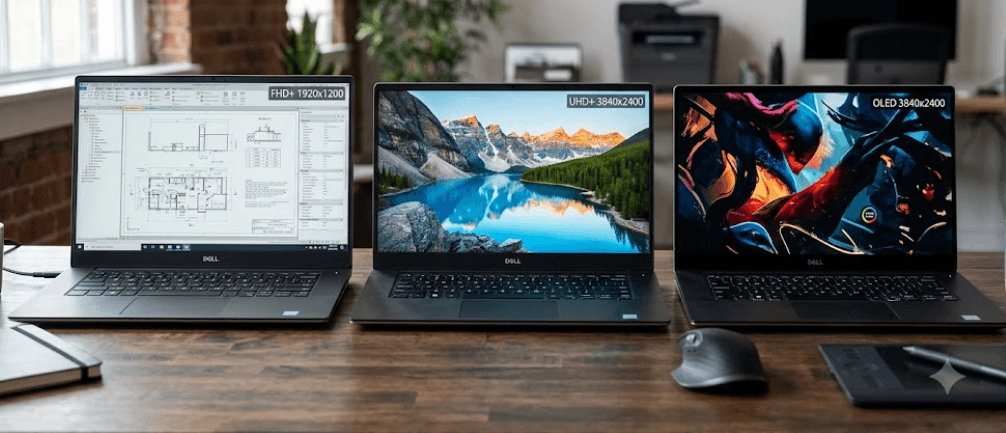
TL;DR Dell Precision mobile workstations can be configured with different display combinations, and the most important thing to understand is that FHD+ and UHD+ describe resolution, while OLED describes panel technology. A Dell Precision with FHD+ can offer a practical 1920 x 1200 resolution, while UHD+ can reach 3840 x 2400 with much higher pixel density. OLED can then be paired with a high-resolution option, as seen on Precision models where Dell offers UHD+ OLED panels. Current Dell specifications show that the right choice depends on more than resolution alone. Brightness, color gamut, refresh rate, touch support, surface finish, power consumption, and the type of work you do all affect the experience. For office work and long battery-focused use, a well-specced FHD+ panel can be enough. For detailed creative, engineering, photography, and video work, UHD+ or UHD+ OLED can make more sense.
Understanding FHD+, UHD+, And OLED
FHD+, UHD+, and OLED are often discussed together when comparing workstation displays, but they do not describe the same thing. FHD+ and UHD+ refer primarily to screen resolution, while OLED describes the underlying display technology. Dell's Precision display documentation defines FHD+ as 1920 x 1200 and UHD+ as 3840 x 2400. That means UHD+ has four times as many pixels as FHD+, giving you considerably more detail on the same screen size. OLED, meanwhile, refers to how the pixels produce the image rather than how many pixels the display contains. This distinction is important because an OLED screen can also be UHD+, as Dell's Precision configurations demonstrate.
The difference becomes particularly noticeable on larger Precision workstations. Dell's Precision 5690, for example, offers a 16-inch FHD+ display at 1920 x 1200 and a 16-inch UHD+ OLED display at 3840 x 2400. The FHD+ option has 142 pixels per inch, while the UHD+ OLED option reaches 283 pixels per inch. That higher pixel density can make fine interface elements, photographs, illustrations, text, and detailed technical drawings look noticeably sharper. However, more pixels do not automatically mean a better choice for every user. If your work is mainly documents, browser tabs, presentations, and business applications, FHD+ can provide the resolution you need without paying for pixels you may rarely notice.
Current Dell Pro Precision models also show why you should check the exact configuration instead of assuming every Precision laptop has the same display choices. The current 16-inch Dell Pro Precision 7 Series offers a 1920 x 1200 WUXGA panel and a 3840 x 2400 WQUXGA tandem OLED option, both with a 16:10 aspect ratio. The 14-inch version instead offers FHD+ and QHD+ tandem OLED configurations. In other words, Dell's display lineup varies by model and generation, so a buyer should always check the specifications of the exact Precision configuration before purchasing.
FHD+ And UHD+ Are Resolution Choices
FHD+ provides 1920 x 1200 pixels, while UHD+ provides 3840 x 2400 pixels. Both use the 16:10 format commonly found on modern workstation laptops, giving you additional vertical workspace compared with traditional 16:9 FHD at 1920 x 1080. Dell's Precision display guide lists FHD+ at approximately 2.3 million pixels and UHD+ at approximately 9.2 million pixels. That difference is useful when you work with detailed images or large technical layouts, but it also places greater demands on the graphics system when applications render at native resolution.
| Display Option | Typical Resolution | Pixel Count | Typical Advantage |
|---|---|---|---|
| FHD+ | 1920 x 1200 | 2.3 million | Efficient everyday productivity |
| UHD+ | 3840 x 2400 | 9.2 million | High-detail professional work |
| OLED | Panel technology | Depends on resolution | Contrast, color and response characteristics |
| UHD+ OLED | 3840 x 2400 | 9.2 million | High resolution with OLED characteristics |
FHD+ Displays On Dell Precision Laptops
FHD+ is the practical starting point for many Precision buyers because 1920 x 1200 provides enough workspace for everyday professional tasks while avoiding the extremely high pixel density of a 4K-class panel. On current Dell Precision configurations, FHD+ displays can include features such as anti-glare surfaces, 60Hz or higher refresh rates depending on the model, and wide color coverage. The current Dell Pro Precision 7 Series 16, for example, offers a 1920 x 1200 panel with 120Hz variable refresh rate, 500 nits of brightness, and 100% DCI-P3 coverage. That is an important reminder that an FHD+ display is not automatically a basic display.
FHD+ can also be a sensible choice for professionals who spend most of their day working with Microsoft Office, browser applications, enterprise software, email, spreadsheets, and video calls. The lower resolution means the graphics system has fewer pixels to process at native resolution, while the operating system can maintain a comfortable scaling level without making interface elements excessively small. For mobile workstation users who travel frequently, display efficiency can also matter because the screen is only one part of the laptop's overall power budget. The exact battery difference depends on the laptop and configuration, so it should not be assumed that every FHD+ Precision will automatically last longer than every UHD+ model.
Another advantage is that FHD+ displays can offer strong brightness and color coverage without requiring a move to the most expensive display configuration. Dell's Precision 5690 specifications, for example, list a 16-inch FHD+ panel with 500 nits and 100% DCI-P3, alongside its UHD+ OLED alternative. This means buyers should compare the complete panel specifications rather than using resolution as a shortcut for quality. A high-quality FHD+ panel can be more useful for a professional working in bright offices than a higher-resolution panel with lower brightness.
When FHD+ Makes More Sense
FHD+ is particularly suitable when your Precision is primarily a business and productivity workstation. Word processing, spreadsheets, presentations, browser-based applications, coding, meetings, and general multitasking do not automatically require 3840 x 2400 resolution. A 16-inch 1920 x 1200 display also gives you a useful 16:10 workspace, which can reduce the need to scroll vertically through documents and applications.
It can also make sense if you regularly connect the laptop to an external monitor. In that situation, the built-in display may be used mainly for email, chat, reference material, or secondary applications, while a larger external display handles detailed design or editing work. Paying a substantial premium for a UHD+ OLED panel may therefore offer less practical value if you rarely use the laptop screen for color-critical or highly detailed work.
The important point is not that FHD+ is better than UHD+ or OLED. It is that FHD+ can be the more appropriate specification for a workload that does not benefit significantly from additional resolution. A Precision workstation is designed around professional workloads, but professional users do not all have the same display requirements. A finance professional, developer, consultant, or business user can have very different needs from a photographer, CAD designer, or video editor.
UHD+ Displays For Detailed Professional Work
UHD+ takes the Precision display experience into a different resolution class. Dell defines UHD+ as 3840 x 2400, compared with 1920 x 1200 for FHD+. On a 16-inch display, that translates to 283 pixels per inch on the Precision 5690's UHD+ OLED configuration, compared with 142 pixels per inch on its FHD+ panel. The extra pixel density can make fine details look cleaner and gives professionals more room to work with high-resolution images, complex designs, and detailed interfaces.
The extra resolution can be particularly useful when the work itself contains a large amount of visual information. CAD drawings, architectural plans, photographs, 4K video timelines, detailed 3D assets, and technical diagrams can benefit from additional screen detail. Instead of seeing only a small portion of a high-resolution asset, you can often work with more of the content while maintaining a sharp image. The benefit depends on the software and scaling settings, but the additional pixels provide more information for the display to reproduce.
There is also a clear difference in pixel density between the two resolutions. Dell's Precision documentation lists approximately 9.2 million pixels for UHD+ compared with approximately 2.3 million for FHD+. That does not mean everything on the screen will appear four times larger or four times sharper. Windows scaling adjusts interface elements so that text and controls remain usable. The main benefit is that the display has more physical pixels available to render fine detail, which becomes easier to appreciate in photographs, graphics, and professional applications.
UHD+ For Creative And Technical Work
For photographers and visual designers, UHD+ can provide a useful working environment because images can be displayed with considerable detail. Dell's Precision 5690 pairs its UHD+ resolution with 100% DCI-P3 coverage, 400-nit typical luminance, and OLED technology. Those specifications are more relevant to creative work than resolution alone because color gamut, brightness, contrast, and panel technology all influence what you actually see.
Engineers and designers can also benefit from the additional workspace when working with dense technical applications. However, the ideal display depends on the software, graphics hardware, and whether the workflow involves viewing highly detailed models. A higher-resolution panel does not replace a professional GPU, sufficient RAM, or a properly calibrated workflow. It is one part of the workstation rather than a guarantee of better professional output.
The main trade-off is that UHD+ gives you substantially more pixels to drive. Dell's own Precision specifications show higher maximum display power consumption for the UHD+ OLED panel than the FHD+ option on the Precision 5690. On that model, Dell lists 11.14W maximum display power for the UHD+ OLED option compared with 6.32W for FHD+. Actual laptop battery life depends on the entire system and workload, but this illustrates why higher-resolution displays can come with an efficiency trade-off.
OLED Displays On Dell Precision Workstations
OLED is different from FHD+ and UHD+ because it describes panel technology rather than resolution. Dell has offered OLED on high-resolution Precision configurations, including the Precision 5690, where the 3840 x 2400 UHD+ display uses OLED technology. Dell lists a 100,000:1 minimum contrast ratio and a typical 1ms response time for that panel, compared with a 1,300:1 minimum contrast ratio and 30ms maximum response time for the FHD+ IPS option. This can produce a noticeably different visual experience, particularly in dark scenes, high-contrast content, and media work.
Current Dell Pro Precision models have moved the technology forward as well. The 16-inch Dell Pro Precision 7 Series offers a 3840 x 2400 tandem OLED panel with 120Hz variable refresh rate, 500 nits brightness, 100% DCI-P3 coverage, and VESA DisplayHDR True Black 1000 certification. The 14-inch model offers a QHD+ tandem OLED panel with 100% DCI-P3 coverage and DisplayHDR True Black 500 certification. These specifications show that OLED can be combined with different resolutions and does not automatically mean 4K.
OLED can therefore be attractive if your priority is image quality rather than simply resolution. It can deliver deep blacks and strong contrast because OLED pixels can control their own light output. However, it is not automatically the right choice for every workstation. The price, power characteristics, glossy or anti-reflective surface, touch capability, and the exact color and brightness specifications still matter. A professional who spends most of the day in spreadsheets may value a bright anti-glare FHD+ panel more than the deeper contrast of an OLED screen.
OLED And UHD+ Are Not Competing Terms
The most important correction when comparing these displays is that UHD+ and OLED should not be treated as two mutually exclusive options. UHD+ describes the 3840 x 2400 resolution, while OLED describes the panel technology. A laptop can therefore have a UHD+ OLED display, and Dell's Precision specifications provide direct examples of this configuration.
| Feature | FHD+ | UHD+ | OLED |
|---|---|---|---|
| What it describes | Resolution | Resolution | Panel technology |
| Example resolution | 1920 x 1200 | 3840 x 2400 | Varies |
| Main benefit | Efficiency and practical workspace | Higher detail | Contrast and image characteristics |
| Can be combined with OLED? | Depends on model | Yes | Already a panel technology |
| Ideal users | Business and general productivity | Creative and technical professionals | Users prioritizing premium image quality |
FHD+ Vs UHD+ Vs OLED For Your Work
The right Precision display depends on what you actually do on the laptop. If your workload is dominated by documents, spreadsheets, web applications, coding, meetings, and business software, a strong FHD+ panel can be more than sufficient. The current Dell Pro Precision 7 Series 16 shows that an FHD+ option can still offer 500 nits, 100% DCI-P3, and 120Hz VRR, so choosing FHD+ does not necessarily mean accepting an inferior professional display.
UHD+ becomes more compelling when you regularly work with detailed visual content. Photographers, designers, engineers, architects, video editors, and 3D professionals can have more reason to prioritize the additional pixels. If the workload involves examining small details or working with large high-resolution assets, the difference between 1920 x 1200 and 3840 x 2400 is easier to justify. The exact software and GPU configuration should still be considered before paying for the upgrade.
OLED is best considered when contrast, color, response characteristics, and a premium visual experience matter alongside resolution. A UHD+ OLED Precision can combine the benefits of high pixel density with OLED's display characteristics, but that combination may cost more and can have different power requirements. The sensible approach is therefore to start with your workload, then evaluate resolution, panel technology, brightness, color gamut, refresh rate, and surface finish together.
Display Choice At A Glance
| User Type | Recommended Direction | Why |
|---|---|---|
| Office professional | FHD+ | Practical resolution and productivity focus |
| Student or business user | FHD+ | Enough detail for everyday applications |
| Developer | FHD+ or UHD+ | Depends on screen-space requirements |
| Photographer | UHD+ OLED | High detail, color and contrast |
| Video editor | UHD+ OLED | Useful for detailed visual timelines |
| CAD or 3D professional | UHD+ | Extra detail can help with dense designs |
| Content creator | UHD+ OLED | Strong visual quality for creative work |
| Frequent traveler | FHD+ | Practical balance for mobile productivity |
Common Mistakes When Choosing A Precision Display
One common mistake is assuming that UHD+ automatically means better in every situation. Higher resolution can be valuable, but it does not compensate for poor brightness, limited color coverage, or a display surface that does not suit your environment. Dell's own Precision configurations demonstrate this clearly because FHD+ and UHD+ panels can have substantially different brightness and color specifications. On the Precision 7680, for example, Dell lists an entry FHD+ option at 250 nits and 45% NTSC, another FHD+ option at 500 nits and 99% DCI-P3, and a UHD+ OLED option at 400 nits and 100% DCI-P3.
Another mistake is treating OLED as a resolution. OLED does not tell you whether the screen is FHD+, QHD+, UHD+, or another resolution. The current Dell Pro Precision 7 Series 14 illustrates this well because Dell offers an FHD+ display and a QHD+ tandem OLED display. The 16-inch version goes further with a WUXGA display and a 3840 x 2400 tandem OLED option. Looking at the exact resolution and panel technology together is therefore essential when comparing configurations.
Buyers should also avoid comparing only the headline resolution. Brightness, color gamut, refresh rate, touch support, anti-glare or anti-reflection treatment, and power consumption can change the experience considerably. The Precision 5690's specifications are a good example: its FHD+ panel is 500 nits and 100% DCI-P3, while its UHD+ OLED panel is 400 nits and 100% DCI-P3. Neither specification tells the entire story on its own, which is why the full display configuration should always be checked before purchase.
Frequently Asked Questions
Q. What is FHD+ resolution on a Dell Precision laptop?
FHD+ generally refers to a 1920 x 1200 resolution on Dell Precision laptops. The 16:10 aspect ratio provides more vertical pixels than standard 1920 x 1080 FHD, making it useful for documents, spreadsheets, browser windows, and general professional work.
Q. What does UHD+ mean on Dell Precision laptops?
UHD+ refers to a 3840 x 2400 resolution in Dell's Precision display terminology. It provides approximately 9.2 million pixels, compared with approximately 2.3 million on a 1920 x 1200 FHD+ display.
Q. Is OLED better than UHD+ on a Dell Precision laptop?
They are not directly competing specifications. UHD+ describes resolution, while OLED describes panel technology. Dell offers configurations where both are combined, such as the 3840 x 2400 UHD+ OLED option on the Precision 5690.
Q. Is FHD+ enough for professional work?
Yes. A high-quality FHD+ panel can be suitable for office applications, coding, business software, browsing, presentations, and many professional workloads. Dell's current Pro Precision 7 Series 16, for example, offers a 1920 x 1200 FHD+ option with 500 nits, 100% DCI-P3, and 120Hz VRR.
Q. Who should choose a UHD+ Dell Precision display?
UHD+ is particularly useful for professionals who work with detailed photographs, video, CAD, 3D models, technical drawings, and other high-resolution visual content. The benefit is most noticeable when the additional pixel density matches the workload.
Q. Does every Dell Precision laptop offer OLED?
No. Display options vary by Precision model and generation. Current Dell Pro Precision models offer OLED on selected configurations, while other Precision systems may use FHD+, QHD+, WUXGA, or other display technologies. Always check the exact model's specifications.
Q. Does a higher-resolution display use more power?
It can. Dell's Precision 5690 specifications list maximum display power consumption of 6.32W for the FHD+ option and 11.14W for the UHD+ OLED option. Actual battery life depends on the complete laptop configuration and workload, so these figures should not be treated as direct battery-life measurements.
Q. Is OLED good for photo and video editing?
OLED can be useful for creative work because of its strong contrast and wide color coverage on supported Precision configurations. However, professionals should also check color gamut, brightness, calibration, resolution, and software requirements rather than choosing a display solely because it is OLED.
Q. Is FHD+ or UHD+ better for battery life?
FHD+ can have an efficiency advantage because it drives fewer pixels, but actual battery life depends on the entire system. Processor, graphics, battery capacity, brightness, software workload, and other components all affect runtime. Dell's Precision 5690 specifications illustrate that its UHD+ OLED panel has a higher listed maximum display power consumption than its FHD+ option.
Q. Which Dell Precision display should I buy?
Choose FHD+ if your priority is everyday productivity and a practical workstation display. Consider UHD+ when your work benefits from very high pixel density, and consider an OLED configuration when contrast, colour, and premium image quality are important. Check the complete display specification rather than relying on the resolution or OLED label alone.
Final Recommendation
The best Dell Precision display is the one that matches the work you actually do. FHD+ remains a practical option for professionals who primarily use office software, browsers, coding tools, business applications, and video calls. A strong FHD+ panel can offer excellent brightness, color coverage, and refresh rate without requiring the higher pixel count of a UHD+ screen. Current Dell Pro Precision specifications show that FHD+ configurations can be much more capable than the basic 1080p label might suggest.
UHD+ is the more logical step when fine detail and screen resolution are central to your workflow. If you edit high-resolution photographs, work on detailed CAD models, create video content, or regularly handle visually dense professional applications, the additional pixels can be worthwhile. OLED should be treated as a separate consideration because it describes the panel technology. When Dell combines UHD+ with OLED, as it does on selected Precision configurations, you get both high resolution and OLED's contrast and response characteristics.
For most buyers, the safest way to compare Dell Precision display options is to check six things together: resolution, panel technology, brightness, color gamut, refresh rate, and surface finish. Do not assume that the most expensive display is automatically the most suitable one. A well-specified FHD+ panel can be the smarter choice for productivity, while UHD+ OLED can make more sense for demanding creative and visual workloads. The exact model configuration should always be checked before purchase because Dell's available display combinations vary across Precision generations and screen sizes.






