

Dell Precision Cooling System Explained: Why Workstations Run Quieter
Dell Precision workstations use fans, heat sinks, air shrouds, and thermal management controls to balance performance, temperature, and noise. Here is how the cooling system works and why it matters.

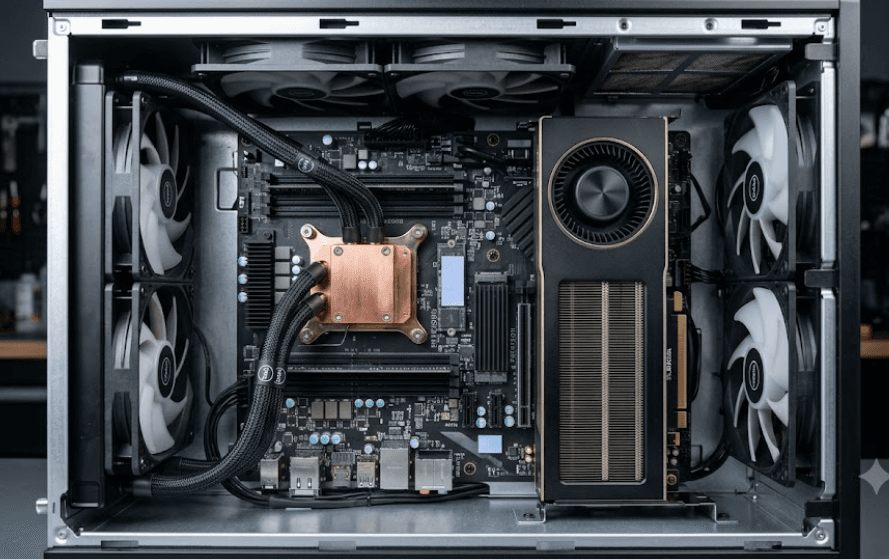
TL;DR Dell Precision workstations are designed to manage heat from high-performance processors, professional GPUs, storage, and other components without relying on maximum fan speed all the time. Depending on the Precision model, Dell combines processor heat sinks, system fans, air shrouds, thermal-management controls, and carefully directed airflow to move heat away from critical components. Dell documentation specifically describes Thermal Management settings as a way to adjust the balance between system performance, noise, and temperature. That does not mean every Precision workstation will always be quiet, especially during sustained rendering or other heavy workloads, but effective thermal management can reduce unnecessary fan activity while keeping temperatures under control.
How Dell Precision Cooling Works
Dell Precision workstations are built for workloads that can keep the processor and graphics hardware busy for long periods. Tasks such as 3D rendering, CAD, simulation, video production, engineering applications, and other professional workloads can generate substantially more heat than ordinary office applications. The cooling system therefore has to do more than simply remove hot air. It needs to move heat away from individual components, maintain useful airflow through the chassis, and respond when temperatures or workloads change. Dell's Precision service documentation shows dedicated heat-sink assemblies, processor fans, system-fan assemblies, and air shrouds in workstation designs such as the Precision 5860 and 7960 Tower.
The heat sink is responsible for transferring heat away from the processor so that airflow can carry it away from the system. Dell's documentation for the Precision 5860 Tower identifies the processor fan and heat-sink assembly as a combined component, while the Precision 7960 Tower includes a heat sink, front system-fan assembly, rear system-fan assembly, and air shroud as separate elements of the overall design. This shows why workstation cooling should not be reduced to simply asking how many fans a computer has. The arrangement of the cooling components and the path that air takes through the chassis are equally important.
Air shrouds are particularly important because they help direct airflow through the intended areas of the workstation instead of allowing air to move randomly inside the chassis. Dell's Precision documentation shows air shrouds as part of the cooling structure in its tower workstations. When the processor, graphics hardware, memory, storage, and expansion cards are working simultaneously, controlled airflow becomes increasingly important because several heat sources can be active at the same time. A well-organized cooling system therefore helps the workstation handle sustained workloads without depending entirely on constantly increasing fan speed.
Main Cooling Components
| Component | Cooling Role |
|---|---|
| Heat sink | Transfers heat away from the processor |
| Processor fan | Moves air across the processor cooling assembly |
| System fans | Move air through the workstation chassis |
| Air shroud | Helps direct airflow through specific areas |
| Thermal management | Adjusts the balance between performance, temperature, and noise |
Why Thermal Management Affects Fan Noise
A workstation fan does not need to operate at maximum speed simply because the computer is powered on. Fan behavior changes according to the system's thermal requirements, and Dell provides thermal-management controls on supported Precision systems. For example, the Precision 5860 Tower's system setup documentation describes Thermal Management as a feature that adjusts cooling for the fan and processor while balancing system performance, noise, and temperature. The default setting is listed as Optimized.
This matters because fan noise is closely connected to how aggressively the system has to move air. During light workloads such as browsing documents, checking email, or working with relatively simple applications, the thermal load may be much lower than during rendering or simulation. A thermal-management system can therefore avoid treating every workload as a full-power situation. When the workload increases, the cooling system can respond by increasing fan activity to maintain the required thermal conditions.
The important point is that quieter operation should not be confused with weaker cooling. A workstation that keeps temperatures under control through efficient airflow and appropriate thermal management may not need to run its fans at maximum speed continuously. At the same time, there is no guarantee that a Precision workstation will remain quiet under every workload. Dell's own troubleshooting guidance for the Precision 7960 Tower specifically addresses situations where fans run too fast or make loud noise, along with temperature, heat-sink, and performance issues.
Performance, Temperature, and Noise
| Workload | Typical Cooling Demand | Expected Fan Behavior |
|---|---|---|
| Web and office work | Low | Lower cooling demand |
| Photo editing | Moderate | Variable fan activity |
| Video editing | Moderate to high | Increased cooling |
| 3D rendering | High | Higher fan activity |
| Sustained workstation workloads | High | Active thermal management |
How Airflow Helps Precision Workstations
Airflow is one of the less visible parts of workstation design, but it can have a major effect on thermal behavior. The purpose is to move cooler air toward components that need it and carry heated air away from those components. Dell's Precision 7960 Tower documentation identifies both front and rear system-fan assemblies along with an air shroud, illustrating how airflow is integrated into the chassis rather than handled by a single processor fan.
The physical layout also matters because professional workstations can contain considerably more hardware than a basic desktop. A Precision tower may include multiple storage devices, expansion cards, professional graphics, high-performance processors, and large amounts of memory depending on configuration. Dell lists the Precision 7960 Tower with workstation-class Intel Xeon W processors, including configurations reaching up to 56 cores and processor power ratings as high as 350 W. Hardware at this level creates a substantial thermal-management requirement.
That is where controlled airflow becomes useful. Instead of simply adding faster fans, the cooling system needs to move air through the areas where heat is being generated. Dell's documentation also emphasizes keeping external airflow unobstructed and ensuring that cooling fans and air-shroud components remain correctly installed when troubleshooting cooling problems. This reinforces an important practical point: even a well-designed cooling system depends on an unobstructed chassis and functioning cooling components.
Why Chassis Design Matters
A workstation can have powerful cooling hardware and still struggle if airflow is restricted. Dust accumulation, blocked vents, an incorrectly installed cover, or a failed fan can increase thermal demand and cause the cooling system to work harder. Dell's cooling troubleshooting documentation specifically instructs users to check that the system cover, cooling shroud, filler panels, and brackets are properly in place and that external airflow is not obstructed.
This is also why workstation cooling cannot be judged only from fan size or fan count. The position of the fans, the heat-sink design, the air shroud, and the chassis layout all contribute to the final result. Dell's Precision 7960 documentation, for example, identifies front and rear fan assemblies as well as an air shroud within the system's major components.
For users who keep a workstation under a desk or inside a restricted space, the surrounding environment also matters. Dell specifies operating environmental limits for Precision systems, and the Precision 7960 Tower is rated for an operating temperature range of 10°C to 35°C. Running a workstation in a hotter environment can change the thermal conditions it has to manage, which may affect fan behavior and overall performance.
Cooling In Precision Laptops
Dell Precision cooling is not limited to tower workstations. Mobile Precision systems also use dedicated cooling components, although the physical design is different because the available space is much more restricted. The Precision 5690, for example, has dedicated processor and graphics-card fans, while Dell's documentation also references heat sinks with thermal pads and vapor-chamber variants on certain configurations.
This approach allows a mobile workstation to manage heat while keeping the chassis considerably smaller than a tower. The cooling hardware has to deal with processor and graphics heat in a much tighter space, which makes component placement particularly important. Dell's Precision 5690 service documentation shows separate processor and graphics-card fan components, demonstrating that cooling responsibilities can be distributed across different parts of the system.
However, the phrase "Precision cooling system" should not be interpreted as one identical cooling design across every Dell Precision model. A Precision laptop and a Precision Tower have very different thermal constraints, and even different generations of the same product family can use different cooling hardware. Dell's service documentation should therefore be checked for the exact model when you need information about fans, heat sinks, vapor chambers, or thermal-management options.
Tower And Laptop Cooling Compared
| Cooling Area | Precision Tower | Precision Laptop |
|---|---|---|
| Heat sink | Larger workstation-oriented assemblies | Compact heat-sink assemblies |
| Fans | Dedicated system and processor cooling | Compact processor and graphics fans |
| Airflow | Larger chassis airflow path | More space-constrained airflow |
| Expansion | Designed for workstation components | Limited by mobile chassis |
| Thermal flexibility | Generally greater physical cooling capacity | More constrained by size and power |
Why Cooling Matters For Professional Work
Cooling becomes particularly important when a workstation is used for sustained professional workloads rather than short bursts of activity. A processor running a rendering workload for several minutes or hours produces a very different thermal challenge from a processor opening a spreadsheet. Professional users therefore need a cooling system that can continue moving heat away from the hardware without relying on temporary performance alone.
The relationship between temperature and performance is also important. Dell's Precision 7960 troubleshooting documentation lists unexpected performance reductions alongside fan, temperature, and heat-sink issues. That does not mean every reduction in performance is caused by cooling, but it shows why thermal conditions are an important part of diagnosing workstation performance problems.
For users, this translates into a simple practical benefit. Effective cooling helps a workstation remain usable during long workloads while managing the competing requirements of temperature, performance, and acoustics. The objective is not to make a high-performance workstation completely silent. Instead, the goal is to manage heat efficiently enough that the system does not need unnecessary cooling activity during lighter workloads while still having the cooling capacity required when the workload becomes demanding.
Cooling And Workstation Reliability
Regular maintenance also matters. Dell provides service documentation for replacing processor fans, heat sinks, system fans, and other cooling components across Precision models. The Precision 3660 Tower, for example, has documented processor fan and air-cooler heat-sink assemblies, while newer Precision systems also have documented fan replacement procedures.
If a fan becomes noisy, stops working correctly, or the workstation begins showing thermal warnings, it should not simply be ignored. Dell's support documentation specifically provides troubleshooting procedures for fan and thermal problems, and its service manuals identify the relevant cooling components for individual models.
The most useful approach is therefore to treat cooling as part of workstation maintenance rather than as a feature that never needs attention. Keeping vents unobstructed, maintaining the correct chassis configuration, and using the appropriate replacement parts can help preserve the intended cooling behavior over time. Dell also sells genuine replacement cooling parts for compatible systems and directs users to the relevant service manual for installation instructions.
Common Cooling Myths About Dell Precision
One common misconception is that a workstation is quiet simply because its cooling system is better. That is too broad a conclusion. High-performance Precision systems can become loud under heavy workloads because the fans have to remove the heat generated by powerful processors and graphics hardware. Dell itself documents fan and thermal troubleshooting for situations involving excessive fan speed or loud noise.
Another misconception is that more fan activity automatically means the cooling system is failing. Fan speed can increase normally when workload or temperature increases. The more useful question is whether the fan behavior is consistent with the workload and whether the system is showing other symptoms such as overheating, unexpected shutdowns, warnings, or unexplained performance reductions.
It is also inaccurate to assume that every Dell Precision workstation uses exactly the same cooling architecture. Precision towers, rack workstations, and mobile workstations have different physical designs and thermal requirements. Dell's documentation shows examples ranging from processor fan and air-cooler assemblies in the Precision 3660 to multiple system-fan assemblies and air shrouds in the Precision 7960 Tower, while mobile Precision models can use dedicated processor and graphics fans.
Myth Vs Fact
| Myth | Fact |
|---|---|
| Precision workstations are always silent | Fan noise can increase significantly under sustained workloads |
| Higher fan speed always means a fault | Fan speed can increase normally as thermal demand rises |
| All Precision systems use the same cooler | Cooling architecture varies by model and form factor |
| More fans automatically mean better cooling | Airflow design, heat sinks, fans, and thermal management all matter |
| Quiet operation means weak cooling | Thermal management aims to balance temperature, performance, and noise |
Frequently Asked Questions
Q. What is the Dell Precision cooling system?
The Dell Precision cooling system is the combination of heat sinks, processor or graphics fans, system fans, airflow paths, air shrouds, and thermal-management controls used to manage heat inside a Precision workstation. The exact configuration depends on the Precision model.
Q. Why are Dell Precision workstations designed with strong cooling?
Precision workstations are designed for professional workloads that can place sustained demands on processors, graphics hardware, memory, storage, and expansion cards. Higher-performance components generate more heat, making effective thermal management important for sustained operation.
Q. Does Dell Precision cooling make the workstation completely silent?
No. A Precision workstation can still become noticeably louder when the processor or graphics hardware is under sustained load. Dell specifically provides troubleshooting guidance for systems where fans run too fast or make loud noise.
Q. How does Dell thermal management control fan noise?
On supported Precision systems, Thermal Management settings are designed to adjust cooling behavior while balancing performance, temperature, and noise. Dell's Precision 5860 documentation lists Optimized as the default Thermal Management option.
Q. What does an air shroud do in a Dell Precision workstation?
An air shroud helps direct airflow through the intended areas of the chassis. Dell lists air shrouds among the major cooling-related components of Precision tower workstations such as the Precision 7960.
Q. Why does my Dell Precision fan get louder during rendering?
Rendering and other sustained workloads can increase processor and graphics activity, which increases heat generation. The cooling system may respond with higher fan speeds to maintain suitable thermal conditions. Increased fan noise under heavy workloads is therefore not automatically a sign of a fault.
Q. Can blocked airflow make a Dell Precision workstation louder?
Yes. Dell's cooling troubleshooting guidance specifically recommends checking that external airflow is not obstructed and that the system cover and cooling-shroud components are correctly installed.
Q. Do Dell Precision laptops use the same cooling system as Precision Towers?
No. The cooling approach varies according to the form factor and model. For example, the Precision 5690 documentation identifies separate processor and graphics-card fans, while Precision towers can use larger heat-sink and system-fan assemblies.
Q. Can a Dell Precision fan be replaced?
Many Precision systems have documented fan replacement procedures, although the exact process depends on the model. Dell provides service manuals and replacement guidance for specific Precision systems, including recent models.
Q. Is Dell Precision cooling important for workstation performance?
Yes. Cooling helps manage the heat generated during demanding workloads. Dell's Precision troubleshooting documentation includes unexpected performance reductions among issues that can occur alongside fan, temperature, or heat-sink problems, making thermal management an important part of workstation performance maintenance.
Final Recommendation
Dell Precision cooling is best understood as a complete thermal-management system rather than a collection of fans. Heat sinks transfer heat away from processors, fans move air through the system, air shrouds help direct that airflow, and thermal-management controls can balance performance, temperature, and noise. Dell's documentation confirms that these components vary considerably between Precision towers and mobile workstations, so there is no single cooling design that applies to every model.
For everyday office work, a properly configured Precision workstation should not need maximum cooling activity continuously. During demanding workloads such as rendering, simulation, or other sustained professional tasks, however, higher fan speeds are expected because the hardware is producing more heat. The important consideration is whether the system is managing that heat normally without repeated thermal warnings, unexpected shutdowns, or unexplained performance reductions.
For buyers choosing a Dell Precision workstation, the cooling system should therefore be considered alongside the processor, GPU, memory, storage, chassis size, and intended workload. A workstation that combines suitable hardware with a properly designed thermal system is better positioned for sustained professional use. Rather than looking for a machine that promises to be completely silent, look for a configuration whose cooling capacity matches the workload you actually expect to run.
Ready to upgrade your tech?
Browse our collection of quality refurbished products at unbeatable prices.






