
Dell Precision 7750 vs 7760 vs 7770: Which Generation Should You Buy?
Dell Precision 7750, 7760, and 7770 are powerful 17-inch mobile workstations from three generations. Here is how their CPUs, GPUs, RAM, displays, and upgradeability compare in 2026.

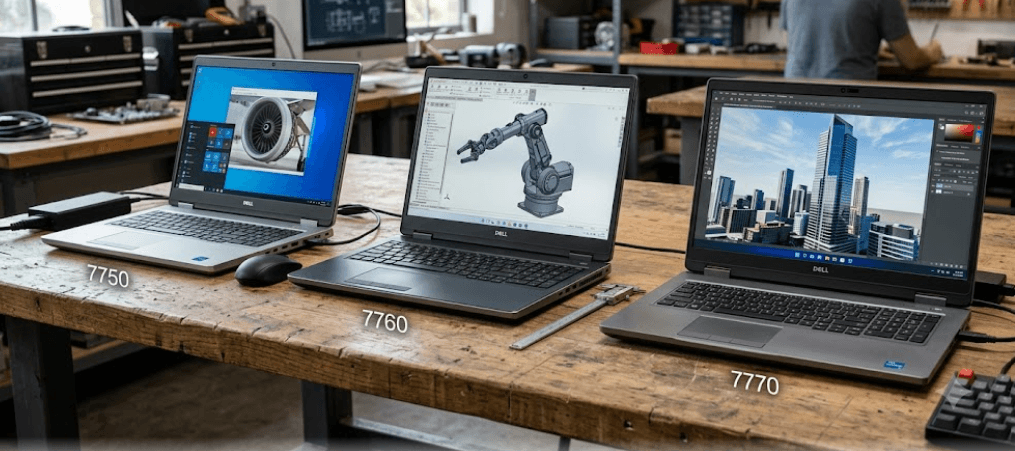
TL;DR The Dell Precision 7750, 7760, and 7770 are all large 17.3-inch mobile workstations, but they belong to three different Intel generations. The Precision 7750 uses 10th Gen Intel processors and DDR4 memory, the 7760 moves to 11th Gen Intel processors while retaining DDR4, and the 7770 makes the bigger platform jump to 12th Gen Intel processors and DDR5 or CAMM memory options. For a refurbished buyer in 2026, the 7750 can make sense at an aggressive price, the 7760 offers a useful middle ground, and the 7770 offers a more modern platform with stronger CPU options, newer memory, and newer connectivity. Your choice should depend on the exact CPU, GPU, RAM configuration, condition, battery health, and price rather than the model number alone.
Dell Precision 7750 vs 7760 vs 7770: What Changed?
The Dell Precision 7750, Precision 7760, and Precision 7770 belong to successive generations of Dell's 17-inch Precision mobile workstation family. The Precision 7750 is based on 10th Gen Intel Core and Xeon processors, while the Precision 7760 moves to 11th Gen Intel Core and Xeon options. The Precision 7770 then makes another substantial platform change with 12th Gen Intel Core processors, including HX-series chips. This means the three machines may look similar as large professional workstations, but their internal platforms are not identical.
The Precision 7750 is the oldest of the three. Dell offered it with processors ranging from the Core i5-10400H through higher-end Core i7 and i9 chips, alongside Xeon W-10855M and W-10885M options. Graphics included NVIDIA Quadro T1000, Quadro RTX 3000, RTX 4000, and RTX 5000 configurations. The Precision 7760 retained the 17.3-inch format but upgraded the processor platform to 11th Gen Intel, including Core i5, i7, i9, and Xeon W-11855M and W-11955M options. Its professional GPU options included the NVIDIA T1200 and RTX A-series graphics.
The Precision 7770 is where the generational change becomes more obvious. It introduced 12th Gen Intel processors, including the Core i5-12600HX, Core i7-12800HX, Core i7-12850HX, Core i9-12900HX, and Core i9-12950HX. It also introduced DDR5 memory options and supported newer professional graphics such as the NVIDIA RTX A1000, A3000, A4500, and A5500. In 2026, Dell lists all three models as unavailable, so buyers will primarily encounter them through refurbished, used, or remaining-stock channels.
Generation Comparison
| Model | CPU Generation | Memory | Professional GPU Options | Display Size |
|---|---|---|---|---|
| Precision 7750 | 10th Gen Intel | DDR4 | Quadro T1000 to RTX 5000 | 17.3-inch |
| Precision 7760 | 11th Gen Intel | DDR4 | T1200 to RTX A5000 | 17.3-inch |
| Precision 7770 | 12th Gen Intel | DDR5/CAMM or SODIMM | RTX A1000 to RTX A5500 | 17.3-inch |
Dell Precision 7750: What You Get
The Precision 7750 remains a capable workstation if you find a well-maintained refurbished configuration at the right price. Its biggest advantage is the range of professional hardware Dell originally offered. Depending on the configuration, buyers could get a 10th Gen Intel Core processor or Xeon W-series chip, along with professional NVIDIA Quadro graphics. That makes the 7750 more suitable for CAD, engineering applications, 3D work, development, and other workstation workloads than a typical consumer laptop from the same period.
Memory flexibility is another major strength. Dell's specifications show four SODIMM slots, with supported configurations reaching up to 128GB of DDR4 memory. That is particularly useful for workstation buyers because RAM requirements can grow quickly when working with large datasets, virtual machines, engineering software, or professional creative applications. Unlike thin modern laptops with soldered memory, the Precision 7750 was designed around serviceability and upgradeability.
The limitation is its age. The 7750 uses an older 10th Gen platform and PCIe Gen 3, so you should not expect it to compete directly with newer workstations simply because it carries the Precision name. Battery condition is also especially important when buying one used because these machines are several years old. Dell offered 68Wh and 95Wh battery options, but the capacity remaining in a particular refurbished unit depends on its usage history and battery health.
Precision 7750 Key Specifications
| Feature | Dell Precision 7750 |
|---|---|
| CPU Platform | 10th Gen Intel Core / Xeon |
| Memory | DDR4 |
| Maximum RAM | Up to 128GB |
| GPU Options | Quadro T1000, RTX 3000, RTX 4000, RTX 5000 |
| Display | 17.3-inch |
| Storage | PCIe NVMe SSD options |
| Battery Options | 68Wh or 95Wh |
| PCIe | Up to Gen 3 |
Dell Precision 7760: The Middle Generation
The Precision 7760 occupies an interesting position because it improves several important components without completely changing the workstation formula. It moves from 10th Gen to 11th Gen Intel processors and supports higher-end CPUs such as the Core i9-11950H and Xeon W-11955M. For buyers comparing refurbished Precision laptops, that CPU generation can provide a useful step up from the 7750 while keeping the familiar large workstation design.
The memory system is also highly practical. Dell specifies four SODIMM slots and support for up to 128GB of DDR4 memory. Buyers could configure the machine with ECC or non-ECC memory depending on the chosen platform and configuration. This matters for professional users because upgradeability can extend the useful life of a refurbished workstation. You can start with a reasonable RAM configuration and add memory later rather than replacing the entire laptop.
Graphics options also moved forward. The 7760 was available with NVIDIA T1200, RTX A3000, RTX A4000, and RTX A5000 professional GPUs. It also offered several display choices, including a 17.3-inch FHD panel and higher-end 4K options. Dell listed a 4K 120Hz panel with 100% Adobe coverage and HDR400, making the display configuration an important part of the buying decision. In other words, two Precision 7760 laptops can offer very different experiences depending on their exact screen and GPU.
Precision 7760 Key Specifications
| Feature | Dell Precision 7760 |
|---|---|
| CPU Platform | 11th Gen Intel Core / Xeon |
| Memory | DDR4 |
| Maximum RAM | Up to 128GB |
| GPU Options | T1200, RTX A3000, A4000, A5000 |
| Display | 17.3-inch FHD or 4K options |
| Storage | PCIe NVMe SSD options |
| Battery Options | 68Wh or 95Wh |
| PCIe | Up to Gen 4 |
Dell Precision 7770: The Newer Platform
The Precision 7770 is the biggest generational step in this comparison. Its 12th Gen Intel HX processors use a newer hybrid architecture and offer substantially different core configurations from the 10th and 11th Gen H-series processors found in the earlier machines. The top configurations included the Core i9-12900HX and i9-12950HX, making the 7770 considerably more modern as a CPU platform.
Memory is another major difference. Dell offered DDR5 configurations as well as CAMM memory options, with configurations reaching up to 128GB. The exact memory technology depends on the configuration, so refurbished buyers should check the installed memory rather than assuming every Precision 7770 uses the same setup. The machine also supports PCIe Gen 4 storage, giving it a newer storage platform than the Precision 7750.
Graphics options include professional NVIDIA RTX A1000, A3000, A4500, and A5500 GPUs, with some configurations also offering other graphics choices. The 7770 also has newer connectivity, including two Thunderbolt 4 ports, USB-C, HDMI, Ethernet, and an SD card slot. Dell lists a starting weight of about 3.02kg, so it remains a substantial workstation rather than a portable ultrabook.
Precision 7770 Key Specifications
| Feature | Dell Precision 7770 |
|---|---|
| CPU Platform | 12th Gen Intel Core HX |
| Memory | DDR5 / CAMM / SODIMM depending on configuration |
| Maximum RAM | Up to 128GB |
| GPU Options | RTX A1000, A3000, A4500, A5500 |
| Display | 17.3-inch FHD or 4K |
| Storage | PCIe NVMe Gen 4 options |
| Battery Options | 83Wh or 93Wh |
| Starting Weight | About 3.02kg |
Precision 7750 vs 7760 vs 7770 Performance
When comparing performance, the generation of the processor and GPU matters more than the model number printed on the lid. A high-end Precision 7750 with a Quadro RTX 5000 can still be useful for professional workloads, while a lower-spec Precision 7770 may not automatically outperform every older configuration in every graphics workload. This is especially important when shopping refurbished because sellers often list only the model family without making the exact GPU obvious.
For CPU-heavy workloads, the Precision 7770 has the clearest platform advantage. Its 12th Gen HX processors offer a newer architecture and more cores in the higher-end configurations than the 10th Gen chips available in the 7750. The Precision 7760 sits between them with 11th Gen processors. For tasks such as compiling code, running virtual machines, rendering, engineering simulations, or handling large multitasking workloads, the exact CPU should therefore be one of the first specifications you check.
GPU selection can change the comparison completely. A Precision 7750 with an RTX 5000 is a different proposition from a basic T1000 configuration, just as an RTX A5500-equipped 7770 is in a different performance class from an A1000-equipped model. The same principle applies to displays and RAM. If your workload is professional 3D, CAD, video editing, or data-heavy development, compare the complete configuration rather than buying solely based on the newest model number.
Performance Factors To Check
| Workload | Most Important Specification |
|---|---|
| CAD and 3D | Professional GPU |
| Video Editing | GPU, CPU, RAM, SSD |
| Programming | CPU, RAM, SSD |
| Virtual Machines | CPU cores and RAM |
| Large Datasets | RAM and CPU |
| Color-Critical Work | Display configuration |
| General Office Work | CPU, SSD, battery condition |
Which Precision Should You Buy In 2026?
For a refurbished buyer in 2026, the Precision 7750 makes the most sense when the price is significantly lower than newer generations and the configuration matches your workload. Its four SODIMM slots and support for up to 128GB RAM remain useful, and higher-end Quadro configurations can still handle many professional applications. The key is to avoid paying a premium simply because the laptop is marketed as a workstation.
The Precision 7760 is the middle option for buyers who want a newer CPU and GPU platform without moving to the 7770. Its 11th Gen Intel processors, PCIe Gen 4 support, 128GB maximum RAM, and RTX A-series graphics options give it a solid refurbished profile. It can be particularly interesting when a seller offers a high-spec 7760 at a price that is close to lower-spec 7770 machines.
The Precision 7770 is the most modern platform of the three and therefore has the longest technology runway. Its 12th Gen HX processors, DDR5/CAMM options, PCIe Gen 4, newer professional RTX graphics, Thunderbolt 4, and larger battery options make it the model to examine first when the price difference is reasonable. However, because these are older discontinued workstations in 2026, condition and configuration can matter more than the generation alone.
Buying Checklist
| Check Before Buying | Why It Matters |
|---|---|
| Exact CPU | Determines processing capability |
| Exact GPU | Major impact on workstation performance |
| RAM Capacity | Important for professional multitasking |
| RAM Type | 7750/7760 use DDR4; 7770 varies by configuration |
| SSD Health | Important for refurbished systems |
| Battery Health | Older batteries may have reduced capacity |
| Display Resolution | FHD and 4K versions differ significantly |
| Charger | High-power workstation configurations need the correct adapter |
| Physical Condition | Large workstation chassis can show heavy use |
| Warranty | Especially important for refurbished purchases |
Common Buying Mistakes To Avoid
The biggest mistake is buying the newest model number without checking the configuration. A Precision 7770 sounds automatically better than a Precision 7760, but workstation performance depends heavily on the processor, GPU, RAM, display, and cooling configuration. A buyer should therefore compare the exact specifications of the machines being offered rather than assuming that every 7770 has the same hardware.
Another mistake is ignoring the display. Dell offered multiple 17.3-inch display configurations across these generations, and the differences are meaningful. The Precision 7760, for example, could be configured with a basic FHD display or a 4K 120Hz panel with wide color coverage. If you edit photos, work with video, or spend long hours looking at the screen, the panel can matter almost as much as the CPU.
Battery condition and physical condition are equally important in 2026. These are large mobile workstations, and a refurbished unit may have spent years under demanding workloads. Check battery health, keyboard condition, ports, hinges, fans, SSD health, and the condition of the charger. A lower-priced laptop is not necessarily better value if it requires immediate repairs or a replacement battery.
What To Avoid
| Mistake | Better Approach |
|---|---|
| Buying based only on model number | Check the full configuration |
| Ignoring GPU | Match GPU to your workload |
| Assuming all screens are identical | Verify resolution and panel specification |
| Ignoring battery health | Check battery condition before purchase |
| Choosing the cheapest listing | Compare condition, warranty, and configuration |
| Assuming newer always means faster | Compare CPU and GPU directly |
Frequently Asked Questions
Q. Is the Dell Precision 7770 better than the 7760?
The Precision 7770 has the newer 12th Gen Intel platform, newer memory options, and newer professional GPU choices, so it is the more modern platform. However, the exact CPU and GPU configuration still determines how it performs.
Q. Is the Dell Precision 7750 still worth buying in 2026?
It can be worth considering as a refurbished workstation if it has a strong CPU and GPU configuration and is priced appropriately. Its four SODIMM slots and up to 128GB RAM support are still useful.
Q. Does the Precision 7760 support 128GB RAM?
Yes. Dell specifies four SODIMM slots and support for up to 128GB of DDR4 memory on the Precision 7760.
Q. Does the Precision 7770 use DDR5 RAM?
Yes, the Precision 7770 supports DDR5 memory, including CAMM configurations, as well as SODIMM configurations depending on the specific configuration.
Q. Which Precision has the newest processor?
The Precision 7770 has the newest processor platform of the three, using 12th Gen Intel Core HX processors. The 7760 uses 11th Gen Intel processors, while the 7750 uses 10th Gen Intel processors.
Q. Which Precision is best for CAD and 3D work?
The exact professional GPU matters more than the model number. Higher-end configurations such as the Precision 7750 with Quadro RTX 5000, Precision 7760 with RTX A4000 or A5000, or Precision 7770 with RTX A4500 or A5500 are the configurations to investigate for demanding 3D workloads.
Q. Are the Precision 7750, 7760, and 7770 good for video editing?
They can be suitable for video editing when configured with enough RAM, a capable professional GPU, and a fast NVMe SSD. The exact configuration matters because these workstations were sold with a wide range of hardware.
Q. Which Precision has the best upgradeability?
All three offer substantial memory upgradeability compared with many thin modern laptops. The 7750 and 7760 have four SODIMM slots and support up to 128GB, while the 7770 has different memory configurations depending on whether it uses CAMM or SODIMM memory.
Q. Are Dell Precision 7750, 7760, and 7770 still sold new?
Dell currently lists these models as unavailable. In 2026, buyers are therefore more likely to encounter them through refurbished, used, or remaining-stock sellers.
Q. Should I buy a refurbished Precision 7770 instead of a newer consumer laptop?
It depends on your workload. A refurbished Precision can provide professional graphics, high RAM capacity, extensive connectivity, and workstation-oriented hardware, but it is also heavier and older than many newer consumer laptops. Compare the exact configuration, condition, warranty, and price before buying.
Final Recommendation
If you are choosing between the Dell Precision 7750, 7760, and 7770 in 2026, start with the exact configuration rather than the generation number. The Precision 7750 remains relevant when its lower refurbished price is paired with a capable GPU and plenty of upgradeable RAM. The Precision 7760 is a useful middle ground, bringing 11th Gen Intel processors, PCIe Gen 4, and NVIDIA RTX A-series graphics into the same large workstation format. The Precision 7770 is the most modern of the three, with 12th Gen Intel HX processors, newer memory technology, newer professional GPUs, and Thunderbolt 4.
For most buyers specifically looking for the newest platform among these three, the Precision 7770 is the model to examine first. However, that does not mean every 7770 is automatically the right purchase. A well-priced Precision 7760 with a stronger GPU, more RAM, or better condition can make more sense than a low-spec 7770. Likewise, a high-end Precision 7750 can still be useful for professional workloads when the price reflects its age.
The safest approach is to compare the CPU, GPU, RAM, display, SSD, battery health, physical condition, charger, and warranty together. These machines were designed as configurable professional workstations, so the configuration can change the experience dramatically. In 2026, that matters even more because the Precision 7750, 7760, and 7770 are no longer current Dell models. Buy the configuration that fits your workload and budget, not simply the newest number on the lid.






