
Dell Precision 7670 vs 7760: 16-inch vs 17-inch, Which Should You Buy?
The Dell Precision 7670 and 7760 are powerful mobile workstations, but the 7670 offers newer hardware in a smaller 16-inch design, while the 7760 gives you a larger 17.3-inch workspace.

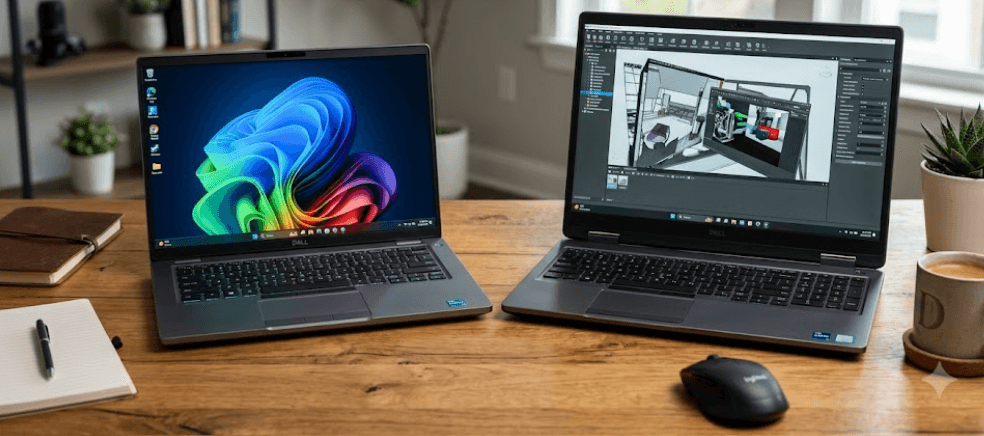
TL;DR The Dell Precision 7670 and Precision 7760 are both full-size mobile workstations designed for demanding professional workloads, but they take different approaches. The Precision 7670 has a 16-inch display, 12th Gen Intel Core HX processors, DDR5 memory, and optional NVIDIA RTX professional graphics, while the Precision 7760 has a larger 17.3-inch display, 11th Gen Intel processors, DDR4 memory, and a similarly workstation-focused GPU lineup. The 7670 is the more compact choice and brings a newer CPU and memory platform, while the 7760 makes more sense if a larger screen and four SODIMM slots are more important than having the newer generation of hardware. For refurbished buyers, the actual configuration matters as much as the model number, so check the exact CPU, GPU, display, RAM, storage, and battery condition before buying.
Dell Precision 7670 vs 7760: Key Differences
The biggest difference between the Dell Precision 7670 and 7760 is not simply the one-inch screen-size gap suggested by their names. The Precision 7670 has a 16-inch display, while the Precision 7760 uses a 17.3-inch panel. The difference becomes more meaningful when you look at the physical footprint. Dell lists the 7670 at 356 mm wide and 258.34 mm deep, with a minimum weight of 2.60 kg. The 7760 measures 400 mm wide and 263.6 mm deep and starts at 3.01 kg. That makes the 7670 noticeably easier to carry, although neither machine should be considered lightweight in the usual thin-and-light laptop sense.
The hardware generation is another major difference. The Precision 7670 uses 12th Gen Intel Core HX processors, including Core i5-12600HX, Core i7-12800HX, Core i7-12850HX, Core i9-12900HX, and Core i9-12950HX configurations. The Precision 7760 belongs to the previous generation and was offered with 11th Gen Intel Core H-series processors and Intel Xeon W-series options. That means a 7670 and 7760 can both be powerful workstation laptops, but their processor platforms are not directly equivalent.
Memory is also different. The 7760 uses DDR4 memory and can be configured with up to 128GB through four SODIMM slots. The 7670 supports DDR5 and introduced Dell's CAMM memory configuration, with support for up to 128GB through a CAMM module. It can also be configured with SODIMM memory through the appropriate interposer setup. This is an important distinction for refurbished buyers because the installed memory configuration can affect future upgrade options.
Dell Precision 7670 vs 7760 At A Glance
| Feature | Dell Precision 7670 | Dell Precision 7760 |
|---|---|---|
| Display Size | 16-inch | 17.3-inch |
| Processor Generation | 12th Gen Intel | 11th Gen Intel |
| Processor Class | Core HX | Core H / Xeon W |
| Memory | DDR5 | DDR4 |
| Maximum Memory | Up to 128GB | Up to 128GB |
| Memory Design | CAMM or SODIMM configurations | SODIMM |
| Minimum Weight | 2.60 kg | 3.01 kg |
| Display Options | FHD+, UHD+ OLED | FHD, UHD |
| Professional GPUs | NVIDIA RTX A1000 to A5500 options | NVIDIA T1200 to RTX A5000 options |
| Thunderbolt | Thunderbolt 4 | Thunderbolt 4 |
Display And Size: 16 Inches vs 17.3 Inches
The screen is probably the clearest reason to choose one model over the other. The Precision 7670 uses a 16-inch 16:10 display, giving you more vertical workspace than a traditional 16:9 panel of similar diagonal size. Dell offered the 7670 with FHD+ 1920 x 1200, higher-quality FHD+ 99% DCI-P3 500-nit, and UHD+ 3840 x 2400 OLED configurations. The exact display therefore matters considerably when buying a refurbished 7670. A base FHD+ configuration and the UHD+ OLED model can provide very different experiences.
The Precision 7760 takes a different approach with its 17.3-inch 16:9 display. Dell offered FHD 1920 x 1080 options at 220 nits or 500 nits, as well as a UHD 3840 x 2160 panel with a 120Hz refresh rate, 500-nit brightness, and 100% Adobe RGB coverage. For spreadsheet-heavy work, CAD interfaces, timelines, large engineering applications, or simply keeping several windows visible, the additional physical screen area can be useful.
The trade-off is portability. The 7760 is wider, slightly deeper, and at least 410 grams heavier than the minimum-weight 7670 specification. That difference can become noticeable if you carry the workstation between an office, college, client site, or home every day. The 7670's 16-inch format gives you a more manageable footprint without moving into the smaller-screen category associated with mainstream 14-inch business laptops.
Display Comparison
| Display Feature | Precision 7670 | Precision 7760 |
|---|---|---|
| Screen Size | 16 inches | 17.3 inches |
| Base Resolution | 1920 x 1200 | 1920 x 1080 |
| High-End Resolution | 3840 x 2400 | 3840 x 2160 |
| High-End Panel | OLED | WLED |
| High-End Refresh Rate | 60Hz | 120Hz |
| High-End Color | 100% DCI-P3 | 100% Adobe RGB |
| Aspect Ratio | 16:10 | 16:9 |
Performance And Graphics
The Precision 7670 has the newer processor platform of the two. Its 12th Gen Intel HX processors use a hybrid performance and efficiency-core design, with higher-end configurations such as the Core i7-12800HX and Core i9-12900HX offering 16 cores and 24 threads. These processors were designed for high-performance mobile workstations rather than thin laptops, making the 7670 suitable for workloads that can use substantial CPU resources.
The Precision 7760 uses 11th Gen Intel processors, including Core i7 and Core i9 options, along with Xeon W-11855M and W-11955M configurations. The Xeon choices are particularly relevant to professional users who need workstation-oriented features. However, the 7760's processor generation is older than the 7670's, so when comparing similarly configured systems, the 7670 generally offers the newer CPU platform.
Graphics options are important because neither machine should be judged solely by its integrated graphics. The 7670 could be configured with professional NVIDIA options ranging from the RTX A1000 through RTX A5500, alongside a GeForce RTX 3080 Ti laptop option in Dell's specifications. The 7760 offered NVIDIA options including the T1200, RTX A3000, RTX A4000, and RTX A5000. For CAD, 3D modelling, engineering software, rendering, and other GPU-heavy applications, the exact graphics configuration can matter more than the difference between the two chassis generations.
GPU Options
| GPU Class | Precision 7670 | Precision 7760 |
|---|---|---|
| Entry Professional GPU | RTX A1000 4GB | NVIDIA T1200 4GB |
| Mid-Range | RTX A2000 / A3000 | RTX A3000 / A4000 |
| High-End | RTX A4500 / A5500 | RTX A5000 |
| Maximum Listed VRAM | 16GB | 16GB |
RAM, Storage, And Upgradeability
The Precision 7760 has a straightforward memory design. Dell specifies four SODIMM slots, and the workstation supports DDR4 memory configurations up to 128GB. This is useful if you want a machine that can be expanded over time using conventional laptop memory modules. A refurbished 7760 with 16GB or 32GB installed does not necessarily have to remain at that capacity, provided the configuration and memory modules are compatible.
The Precision 7670 is more unusual because Dell introduced CAMM memory with this generation. CAMM, or Compression Attached Memory Module, uses a different physical design from traditional SODIMMs and was intended to provide a high-capacity, space-efficient memory solution. Dell's documentation lists CAMM configurations up to 128GB, while certain 7670 configurations also support SODIMM memory through an interposer. Therefore, calling the 7670 simply "non-upgradeable" would be incorrect.
Storage is flexible on both workstations. The 7670 supports multiple M.2 NVMe SSD configurations, including PCIe Gen4 drives, while the 7760 also supports multiple M.2 SSD options, including PCIe Gen3 and Gen4 configurations depending on the drive. For a used or refurbished workstation, SSD health and remaining capacity are worth checking because replacing storage may be necessary sooner than replacing the entire machine.
Memory And Storage Comparison
| Feature | Precision 7670 | Precision 7760 |
|---|---|---|
| Memory Type | DDR5 | DDR4 |
| Maximum RAM | 128GB | 128GB |
| Primary Memory Option | CAMM | SODIMM |
| SODIMM Support | Configuration dependent | Yes |
| SSD Interface | M.2 NVMe, including Gen4 | M.2 NVMe, including Gen4 |
| Best Upgrade Consideration | Check CAMM/SODIMM configuration | Four SODIMM slots |
Battery Life And Portability
Neither workstation should be purchased primarily as an ultraportable laptop. The components inside these machines are designed for demanding professional workloads, and the large chassis is partly there to accommodate performance hardware and cooling. The Precision 7670 offers either an 83Wh or 93Wh six-cell battery depending on configuration. Dell also notes that battery operating time varies significantly with operating conditions, particularly under power-intensive workloads.
The Precision 7760 offers 68Wh and 95Wh battery options. The larger 95Wh option gives the 17.3-inch workstation substantial battery capacity for its class, but capacity alone does not guarantee long runtime. The CPU, GPU, display resolution, brightness, workload, and battery health all influence how long a used machine will actually last away from the charger.
For refurbished buyers, this is where the model number can become misleading. A heavily used 7760 with a worn 95Wh battery may deliver less practical runtime than a healthier 7670 with a smaller battery. Check battery health, charge cycles, and the actual installed battery rather than assuming that the larger number automatically means better real-world endurance.
Connectivity And Professional Use
Both Precision models are designed around professional connectivity rather than minimal port selection. The 7670 includes Thunderbolt 4, USB Type-A, USB Type-C with DisplayPort, HDMI, Ethernet, an SD card slot, and other business-oriented connectivity options. This makes it suitable for docking stations, external monitors, wired networks, external storage, and professional peripherals without requiring a large collection of adapters.
The Precision 7760 also provides a strong port selection, including two Thunderbolt 4 ports, USB Type-A ports, HDMI 2.1, mini DisplayPort 1.4, Ethernet, an SD card slot, and a smart-card reader. The inclusion of both mini DisplayPort and HDMI can be particularly useful in older professional setups where multiple display standards are still in use.
The difference therefore comes less from whether these laptops have enough ports and more from the physical size and age of the platform. Both can work well as desktop-replacement workstations. The 7670 is easier to integrate into a mobile workflow because of its smaller footprint, while the 7760's larger chassis and screen make it more comfortable for users who mostly work from a desk.
Which Dell Precision Should You Buy?
The Precision 7670 is the more modern choice between these two generations. Its 12th Gen Intel HX processors, DDR5 memory platform, 16-inch 16:10 display, and newer workstation architecture make it a strong option when you want substantial performance without moving all the way to the 17.3-inch footprint. It is particularly suitable for professionals who regularly move between locations but still need workstation-class hardware for engineering, design, development, analysis, or content-production workloads.
The Precision 7760 remains interesting when the screen is a major priority. Its 17.3-inch display provides more physical workspace, and its four-SODIMM memory design can be attractive for buyers who specifically want conventional, easily replaceable RAM. Higher-end configurations with the 4K 120Hz display and RTX A5000 can also remain relevant for demanding professional workloads, provided you find one in good condition at an appropriate refurbished price.
The deciding factor should therefore be the configuration rather than the model number alone. A well-equipped Precision 7760 with an RTX A5000, 64GB or 128GB RAM, a healthy 95Wh battery, and a high-quality display can be a better fit for a desk-based professional than a basic 7670. Conversely, a 7670 with a high-end HX processor, RTX A-series GPU, 32GB or 64GB RAM, and a good 16-inch panel gives you a newer platform in a more manageable chassis.
Quick Buying Guide
| Your Priority | More Suitable Model |
|---|---|
| Newer CPU platform | Precision 7670 |
| Smaller footprint | Precision 7670 |
| DDR5 memory | Precision 7670 |
| 16:10 display | Precision 7670 |
| Larger workspace | Precision 7760 |
| 17.3-inch display | Precision 7760 |
| Four SODIMM slots | Precision 7760 |
| Desk-based workstation | Precision 7760 |
| Easier daily carrying | Precision 7670 |
| High-end refurbished workstation | Depends on exact configuration |
Frequently Asked Questions
Q. Is the Dell Precision 7670 newer than the 7760?
Yes. The Precision 7670 is the newer generation. It uses 12th Gen Intel Core HX processors, while the Precision 7760 uses 11th Gen Intel Core processors and Xeon W options.
Q. Is the Dell Precision 7670 16 inches?
Yes. The Precision 7670 has a 16-inch display with a 16:10 aspect ratio and resolutions ranging from FHD+ to UHD+ OLED depending on configuration.
Q. Is the Dell Precision 7760 17 inches?
The exact display size is 17.3 inches. Dell offered the Precision 7760 with FHD and UHD display configurations, including a 4K 120Hz option.
Q. Which has better performance, the Precision 7670 or 7760?
The answer depends on the exact CPU and GPU configuration, but the 7670 uses a newer 12th Gen Intel HX platform. A high-end 7760 configuration can still be powerful, particularly with an RTX A5000 GPU.
Q. Can you upgrade RAM on the Precision 7670?
Yes, but the memory configuration matters. The 7670 supports CAMM memory and certain SODIMM configurations. Dell lists up to 128GB of memory.
Q. Can you upgrade RAM on the Precision 7760?
Yes. The Precision 7760 uses four SODIMM slots and supports up to 128GB of DDR4 memory according to Dell's specifications.
Q. Which Precision has the bigger screen?
The Precision 7760 has the larger display at 17.3 inches, compared with 16 inches on the Precision 7670.
Q. Is the Precision 7670 easier to carry?
Yes. Dell lists the Precision 7670 at a minimum of 2.60 kg, compared with a starting weight of 3.01 kg for the Precision 7760. Actual weight varies by configuration.
Q. Which is better for CAD and 3D work?
Both are professional mobile workstations and can be configured with NVIDIA professional GPUs. For CAD and 3D workloads, compare the exact GPU, VRAM, CPU, RAM, and display configuration rather than choosing only by model number.
Q. Should you buy a Precision 7670 or 7760 refurbished?
Choose based on configuration and condition. The 7670 offers a newer processor and DDR5 platform in a smaller chassis, while the 7760 gives you a larger 17.3-inch display and four SODIMM slots. Battery health, GPU, RAM, SSD condition, and display quality should all be checked before purchase.
Final Recommendation
The Dell Precision 7670 is the more practical choice for most buyers who want a powerful refurbished mobile workstation without carrying a 17.3-inch machine. Its 12th Gen Intel HX processors, DDR5 memory support, 16-inch 16:10 display, and smaller footprint give it a more modern overall platform. It is especially attractive when you need workstation performance but still move the laptop between different locations.
The Precision 7760 makes more sense when screen size and conventional memory expansion matter more than having the newer generation. Its 17.3-inch display gives you more physical workspace, while four SODIMM slots make memory upgrades straightforward. A well-configured 7760 can still be a capable professional workstation, particularly when equipped with a higher-end NVIDIA RTX A-series GPU and a quality 4K display.
For a refurbished purchase in 2026, do not choose solely because one model is newer. Compare the exact configuration, especially the processor, professional GPU, RAM capacity, SSD, display, battery health, and physical condition. If comparable configurations are similarly priced, the Precision 7670 is the more sensible choice for buyers who value newer hardware and portability. If you primarily work at a desk and want the largest possible built-in workspace, the Precision 7760 remains a compelling alternative.






