
Dell Precision 7560: The Powerhouse Mobile Workstation for Professionals
Discover the Dell Precision 7560, a mobile workstation built for engineers, designers, and creators. Explore specs, performance, pros & cons, pricing, and why it’s one of the best professional laptops.

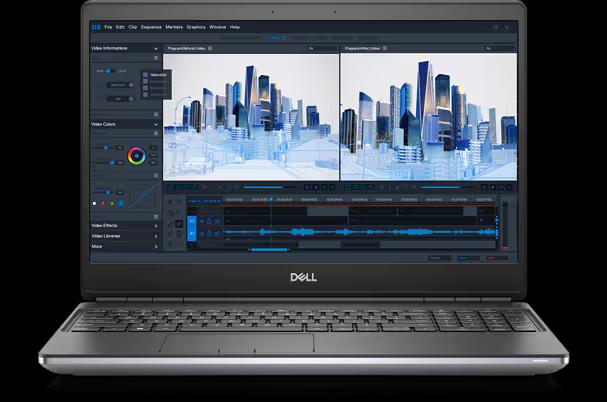
TL;DR The Dell Precision 7560 is a true workstation-class laptop built for professionals who need desktop-level power in a portable form. It is ideal for engineers, architects, video editors, designers, and enterprise users working with software like AutoCAD, SolidWorks, Adobe Premiere Pro, and MATLAB. With Intel 11th Gen Core i7 or Xeon options, NVIDIA Quadro RTX graphics, support for up to 128GB RAM, and multiple NVMe SSD slots, it is highly future-proof. The rugged build, ISV certifications, advanced security, and excellent port selection make it a dependable long-term investment. While expensive and heavier than ultrabooks, it delivers unmatched reliability and scalability for demanding professional workloads.
Introduction
When it comes to professional-grade laptops, the Dell Precision 7560 stands out as one of the most powerful and reliable mobile workstations available today. Designed for engineers, architects, designers, and data scientists, this workstation-class laptop balances raw performance, advanced graphics capabilities, and enterprise-level durability. Unlike consumer-grade laptops, the Precision 7560 is optimized for running heavy applications such as AutoCAD, SolidWorks, MATLAB, Adobe Premiere Pro, and complex data analysis tools.
Dell has consistently been a leader in the workstation market, and the Precision 7560 proves why. It brings together Intel Core i7 11th Gen processors, professional NVIDIA Quadro graphics (optional), and expandable memory options in a portable design that doesn’t compromise on performance. If you’re looking for a reliable laptop that can replace a desktop workstation, this model deserves serious consideration.
Feature Table: Dell Precision 7560 Specifications
| Feature | Specification |
|---|---|
| Brand | Dell |
| Model | Precision 7560 |
| Processor Brand | Intel |
| Processor Name | Intel Core i7 |
| Processor Gen | 11th Generation |
| Cores | 4 |
| RAM | 32GB DDR4 |
| RAM Expansion | Supported (Up to 128GB) |
| Storage | 512GB SSD |
| Storage Expansion | Yes, Multiple NVMe SSD Slots |
| Graphics | NVIDIA Quadro RTX (optional configs) |
| Display Size | 15.6-inch FHD/UHD options |
| Release Year | 2021 |
Design and Build Quality
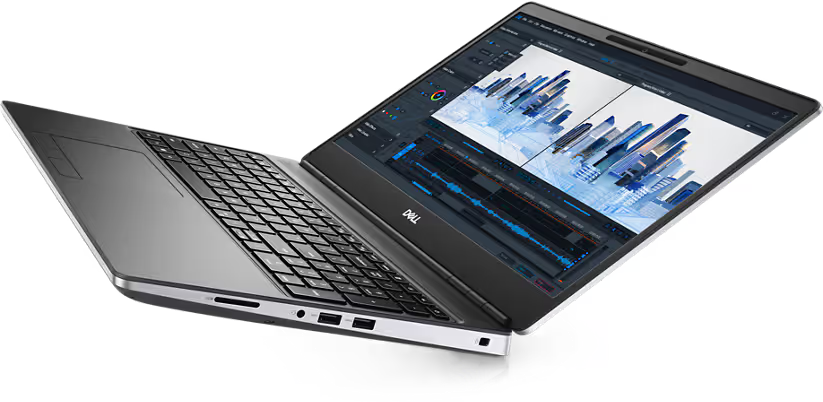
The Dell Precision 7560 follows the familiar professional-grade design Dell is known for. It features a robust chassis built from premium magnesium alloy and aluminum, ensuring both durability and a professional aesthetic. This laptop passes MIL-STD-810H testing, which means it can withstand challenging work environments, making it perfect for engineers and professionals working on-site.
Despite being a mobile workstation, Dell has managed to keep the design relatively slim and portable compared to older Precision models. It measures around 1.08 inches in thickness and weighs approximately 5.4 pounds, which is reasonable for a workstation-class laptop with advanced cooling and powerful hardware.
The laptop’s keyboard is another highlight, offering a comfortable typing experience with backlighting, perfect for late-night work sessions. The precision touchpad is smooth and responsive, and Dell even includes a pointing stick (TrackPoint) for professionals who prefer it.
Performance and Processing Power
The 11th Gen Intel Core i7 processor in the Precision 7560 delivers excellent performance for a wide range of workloads. While consumer laptops with gaming CPUs focus on raw speed, this workstation emphasizes reliability, stability, and certified application performance.
Dell partners with Independent Software Vendors (ISVs) to ensure that the Precision 7560 runs critical software like AutoDesk, Siemens NX, Adobe Creative Suite, Dassault Systèmes CATIA, and other engineering applications without compatibility or stability issues.
The laptop’s 4-core Intel Core i7 CPU with hyper-threading allows efficient multitasking, but professionals can also configure the system with Xeon processors for even higher performance and ECC memory support.
For graphics-intensive workloads, Dell offers NVIDIA Quadro RTX GPUs, which provide real-time ray tracing, AI-enhanced workflows, and optimized rendering performance. This makes the Precision 7560 a great option for 3D modeling, simulations, VR development, and video editing.
Memory and Storage Expansion
Unlike typical laptops, the Dell Precision 7560 supports up to 128GB of DDR4 RAM, making it future-proof for demanding workloads. For professionals working with massive datasets, 4K video editing, or AI training models, this is a huge advantage.
The laptop comes with a 512GB SSD by default, but Dell provides multiple M.2 NVMe SSD slots, allowing users to expand storage easily. With support for RAID configurations, professionals can choose between speed (RAID 0) or redundancy (RAID 1), depending on their needs.
This kind of scalability makes the Precision 7560 more versatile than standard ultrabooks or gaming laptops, which often lack expandability.
Display and Visual Experience
The Dell Precision 7560 offers multiple display options, starting with a 15.6-inch Full HD (FHD) panel and scaling up to Ultra HD (UHD) HDR400 displays with 100% AdobeRGB coverage.
For designers, architects, and video editors, the UHD option is a game-changer as it delivers:
- High brightness levels (up to 600 nits)
- Wide color accuracy with factory calibration
- Optional touch functionality for more intuitive workflows
Professionals who require true-to-life visuals for color-sensitive work such as animation, graphic design, or cinematography will greatly benefit from these display options.
Cooling and Thermals
Workstation laptops often face heating challenges due to powerful components packed in a portable design. Dell addresses this with an advanced dual-fan cooling system and large heat pipes.
The Precision 7560’s thermal management ensures the system can run at high loads for extended periods without throttling. Whether you’re rendering a 3D model or running complex simulations, the laptop maintains performance stability.
Connectivity and Ports
One of the major advantages of workstation laptops like the Precision 7560 is their comprehensive connectivity.
It includes:
- 2x Thunderbolt 4 ports
- USB 3.2 Gen 1 and Gen 2 ports
- HDMI 2.1
- Mini DisplayPort
- Ethernet port (RJ-45)
- Smart Card Reader (for enterprise security)
- SD card reader
With these ports, professionals can connect multiple external monitors, docking stations, and other peripherals with ease.
Security and Enterprise Features
Since the Precision series is built for professionals, Dell has integrated enterprise-level security features:
- TPM 2.0 security chip
- Fingerprint reader and IR camera for Windows Hello login
- Dell SafeBIOS for firmware security
- Optional Smart Card authentication
These make the laptop ideal for businesses handling sensitive data or organizations that require strict compliance standards.
Pricing and Value Proposition
The Dell Precision 7560 is positioned as a premium mobile workstation, so it comes with a higher price tag compared to consumer laptops. Depending on configurations, pricing typically starts around $2,000 and goes higher for models with Xeon CPUs and Quadro RTX GPUs.
However, considering its expandability, reliability, and certified performance, it provides excellent long-term value for professionals who rely on workstation-grade machines for their livelihood.
For users looking at alternatives, the HP ZBook Fury 15 G8 and Lenovo ThinkPad P15 Gen 2 are close competitors, but the Precision 7560 stands out with its strong ISV certifications, superior build quality, and Dell’s excellent after-sales support.
Pros and Cons of Dell Precision 7560
Pros:
- Rugged and professional-grade build quality
- Expandable memory (up to 128GB RAM) and storage options
- ISV-certified for industry-leading applications
- Excellent display options with UHD and HDR support
- Comprehensive connectivity with Thunderbolt 4
Cons:
- Premium pricing compared to consumer laptops
- Heavier than ultrabooks (not the most portable)
- Base models come with limited storage (512GB SSD may not be enough for some users)
Customer Response
Users of the Dell Precision 7560 generally praise its performance stability, build quality, and reliability. Many professionals highlight that the system handles heavy workloads effortlessly and remains a trustworthy tool for years.
However, some note that the base model storage could be larger, and the price is steep compared to gaming laptops with similar raw specs. That said, for professionals who need ISV certification, long-term reliability, and enterprise features, the Precision 7560 is considered a worthwhile investment.
Final Verdict: Should You Buy the Dell Precision 7560 in 2026?
The Dell Precision 7560 remains one of the most dependable mobile workstation laptops you can buy in 2026, especially for professionals whose work directly depends on certified performance, hardware stability, and long-term upgrade flexibility. Unlike standard high-performance laptops that focus mainly on benchmark speed, the Precision 7560 is engineered for sustained professional workloads such as AutoCAD, SolidWorks, CATIA, Adobe Premiere Pro, MATLAB, 3D rendering, simulations, and enterprise data processing.
Its biggest strengths are workstation-grade NVIDIA RTX professional graphics, Intel 11th Gen Core i7 and Xeon options, support for up to 128GB RAM, multiple NVMe SSD slots, enterprise security, and excellent port selection. These features make it a true desktop replacement for engineers, architects, video editors, product designers, developers, and data-heavy enterprise users. Even in 2026, the hardware remains highly capable for serious CAD, rendering, simulation, and content production workflows.
The only trade-offs are weight and premium pricing. It is noticeably heavier than ultrabooks and may feel excessive for casual users, students, or buyers focused mainly on portability. However, for professionals who prioritise reliability over thinness, the Precision 7560 continues to justify its price through long-term durability, ISV certifications, excellent thermal stability, and superior upgradeability.
If your workflow involves mission-critical software, large datasets, professional rendering, or on-site engineering work, the Dell Precision 7560 remains a highly recommended workstation investment in 2026.
Frequently Asked Questions
Q. Who should buy the Dell Precision 7560?
The Dell Precision 7560 is ideal for engineers, architects, CAD professionals, 3D designers, video editors, data scientists, and enterprise users who need workstation-grade reliability, certified software compatibility, and strong long-term scalability.
Q. Is the Dell Precision 7560 good for AutoCAD and SolidWorks?
Yes, this is one of its strongest use cases. The laptop is built for CAD, simulation, and professional 3D workloads, with ISV certifications that ensure stable performance in AutoCAD, SolidWorks, CATIA, Siemens NX, and similar engineering tools.
Q. Can the Dell Precision 7560 be upgraded later?
Yes, it is highly upgradeable. It supports up to 128GB DDR4 RAM and multiple NVMe SSD slots, making it one of the best workstation laptops for long-term hardware expansion.
Q. Is the Dell Precision 7560 good for video editing and Adobe Premiere Pro?
Yes, it performs extremely well for professional video editing. The RTX workstation GPU, high RAM ceiling, fast SSD expansion, and colour-accurate display options make it highly suitable for Adobe Premiere Pro, DaVinci Resolve, After Effects, and 4K production workflows.
Q. How good is the cooling system on the Dell Precision 7560?
The cooling system is one of its biggest strengths. Dell’s advanced dual-fan design and large heat pipes help the laptop sustain heavy rendering, simulations, and long export sessions without major throttling issues.
Q. Is the Dell Precision 7560 worth buying in 2026?
Yes, it is still worth buying in 2026, especially in refurbished or enterprise resale markets. It offers workstation-class performance, excellent durability, and upgrade flexibility at a better value than many newer mobile workstations.
Q. Can the Dell Precision 7560 replace a desktop workstation?
Yes, for many professionals it can fully replace a desktop. With Xeon options, RTX professional graphics, 128GB RAM support, and multiple SSD slots, it is designed specifically as a portable desktop replacement.
Q. Is the base 512GB SSD enough for professional workloads?
For light to moderate professional use it may be enough, but CAD files, 4K video footage, and datasets can fill it quickly. The good news is that storage expansion is easy thanks to multiple NVMe slots.
Q. Is the Dell Precision 7560 good for travel and portability?
For a workstation, portability is good, but it is still heavier than standard laptops at around 5.4 pounds. It is best for professionals moving between office, home, and on-site work rather than frequent lightweight travel.
Q. What are the best alternatives to the Dell Precision 7560?
The closest alternatives are the HP ZBook Fury 15 G8 and Lenovo ThinkPad P15 Gen 2. However, the Precision 7560 stands out for strong ISV certification coverage, excellent enterprise support, and superior long-term scalability.
Ready to upgrade your tech?
Browse our collection of quality refurbished products at unbeatable prices.






