
Dell Precision 5560 Review: A Slim Workstation for Designers and Editors
The Dell Precision 5560 remains an interesting slim workstation for designers and editors in 2026. Its color-focused display, upgradeable RAM and RTX A2000 graphics make refurbished configurations worth considering.

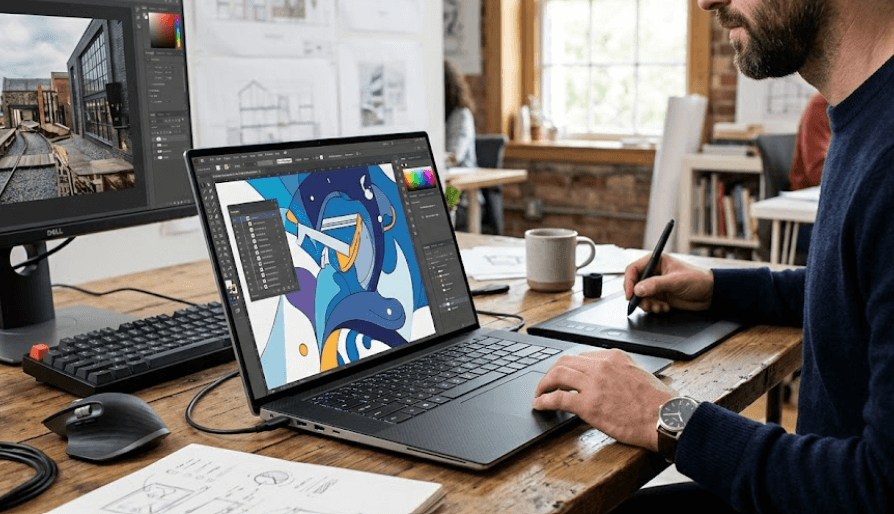
TL;DR The Dell Precision 5560 is an older mobile workstation that still makes sense for designers, editors, CAD users, and other professionals who want workstation-class hardware in a relatively slim 15.6-inch chassis. Released with 11th Gen Intel Core and Xeon processors, NVIDIA T1200 or RTX A2000 graphics, DDR4 memory, and FHD+ or UHD+ display options, it was designed to balance portability with professional workloads. The UHD+ configuration is particularly interesting for visual work because Dell rated it for 100% AdobeRGB minimum and 99% DCI-P3 typical coverage, while independent testing measured strong color coverage and roughly 500-nit brightness. In 2026, however, the Precision 5560 should be viewed primarily as a refurbished workstation rather than a modern flagship. Its older CPU platform, 45W RTX A2000 implementation, 60Hz display options, and aging battery are important considerations. If you find a well-maintained configuration with 32GB or 64GB RAM, an RTX A2000, a healthy battery, and the UHD+ panel at the right price, it can still be a capable professional machine.
Dell Precision 5560 Design And Build
The Dell Precision 5560 was designed for professionals who wanted workstation hardware without carrying a thick desktop-replacement laptop. Its chassis is based on the same general design language as Dell's XPS 15 family, giving it a much slimmer appearance than traditional mobile workstations. Independent testing measured the system at approximately 18mm thick and around 2kg depending on configuration, which is impressive for a machine carrying a 45W-class Intel processor and professional NVIDIA graphics. That makes the Precision 5560 particularly interesting for designers, editors, engineers, and consultants who regularly move between offices, studios, classrooms, and client locations.
The slim design does involve compromises. The Precision 5560 is not built like a large workstation such as Dell's thicker Precision 7000-series machines, where there is more room for cooling and higher-power graphics. Dell's RTX A2000 configuration is limited to a 45W graphics power target in independent testing, so buyers should not expect the same sustained GPU performance as a thicker workstation with a higher-power professional GPU. Still, the combination of a relatively compact chassis and professional graphics was one of the model's biggest selling points when it launched.
Build quality is another reason the Precision 5560 remains relevant on the refurbished market. Its narrow bezels and 16:10 display proportions give it a modern-looking front compared with many older business laptops, while the large touchpad and backlit keyboard are useful for long editing and productivity sessions. The design also avoids the bulky appearance associated with many traditional workstations. For someone who wants a professional laptop that can travel easily but still run workstation applications, the 5560's physical design remains one of its strongest characteristics.
Design And Build Specifications
| Feature | Dell Precision 5560 |
|---|---|
| Screen Size | 15.6 inches |
| Aspect Ratio | 16:10 |
| Thickness | About 18mm |
| Weight | About 2kg, configuration dependent |
| Battery | 86Wh |
| Operating System Support | Windows 11 and other supported OS options |
| Chassis Positioning | Slim mobile workstation |
Display Quality For Designers And Editors
The display is arguably the most important part of the Precision 5560 for creative professionals, but buyers need to identify the exact panel fitted to the refurbished unit. Dell offered a 15.6-inch FHD+ 1920 x 1200 anti-glare panel rated at 500 nits and 100% sRGB minimum, as well as a UHD+ 3840 x 2400 touchscreen panel rated at 500 nits, 100% AdobeRGB minimum, and 99% DCI-P3 typical coverage. These are substantially different displays, so simply buying a Precision 5560 because it has a high-resolution screen is not enough. The panel specification should be confirmed before purchase.
For photo editing, graphic design, color-sensitive work, and high-resolution video timelines, the UHD+ option is the more interesting configuration. Independent testing of the UHD+ panel found approximately 100% sRGB and 100% AdobeRGB coverage, along with about 95% Display P3 coverage and brightness around 500 nits. Those results make the display well suited to applications where accurate and wide-gamut color reproduction matters. The 16:10 aspect ratio also gives designers and editors additional vertical workspace compared with traditional 16:9 panels.
There is one important limitation: the Precision 5560's display options are 60Hz, and the UHD+ panel is not an OLED panel. Independent testing also noted relatively slow response times on the IPS panel, which can produce visible ghosting in fast-moving content. That is not a major concern for photo editing, CAD, graphic design, or timeline-based editing, but it does make the 5560 less attractive if gaming or extremely fluid motion is a priority. For professional visual work, however, color coverage and resolution are more relevant than a high refresh rate.
Display Options
| Display | Resolution | Brightness | Color Coverage | Touch |
|---|---|---|---|---|
| FHD+ | 1920 x 1200 | 500 nits | 100% sRGB minimum | No |
| UHD+ | 3840 x 2400 | 500 nits | 100% AdobeRGB minimum, 99% DCI-P3 typical | Yes |
Performance And RTX A2000 Graphics
The Precision 5560 uses Intel's 11th Gen Tiger Lake-H platform. Available processors included models such as the Core i5-11500H, Core i7-11800H, Core i7-11850H, Core i9-11950H, and Xeon W-11955M, depending on configuration. The higher-end versions paired these CPUs with NVIDIA professional graphics, including the T1200 and RTX A2000. This hardware combination was aimed at applications where certified workstation graphics and sustained professional performance mattered more than thin-and-light consumer design.
The RTX A2000 is particularly relevant for designers and editors because it belongs to NVIDIA's professional RTX workstation family rather than the GeForce range. The Precision 5560's RTX A2000 has 4GB of GDDR6 memory and was tested at a 45W graphics power limit. That makes it suitable for many professional 3D, CAD, rendering, and GPU-accelerated creative workloads, but buyers should keep expectations realistic in 2026. Modern professional applications can benefit from considerably newer GPUs with more VRAM and higher performance, especially for demanding 3D scenes, AI-assisted workflows, complex effects, and high-resolution video production.
For general editing, Photoshop, Lightroom, CAD, moderate Premiere Pro projects, and professional multitasking, a well-configured Precision 5560 can still be useful. The key is buying enough memory and choosing the RTX A2000 configuration rather than assuming every Precision 5560 has the same graphics capability. A refurbished 5560 with an i7 processor, RTX A2000, 32GB or 64GB RAM, and a fast SSD is a very different proposition from an entry-level configuration with 8GB RAM and a T1200.
Hardware Configurations
| Component | Dell Precision 5560 Options |
|---|---|
| CPU | 11th Gen Intel Core i5, i7, i9 or Xeon |
| GPU | NVIDIA T1200 or RTX A2000 |
| GPU Memory | 4GB GDDR6 |
| RAM | Up to 64GB DDR4 |
| Storage | PCIe NVMe SSD |
| SSD Slots | Two M.2 PCIe 4.0 slots |
| Professional Positioning | Mobile workstation |
RAM And Storage Upgradeability
One of the strongest reasons to consider the Precision 5560 in 2026 is its upgradeable internal hardware. Unlike many modern thin laptops that use soldered memory, the Precision 5560 uses removable DDR4 memory modules. Dell's specifications list configurations up to 64GB, while its service documentation includes procedures for removing and installing the memory. That gives buyers considerably more flexibility when purchasing a refurbished machine because a lower-memory configuration can potentially be upgraded later, provided the appropriate modules and configuration are used.
Storage is also flexible. Independent testing confirmed that the Precision 5560 has two M.2 PCIe 4.0 x4 SSD slots. This is particularly useful for editors and designers who work with large project folders, RAW photographs, video footage, CAD files, or local asset libraries. You can use one SSD for the operating system and applications and another for project files, scratch data, or working storage. The exact configuration of a refurbished unit should still be checked before purchase because sellers can replace or alter the original drives.
This upgradeability changes the value equation in the refurbished market. A Precision 5560 with 16GB RAM may be affordable, but a 32GB or 64GB configuration is more suitable for professional multitasking and demanding creative applications. Similarly, a 512GB SSD may work for office users but can become restrictive for editors. Because the machine supports two M.2 drives, storage expansion is one of the areas where the 5560 remains practical compared with newer laptops that prioritize thinness over serviceability.
Upgrade Potential
| Upgrade Area | Precision 5560 |
|---|---|
| RAM | Upgradeable DDR4 |
| Maximum Listed RAM | Up to 64GB |
| Primary Storage | M.2 NVMe SSD |
| Additional SSD | Second M.2 slot supported |
| Best Professional Configuration | 32GB to 64GB RAM with RTX A2000 |
Battery Life And Everyday Use
The Precision 5560 has an 86Wh battery, which is a substantial capacity for a relatively slim 15.6-inch workstation. Independent testing recorded around 6.3 hours in its Wi-Fi browsing test for a configuration with the RTX A2000 and UHD+ display, while heavier workloads reduced runtime considerably. These results show why battery expectations need to be realistic. A workstation with a high-resolution display, 45W processor, and discrete GPU is not going to behave like an ultraportable laptop during sustained rendering or editing.
For everyday office work, browsing, document editing, research, and lighter creative tasks, the battery can still be practical if the battery itself is in good health. That last point is particularly important in 2026 because refurbished Precision 5560 units may have already gone through several years of use. Battery condition can vary dramatically between individual machines, so buyers should check battery health rather than relying only on the original 86Wh capacity.
Thermal behavior is another consideration. Independent testing recorded load hot spots approaching roughly 49°C on the top surface and 45°C on the bottom in demanding scenarios. The workstation's cooling system is designed to handle its professional hardware within a relatively thin chassis, but sustained heavy workloads can make the system warm. For editors and designers, using the laptop on a hard, flat surface and keeping its cooling vents unobstructed is sensible during long rendering or export sessions.
Connectivity And Windows Support
The Precision 5560 takes a modern-for-its-generation approach to connectivity, with USB-C and Thunderbolt connectivity playing a major role. Independent testing identified two Thunderbolt ports, USB-C connectivity, DisplayPort support, an SD card reader, a 3.5mm audio connection, and other connectivity options. The reliance on USB-C means users who need traditional USB-A, HDMI, or Ethernet may need adapters or a dock, particularly when building a desk setup with external monitors and accessories.
For creative professionals, the SD card reader is useful because it can simplify transfers from cameras without requiring an additional accessory. Thunderbolt support also makes the laptop suitable for a more sophisticated workstation setup with external displays, storage, docking stations, and other peripherals. This is particularly relevant for editors who may use the Precision 5560 as a mobile machine during the day and connect it to a larger monitor or storage system at a desk.
Software support is still reasonably practical. Dell lists Windows 11 among the operating systems supported by the Precision 5560, and Dell's support pages continue to provide Precision 5560 documentation and BIOS resources. Dell also released a Precision 5560 BIOS update in June 2026. That does not make the laptop a modern workstation, but it does mean the model has not simply become unusable because of its age.
Connectivity Overview
| Feature | Precision 5560 |
|---|---|
| Thunderbolt | Supported |
| USB-C | Supported |
| DisplayPort | Supported through USB-C |
| SD Card Reader | Yes |
| 3.5mm Audio | Yes |
| Wi-Fi | Wi-Fi 6 available |
| Windows 11 | Supported |
Is The Dell Precision 5560 Still Worth Buying In 2026?
The answer depends heavily on the configuration and price. The Precision 5560 is not a sensible choice if you are expecting the performance of a current-generation mobile workstation. Its 11th Gen Intel processors and RTX A2000 are several generations old, and the 4GB graphics memory can become restrictive for demanding modern professional workloads. Buyers who need heavy 3D rendering, advanced effects, large AI workloads, or very complex 4K and 8K production should look at newer workstations with more powerful GPUs and greater VRAM.
The situation changes when you look at refurbished pricing. Current listings show that Precision 5560 configurations can vary considerably in price depending on processor, RAM, storage, graphics, display, condition, and warranty. That makes configuration more important than the model number itself. A 64GB RTX A2000 model with the UHD+ display can offer a very different experience from a cheaper 16GB T1200 version, even though both are sold under the Precision 5560 name.
For designers and editors, the ideal refurbished configuration is therefore fairly clear. Look for the RTX A2000, at least 32GB RAM, a 1TB SSD or an easily expandable storage configuration, and preferably the UHD+ display if color work is important. Also check battery health, display condition, keyboard wear, SSD health, charger compatibility, and warranty coverage. A well-maintained unit with these specifications can still provide a strong professional workflow without requiring the cost or bulk of a newer workstation.
What To Check Before Buying
| Check | What To Look For |
|---|---|
| GPU | RTX A2000 preferred for heavier creative work |
| RAM | 32GB or 64GB for professional workloads |
| Display | UHD+ for color-focused work |
| Storage | 1TB preferred, with second SSD slot available |
| Battery | Check actual health, not only rated capacity |
| Warranty | Prefer a seller with clear warranty terms |
| Condition | Check hinges, screen, keyboard, ports and chassis |
Frequently Asked Questions
Q. Is the Dell Precision 5560 good for graphic design?
Yes. A Precision 5560 with the UHD+ display is particularly suitable for graphic design because Dell rated that panel for 100% AdobeRGB minimum and 99% DCI-P3 typical coverage. Independent testing also found approximately 100% sRGB and AdobeRGB coverage. The RTX A2000 configuration adds useful GPU acceleration for professional applications.
Q. Is the Dell Precision 5560 good for video editing?
It can handle many editing workloads well, particularly with an RTX A2000, 32GB or 64GB RAM, and a fast NVMe SSD. However, it is an older workstation, so demanding modern 4K, 6K, 8K, or heavily effects-based projects can benefit from newer CPUs and GPUs with more VRAM.
Q. Does the Dell Precision 5560 have an RTX A2000?
Yes. Dell offered the Precision 5560 with an NVIDIA RTX A2000 with 4GB of GDDR6 memory. It was also available with an NVIDIA T1200, so buyers should verify the exact GPU before purchasing a refurbished unit.
Q. How much RAM can the Dell Precision 5560 support?
Dell lists configurations up to 64GB of DDR4 memory. The memory is removable and upgradeable, making the Precision 5560 more flexible than many newer laptops with soldered RAM.
Q. Does the Dell Precision 5560 support Windows 11?
Yes. Dell officially lists Windows 11 among the supported operating systems for the Precision 5560, and Dell continues to provide support resources and BIOS updates for the model.
Q. Does the Dell Precision 5560 have an SD card reader?
Yes. The Precision 5560 includes an SD card reader, which can be useful for photographers and video creators who regularly transfer files from cameras.
Q. Is the Dell Precision 5560 OLED?
No. The Precision 5560 did not offer an OLED display. Its main display choices were a 15.6-inch FHD+ IPS panel and a 15.6-inch UHD+ IPS touchscreen panel. The UHD+ version is the more relevant choice for color-sensitive creative work.
Q. How many SSDs can the Dell Precision 5560 support?
The Precision 5560 supports two M.2 PCIe 4.0 x4 SSDs. This gives professional users useful flexibility for separating applications, project files, media, and other large datasets.
Q. Is the Dell Precision 5560 good for CAD?
The RTX A2000 configuration can be useful for CAD and other professional 3D applications, particularly where workstation-class NVIDIA graphics are beneficial. However, performance expectations should be based on the specific application and project complexity rather than the Precision branding alone.
Q. Should you buy a Dell Precision 5560 in 2026?
It can make sense as a refurbished workstation if the price is appropriate and the configuration is strong. A model with an RTX A2000, 32GB or 64GB RAM, a healthy battery, and the UHD+ display is considerably more attractive for professional work than a basic configuration. Buyers needing the latest CPU and GPU performance should consider newer Precision generations instead.
Final Recommendation
The Dell Precision 5560 remains an interesting refurbished workstation in 2026 because it gets several important things right. Its slim 15.6-inch design makes it easier to carry than many traditional workstations, while the available RTX A2000, upgradeable DDR4 memory, dual M.2 SSD support, and high-resolution UHD+ display give it the hardware flexibility that professional users need. The display is particularly compelling for designers and editors who value resolution and wide color coverage, while the RTX A2000 gives the machine genuine workstation credentials rather than simply adding a premium-looking badge.
The important qualification is age. The Precision 5560 is based on 11th Gen Intel hardware and an older RTX A2000 platform, so it should not be compared directly with current mobile workstations on raw performance. Its 4GB GPU memory can also become a limitation for demanding modern workloads. Battery condition is another major consideration when buying a refurbished unit because the original 86Wh capacity does not tell you how much capacity remains after years of use.
For a designer, editor, CAD professional, or student who wants a relatively slim workstation at a sensible refurbished price, the Precision 5560 can still be a practical choice when equipped correctly. Prioritize the RTX A2000, 32GB or 64GB RAM, UHD+ display, healthy battery, and reliable warranty over simply choosing the cheapest listing. If those conditions are met, the Precision 5560 offers a useful combination of portability, professional graphics, color-focused display options, and upgradeability that remains relevant even though the platform itself is no longer new.






