
Dell Precision 5550 vs 5560: What Changed?
The Dell Precision 5560 refines the 5550 with newer Intel CPUs, NVIDIA RTX A-series graphics, PCIe 4.0 storage, and Thunderbolt 4 while retaining a very similar design.

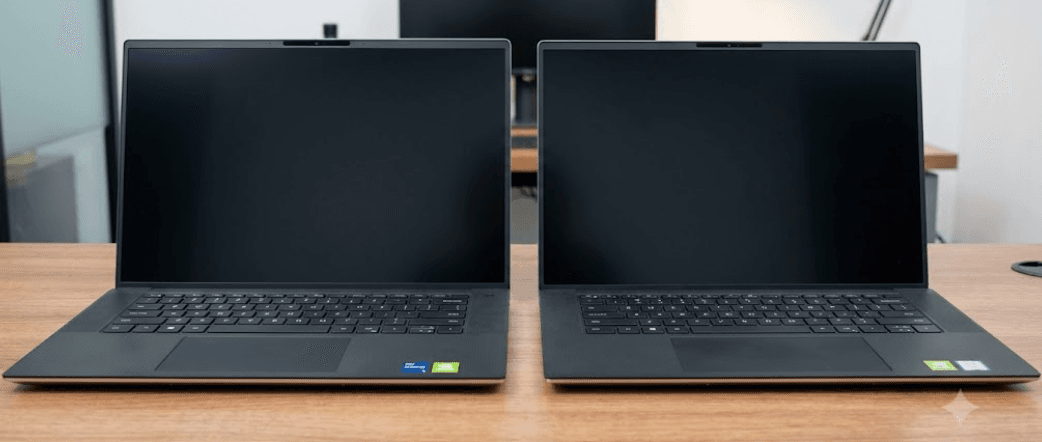
TL;DR The Dell Precision 5560 is best understood as an internal upgrade to the Precision 5550 rather than a completely new workstation. Both use a similar 15.6-inch 16:10 chassis, two SODIMM memory slots, up to 64GB of DDR4 RAM, and similar display options, but the 5560 moves from 10th Gen Intel processors to 11th Gen chips and replaces the 5550's older Quadro graphics with newer NVIDIA professional GPUs, including the RTX A2000. It also adds PCIe 4.0 SSD support and upgrades the two Thunderbolt ports from Thunderbolt 3 to Thunderbolt 4. These changes make the Precision 5560 more capable for GPU-heavy professional workloads, while the Precision 5550 can still make sense when available at a significantly lower refurbished price.
Dell Precision 5550 vs 5560: The Main Difference
The biggest difference between the Dell Precision 5550 and 5560 is what happens inside the chassis. The Precision 5550 belongs to the 2020 generation and uses 10th Gen Intel Core processors or an Intel Xeon option, paired with professional NVIDIA Quadro graphics. The Precision 5560 followed it with 11th Gen Intel Core and Xeon processors and newer NVIDIA professional graphics. Dell's specifications show that the 5560 can be configured with NVIDIA T1200 or RTX A2000 graphics, while the 5550 was offered with Quadro T1000 or Quadro T2000 graphics. This makes the newer model more relevant for workloads that depend heavily on GPU acceleration, including CAD, 3D applications, and other professional visualization tasks.
The change is more substantial for graphics than for the physical design. Notebookcheck describes the Precision 5560 as an internal refresh of the Precision 5550, with the same general XPS 15-based chassis and 16:10 display approach. That means you should not expect the 5560 to look dramatically different when placed beside a 5550. The familiar aluminum and magnesium construction, narrow bezels, large touchpad, and USB-C-focused connectivity remain part of the overall design. The practical difference is that Dell used the same compact workstation formula while updating the components that could deliver more performance.
The CPU upgrade is also meaningful, although it is not as dramatic as the graphics change. The Precision 5550 uses 10th Gen Intel processors, while the 5560 moves to 11th Gen Tiger Lake-H chips. Depending on the configuration, the 5560 could use processors such as the Core i5-11500H, Core i7-11800H, Core i7-11850H, Core i9-11950H, or Xeon W-11955M. The result is a newer platform with improved connectivity and processing capabilities, but the overall workstation experience still depends heavily on the exact CPU and GPU configuration you find.
| Feature | Dell Precision 5550 | Dell Precision 5560 |
|---|---|---|
| CPU generation | 10th Gen Intel Core/Xeon | 11th Gen Intel Core/Xeon |
| Professional GPU | Quadro T1000/T2000 | NVIDIA T1200/RTX A2000 |
| RAM | Up to 64GB DDR4 | Up to 64GB DDR4 |
| RAM slots | 2 SODIMM | 2 SODIMM |
| SSD interface | PCIe Gen 3 | PCIe Gen 3 and Gen 4 options |
| Thunderbolt | Thunderbolt 3 | Thunderbolt 4 |
| Display | 15.6-inch FHD+ or UHD+ | 15.6-inch FHD+ or UHD+ |
| Battery options | 56Wh or 86Wh | 56Wh or 86Wh |
Performance And Processor Changes
The Precision 5560's move to 11th Gen Intel processors gives it a newer CPU platform than the Precision 5550. Dell offered the 5560 with multiple Core and Xeon configurations, including eight-core options, so performance varies substantially depending on which configuration you compare. A Precision 5560 with a Core i7-11850H and RTX A2000, for example, is a very different machine from a lower-end configuration using a Core i5 and T1200. This is important when shopping for either model because the model number alone does not tell you the complete performance level.
The more noticeable improvement comes from the graphics subsystem. The Precision 5550's Quadro T2000 was based on NVIDIA's older Turing generation, while the Precision 5560 introduced Ampere-based professional graphics in the form of the RTX A2000. In Notebookcheck's testing, the RTX A2000 configuration delivered substantially higher graphics performance than the tested Quadro T2000 Max-Q configuration across several professional workloads. That makes the 5560 particularly relevant for users working with 3D modeling, CAD, rendering, engineering applications, and other GPU-dependent software.
This does not mean every Precision 5560 is automatically faster than every Precision 5550. Configuration matters. A 5560 with an entry-level CPU and T1200 should not be compared directly with a 5550 equipped with a higher-end processor and Quadro T2000. For refurbished buyers, the exact processor, GPU, RAM, and SSD should therefore be checked before comparing prices. If two machines have similar configurations, the 5560's newer platform and RTX A2000 option give it a meaningful performance advantage.
Performance Comparison
| Area | Precision 5550 | Precision 5560 |
|---|---|---|
| CPU architecture | 10th Gen Intel | 11th Gen Intel |
| Top professional CPU options | Core i9 / Xeon options | Core i9 / Xeon options |
| Entry professional GPU | Quadro T1000 | NVIDIA T1200 |
| Higher GPU option | Quadro T2000 | NVIDIA RTX A2000 |
| GPU generation | Turing | Ampere |
| Professional graphics advantage | Older architecture | Newer architecture with stronger GPU performance |
Display, Storage, And Connectivity
The display experience is one area where the Precision 5550 and 5560 are remarkably similar. Both models were offered with 15.6-inch 16:10 panels, including a 1920 x 1200 FHD+ non-touch option and a 3840 x 2400 UHD+ touchscreen option. Dell rates the displays at up to 500 nits, with the FHD+ configuration covering 100% of sRGB and the UHD+ option offering 100% AdobeRGB coverage with broad DCI-P3 coverage. Both generations are therefore well suited to professional work where screen resolution and color coverage matter.
Storage is where the 5560 receives a more important platform upgrade. The Precision 5550's storage options were based on PCIe Gen 3 NVMe drives, while Dell introduced PCIe Gen 4 NVMe options for the Precision 5560. The 5560 still supports two M.2 SSD slots, so the upgrade is not about changing the basic storage layout. Instead, it gives compatible configurations access to a newer storage interface with substantially higher theoretical bandwidth. For large project files, professional applications, and frequent file transfers, that can make the newer model more attractive.
Connectivity also received a clear update. The Precision 5550 has two USB-C ports with Thunderbolt 3 and a third USB-C port with DisplayPort functionality. The Precision 5560 keeps the same USB-C-focused philosophy but upgrades its two left-side Thunderbolt ports to Thunderbolt 4. Both machines include an SD card reader and headphone/microphone connectivity, while Dell supplied a USB-C adapter for functions such as USB-A and HDMI connectivity. The 5560's Thunderbolt 4 support gives it a newer connection standard for docks, external displays, and high-speed peripherals.
| Feature | Precision 5550 | Precision 5560 |
|---|---|---|
| FHD+ display | 1920 x 1200, 60Hz | 1920 x 1200, 60Hz |
| UHD+ display | 3840 x 2400, 60Hz touch | 3840 x 2400, 60Hz touch |
| Maximum brightness | 500 nits | 500 nits |
| UHD+ color coverage | 100% AdobeRGB | 100% AdobeRGB minimum |
| SSD interface | PCIe Gen 3 | PCIe Gen 3 and Gen 4 |
| M.2 slots | 2 | 2 |
| Thunderbolt | 2 x Thunderbolt 3 | 2 x Thunderbolt 4 |
| SD card reader | Yes | Yes |
Design, Memory, And Battery Life
If you are comparing the two laptops visually, there is not much to separate them. The Precision 5560 continues the same thin workstation concept used by the 5550 and retains a 15.6-inch 16:10 display with narrow bezels. This is important because the 5560's higher performance does not come from moving to a much larger or substantially thicker workstation. Dell instead updated the internal platform while retaining a familiar form factor.
Memory is another area where the difference is smaller than the model numbers might suggest. Both machines use removable DDR4 SODIMM memory rather than soldered RAM. Dell lists two SODIMM slots and support for up to 64GB on both generations. The 5550 supports configurations using DDR4 memory, while the 5560 supports DDR4-3200 and both ECC and non-ECC configurations depending on the processor and configuration. This makes both models considerably more flexible than thin laptops that use soldered memory.
Battery capacity also does not change dramatically between the generations. Dell offered both the Precision 5550 and Precision 5560 with 56Wh and 86Wh battery options. Actual battery life depends on the processor, display, GPU, battery condition, workload, and power settings. In Notebookcheck's testing, the 5560's higher performance came with some battery-life tradeoffs compared with the tested 5550 configuration. This is especially relevant when buying used because an older battery's health can have a larger impact than the difference between the original battery capacities.
| Hardware Area | Precision 5550 | Precision 5560 |
|---|---|---|
| Memory type | DDR4 SODIMM | DDR4 SODIMM |
| Memory slots | 2 | 2 |
| Maximum RAM | 64GB | 64GB |
| ECC support | Available on supported configurations | Available on supported configurations |
| Battery options | 56Wh / 86Wh | 56Wh / 86Wh |
| General chassis | 15.6-inch 16:10 workstation | Similar 15.6-inch 16:10 workstation |
| Webcam | 720p | 720p |
Which Model Makes More Sense For Refurbished Buyers?
For a refurbished buyer in 2026, the decision is less about whether the Precision 5560 is newer and more about whether its newer hardware justifies the price difference. The 5560 is the more advanced platform, particularly if you find a configuration with the RTX A2000, 11th Gen Core i7 or i9 processor, and PCIe Gen 4 storage. That combination gives you newer CPU architecture, substantially stronger professional GPU capability, and a faster storage interface while retaining the same general workstation format.
The Precision 5550 becomes more interesting when the price gap is large. Its 10th Gen Intel processors are older, and the Quadro T1000 or T2000 graphics are from an earlier generation, but the machine still offers a 15.6-inch 16:10 professional display, up to 64GB of removable DDR4 memory, two M.2 storage slots, and Thunderbolt 3. For office work, programming, general productivity, Adobe applications, and moderate professional workloads, a well-configured 5550 can still provide a capable experience.
The important point is to avoid buying solely on the model number. A refurbished Precision 5560 with 16GB RAM and a T1200 may not automatically be a better purchase than a Precision 5550 with 32GB RAM and a T2000 if the older machine is substantially cheaper. Check the processor, GPU, RAM, SSD, display resolution, battery health, warranty, and physical condition before making the decision. The 5560's biggest advantage is its newer platform, not a completely different user experience.
Refurbished Buying Checklist
| What To Check | Why It Matters |
|---|---|
| CPU model | Determines actual processing performance |
| GPU model | Critical for CAD, 3D and rendering workloads |
| RAM capacity | Both models can support up to 64GB |
| SSD generation | 5560 can support PCIe Gen 4 storage |
| Display | FHD+ and UHD+ configurations differ significantly |
| Battery health | Important for older refurbished units |
| Thunderbolt version | 5560 supports Thunderbolt 4 |
| Warranty | Important when buying an older workstation |
Frequently Asked Questions
Q. What is the main difference between the Dell Precision 5550 and 5560?
The Precision 5560 updates the internal hardware while retaining a very similar chassis. It moves from 10th Gen Intel processors to 11th Gen Intel processors, introduces newer NVIDIA professional GPUs such as the RTX A2000, adds PCIe Gen 4 SSD support, and upgrades Thunderbolt 3 to Thunderbolt 4.
Q. Is the Dell Precision 5560 faster than the 5550?
The Precision 5560 can be significantly faster, particularly in GPU-heavy workloads when equipped with the RTX A2000. CPU gains are more configuration-dependent. The exact processor and graphics configuration should always be checked before comparing two refurbished units.
Q. Does the Precision 5560 have an RTX A2000?
Yes. Dell lists the NVIDIA RTX A2000 with 4GB GDDR6 as one of the discrete graphics options for the Precision 5560. The laptop was also available with the NVIDIA T1200.
Q. What GPU does the Dell Precision 5550 use?
The Precision 5550 was available with NVIDIA Quadro T1000 and Quadro T2000 graphics, both with 4GB of GDDR6 memory. Integrated Intel UHD Graphics options were also available depending on the processor.
Q. Does the Precision 5560 support PCIe Gen 4 SSDs?
Yes. Dell lists PCIe Gen 4 NVMe SSD options for the Precision 5560, alongside PCIe Gen 3 options. The Precision 5550's listed storage options use PCIe Gen 3 NVMe drives.
Q. Can the RAM be upgraded on the Precision 5550 and 5560?
Yes. Both models use two SODIMM memory slots and support up to 64GB of DDR4 memory. This is useful for refurbished buyers because RAM can be upgraded rather than being permanently fixed to the motherboard.
Q. Does the Precision 5560 have a better display than the 5550?
Not necessarily. Both models offer very similar 15.6-inch 16:10 FHD+ and UHD+ display options, including a 3840 x 2400 touchscreen option. The exact panel configuration matters more than the model number.
Q. Does the Precision 5560 have Thunderbolt 4?
Yes. The Precision 5560 has two Thunderbolt 4 USB-C ports, while the Precision 5550 has two Thunderbolt 3 USB-C ports. Both generations also have an additional USB-C port with DisplayPort functionality.
Q. Which is better for CAD, 3D modeling, and professional applications?
The Precision 5560 has an advantage when similarly configured because its RTX A2000 provides newer professional GPU hardware than the Quadro T1000 or T2000 options in the Precision 5550. The exact application and configuration still determine the actual performance.
Q. Is the Dell Precision 5550 still worth buying in 2026?
It can still make sense as a refurbished workstation when the configuration and price are appropriate. Its upgradeable RAM, dual M.2 storage slots, professional GPU options, and high-resolution display remain useful, but buyers should account for its older CPU and GPU generation and check battery health carefully.
Final Recommendation
The Dell Precision 5560 is the more meaningful upgrade if you are choosing between similarly configured machines. Its 11th Gen Intel platform, NVIDIA RTX A2000 option, PCIe Gen 4 storage support, and Thunderbolt 4 connectivity address the main limitations of the Precision 5550 without changing the workstation's basic design. For CAD, 3D modeling, engineering software, visualization, and other GPU-heavy professional workloads, those changes are the most important reason to choose the newer model.
The Precision 5550 should not be dismissed, especially in the refurbished market. Its removable DDR4 memory, support for up to 64GB RAM, dual M.2 storage slots, 15.6-inch 16:10 display options, and professional Quadro graphics still make it a capable workstation. If you find a well-maintained 5550 with a Quadro T2000, 32GB or more RAM, a healthy battery, and a substantial price advantage over a comparable 5560, it can remain a sensible option.
For most buyers comparing equivalent configurations, focus on the GPU first, then CPU, RAM, SSD, display, and battery condition. The 5560 is not a completely different laptop from the 5550, but its internal upgrades are significant enough to matter. In 2026, the right choice therefore comes down to configuration and price: choose the Precision 5560 when you want the newer platform and stronger professional graphics, while the Precision 5550 is worth considering when its refurbished price makes the older hardware a better value for your workload.






