
Buying a Used Nikon D750: Shutter Count and What to Inspect
A used Nikon D750 can still deliver excellent full-frame image quality in 2026. Check shutter count, sensor condition, autofocus, battery health, service history, and Nikon’s past D750 service advisories before buying.

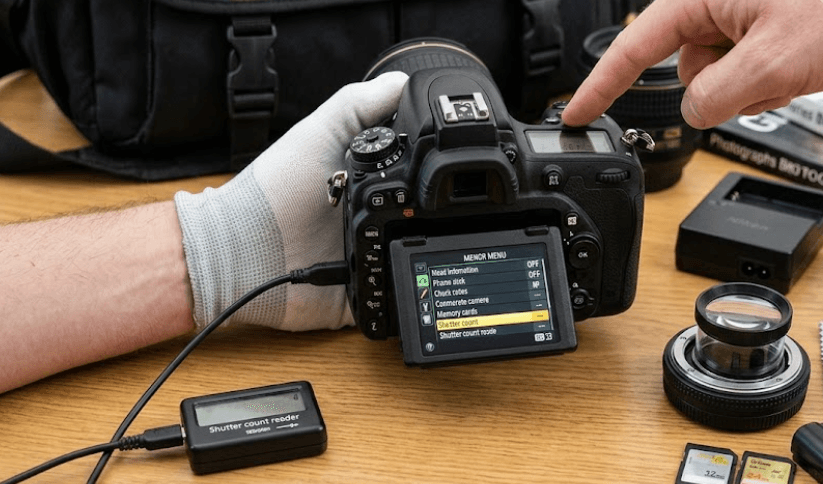
TL;DR Buying a used Nikon D750 can still make sense if you want an affordable full-frame DSLR with strong image quality, a capable autofocus system, dual SD card slots, and access to Nikon’s extensive F-mount lens ecosystem. The D750 was introduced in 2014, so age and condition matter more than simply finding the lowest shutter count. Nikon rates the camera for professional-level durability, but the shutter count should be treated as one part of the inspection rather than a pass-or-fail number. A careful buyer should check the actual shutter count, sensor and mirror condition, autofocus accuracy, LCD and controls, card slots, battery, ports, lens mount, signs of impact or moisture, and service history. It is also important to check the camera’s serial number against Nikon’s historical D750 service advisories, particularly the shutter-related advisory covering units manufactured from July 2014 through September 2016.
Why Buy A Used Nikon D750 In 2026?
The Nikon D750 remains interesting on the used market because it offers a full-frame 24.3-megapixel FX sensor in a DSLR body that is relatively compact for its class. Nikon equipped it with the EXPEED 4 image processor, a 51-point autofocus system, a maximum continuous shooting speed of 6.5 frames per second, and a tilting LCD monitor. These features do not make it equivalent to a current mirrorless camera, but they give the D750 a useful combination of image quality, handling, and versatility for photographers who are comfortable with DSLR technology.
The D750 can therefore be relevant to buyers who want to spend more of their budget on lenses rather than moving immediately into a newer camera body. The Nikon F-mount ecosystem also gives used buyers access to a large selection of lenses, including many older options that can be found at reasonable prices. For portrait photography, landscapes, travel, studio work, and general photography, the D750 still provides enough resolution for a wide range of real-world uses. Its 24.3-megapixel sensor is not designed to compete with today's very high-resolution bodies, but resolution alone does not determine whether a camera is useful.
The main issue in 2026 is not whether the D750 can produce good photographs. It can. The bigger question is whether the particular used unit has been maintained properly. A camera that has spent years in a studio, wedding environment, or dusty outdoor conditions can have very different wear from one used occasionally by a hobbyist. This is why buying a used D750 should be approached as a condition check rather than simply a specification comparison. A clean body with a sensible shutter count, accurate autofocus, healthy battery, working controls, and evidence of proper servicing can be considerably more attractive than a cheaper unit with an uncertain history.
Understanding Nikon D750 Shutter Count
Shutter count is one of the first specifications buyers look at when shopping for a used DSLR. It represents the number of recorded shutter actuations and provides an indication of how much the camera has been used. However, it should not be treated as an exact prediction of how long the camera will continue working. A lower number generally means less recorded shutter use, but a low-count camera can still have been stored poorly, exposed to moisture, dropped, or neglected. Conversely, a higher-count camera that has been professionally maintained can still be perfectly usable.
Nikon does not present shutter count as a simple expiry date for the D750. The practical lesson is that buyers should avoid statements such as "under X clicks is safe" or "over X clicks is finished." Real-world shutter life varies, and community reports include D750 cameras that have continued operating at very high counts as well as examples where shutters failed at lower counts. For a used purchase, the count should therefore be combined with physical condition, test photographs, service records, and the seller's history rather than considered independently.
The D750's shutter history is particularly important because Nikon issued a technical service advisory concerning possible shutter-related image shading. Nikon ultimately stated that D750 cameras manufactured from July 2014 through September 2016 were eligible for inspection and repair for this issue. Nikon's advisory says affected cameras could receive shutter inspection and replacement at no charge under the service programme, including cameras outside their original warranty period. This makes the serial number and service history important checks when buying an older D750.
What Shutter Count Should You Look For?
There is no single shutter-count number that automatically makes a used D750 a good or bad purchase. Instead, think in terms of the relationship between shutter count, asking price, physical condition, and service history. A camera with relatively low usage and clean internals may command more money, while a higher-count body should generally make more sense only when its condition and price reflect that additional use.
| Shutter Count | What It Can Indicate | What To Check |
|---|---|---|
| Under 20,000 | Relatively light recorded use | Overall condition and storage history |
| 20,000 to 50,000 | Moderate use | Controls, sensor and autofocus |
| 50,000 to 100,000 | Noticeable use | Shutter behaviour and service history |
| 100,000+ | Heavy recorded use | Shutter condition, price and service records |
| Very high count | Significant usage | Professional inspection may be worthwhile |
These ranges are practical buying categories, not Nikon-certified failure limits. A shutter count should never be used as a guarantee of remaining life. It is also worth remembering that a camera's overall condition can tell you things that the shutter count cannot. Worn buttons, a damaged hot shoe, loose card doors, excessive port wear, scratches around the tripod mount, or corrosion may indicate heavy or careless use even when the reported shutter count looks attractive.
If the seller provides only a screenshot of a shutter-count website or software result, ask for additional evidence. Ideally, inspect the original camera, take fresh photographs, and verify the count through a method appropriate for Nikon files or service records. A seller who is comfortable demonstrating the camera's operation gives you more information than a listing that only advertises a low number.
What To Inspect Before Buying A Used Nikon D750
The body should be your first physical inspection point. Look closely at the corners, grip, tripod socket, hot shoe, battery door, card-door area, and lens mount. Small scratches are normal on a used camera, but dents or signs of impact deserve more attention because a hard knock can affect internal alignment even when the camera still powers on. Check that the battery door closes properly, the card-door latch works, and the lens mounts securely without excessive play. The D750 uses a robust body construction, but age and previous use still matter.
The sensor deserves particular attention because cleaning marks, scratches, or contamination can affect photographs. Remove the lens in a clean environment and inspect the sensor without touching it. A few dust particles are not necessarily a reason to reject a camera because sensor cleaning is normal maintenance, but scratches or obvious damage are a different matter. Take photographs of a plain, evenly lit surface at a small aperture to look for persistent spots, and inspect the resulting image rather than relying only on what the sensor looks like under a light.
The LCD screen and viewfinder should also be checked carefully. Look for cracks, deep scratches, unusual discoloration, dead pixels, or display problems. Test the tilting mechanism through its normal range without forcing it. Nikon designed the D750 with a tilting LCD, so a hinge that feels loose, damaged, or unusually stiff deserves attention. The viewfinder should remain clear and the autofocus points should behave consistently when tested through the camera.
Test The Controls And Connections
Turn the camera on and test the main controls rather than assuming that everything works because the camera takes one photograph. Check the shutter release, command dials, mode controls, menu buttons, playback controls, autofocus selector, exposure controls, and Live View. Take photographs at different shutter speeds and apertures and listen for unusual shutter or mirror sounds. A camera that behaves normally across several shooting modes gives you much more confidence than one that has only been switched on for a quick demonstration.
The two SD card slots should also be tested independently. Insert a known-good card into each slot, take photographs, and confirm that the camera can write and read images correctly. Check the USB and HDMI connections if you expect to use them, along with the microphone and headphone connections when relevant to your workflow. Built-in Wi-Fi should also be tested if wireless transfer is important to you. Nikon lists built-in Wi-Fi among the D750's features, so it is worth checking that the feature works rather than assuming an older camera will behave exactly like a modern smartphone-connected device.
| Component | What To Check | Warning Sign |
|---|---|---|
| Body | Dents, cracks and excessive wear | Impact damage |
| Sensor | Dust, scratches and image spots | Scratches or persistent defects |
| Shutter | Consistent operation | Irregular sounds or exposure issues |
| LCD | Display and tilt mechanism | Cracks or loose hinge |
| Viewfinder | Clarity and focusing | Damage or alignment issues |
| Card Slots | Read/write operation | One slot failing |
| Lens Mount | Secure fit | Excessive looseness |
| Ports | USB, HDMI and audio | Intermittent connection |
| Battery Door | Secure closure | Loose or broken latch |
Check Autofocus, Exposure, And Image Quality
A used D750 should be tested with a lens you already know is working correctly whenever possible. This helps separate camera problems from lens problems. Take photographs of a stationary subject at different focus points and distances, then review the images at full resolution. The D750 has a 51-point autofocus system, including 15 cross-type sensors, and Nikon designed the system for accurate focusing in challenging lighting conditions. A used camera should still demonstrate consistent focusing across its available autofocus modes.
Next, test exposure and image quality. Photograph a subject in bright light, shade, and a relatively dark environment. Check whether exposures look consistent and whether there are unusual bands, dark areas, or repeating artefacts. This is especially important for older D750 bodies because Nikon's historical shutter advisory concerned situations where a shutter issue could cause shading in part of an image. Testing several photographs gives you more useful evidence than simply checking whether the shutter fires.
You should also inspect RAW files if you are buying the camera primarily for photography rather than casual JPEG shooting. Take a few RAW photographs, transfer them to a computer, and examine them at 100 percent. Look for abnormal lines, persistent marks, uneven exposure, or other issues that may not be obvious on the camera's rear screen. This is one of the most useful tests you can perform because a camera can look excellent externally while still having an internal problem.
Check The Camera With A Lens
The lens mount should hold the lens firmly without excessive movement. Mount and remove the lens normally, then check whether autofocus, aperture control, and image capture work as expected. If possible, use a lens with a known-good history because an old lens can introduce focusing or aperture problems that might otherwise be blamed on the camera.
It is also worth taking several shots at different apertures. This can help identify problems with the lens or communication between the camera and lens. Photograph a textured subject with fine detail and compare images at different settings. If the camera produces consistently sharp images and the exposure behaves as expected, you have stronger evidence that the basic imaging system is functioning correctly.
For buyers building a used Nikon system, the lens budget should be considered alongside the camera price. Spending almost the entire budget on a D750 body and then pairing it with a poor or damaged lens defeats much of the reason for choosing a full-frame camera. A clean, reliable lens can make a larger practical difference to the final shooting experience than chasing a slightly lower shutter count.
Check Battery Health And Accessories
Battery condition becomes more important as a DSLR gets older. The D750 uses Nikon's EN-EL15 family of rechargeable batteries, and Nikon's specifications list EN-EL15, EN-EL15a, and EN-EL15b batteries among the compatible options. Nikon rates battery performance under its CIPA testing conditions, but an older battery may deliver less real-world capacity than a newer one. A used-camera purchase should therefore include a practical battery test rather than relying only on the seller's statement that the battery is "working."
Charge the battery fully and take enough photographs to see whether the percentage drops unusually quickly. If the camera shuts down unexpectedly, shows inconsistent battery levels, or drains rapidly while sitting unused, factor a replacement battery into the total purchase cost. Third-party batteries may be cheaper, but buyers who want predictable compatibility should consider genuine Nikon batteries or reputable replacements.
Accessories should also be evaluated according to what you actually need. A missing charger is more important than a missing strap because the charger is necessary for normal ownership. Check whether the included battery is genuine, whether the charger functions correctly, and whether the camera comes with a body cap. Missing accessories can be inexpensive to replace individually, but several missing items can turn an apparently cheap camera into a more expensive purchase.
| Item | Importance | What To Check |
|---|---|---|
| Battery | High | Charging and real-world runtime |
| Charger | High | Correct charging operation |
| Body Cap | Medium | Protects the lens mount |
| Strap | Low | Comfort and condition |
| SD Card | Medium | Test before relying on it |
| Original Box | Low | Useful but not essential |
| Manuals | Low | Helpful but available digitally |
Check Nikon D750 Service History
Service history can be particularly valuable with an older D750. Ask the seller whether the camera has ever been repaired and whether they have documentation for the work. Nikon's shutter service advisory is one reason this matters. Nikon stated that affected D750 cameras manufactured between July 2014 and September 2016 were eligible for inspection and repair of the shutter issue. The service was designed to address potential image shading caused by the shutter.
The serial number should therefore be treated as an important part of the inspection. Nikon's service advisory provides a serial-number checking process for affected cameras. If you are considering an older D750, check the serial number through Nikon's current support information and ask whether the relevant service has already been performed. Do not assume that every camera from the affected production period is defective. Nikon's advisory specifically concerned potentially affected units and provided a process to determine eligibility.
The D750 also had an earlier Nikon service advisory relating to unnatural flare when a very bright light source was positioned near the top edge of the frame. Nikon said affected cameras could receive service involving light-shielding components and AF sensor adjustment. This does not mean a used D750 is automatically a poor purchase. It simply means that buyers should understand the model's documented service history and verify whether relevant work has already been carried out.
Questions To Ask The Seller
Ask when the camera was purchased, how it was used, whether it was used professionally, and whether it has ever been dropped or exposed to water. A professional wedding photographer's camera may have a completely different usage pattern from a hobbyist's body, even if both have similar shutter counts. You should also ask whether the sensor has been cleaned, whether the shutter has ever been replaced, and whether Nikon or another service centre has worked on the camera.
Ask for the actual serial number before travelling to inspect the camera if the seller is comfortable providing it. This lets you investigate relevant Nikon service information in advance rather than discovering a potential issue after agreeing to the purchase. If the seller refuses to provide basic information or avoids straightforward questions about repairs and usage, treat that as a reason to inspect more carefully.
Finally, ask whether you can take your own test photographs before paying. A legitimate used-camera transaction should allow enough time to confirm that the camera powers on, focuses, exposes correctly, records files, and behaves normally. If you are buying remotely, a return window or warranty from a reputable used-equipment seller can reduce the risk compared with an irreversible private transaction.
Used Nikon D750 Buying Checklist
A good inspection is easier when you have a fixed process. Start with the serial number and service history, then inspect the external body before moving to the sensor, LCD, controls, card slots, battery, autofocus, and image quality. This prevents an attractive price or low shutter count from distracting you from more important problems. The D750 is now an older DSLR, so condition should carry significant weight in the decision.
The most important point is that no single specification tells the entire story. Shutter count is useful, but it does not tell you whether the camera was dropped. A clean sensor is useful, but it does not confirm that autofocus is accurate. A good battery is useful, but it does not tell you whether both card slots work. A complete inspection combines these checks into one picture of the camera's condition.
For buyers comparing several used D750 bodies, it can help to record the results in a simple table before negotiating. This makes it easier to compare two cameras objectively rather than choosing the one that simply looks cleaner in a listing photograph.
| Check | Pass Condition | Action If It Fails |
|---|---|---|
| Shutter count | Consistent with asking price | Negotiate or compare another body |
| Serial number | Service history checked | Investigate before purchase |
| Body | No serious impact damage | Avoid major structural damage |
| Sensor | Clean or normally cleanable | Reject if scratched |
| Autofocus | Consistent focusing | Test with known-good lens |
| Shutter | Normal operation | Consider professional inspection |
| LCD | Fully functional | Factor repair cost |
| Card slots | Both record correctly | Avoid if reliability matters |
| Battery | Holds charge normally | Budget for replacement |
| Lens mount | Secure and clean | Avoid excessive looseness |
| Ports | Work correctly | Factor repair cost |
| RAW files | Clean and consistent | Investigate before purchase |
Frequently Asked Questions
Q. What is a good shutter count for a used Nikon D750?
There is no single shutter count that guarantees a good or bad D750. A lower count can indicate lighter use, but the camera's physical condition, service history, shutter behaviour, and price should also be considered. Treat shutter count as one inspection point rather than a guaranteed remaining-life figure.
Q. Is the Nikon D750 still worth buying used in 2026?
The D750 can still be useful for buyers who want a full-frame DSLR, strong image quality, and access to Nikon F-mount lenses. However, it is an older DSLR, so buyers should place more emphasis on condition, service history, battery health, and actual camera performance than they would with a newer model.
Q. How can I check the Nikon D750 shutter count?
A shutter count can generally be read from image metadata using suitable software or online tools that support Nikon files. For a used purchase, it is better to take fresh photographs with the camera and verify the information rather than relying solely on a seller-provided screenshot.
Q. Does a high shutter count mean I should avoid the D750?
Not automatically. A high count indicates substantial shutter use, but it does not guarantee immediate failure. A higher-count D750 may still be usable if it has been maintained properly and is priced accordingly. Check the shutter operation, service records, overall condition, and image quality before deciding.
Q. What is the D750 shutter service advisory?
Nikon issued a technical service advisory because the shutter in some D750 cameras could malfunction and cause shading in part of an image. Nikon later expanded the eligible production range to D750 cameras manufactured from July 2014 through September 2016 and provided inspection and repair through its service centres.
Q. Should I check the D750 serial number before buying?
Yes. The serial number can help you investigate whether the camera falls within Nikon's historical service advisory information. Ask the seller for the serial number and check the relevant Nikon support information before completing the purchase.
Q. What should I inspect on a used Nikon D750 body?
Check the corners, grip, tripod socket, hot shoe, battery door, card-door area, lens mount, LCD, viewfinder, buttons, dials, and ports. Dents or signs of a serious impact deserve more attention than ordinary cosmetic scratches because physical damage can indicate internal problems.
Q. How do I test a used D750 sensor?
Take photographs of an evenly lit plain surface at a relatively narrow aperture and inspect the files on a computer. Ordinary dust spots can often be cleaned, but scratches or persistent unusual marks can indicate a more serious problem.
Q. What battery does the Nikon D750 use?
The D750 uses the EN-EL15 battery family. Nikon's specifications list EN-EL15, EN-EL15a, and EN-EL15b as compatible battery options. When buying used, check the battery's condition rather than assuming that the original battery still provides its original capacity.
Q. What is more important, shutter count or overall condition?
Both matter, but overall condition provides a broader picture of the camera's history. A low-count camera with impact damage, battery problems, inaccurate autofocus, or poor service history can be a worse purchase than a higher-count camera that has been maintained properly and passes a thorough inspection.
Final Recommendation
A used Nikon D750 can be a sensible purchase in 2026 when the individual camera is in good condition and the price reflects its age. Its 24.3-megapixel FX sensor, 51-point autofocus system, 6.5fps continuous shooting, tilting LCD, dual SD card slots, and F-mount compatibility still make it a capable photography body.
The most important thing is not finding the D750 with the lowest number of shutter actuations. Instead, look for a camera with a verifiable shutter count, clean sensor, accurate autofocus, working controls and card slots, healthy battery, secure lens mount, and no serious impact or moisture damage. Most importantly, check the serial number and Nikon's historical service information because the D750 had documented shutter and flare service advisories.
If the camera passes these checks and the asking price leaves enough room for a good lens and necessary accessories, the D750 can still be a practical way to enter full-frame photography without paying for a newer body. If the seller will not allow basic testing, cannot explain the camera's history, or the body shows signs of serious damage, saving money on the purchase price may not justify the potential repair costs. For a used D750, condition, service history, and actual performance should matter more than the shutter-count number alone.






