
Best Sony A6400 Settings for Portrait Photography
Learn the best Sony A6400 portrait settings for sharp eyes, natural skin tones, and soft backgrounds, including aperture, shutter speed, ISO, autofocus, and lens recommendations.

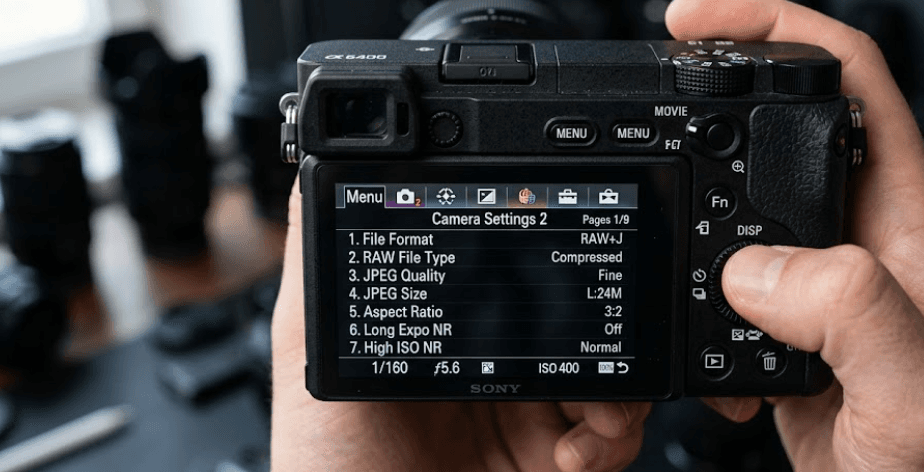
TL;DR The best Sony A6400 settings for portrait photography depend on your subject, lighting, and lens, but a strong starting point is Aperture Priority mode, an aperture around f/1.8 to f/2.8 for individual portraits, Auto ISO with a sensible upper limit, AF-C, Human Eye AF, and a minimum shutter speed around 1/125 sec. For people who move more, raising the shutter speed to 1/250 sec or faster can help prevent motion blur. The a6400 is particularly well suited to portraits because its 24.2MP APS-C sensor provides plenty of resolution, while its Real-time Tracking and Eye AF can keep focus on the subject's face and eye. The important thing is not to treat these numbers as fixed rules. Use them as a starting point, then adjust aperture, shutter speed, and ISO according to the light, movement, and depth of field you want.
Why The Sony A6400 Works Well For Portraits
The Sony A6400 remains a capable portrait camera because it combines a compact APS-C body with a 24.2MP effective-resolution sensor and a strong autofocus system. That gives you enough detail for portraits, headshots, family photography, and social-media images without requiring an oversized camera body. The camera records still images at up to 6000 x 4000 pixels in its standard 3:2 format, and it can record both JPEG and Sony ARW RAW files. RAW is particularly useful when you want greater flexibility when adjusting exposure, highlights, shadows, and color during editing.
Autofocus is one of the biggest reasons the a6400 can still be a practical portrait camera. Its Real-time Tracking system can follow a selected subject and transition to face and eye detection when photographing people. This is useful when your subject moves slightly, changes their pose, or shifts around the frame. DPReview found the a6400's Eye AF and Real-time Tracking particularly effective for portrait and people photography, including shooting with fast prime lenses at wide apertures. That matters because shallow depth of field leaves less room for focusing errors.
The camera also gives you enough control to build different portrait setups instead of relying entirely on Auto mode. You can choose your aperture, control shutter speed, set ISO manually or automatically, select RAW capture, adjust white balance, and choose how the autofocus system behaves. The a6400 also supports continuous shooting at up to 11 frames per second, which can be useful when photographing expressions or small movements. In practice, you do not need to shoot every portrait at 11 fps, but having the option gives you flexibility when the moment changes quickly.
A Good Starting Point For Portraits
For a typical individual portrait in reasonable light, start with Aperture Priority mode, an aperture between f/1.8 and f/2.8, Auto ISO, AF-C, Human Eye AF, and a shutter speed that stays around 1/125 sec or faster. If the person is moving, increase the shutter speed rather than trying to solve motion blur with aperture alone.
| Setting | Recommended Starting Point |
|---|---|
| Shooting Mode | Aperture Priority |
| Aperture | f/1.8 to f/2.8 |
| Shutter Speed | 1/125 sec or faster |
| ISO | Auto ISO |
| Focus Mode | AF-C |
| Focus Area | Tracking: Flexible Spot M |
| Eye Detection | Human |
| Drive Mode | Single or Continuous Low/Hi |
| File Format | RAW or RAW + JPEG |
| White Balance | Auto WB |
These settings are a starting point rather than a universal preset. Your lens and lighting can change what works best, so check your shutter speed and exposure before starting a portrait session.
Best Aperture Settings For Sony A6400 Portraits
Aperture is one of the most important settings for portrait photography because it controls both exposure and depth of field. A wider aperture such as f/1.4, f/1.8, or f/2 can separate your subject from the background and create a softer background. This is especially useful for individual portraits where you want attention to remain on the person's face. However, shooting wide open is not automatically better. At very wide apertures, depth of field becomes shallow, so small changes in subject distance or positioning can affect which parts of the face appear sharp.
For a single-person portrait, f/1.8 to f/2.8 is a practical range to start with when your lens allows it. If you want a stronger background blur and your subject is positioned at a suitable distance from the background, f/1.8 can produce an attractive result. If you need slightly more of the face in focus, moving toward f/2.2 or f/2.8 can give you more depth of field while still providing background separation. With a group portrait, stop down further because you need more depth of field to keep multiple people acceptably sharp.
Your lens also determines how useful a particular aperture will be. A fast prime lens gives you more control over background blur than a slower kit zoom. DPReview specifically highlighted the a6400's compatibility with fast prime lenses for formal portraits and noted the usefulness of Eye AF when working at wide apertures. This means you should think about the lens and aperture as a combination rather than treating f/1.8 as a magic setting. The right aperture is the one that gives you the depth of field you actually need.
Aperture Guide For Different Portraits
| Portrait Situation | Suggested Aperture |
|---|---|
| Individual portrait | f/1.8 to f/2.8 |
| Environmental portrait | f/2.8 to f/4 |
| Two people | f/2.8 to f/4 |
| Small group | f/4 to f/5.6 |
| Full-body portrait | f/2.8 to f/5.6 |
| Bright outdoor portrait | f/2.8 to f/5.6 |
Remember that these are practical starting points, not fixed requirements. Change the aperture when you need more depth of field or a different background appearance.
Best Shutter Speed And ISO For Portraits
Shutter speed becomes especially important when your subject is not completely still. A portrait can look correctly exposed but still fail because the person's movement or your own camera movement has introduced blur. For a relaxed, stationary portrait, around 1/125 sec can be a useful starting point. If your subject is walking, turning, talking with expressive gestures, or moving naturally during a lifestyle session, moving toward 1/250 sec or faster can give you a better chance of freezing that movement.
The Sony A6400 can shoot still images across a shutter-speed range from 1/4000 to 30 seconds, with Bulb available as well. That gives you considerable control, but portrait photography rarely requires extremely slow shutter speeds. Instead, the goal is usually to keep the shutter fast enough for the person in front of you while allowing the camera to maintain a sensible ISO in the available light. If your shutter speed starts dropping too low, increase ISO or open the aperture rather than accepting a blurry photograph.
Auto ISO can make this process much easier, particularly when you are moving between different lighting conditions. You can set the aperture according to the look you want and let the camera adjust ISO as the light changes. The a6400 also includes an ISO AUTO Min. SS function, which gives you additional control over the minimum shutter speed used with Auto ISO. That is useful when you want to prevent the camera from choosing a shutter speed that is too slow for your subject.
A Practical Exposure Starting Point
| Lighting | Aperture | Shutter Speed | ISO Approach |
|---|---|---|---|
| Bright outdoor | f/2.8 | 1/250 sec | Auto ISO |
| Open shade | f/2 | 1/250 sec | Auto ISO |
| Indoor window light | f/1.8 to f/2.8 | 1/125 to 1/250 sec | Auto ISO |
| Dim indoor light | f/1.8 | 1/125 sec or faster | Raise ISO as needed |
| Moving subject | f/2 to f/2.8 | 1/250 sec or faster | Auto ISO |
Do not chase a low ISO number at the expense of shutter speed. A slightly higher ISO with a sharp photograph is usually more useful than a cleaner-looking file that contains motion blur.
Best Autofocus Settings For Portrait Photography
Autofocus is where the Sony A6400 can make portrait shooting considerably easier. For moving or naturally posing subjects, AF-C is a strong starting point because the camera can continuously adjust focus as the subject changes position. Combine that with Human Eye Detection and the camera can prioritize the person's eye when the system recognizes the subject. This is particularly helpful when shooting at wider apertures, where the depth of field can be quite shallow.
A useful setup is AF-C with Tracking: Flexible Spot M. You can place the tracking area over your subject and allow the camera to follow them as they move. DPReview's testing found that the a6400's Real-time Tracking could transition between subject tracking, face detection, and Eye AF, making it possible to maintain focus without constantly changing autofocus modes. For portraits, that means you can spend more time directing your subject and less time repeatedly moving the focus point.
Eye AF is not a substitute for checking your images. The camera can still select the wrong subject in a complicated scene, particularly when multiple people are present or another face is closer to the camera. If you are photographing a group, deliberately start tracking the person you want to photograph. For a static portrait, you can also use a simpler focus-area setup if that feels more predictable. The best autofocus configuration is ultimately the one that lets you consistently place focus where you want it.
Recommended AF Setup
| Autofocus Setting | Portrait Recommendation |
|---|---|
| Focus Mode | AF-C |
| Focus Area | Tracking: Flexible Spot M |
| Face Priority In AF | On |
| Subject Recognition | Human |
| Eye Detection | On |
| Touch Tracking | Useful for selecting subjects |
| AF Priority | Focus priority can be useful |
The a6400's autofocus menu contains many options, so you do not need to change every setting before taking portraits. Start with a simple configuration and only add complexity when a specific shooting situation requires it.
Best White Balance And Image Quality Settings
White balance has a major effect on skin tones because different light sources can make skin appear warmer, cooler, greener, or more neutral. Auto White Balance is a sensible choice when you are moving between locations or photographing changing natural light. If you are shooting in a controlled environment, however, setting a specific white balance can make your results more consistent from frame to frame. This is particularly helpful when you plan to batch-edit a portrait session.
For image quality, RAW is generally the most flexible option if you intend to edit your photographs. The a6400 supports Sony's ARW RAW format as well as JPEG and RAW plus JPEG recording. RAW files give you more flexibility when recovering highlights, opening shadows, and adjusting white balance during post-processing. If you are photographing portraits for immediate sharing and do not expect to edit heavily, JPEG can be convenient, but RAW is the safer choice when you want maximum editing flexibility.
The camera also offers Creative Style options, including Portrait, Standard, Neutral, and others. These can influence JPEG output, but they should not be confused with a setting that physically improves the camera's sensor performance. If you shoot RAW, your editing workflow will generally have more influence over the final look. For portraits, pay particular attention to exposure and skin tones rather than relying on a particular Creative Style to make the photograph look finished.
Recommended Image Settings
| Setting | Recommended Choice |
|---|---|
| File Format | RAW |
| RAW + JPEG | Useful if you need both |
| White Balance | Auto WB for changing light |
| Creative Style | Portrait or Standard for JPEG |
| Aspect Ratio | 3:2 |
| Image Quality | Highest available quality |
If you know the lighting will remain consistent, a custom or preset white balance can be worth using for a more consistent portrait series.
Best Lenses And Focal Lengths For A6400 Portraits
The lens you use can have as much influence on a portrait as the camera settings. Because the a6400 uses an APS-C sensor, focal length and framing should be considered carefully. A lens around 50mm to 60mm gives a useful perspective for portraits, while an 85mm-equivalent field of view is particularly popular for head-and-shoulder work. On the a6400, a 56mm lens provides approximately that kind of framing, which is one reason fast 56mm primes are popular choices for this camera.
A shorter lens can still be excellent for environmental portraits. Something around 30mm to 35mm can let you include more of the surroundings while keeping the subject prominent. The important thing is to avoid getting extremely close to someone's face with a very wide lens if you want flattering facial proportions. Instead, step back when possible and choose a focal length that gives you the framing you want without forcing the camera too close to your subject.
Fast lenses also make it easier to work in available light and create background separation. A lens with an f/1.4 or f/1.8 maximum aperture can give you more options than a slower kit zoom, although you should not feel obligated to shoot wide open. For portraits, lens choice should match the type of photograph you are trying to make, whether that is a close headshot, a full-body portrait, a family photograph, or an environmental image.
Useful Focal Length Options
| Lens Type | Portrait Use |
|---|---|
| 23mm to 30mm | Environmental portraits |
| 30mm to 35mm | Lifestyle and full-body portraits |
| 50mm | General portrait work |
| 56mm | Headshots and flattering perspective |
| 85mm equivalent | Tight portraits and background compression |
A good portrait lens is not necessarily the most expensive one. Prioritize the focal length, maximum aperture, autofocus performance, and the type of portraits you actually shoot.
Common Sony A6400 Portrait Mistakes To Avoid
One common mistake is shooting every portrait at the lens's widest possible aperture. While f/1.4 or f/1.8 can create attractive background blur, the resulting depth of field can be very shallow. If the subject's face is angled or they are moving, one eye may be sharp while the other becomes noticeably softer. Stopping down slightly can produce a more forgiving result while still keeping the background blurred.
Another mistake is allowing shutter speed to fall too low because the camera is trying to maintain a low ISO. This is especially common indoors or in shade. Portrait subjects move, even when they appear to be standing still, and tiny movements can soften an otherwise sharp photograph. Check the shutter speed shown in the viewfinder and increase it when necessary. A higher ISO is often a better compromise than motion blur.
Finally, do not assume autofocus will automatically solve every composition problem. If there are several people in the frame, start tracking the person you want. If the background is visually busy, give the camera a clear subject to identify. Also watch your exposure on bright skin, especially in strong sunlight. The A6400 gives you tools such as histogram and exposure-related display options, so use them instead of judging every image solely from the rear screen.
Frequently Asked Questions
Q. What is the best aperture for Sony A6400 portraits?
For an individual portrait, f/1.8 to f/2.8 is a useful starting range. Use a wider aperture when you want stronger background blur and stop down when you need more of the subject's face or body in focus.
Q. What shutter speed should I use for portraits on the Sony A6400?
Start around 1/125 sec for relatively still subjects and move toward 1/250 sec or faster when the person is moving. The right speed depends on the subject and shooting conditions.
Q. Should I use AF-S or AF-C for portraits on the Sony A6400?
AF-C is a strong general-purpose choice when photographing people because it can continuously adjust focus as the subject moves. AF-S can still be useful for very static portraits.
Q. Does the Sony A6400 have Eye AF for portraits?
Yes. The a6400 supports face and eye detection, and its Real-time Tracking system can transition between subject tracking, face detection, and Eye AF when photographing people.
Q. What ISO should I use for Sony A6400 portraits?
There is no single ISO that works for every portrait. Auto ISO is convenient when lighting changes, while a manual ISO can be useful in controlled lighting. Prioritize correct exposure and a sufficiently fast shutter speed.
Q. Should I shoot RAW or JPEG for portraits?
RAW is preferable when you plan to edit your portraits because it gives you greater flexibility for exposure, white balance, highlights, shadows, and color adjustments. JPEG is convenient for quick sharing.
Q. What lens is good for portraits on the Sony A6400?
A fast prime around 50mm to 56mm is a strong choice for traditional portraits. Wider lenses around 30mm to 35mm can work well for environmental and lifestyle portraits.
Q. Can I use Aperture Priority for Sony A6400 portraits?
Yes. Aperture Priority is a convenient way to control depth of field while allowing the camera to select shutter speed. Monitor the shutter speed and raise ISO or adjust your settings if it becomes too slow.
Q. What white balance should I use for A6400 portraits?
Auto White Balance is a practical starting point when lighting changes. For controlled lighting, a fixed or custom white balance can provide more consistent colour across a portrait session.
Q. Can the Sony A6400 shoot portraits at 11 fps?
Yes. Sony specifies a maximum continuous shooting speed of approximately 11 frames per second in Hi+ mode. You do not need to use the maximum speed for every portrait, but it can help capture changing expressions and movement.
Final Recommendation
The Sony A6400 does not need an overly complicated setup to produce strong portraits. Start with Aperture Priority, f/1.8 to f/2.8 for individual portraits, Auto ISO, AF-C, Human Eye Detection, and a shutter speed of at least around 1/125 sec. Increase the shutter speed when your subject moves, and stop down when you need more depth of field. These settings give you a dependable starting point while leaving enough control to respond to changing light and composition.
The biggest advantage of the A6400 for portrait photography is its autofocus rather than any single exposure setting. Its Real-time Tracking and Eye AF make it easier to keep attention on your subject, particularly when you pair the camera with a fast portrait lens. The 24.2MP APS-C sensor also provides enough resolution for detailed portraits and gives RAW shooters useful flexibility during editing.
Ultimately, the best Sony A6400 portrait settings are the ones that match the scene rather than a fixed combination copied from a settings guide. Start with the recommended setup, check your shutter speed and focus, and then adjust aperture, ISO, and exposure as the situation changes. For most photographers, that approach will produce more consistently sharp and natural-looking portraits than trying to force every session into one preset.
Ready to upgrade your tech?
Browse our collection of quality refurbished products at unbeatable prices.






