
Best Refurbished HP ZBook 15 Models in India: Best Value Workstations
This guide lists the best refurbished HP ZBook 15 models in India in 2026, focusing on value, performance, battery, GPU support and upgradeability for professionals and students.

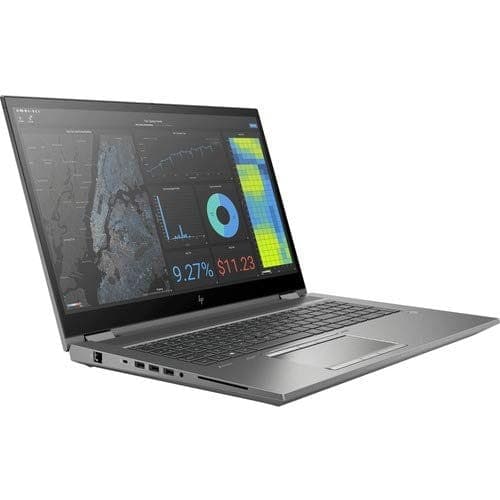
TL;DR Refurbished HP ZBook 15 workstations remain among the best value-for-money professional laptops available in India. Originally designed for enterprise environments, these mobile workstations offer durable construction, professional graphics support, extensive upgradeability, superior cooling systems, and workstation-grade reliability at a fraction of the cost of new devices. Whether you are an engineering student, architect, programmer, designer, researcher, or business professional, the right refurbished HP ZBook 15 model can provide years of dependable performance while helping you avoid the premium pricing associated with modern workstation laptops.
Why Refurbished HP ZBook 15 Workstations Continue To Make Sense
The Indian refurbished laptop market has evolved significantly as professionals, students, and businesses increasingly recognize the value offered by enterprise-grade hardware. Modern software requirements continue to grow, and many users now require systems capable of handling CAD software, simulation tools, software development environments, large datasets, virtualization, and professional multitasking. Unfortunately, purchasing a brand-new workstation laptop often requires a substantial financial investment that may not be practical for every buyer.
This is where refurbished HP ZBook 15 workstations continue to stand out. These machines were originally engineered for demanding enterprise deployments where reliability, durability, and long-term performance were critical priorities. Unlike many consumer laptops that prioritize thin designs and aesthetics, ZBook workstations were built to withstand intensive professional workloads while maintaining stable performance during extended usage sessions. Their workstation-focused design philosophy remains relevant even years after their original release.
Another major advantage is the exceptional value proposition offered by refurbished enterprise hardware. Buyers can often acquire workstation-grade processors, professional graphics solutions, large memory capacities, and upgrade-friendly chassis designs at prices that would otherwise only purchase entry-level consumer laptops. For users whose workloads prioritize performance and reliability over having the latest hardware generation, refurbished ZBook workstations continue to represent some of the strongest value opportunities available in the Indian laptop market.
What Makes The HP ZBook 15 Series Different From Consumer Laptops
Many buyers initially compare refurbished workstations against new consumer laptops because they often occupy similar price ranges. However, workstation-class systems such as the HP ZBook 15 series are built with fundamentally different priorities. While consumer laptops frequently focus on portability, thin designs, and media consumption, workstations are engineered specifically for demanding professional workloads that require sustained performance and long-term reliability.
One of the most important differences is the inclusion of professional graphics options. Many ZBook configurations feature NVIDIA Quadro graphics solutions that are certified for professional applications rather than optimized exclusively for gaming. These GPUs provide enhanced stability and compatibility when working with engineering software, CAD applications, architectural tools, simulation platforms, and professional design workflows. This certification can significantly improve reliability for users whose work depends on professional software ecosystems.
Upgradeability is another area where the ZBook series excels. Most generations support multiple storage devices, higher RAM capacities, serviceable components, and user-accessible upgrade paths. This flexibility allows buyers to purchase affordable refurbished configurations initially and gradually improve specifications over time. Such expandability is increasingly uncommon in modern consumer laptops, making older workstation platforms particularly attractive for users seeking long-term value and customization options.
Why Refurbished Workstations Offer Better Long-Term Value
Refurbished workstations appeal to budget-conscious buyers because they often provide performance levels that remain highly competitive despite being several generations old. Professional workloads such as programming, engineering, design, data analysis, and office productivity frequently benefit more from reliability, memory capacity, and upgrade flexibility than from having the latest processor generation. As a result, enterprise-grade systems often maintain their usefulness for significantly longer periods than many consumer alternatives.
The durable construction of workstation laptops also contributes to their long-term value. HP designed the ZBook 15 series for corporate environments where systems needed to withstand frequent transportation, heavy daily usage, and extended deployment cycles. Strong chassis construction, quality internal components, serviceability, and robust cooling solutions help these systems remain operational long after many consumer devices begin showing signs of wear. This durability becomes especially valuable when purchasing refurbished hardware.
For students and professionals, value extends beyond initial purchase price. A workstation capable of supporting future upgrades can remain productive for many years without requiring complete replacement. Upgrading memory, adding SSD storage, replacing batteries, and maintaining cooling systems often extends useful lifespan considerably. This ability to evolve alongside changing requirements makes refurbished workstations particularly attractive from both financial and practical perspectives.
HP ZBook 15 G1: The Budget-Friendly Entry Point
The HP ZBook 15 G1 remains one of the most affordable entry points into workstation-class computing. Although it is the oldest model in this guide, it continues to provide respectable performance for users whose workloads focus primarily on productivity, programming, learning CAD software, moderate multitasking, and office applications. When configured with sufficient RAM and SSD storage, the G1 remains surprisingly capable for everyday professional tasks.
One of the reasons the G1 remains popular within refurbished inventories is its balance between cost and functionality. Buyers can often acquire these systems at highly attractive prices while still benefiting from enterprise-grade construction, upgrade flexibility, and workstation-focused design principles. For students entering engineering programs or professionals seeking affordable workstation hardware, the G1 provides a practical starting point without requiring substantial financial investment.
The system particularly benefits users who prioritize value above all else. While newer generations deliver stronger performance, the G1 still handles office productivity, software development, web-based workloads, educational software, and introductory engineering applications competently. Buyers should ensure configurations include SSD storage and adequate memory, as these upgrades dramatically improve overall responsiveness and user experience.
Key Advantages Of The HP ZBook 15 G1
The G1 offers proven reliability, workstation-grade construction, upgradeable hardware, professional graphics options, and excellent affordability. These characteristics make it one of the most accessible refurbished workstation platforms currently available.
HP ZBook 15 G2: Improved Performance And Better Graphics Options
The HP ZBook 15 G2 builds upon the strengths of its predecessor by introducing improved processor options, enhanced graphics configurations, and stronger overall performance. Many refurbished G2 units include NVIDIA Quadro graphics, making them particularly attractive for engineering students, architects, and users working with moderately demanding professional software.
Compared to the G1, the G2 provides better multi-core performance and improved efficiency, which helps when running productivity applications, development environments, content creation software, and professional workloads simultaneously. Users upgrading from consumer laptops frequently notice significant improvements in stability, cooling performance, and sustained workload capability. These advantages become especially important during long work sessions involving resource-intensive applications.
The G2 represents a strong middle ground for buyers seeking more performance than the G1 while maintaining affordability. Its improved hardware platform remains capable of handling CAD projects, moderate simulations, photo editing, programming environments, and creative workloads without pushing budgets into significantly higher territory. For many users, the G2 continues to offer one of the best price-to-performance ratios within the refurbished workstation market.
Why The HP ZBook 15 G2 Remains Popular
Improved graphics options, stronger processor performance, reliable cooling, dual-storage support, and enterprise-grade durability help the G2 remain highly relevant for budget-conscious professionals and students.
HP ZBook 15 G3: The Sweet Spot For Most Buyers
The HP ZBook 15 G3 is often considered the best overall balance between affordability, performance, modernity, and upgrade potential. For many professionals and students, it represents the point where workstation performance begins feeling genuinely modern while remaining affordable within the refurbished market. This combination has helped establish the G3 as one of the most frequently recommended ZBook generations available today.
The G3 introduced significant improvements in responsiveness, storage performance, memory support, and overall configurability. Users benefit from higher RAM capacities, stronger processor options, improved professional graphics configurations, and greater flexibility when upgrading components. These improvements make the system particularly attractive for users handling larger projects, complex datasets, professional design applications, and advanced multitasking environments.
Engineering students, architects, researchers, developers, and technical professionals often find the G3 offers the best balance between price and capability. It remains powerful enough for demanding professional software while still being considerably more affordable than newer workstation platforms. For many buyers, the G3 represents the ideal entry point into serious workstation computing without excessive financial commitment.
Why The G3 Is Often The Recommended Choice
Strong professional GPU options, higher RAM capacities, extensive upgradeability, workstation reliability, and attractive refurbished pricing make the G3 one of the strongest value propositions within the ZBook lineup.
HP ZBook 15 G4: Strong Professional Performance At Refurbished Prices
The HP ZBook 15 G4 continues the workstation-focused philosophy while incorporating newer hardware generations and improved overall performance. Typical configurations include modern Intel Core i7 or Xeon processors paired with capable professional graphics solutions. These upgrades make the G4 particularly attractive for users whose workloads extend beyond basic engineering and productivity tasks into more demanding professional environments.
Businesses frequently favor refurbished G4 systems because they provide professional-grade performance while significantly reducing procurement costs. Educational institutions, technical departments, and organizations requiring multiple workstations can deploy G4 units efficiently without sacrificing reliability or capability. This cost-effectiveness contributes substantially to the model's continued popularity within the refurbished market.
For individual buyers, the G4 delivers excellent performance for content creation, advanced engineering workflows, software development, virtualization, simulation software, and professional multitasking. Faster storage support, improved connectivity options, and stronger overall hardware capabilities help ensure the system remains productive for years after purchase. These characteristics make the G4 one of the most balanced professional workstation options available.
HP ZBook 15 G5: The Most Capable Choice For Demanding Users
The HP ZBook 15 G5 sits at the top of the value hierarchy for buyers seeking near-modern workstation performance without paying premium prices. Representing one of the final generations before workstation laptops began emphasizing thinner designs, the G5 combines powerful processors, professional graphics options, strong thermal management, and extensive upgradeability into a platform that remains highly competitive even today.
The G5 particularly excels for users running virtualization environments, complex engineering simulations, professional content creation applications, advanced software development workflows, and large multitasking workloads. Improved processor architectures and stronger graphics configurations provide substantial performance advantages compared to earlier generations, making the system suitable for demanding professional environments where reliability and sustained performance are critical.
Although G5 systems generally command higher prices within the refurbished market, many buyers find the additional investment worthwhile due to improved longevity and capability. Users seeking a workstation that feels closest to modern professional laptops while still benefiting from refurbished value often identify the G5 as the strongest overall option available within the ZBook 15 lineup.
How To Choose The Right HP ZBook 15 For Your Requirements
Selecting the right ZBook generation depends largely on workload requirements, budget constraints, and future upgrade plans. Users focused primarily on affordability and basic professional workloads often find the G1 and G2 more than sufficient for their needs. These models continue offering strong value while maintaining workstation reliability and upgrade flexibility.
Buyers seeking the strongest balance between price and performance should generally focus on the G3 and G4 generations. These models offer modern enough hardware to comfortably support engineering applications, development environments, creative software, virtualization, and professional multitasking while remaining attractively priced within the refurbished market. For most users, these generations represent the sweet spot of the lineup.
Professionals handling intensive workloads, larger datasets, advanced simulations, professional content creation, or long-term deployment plans may benefit most from the G5. Although more expensive than earlier generations, the improved hardware capabilities and extended useful lifespan often justify the additional investment. Choosing the correct model ultimately requires balancing immediate budget considerations against long-term performance requirements.
Important Checks Before Purchasing A Refurbished ZBook
Before purchasing any refurbished workstation, buyers should carefully evaluate hardware condition, component specifications, and seller credibility. Professional workstations are designed for longevity, but proper refurbishment and verification remain essential to ensure a positive ownership experience. Checking detailed specifications helps prevent configuration mismatches and unexpected performance limitations after purchase.
Particular attention should be given to graphics configurations, RAM capacity, storage health, battery condition, charging performance, and port functionality. Professional workloads often depend heavily on GPU capabilities and available memory, making these components especially important. Buyers should also confirm whether future upgrades remain possible, as expandability is one of the key advantages offered by the ZBook platform.
Seller reputation and warranty coverage are equally important considerations. Reputable refurbishers typically provide testing reports, component verification, transparent grading systems, and warranty protection. These factors significantly reduce purchasing risk while increasing confidence in the refurbishment process. Choosing the right seller can be just as important as choosing the right workstation model.
Key Components To Verify Before Purchase
Always verify GPU configuration, installed memory, SSD health, battery condition, charger functionality, display quality, BIOS integrity, and warranty coverage before finalizing a purchase decision.
Why Seller Reputation Matters
Transparent refurbishment practices, documented testing procedures, warranty support, and positive customer feedback often indicate a more reliable purchasing experience and better long-term satisfaction.
Why The HP ZBook 15 Series Continues To Deliver Exceptional Value
The HP ZBook 15 lineup remains relevant because it continues providing features that many modern consumer laptops struggle to match. Expandable memory, multiple storage options, professional graphics support, serviceable designs, strong cooling systems, and enterprise-grade durability create a foundation that remains highly attractive for professional users. These characteristics allow the systems to remain productive long after their original release dates.
As refurbished technology gains broader acceptance across India, enterprise workstations continue demonstrating that professional-grade computing does not necessarily require premium budgets. Buyers willing to invest time researching configurations, verifying component health, and selecting reputable refurbishers can access powerful hardware at remarkably attractive prices. This combination of performance and affordability continues driving demand for refurbished workstation platforms.
Whether you prioritize affordability, engineering performance, professional reliability, upgrade flexibility, or long-term value, there is likely a refurbished HP ZBook 15 configuration that aligns with your requirements. From the budget-friendly G1 and G2 models to the highly capable G3, G4, and G5 generations, the ZBook lineup continues offering some of the strongest workstation value available in the Indian refurbished laptop market. For professionals, students, researchers, and businesses alike, these systems remain practical, dependable, and cost-effective choices.
Frequently Asked Questions
Q. Are refurbished HP ZBook 15 workstations still worth buying?
Yes. Their professional-grade construction, upgradeability, workstation graphics options, and long-term reliability continue making them excellent value choices for professional workloads.
Q. Which HP ZBook 15 generation offers the best overall value?
For most buyers, the HP ZBook 15 G3 and G4 provide the strongest balance between affordability, performance, expandability, and long-term usability.
Q. Should engineering students choose a professional GPU configuration?
Yes. Professional graphics solutions provide better compatibility, stability, and performance for CAD software, simulation tools, and engineering applications.
Q. How important is battery health when purchasing refurbished workstations?
Battery condition is extremely important because degraded batteries can significantly reduce portability and overall user experience.
Q. What should buyers check before purchasing a refurbished HP ZBook 15?
Verify the GPU, RAM, SSD health, battery condition, warranty coverage, display quality, charging performance, and seller reputation.
Q. Is a refurbished HP ZBook suitable for programming and software development?
Yes. Most configurations comfortably support programming environments, virtualization tools, development frameworks, and multitasking workflows.
Q. Can HP ZBook 15 laptops be upgraded after purchase?
Yes. Most generations support memory and storage upgrades, making them highly flexible long-term investments.
Q. Are refurbished ZBooks better than new budget laptops?
For professional workloads, many refurbished ZBook models provide superior build quality, cooling performance, upgradeability, and workstation-focused capabilities.
Q. Which generation is recommended for engineering students?
The G3 and G4 generations generally offer the best balance of affordability, performance, upgrade potential, and software compatibility.
Q. How much RAM is recommended for CAD and simulation workloads?
A minimum of 16GB is recommended, while 32GB or more provides a noticeably smoother experience for larger projects and advanced multitasking workloads.
Ready to upgrade your tech?
Browse our collection of quality refurbished products at unbeatable prices.






