
Best Computer for a Billing Counter: Mini PC vs All-in-One vs Laptop
Choosing a computer for your billing counter? Compare mini PCs, all-in-one desktops, and laptops by cost, performance, space, connectivity, and reliability to find the right setup for your shop.

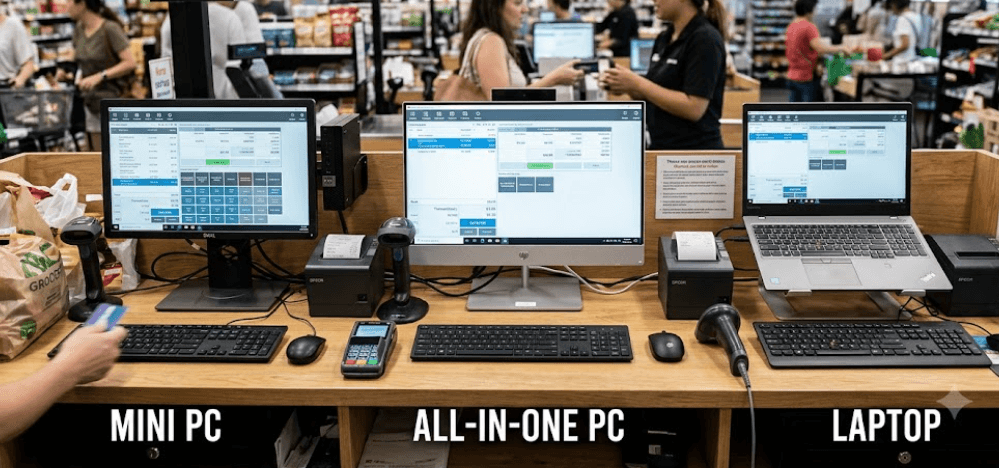
TL;DR: The best computer for a billing counter depends on your shop's space, daily workload, budget, and connected peripherals. A mini PC is a practical choice for fixed counters with an existing monitor, an all-in-one desktop offers a clean setup with fewer cables, and a laptop suits businesses that need portability or battery backup. For most small retail stores, prioritize an SSD, sufficient RAM, compatible billing software, and support for receipt printers and barcode scanners over expensive specifications. Before buying, check software compatibility, connectivity, warranty, and the total cost of the complete setup.
What Makes A Computer Suitable For A Billing Counter?
Focus On Daily Billing Requirements
A computer at a billing counter needs to handle invoices, product searches, inventory updates, customer records, payment entries, and tax calculations without unnecessary delays. For a small shop using straightforward billing software, these tasks generally do not require a high-end processor or a dedicated graphics card. However, performance requirements increase when the system also manages large inventories, accounting, multiple applications, or several users.
An SSD is particularly useful because it can improve startup times and make applications more responsive than a traditional mechanical hard drive. For a new Windows-based billing computer, 8GB of RAM and a 256GB SSD are sensible starting points for typical small-business workloads. More demanding software or multitasking may justify 16GB of RAM. These are practical recommendations rather than universal minimum requirements, so check the specifications published by your billing software provider.
Compatibility matters just as much as performance. Before purchasing a computer, confirm that it supports your preferred billing application and operating system. For example, TallyPrime's published requirements specify a compatible 64-bit Windows environment, while cloud-based billing applications may have different browser and connectivity requirements. Buying a powerful computer that cannot run your required software is an avoidable expense.
Consider Your Billing Counter Setup
The physical counter influences which computer makes the most sense. A compact grocery store may need room for a monitor, barcode scanner, receipt printer, cash drawer, and payment terminal. A mini PC can keep the main computer out of the way, while an all-in-one combines the computer and display. A laptop occupies little space when closed but still needs room for its keyboard and screen when used for billing.
Next, consider the peripherals your shop uses. Check the number and type of available USB ports, display connections, Ethernet, and wireless connectivity. Some barcode scanners connect through USB, while printers may use USB, Ethernet, or Wi-Fi, depending on the model. A cash drawer may connect through a compatible receipt printer rather than directly to the computer. Verify the exact connection method before buying.
Finally, consider the cost of downtime. If the computer stops working during a busy period, billing may slow down or stop entirely. A reliable device, regular data backups, a stable power supply, and an accessible service provider can be more valuable than paying extra for performance you rarely use.
Mini PC Vs. All-in-One Vs. Laptop: At A Glance
Understanding The Main Differences
A mini PC is a compact desktop computer that generally requires a separate monitor, keyboard, and mouse. It is well suited to fixed counters where space is limited or an existing monitor can be reused. However, its small size does not automatically make it more powerful, easier to repair, or cheaper than every alternative.
An all-in-one desktop integrates the computer into the display, reducing the number of separate components on the counter. This can make installation simpler and create a tidy workspace. The trade-off is that the computer and screen are more closely integrated, so a display or internal hardware problem may require specialized servicing.
A laptop combines the computer, display, keyboard, touchpad, and battery in one portable device. It can be moved between a billing counter, back office, or storage area without disconnecting multiple components. Its battery may provide temporary power during an outage, although runtime depends on battery condition, workload, and device settings.
| Factor | Mini PC | All-in-One | Laptop |
|---|---|---|---|
| Counter space | Very compact computer; needs a separate display | Compact, integrated setup | Compact, self-contained device |
| Initial setup | Requires additional peripherals | Usually straightforward | Usually straightforward |
| Portability | Limited | Limited | Excellent |
| Built-in battery | Generally no | Generally no | Yes, on most models |
| Display flexibility | High | Limited to built-in display, with exceptions | Built-in display plus possible external monitor |
| Upgrades | Varies by model | Varies by model | Often limited; varies by model |
| Best suited for | Fixed billing counters | Shops wanting a tidy setup | Mobile billing and flexible workspaces |
The right choice depends on the complete setup, not just the computer's advertised price. Include the monitor, keyboard, mouse, cables, mounting accessories, and any required adapters when comparing costs. Also account for software licensing, warranty coverage, and servicing.
Mini PC: Best For Compact, Fixed Billing Counters
Advantages Of A Mini PC
A mini PC is a strong option for a shop that wants a dedicated billing computer without placing a large desktop tower on the counter. The compact unit can often sit beside the monitor or be mounted behind a compatible display using an appropriate mounting system. This leaves more room for products, paperwork, scanners, and payment equipment.
Another advantage is flexibility. You can choose a monitor size that suits your counter and replace the display separately if needed. Depending on the model, the computer may also support RAM or SSD upgrades, allowing you to extend its useful life. Check the manufacturer's specifications because some compact models have soldered memory or restricted upgrade options.
For everyday billing, a suitable mini PC with a modern supported processor, SSD, and adequate RAM can comfortably handle routine invoicing and inventory tasks. It can also support office applications and web-based business tools. For shops that already own a compatible monitor and peripherals, reusing those components may reduce the initial cost.
Limitations To Consider
The main drawback is that a mini PC is not a complete workstation by itself. You generally need to purchase or reuse a monitor, keyboard, and mouse. Depending on your billing workflow, you may also need USB hubs, display adapters, or other accessories. These additions can make a seemingly inexpensive model less economical than expected.
Port selection deserves careful attention. A computer with too few USB ports may struggle to accommodate a barcode scanner, printer, keyboard, and other wired accessories simultaneously. A USB hub can help, but you should verify compatibility and power requirements rather than assuming every peripheral will work through one.
A mini PC also usually lacks an internal battery. Without backup power, an outage can interrupt billing and potentially cause unsaved work to be lost. Pairing the computer with a suitable uninterruptible power supply (UPS) can help, provided the UPS has enough capacity for the computer, monitor, and other essential equipment.
All-In-One Desktop: Best For A Clean, Simple Setup
Advantages Of An All-In-One
An all-in-one desktop combines the computer and monitor in a single unit, making it a convenient option for businesses setting up a billing counter from scratch. Instead of choosing a separate monitor and finding space for a computer, you can start with one integrated system and add the necessary peripherals. This can simplify installation and reduce cable clutter.
The integrated display is useful for billing staff who spend most of their working hours entering products, checking prices, and generating invoices. A larger screen can make menus and item lists easier to view, depending on the software interface. Some models also include a webcam, speakers, or touchscreen functionality, although these features are not standard across every product.
For a retail store with a permanent counter and adequate desk space, an all-in-one can provide a neat, professional-looking workspace. It may be especially suitable when the owner prefers a straightforward setup rather than selecting individual computer components.
Limitations To Consider
The main trade-off is flexibility. Because the display and computer are integrated, replacing or upgrading the entire setup can be more complicated than replacing a separate mini PC. Repair costs and serviceability vary by manufacturer and model, so check warranty coverage and local service availability before purchasing.
An all-in-one can also cost more upfront than a basic mini PC when you already have a suitable monitor. However, that does not mean every all-in-one is more expensive than every mini PC setup. Compare equivalent configurations and include the cost of the required accessories.
Touchscreen functionality may be useful for certain point-of-sale applications, but it is not essential for standard billing. Similarly, a high-resolution display, powerful graphics, or built-in webcam may add little value to a shop that primarily generates invoices. Choose these features only when they support an actual business requirement.
Laptop: Best For Portability And Flexible Billing
Advantages Of A Laptop
A laptop is the most flexible choice for businesses that need to move between locations. It can be used at the main counter during business hours and taken to a back office for inventory checks, reporting, or accounting work. This makes it useful for small businesses where one computer serves several purposes.
Its built-in battery is another practical advantage. During a power interruption, a laptop may continue running long enough to complete transactions or save work, provided its battery is charged and healthy. However, external peripherals such as printers and network equipment may still need power, so the battery does not guarantee uninterrupted billing.
A laptop also includes its own display, keyboard, and touchpad, reducing the need to purchase separate components. If the shop needs a compact setup that can be packed away after closing, it can be a convenient alternative to a permanent desktop installation.
Limitations To Consider
A laptop used at a fixed billing counter may experience more wear if it is repeatedly moved, opened, closed, or connected to peripherals. The keyboard and touchpad can also take up valuable counter space. An external keyboard, mouse, and monitor may improve comfort, but they add to the overall setup cost.
Battery life should not be the only reason to choose a laptop. Battery capacity declines with use, and a device that once lasted several hours may provide less backup after years of operation. If billing continuity is important, check battery health and consider backup power for the connected printer, router, and other essential equipment.
For a permanently installed billing station, a mini PC or all-in-one may offer a more convenient long-term arrangement. A laptop is the better choice when portability, shared use, or temporary operation during power interruptions is genuinely important.
What Specifications Should You Look For?
Processor, RAM, And Storage
For a typical single-counter billing setup, prioritize a modern entry-level processor that meets your software requirements, 8GB of RAM, and an SSD. This combination is generally sufficient for routine invoicing, product searches, and basic inventory management. If you regularly use accounting software, spreadsheets, multiple browser tabs, and other applications simultaneously, 16GB of RAM offers more room for multitasking.
Storage capacity depends on the applications, company data, and files you keep locally. A 256GB SSD is a practical starting point for many small shops, although 512GB may be preferable if you store larger databases or additional business files. Maintain backups on a separate, secure destination rather than treating the computer's internal drive as the only copy of important records.
Do not purchase a computer based solely on processor branding or advertised clock speed. Compare the actual processor model, supported operating system, memory configuration, storage type, and upgrade options. A well-balanced system is usually more useful for billing than an expensive processor paired with insufficient memory or slow storage.
Operating System, Connectivity, And Security
Operating system support is particularly important for a business computer that handles customer information, sales records, and invoices. If you choose Windows, check that the device meets the requirements for a supported Windows release and that your billing software and peripherals are compatible. Windows 10 support ended on October 14, 2025, so it should not be treated as the default long-term choice for a new purchase.
Check the ports before placing an order. Your setup may need USB connections for scanners and printers, HDMI or DisplayPort for an external monitor, and Ethernet for a stable wired network. Wireless connectivity can be convenient, but a wired connection may be preferable when the billing software depends on consistent local-network access.
Security and data protection matter regardless of the computer type. Keep the operating system and applications updated, use strong account passwords, restrict access to authorized staff, and schedule regular backups. For cloud-based billing, reliable internet access is important; for locally installed software, verify how data is stored, backed up, and recovered if the computer fails.
Budgeting For The Complete Billing Setup
Compare Total Cost, Not Just The Computer Price
A mini PC may look like the cheapest option when its price is compared with that of a complete all-in-one desktop. However, the mini PC may need a separate monitor, keyboard, mouse, and additional cables. If you already own compatible equipment, this is less of a concern. If you are starting from scratch, compare the full purchase price of each setup.
Remember to budget for billing peripherals. Depending on the business, these may include a barcode scanner, receipt or thermal printer, cash drawer, UPS, and a payment terminal. Not every shop needs every item, and the appropriate equipment depends on the billing workflow. Confirm that the chosen software supports the required hardware before purchasing it.
Warranty and service arrangements should also factor into your decision. A computer that costs slightly more but has convenient local servicing may be a better business investment than one with limited support. Ask about warranty duration, repair procedures, replacement availability, and whether the manufacturer provides service at your location.
| Cost Component | Mini PC | All-In-One | Laptop |
|---|---|---|---|
| Computer | Required | Included in the unit | Included in the unit |
| Display | Usually separate | Integrated | Integrated |
| Keyboard and mouse | Usually separate | Usually separate | Built-in |
| Barcode scanner | Optional, based on workflow | Optional, based on workflow | Optional, based on workflow |
| Receipt printer | Optional, based on workflow | Optional, based on workflow | Optional, based on workflow |
| UPS or backup power | Worth considering | Worth considering | Depends on required backup |
| Adapters and cables | Depends on available ports | Depends on available ports | Depends on available ports |
Final Recommendation
For most fixed retail billing counters, a mini PC with a suitable monitor is a practical starting point, particularly when the business already owns compatible peripherals. It saves counter space, offers flexibility in display selection, and can handle everyday billing when its specifications match the software requirements. Choose a model with sufficient ports, a supported operating system, and accessible service options.
An all-in-one desktop is a better fit when you want an integrated system with fewer cables and a straightforward installation. It is particularly suitable for a permanent counter where appearance and simplicity matter. A laptop is the strongest option when the computer must move between locations or serve as a general-purpose device beyond billing.
Before buying, confirm software compatibility, processor and memory requirements, printer and scanner connections, warranty coverage, and the cost of the complete setup. For many small shops, 8GB of RAM and a 256GB SSD are sensible starting points, but more demanding workloads may require 16GB of RAM or additional storage. Above all, choose a dependable computer that keeps billing simple, protects business data, and can be serviced when needed.
Frequently Asked Questions
Q. Which computer is best for a billing counter?
A mini PC is a strong choice for a fixed counter, an all-in-one desktop suits businesses that want a tidy integrated setup, and a laptop is better for portability. The best option depends on your software, peripherals, and workspace.
Q. Is a mini PC powerful enough for billing software?
Yes, many mini PCs can handle routine billing, invoicing, and inventory tasks. Check the processor, RAM, storage, operating system, and software requirements before buying.
Q. Is 8GB RAM enough for a billing computer?
For many basic billing applications, 8GB is a sensible starting point. If you run multiple applications or manage a large inventory, 16GB may provide a smoother experience.
Q. Is an SSD necessary for a billing counter computer?
An SSD is strongly recommended because it generally improves startup times and application responsiveness compared with a mechanical hard drive. It is not a universal software requirement.
Q. Can I connect a barcode scanner to a mini PC?
Yes, if the scanner and computer have compatible connections and software support. Check the available USB ports or other required interfaces before purchasing.
Q. Can a laptop run billing software during a power cut?
The laptop itself may continue operating on battery power, but the router, receipt printer, and other peripherals may still need electricity. Actual runtime depends on battery condition and workload.
Q. Is an all-in-one computer good for a retail shop?
Yes. It offers an integrated computer and display, which can reduce cable clutter and simplify installation. Check its ports, serviceability, and warranty before buying.
Q. Does billing software require an expensive processor?
Usually not for basic billing. A suitable modern entry-level processor is often sufficient, but demanding accounting, reporting, or inventory workloads may need more processing power.
Q. Which operating system should I choose for a billing computer?
Choose an operating system that is supported by your billing software and receives security updates. For Windows, check compatibility with a currently supported release before buying.
Q. Should I buy a UPS for my billing counter?
A UPS can help keep a desktop computer and connected equipment running briefly during a power interruption, depending on its capacity and load. Select one that can support the devices you need to keep powered.
Ready to upgrade your tech?
Browse our collection of quality refurbished products at unbeatable prices.






