Authenticator App vs SMS OTP: Which Is Safer?
Authenticator apps are generally safer than SMS OTPs because they avoid many phone-number-based attacks. Compare their security, phishing risks, recovery options, and why passkeys are stronger.

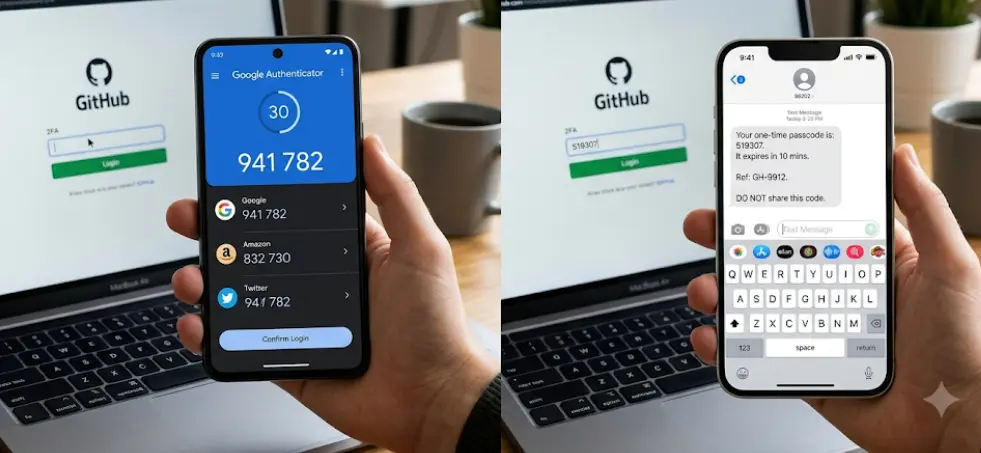
TL;DR: Authenticator apps are generally safer than SMS OTPs because they do not depend on your mobile number or cellular network to generate a verification code. SMS OTPs can be exposed through SIM-swap attacks, number-porting abuse, phone-number takeovers, and weaknesses in mobile signaling systems. Authenticator apps can generate time-based one-time passwords directly on your device, often even without an internet or mobile connection. However, neither method is completely phishing-resistant because attackers can trick users into entering an OTP on a fake login page. For the strongest protection, use a passkey or FIDO security key when a service supports it.
What Is An SMS OTP?
An SMS OTP, or one-time password, is a temporary verification code sent to your registered mobile number when you attempt to sign in. After entering your username and password, the service sends a code, commonly six digits, through a text message. You then enter that code on the login screen to complete the second step of authentication. This is one of the most familiar forms of two-factor authentication because it does not require installing a separate authenticator application.
The main advantage of SMS OTP is convenience. Almost any mobile phone capable of receiving text messages can use it, and users do not need to configure a separate app. It can also be useful as a backup authentication method when a person cannot access an authenticator application. For many accounts, enabling SMS-based two-step verification is still better than relying only on a password.
The problem is that SMS depends on the security of the telephone-number ecosystem. NIST classifies the use of the public switched telephone network, including SMS for authentication, as a restricted authenticator in its current digital identity guidance. Risks include SIM changes, number porting, and other attacks that can redirect authentication messages away from the legitimate user. CISA similarly recommends moving away from SMS-based MFA where stronger options are available.
What Is An Authenticator App?
An authenticator app generates one-time verification codes directly on a smartphone. Google Authenticator and Microsoft Authenticator are common examples, although the exact features vary between applications. During setup, the account and authenticator establish a secret that is subsequently used to generate valid codes. When you log in, you enter the current code shown by the app.
A major difference is where the code comes from. With SMS OTP, the service sends the code through the mobile network. With a typical time-based authenticator app, the code is generated on the device using the previously established secret and time. Google confirms that Google Authenticator can generate verification codes without an internet connection or mobile service, which can make it useful in situations where SMS delivery is unavailable.
Authenticator apps therefore remove several risks associated specifically with telephone numbers. An attacker who successfully performs a SIM swap may receive SMS messages intended for the victim, but that does not automatically give the attacker access to codes generated by an authenticator app on the victim's device. However, authenticator-generated OTPs are still vulnerable to phishing because a user can be tricked into entering a legitimate code into a fake website. NIST explicitly states that OTP authentication is not phishing-resistant.
Authenticator App Vs SMS OTP: Key Differences
The two methods both provide an additional verification step, but they protect that step in different ways. SMS OTP relies on a mobile telephone number and the telecommunications infrastructure behind it. An authenticator app generally relies on a secret stored within the authenticator and generates the code locally.
This difference matters most when an attacker targets the phone number itself. SIM swapping and number-porting attacks can potentially redirect SMS-based authentication messages. SMS can also be affected by weaknesses in telecommunications signaling. NIST specifically recommends that services consider indicators such as SIM changes and number porting when using PSTN-based authentication.
Authenticator apps are not perfect either. Losing your phone without having backup access can create an account-recovery problem. Some authenticator apps now support encrypted synchronization or backup features, but these vary by provider. Google, for example, supports synchronized Authenticator codes for supported versions when users sign in to their Google Account.
| Feature | Authenticator App | SMS OTP |
|---|---|---|
| Code generation | Generated by the app | Sent through SMS |
| Requires mobile signal | Usually no for TOTP codes | Yes |
| SIM-swap exposure | Lower | Higher |
| Phishing resistance | No for OTP codes | No |
| Setup | Requires initial configuration | Usually simple |
| Number takeover risk | Lower | Higher |
| Works offline | Often yes for TOTP | No |
| Recovery considerations | Device/app dependent | Phone-number dependent |
| Overall security | Generally stronger | Generally weaker |
Why Authenticator Apps Are Generally Safer
The biggest advantage of an authenticator app is that authentication does not depend on delivering a secret to your phone number every time you log in. Once an authenticator is properly enrolled, the application can generate the required OTP locally. This reduces exposure to attacks that specifically target mobile-number ownership.
SMS also introduces an external delivery path. A message has to travel through the telecommunications network before reaching the user's phone. NIST identifies several risks associated with PSTN-based authentication, including SIM changes, number porting, and weaknesses that can affect the delivery of authentication secrets.
CISA therefore recommends authenticator-based codes over SMS when phishing-resistant MFA is not available. Its guidance places app-based OTP authentication above SMS or voice MFA because app-based authentication is not exposed to the same SS7 and SIM-swap risks. However, CISA also makes an important point: authenticator-generated OTPs can still be phished.
Where SMS OTP Still Has An Advantage
Security is not the only consideration. SMS OTP is easier for many people to understand and set up. There is usually no separate application to install, no authenticator secret to transfer, and no additional app to manage. For someone who has never used MFA before, receiving a text message can be a straightforward first step beyond password-only security.
SMS can also serve as a recovery option when an authenticator device has been lost or replaced. However, this convenience can become a security weakness if SMS remains enabled as a fallback after a stronger authenticator has been configured. CISA specifically warns that enrolling in authenticator-based MFA does not automatically remove SMS, meaning the weaker method can remain available as a potential attack path.
For that reason, users should not think of SMS as useless or completely unsafe. It is better described as less secure than stronger available alternatives. If an important account offers only SMS as a second factor, enabling it is generally preferable to using no MFA at all. If the same account supports an authenticator app, passkey, or security key, the stronger option should normally be preferred.
Can An Authenticator App Be Hacked?
An authenticator app is not a magic shield. If your phone is compromised by malware, an attacker may potentially gain access to sensitive information on the device. Likewise, if someone obtains access to your authenticator account or backup mechanism, they may be able to compromise the associated authentication credentials.
Phishing is another major limitation. Imagine receiving an email that appears to come from your bank and clicking a convincing login page. You enter your username and password, and the fake website immediately asks for the six-digit authenticator code displayed on your phone. If you enter it, the attacker may be able to relay that code to the real service in real time. The fact that the code came from an authenticator app does not make the OTP phishing-resistant.
This is why the strongest modern authentication methods move beyond manually entered codes. CISA identifies FIDO-based authentication as phishing-resistant and recommends FIDO authentication, including passkeys and security keys, where feasible. NIST also distinguishes cryptographic authentication methods from manually entered OTPs because OTPs are not bound strongly enough to the specific website or authentication session to resist verifier impersonation.
What About Passkeys?
Passkeys are different from both SMS OTPs and traditional authenticator-app codes. Rather than asking you to manually type a temporary code, passkey authentication uses public-key cryptography and is designed to resist phishing. The private key remains protected by the user's device or credential manager, while the service retains the corresponding public key.
This makes passkeys particularly useful against fake login websites. A properly implemented passkey is tied to the legitimate website or service, so the authentication process does not simply hand a reusable six-digit code to a phishing page. CISA describes FIDO authentication as the strongest form of MFA and identifies passkeys as an acceptable phishing-resistant alternative to hardware security keys.
That does not mean everyone should immediately abandon authenticator apps. Many websites still support authenticator-based OTPs but do not yet offer passkeys. In that situation, an authenticator app is a meaningful improvement over SMS OTP. Think of the security ladder as a progression rather than an all-or-nothing choice: password only is weaker, SMS MFA is better, authenticator OTP is generally better still, and phishing-resistant FIDO authentication is stronger.
How To Choose The Right MFA Method
For ordinary accounts, start by checking which MFA options the service provides. If you can choose between SMS and an authenticator app, the authenticator app is generally the better choice. If a passkey or FIDO security key is available, it deserves serious consideration, particularly for accounts containing financial, business, identity, or sensitive personal information.
Your recovery strategy matters just as much as the initial setup. Store recovery codes somewhere secure and follow the provider's recommended account-recovery process. If your authenticator app supports encrypted synchronization or secure backups, understand how that feature works before enabling it. Do not take screenshots of secret setup keys or store recovery information in an easily accessible notes app.
Finally, protect the device running your authenticator. Use a strong screen lock, keep the operating system updated, and install applications only from trusted sources. Never share an OTP with someone who contacts you unexpectedly. Google explicitly warns users not to share verification codes because scammers can use them to take over accounts.
| Your Situation | Recommended Choice |
|---|---|
| Service offers only password + SMS | Enable SMS MFA |
| SMS vs authenticator app | Choose authenticator app |
| Authenticator app vs passkey | Prefer passkey where supported |
| High-value account | Prefer passkey or security key |
| Authenticator phone lost | Use secure recovery method or backup authenticator |
| No mobile signal | Authenticator app may still generate TOTP codes |
| Business-critical account | Use phishing-resistant MFA where possible |
Common Mistakes To Avoid
One common mistake is assuming that every MFA method provides the same level of protection. MFA is valuable, but the strength of the second factor matters. CISA explicitly distinguishes phishing-resistant authentication from app-based OTP and SMS-based authentication, so simply seeing "MFA enabled" does not tell you how resistant an account is to modern attacks.
Another mistake is leaving SMS enabled as a fallback without considering the risk. If an account has both an authenticator app and SMS recovery or login enabled, an attacker may focus on the weaker option. Whether SMS can or should be removed depends on the service's recovery design, but users should at least understand which methods remain active.
Finally, never approve an unexpected authentication request or provide a verification code to someone claiming to be customer support. A legitimate support representative should not need you to read a one-time authentication code aloud. Treat an unsolicited OTP request as a warning sign, especially if you were not attempting to sign in.
Frequently Asked Questions
Q. Is an authenticator app safer than SMS OTP?
Yes. In general, authenticator-app OTP is safer than SMS OTP because it avoids many phone-number-based risks such as SIM swapping and number porting. However, authenticator OTP is still vulnerable to phishing.
Q. Can an authenticator app work without internet?
Many authenticator apps that generate time-based OTPs can generate codes without an internet or mobile connection. Google Authenticator, for example, supports generating codes offline.
Q. Can SMS OTP be intercepted?
Yes. SMS authentication can be exposed through threats involving SIM swaps, number porting, and weaknesses in telecommunications infrastructure. NIST therefore classifies PSTN-based authentication as restricted.
Q. Is an authenticator app completely phishing-proof?
No. OTP codes generated by authenticator apps can still be stolen through phishing if a user enters the code into a fraudulent website. NIST explicitly states that OTP authentication is not phishing-resistant.
Q. What is safer than an authenticator app?
Passkeys and other FIDO-based authentication methods are designed to provide phishing resistance and are generally stronger than manually entered OTPs. CISA recommends phishing-resistant authentication where feasible.
Q. Should I disable SMS after setting up an authenticator app?
If the service allows it and you have a secure alternative recovery method, removing SMS can reduce reliance on the weaker factor. However, check the service's recovery options first so you do not accidentally lock yourself out.
Q. What happens if I lose my phone with the authenticator app?
You may be able to restore the authenticator using the provider's synchronization or backup feature, use another registered authenticator, enter a recovery code, or follow the service's account-recovery process. Set up recovery options before you lose access.
Q. Is SMS two-factor authentication still worth using?
Yes, if it is the only MFA option available. SMS MFA is generally better than using a password alone. However, switch to an authenticator app or phishing-resistant method when the service offers a stronger alternative.
Q. Can hackers get my SMS OTP through a SIM swap?
A successful SIM-swap attack can redirect text messages sent to your phone number to a SIM controlled by the attacker. This is one reason NIST identifies SIM changes and number porting as relevant risks for PSTN-based authentication.
Q. Which MFA method should I use for banking and important accounts?
Use the strongest method the service supports. Prefer a passkey or FIDO security key where available. If those are unavailable, an authenticator app is generally preferable to SMS OTP, while keeping secure recovery options enabled.
Final Recommendation
If you are choosing between an authenticator app and SMS OTP, choose the authenticator app whenever the service supports it. It removes several risks associated with mobile-number authentication and can generate time-based codes even when your phone has no mobile signal or internet connection.
But there is an important caveat: authenticator-app OTP is not the final word in account security. A six-digit code can still be phished. For your most important accounts, look for passkeys or FIDO security keys, which are designed to resist phishing. CISA's current guidance places phishing-resistant FIDO authentication above both app-based OTP and SMS-based MFA.
The practical rule is simple: use MFA rather than no MFA, use an authenticator app rather than SMS when you can, and use a passkey or security key when available. Security is not about finding one perfect method; it is about choosing the strongest practical protection and maintaining secure recovery options.
Ready to upgrade your tech?
Browse our collection of quality refurbished products at unbeatable prices.