
ASUS ROG Zephyrus G14 vs G16: Which Slim Gaming Laptop Should You Buy?
The ASUS ROG Zephyrus G14 and G16 combine slim designs with premium OLED displays and dedicated NVIDIA graphics. Compare their screens, performance, portability, and prices to find the right gaming laptop for your needs.

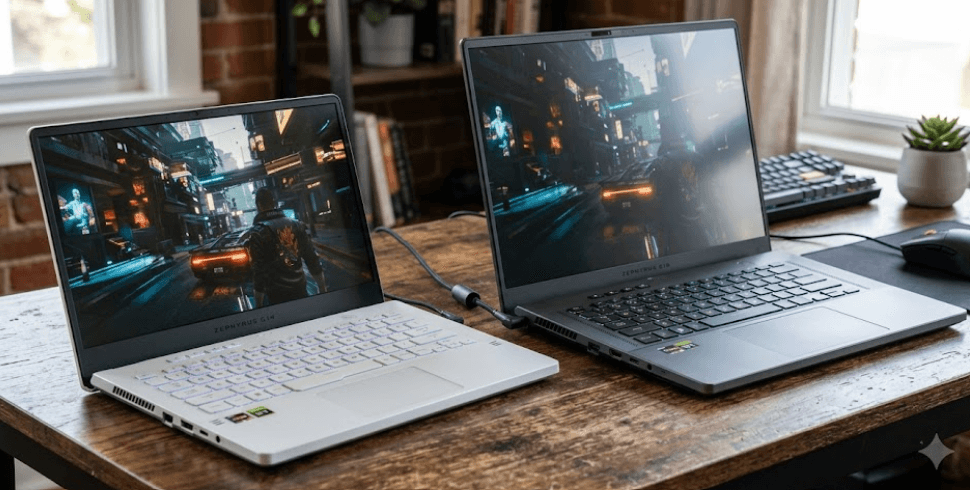
TL;DR The ASUS ROG Zephyrus G14 is the better choice if you want a compact gaming laptop that is easier to carry between work, college, and travel. The Zephyrus G16 is worth considering if you prefer a larger OLED display, more screen space for creative work, and higher-performance configurations. The 2026 lineup includes different processor and graphics options, so the G16 is not automatically faster in every configuration, and the G14 is not automatically the better value. Compare the exact GPU, memory, storage, display, and price before deciding. For most people who prioritize portability, the G14 is the practical pick; for gamers and creators who spend long hours at a desk, the G16 is the more comfortable option.
Understanding The Zephyrus G14 And G16
ASUS designed the ROG Zephyrus series for people who want gaming performance without carrying a traditional, bulky gaming laptop. The G14 and G16 share that approach, combining premium construction, OLED displays, dedicated NVIDIA graphics in the configurations discussed here, and features for gaming and productivity. However, their different sizes serve different needs. The G14 is built around a 14-inch display, while the G16 uses a larger 16-inch screen. That difference affects portability, workspace, and how comfortable each laptop feels during long gaming sessions.
The 2026 generation makes the comparison more configuration-dependent. ASUS lists an AMD-powered G14 with a Ryzen AI 9 465 processor and RTX 5060 graphics, alongside an Intel-powered G14 with a Core Ultra 9 386H processor and RTX 5070 graphics. The G16 lineup also includes Intel Core Ultra 9 386H configurations, with the RTX 5070 Ti available in the Indian listing discussed below. These are not identical machines with different screen sizes, so buyers should compare specific model numbers rather than assuming every G14 or G16 has the same hardware.
The main decision comes down to how you divide your time between gaming, work, and travel. If you regularly carry your laptop in a backpack, work in different locations, or prefer a smaller desk setup, the G14 makes more sense. If your laptop spends most of its time on a desk and you want more room for games, timelines, spreadsheets, and multiple windows, the G16 has a clear practical advantage. Neither is universally better. Your preferred screen size, budget, and chosen configuration should determine which model you buy.
Key Differences At A Glance
| Feature | ROG Zephyrus G14 | ROG Zephyrus G16 |
|---|---|---|
| Display size | 14 inches | 16 inches |
| Example 2026 GPU | RTX 5060 or RTX 5070, depending on model | RTX 5070 Ti in the listed configuration |
| Display | 3K OLED, 120Hz on listed G14 models | 2.5K OLED, 240Hz on the listed G16 model |
| Portability | Better for frequent travel | Larger, but still relatively slim |
| Memory | Soldered LPDDR5X in listed models | Soldered LPDDR5X in listed models |
| Best suited for | Portable gaming and everyday work | Larger-screen gaming and creative workloads |
Display Quality And Gaming Experience
The display is one of the biggest differences between these laptops. The 2026 G14 configurations listed by ASUS feature a 14-inch, 2880 × 1800 OLED panel with a 120Hz refresh rate. The listed G16 configuration uses a 16-inch, 2560 × 1600 OLED panel with a 240Hz refresh rate. Both offer a 16:10 aspect ratio, which provides more vertical room than a traditional 16:9 display. OLED technology also delivers deep blacks and strong contrast, making dark scenes in games and high-contrast content look impressive.
The G14's higher pixel resolution on a smaller screen produces a sharp image for text, photos, and everyday applications. Its 120Hz refresh rate is already smooth for most gaming and general use. The G16, meanwhile, gives you a larger viewing area and a higher refresh rate. That can be useful in fast-paced competitive games, provided your chosen GPU can produce sufficiently high frame rates. A 240Hz panel does not automatically make games run at 240 frames per second, and the actual result depends on the game, graphics settings, and hardware configuration.
For creative work, the G16's extra screen space can make editing video timelines, arranging design tools, and comparing documents more comfortable. The G14 is easier to position in tight spaces and works well for gaming when travelling. Both displays are capable options, but buyers should also check the exact panel specifications, brightness, colour coverage, and refresh rate on the SKU they intend to purchase. A larger display is not automatically more accurate, and OLED quality alone does not determine gaming performance.
Which Display Should You Choose?
Choose the G14 if sharpness, compact dimensions, and a high-quality OLED screen matter most. Choose the G16 if you prefer a larger image and want to benefit from its 240Hz refresh rate in supported games. For single-player titles, both refresh rates can provide a smooth experience, while competitive players may appreciate the G16's higher refresh-rate ceiling.
Processor And Graphics Performance
Processor and graphics specifications matter more than the laptop's name when comparing gaming performance. ASUS lists the Intel-powered G14 with a Core Ultra 9 386H and RTX 5070 Laptop GPU, while the AMD-powered G14 includes a Ryzen AI 9 465 and RTX 5060 Laptop GPU. The listed 2026 G16 configuration combines the Core Ultra 9 386H with an RTX 5070 Ti Laptop GPU. This makes the specific G16 configuration a stronger graphics option on paper, but results vary by game, graphics settings, power limits, cooling, and driver updates.
The G16's larger chassis gives ASUS more physical room to design its cooling system, but that does not guarantee a fixed performance advantage in every task. GPU power limits and thermal behaviour affect sustained frame rates, while processor-intensive applications can respond differently from games that depend heavily on graphics. The G14 can still be a capable gaming machine, particularly with an RTX 5070 configuration, and it may be a better fit for people who value portability more than the highest available frame rates.
Both laptops can handle everyday productivity, demanding applications, and modern games when configured appropriately. However, buyers should not choose solely by processor branding or assume an RTX 5070 and RTX 5070 Ti deliver identical results. Check the exact GPU and its power configuration, then compare independent reviews using the games or applications you actually run. That is more useful than relying on a single benchmark or the assumption that a larger laptop always wins.
Performance Comparison
| Workload | G14 | G16 |
|---|---|---|
| Everyday productivity | Excellent for typical workloads | Excellent, with more screen space |
| Competitive gaming | Strong, depending on GPU | Higher refresh-rate display and stronger listed GPU |
| AAA gaming | Depends on GPU and settings | Strong potential with RTX 5070 Ti |
| Video editing | Suitable with a capable configuration | Larger workspace for timelines |
| Travel and mobile work | More convenient | Less compact |
Portability, Battery Life, And Cooling
The G14's biggest advantage is its smaller footprint. The 2026 AMD G14 is listed at approximately 1.5 kg, making it a practical option for commuters, students, and professionals who need a powerful laptop away from a desk. Its compact dimensions also make it easier to fit into smaller bags and use in places where desk space is limited. The G16 remains slim for a gaming laptop, but its larger body takes up more space and can be less convenient to carry every day.
Battery capacity and real-world battery life should be considered separately. The 2026 Intel G14 specification lists a 73Wh battery, while the 2025 G16 specification lists a 90Wh battery. These figures refer to different generations, so they should not be treated as a direct 2026 comparison. Battery runtime also depends on screen brightness, refresh rate, workload, power mode, and whether the dedicated GPU is active. Gaming on battery generally consumes power quickly, so both laptops are best used with their power adapters for demanding sessions.
Cooling is equally important for sustained performance. Both models use performance-oriented cooling systems, and fan noise can rise when the CPU and GPU are under heavy load. The G16's larger chassis may offer more room for cooling hardware, but temperatures and noise depend on the exact configuration and operating mode. If you often play demanding games for several hours, look for sustained-performance tests rather than relying on chassis size alone. For lighter work, both can be practical portable systems, although neither should be expected to behave like a silent ultra-book during intensive gaming.
Portability And Battery Considerations
| Factor | G14 | G16 |
|---|---|---|
| Carrying daily | Easier | More noticeable bulk |
| Workspace | Compact | More room for multitasking |
| Battery comparison | Check exact 2026 SKU | Check exact 2026 SKU |
| Heavy gaming | Best plugged in | Best plugged in |
| Cooling under load | Configuration-dependent | Configuration-dependent |
Memory, Storage, And Connectivity
Memory deserves special attention because the listed G14 and G16 configurations use onboard LPDDR5X RAM, which cannot be upgraded through a conventional memory slot. ASUS lists 16GB or 32GB memory options for the 2026 Intel G14, depending on the SKU, while the listed 2025 G16 configuration has 32GB onboard memory. Buyers should choose enough RAM at purchase because adding a removable memory module later is not an option on these configurations. For gaming, general productivity, and moderate creative work, 32GB offers more headroom than 16GB when your budget allows it.
Storage is more flexible. The cited G14 models list a 1TB PCIe 4.0 NVMe SSD, while the listed G16 model has a 2TB SSD and two M.2 expansion slots, according to ASUS's 2025 specification page. Expansion details can change between generations and SKUs, so verify the exact model before relying on an additional SSD slot. More storage is useful if you install several large games, work with high-resolution video, or keep substantial project files locally. Cloud storage can supplement local capacity, but it does not replace fast local storage for every workload.
Connectivity also affects how easily each laptop fits into a work setup. The cited specifications include HDMI, USB-A, USB-C with DisplayPort support, and high-speed connectivity options; the referenced models also list an SD card reader. The exact USB standard and supported features differ by port, so check the product page if you use external monitors, docks, high-speed drives, or professional camera cards. The G16's larger display and storage configuration may suit desk-based creators, while the G14 provides many of the same essential connections in a more compact package.
Pricing And Value In India
The price gap between these laptops can be substantial, especially when comparing different graphics configurations. At the time of research, ASUS India's listing showed the AMD-powered 2026 G14 starting at ₹2,59,990. Its Intel-powered G14 GU405 listing showed a starting price of ₹3,59,990, while the listed 2026 G16 GU606AR configuration with an RTX 5070 Ti was priced at ₹4,89,990. These are listed Indian prices, not guaranteed street prices, and discounts, availability, and model specifications may change.
The G14 is the more sensible starting point if you want premium portable gaming without paying for the higher-end G16 configuration. The AMD G14 with RTX 5060 is a different proposition from the Intel G14 with RTX 5070, so do not compare the series' starting price with a higher-spec G16 and assume the difference comes only from screen size. Compare the processor, GPU, memory, SSD, display, warranty, and actual selling price together.
The G16's higher price may make sense if you will use its larger 240Hz OLED display, stronger listed GPU, and higher storage capacity regularly. However, a premium configuration is poor value if you mainly play lighter games or use productivity applications that do not benefit much from the extra graphics power. Before buying, compare current offers for the exact SKU and check whether the retailer is an authorized seller. The best value is the configuration that meets your needs without making you pay for performance you will rarely use.
Listed Prices At A Glance
| Model | Listed Price In India | Configuration Highlight |
|---|---|---|
| Zephyrus G14 (2026, AMD) | ₹2,59,990 | Ryzen AI 9 465, RTX 5060 |
| Zephyrus G14 (2026, Intel) | ₹3,59,990 | Core Ultra 9 386H, RTX 5070 |
| Zephyrus G16 (2026) | ₹4,89,990 | Core Ultra 9 386H, RTX 5070 Ti |
Prices are based on ASUS India listings checked for this article and can change. Confirm the final price and complete specification on the exact product page before purchasing.
Who Should Buy The G14 Or G16?
The G14 is the better fit for buyers who travel regularly, move between workspaces, or want a gaming laptop that is easier to carry alongside everyday essentials. It combines a compact display with powerful configurations and a high-resolution OLED panel. If you play games after work, edit photos, attend classes, and travel with your laptop, the G14 offers a useful balance. Choose the 32GB configuration if your budget allows and you plan to keep the laptop for several years, because its onboard memory cannot be upgraded later.
The G16 suits gamers who want a bigger display and buyers who spend long sessions editing video, managing creative applications, or multitasking across several windows. Its 240Hz OLED panel and the listed RTX 5070 Ti configuration make it appealing for users who can benefit from a higher refresh rate and additional graphics performance. It is also worth considering if the laptop usually stays on a desk and portability is less important than screen size and performance headroom.
Neither model is the right purchase for every budget. If the G16 stretches your finances, a suitably configured G14 may deliver a better overall experience than buying a more expensive machine you do not fully use. On the other hand, if you regularly play demanding games and want the larger screen, the G16 can justify the added cost. Start with your workload, then compare exact configurations and prices rather than choosing by model name alone.
Frequently Asked Questions
Q. Is the ASUS ROG Zephyrus G14 better than the G16?
The G14 is better for portability, while the G16 is better for buyers who want a larger screen and higher-end graphics options. The right choice depends on the exact configurations and your workload.
Q. Which Zephyrus laptop is better for gaming?
The listed G16 configuration with an RTX 5070 Ti has stronger graphics hardware than the cited G14 RTX 5060 configuration. However, compare exact GPU variants and independent game benchmarks before buying.
Q. Is the Zephyrus G14 good for college and work?
Yes. Its compact size, OLED display, and dedicated graphics make it suitable for productivity, creative applications, and gaming. Choose sufficient memory and storage for your expected workload.
Q. Does the Zephyrus G16 have a better display?
The cited 2026 G16 configuration has a 16-inch, 2560 × 1600 OLED panel with a 240Hz refresh rate. The listed G14 has a 14-inch, 2880 × 1800 OLED panel at 120Hz. The G16 offers more screen space and a higher refresh rate, while the G14 has higher pixel resolution on a smaller screen.
Q. Which model is easier to carry?
The G14 is easier to carry because it has a smaller body and lower weight. It is the more practical option for frequent commuting and travel.
Q. Can you upgrade RAM on the Zephyrus G14 or G16?
The cited configurations use onboard LPDDR5X memory without conventional RAM expansion slots. Check the exact SKU, but do not assume you can upgrade the memory later.
Q. Is 16GB RAM enough for a Zephyrus gaming laptop?
16GB can work for everyday tasks and many games, but 32GB offers more headroom for demanding titles, multitasking, and creative applications. Since onboard memory is not upgradeable on the cited models, plan ahead.
Q. Does the Zephyrus G16 have better battery life?
Not necessarily. Battery life depends on the exact generation, battery capacity, display settings, power mode, and workload. Compare tests of the specific models you plan to buy.
Q. Which Zephyrus model offers better value in India?
The G14 can offer better value if portability matters and its GPU meets your needs. The G16 may justify its higher price if you benefit from the larger 240Hz display and stronger graphics configuration. Compare current prices for equivalent specifications.
Q. Should you buy the 2026 Zephyrus G14 or G16?
Choose the G14 for a compact gaming and productivity laptop. Choose the G16 for a larger display and higher graphics performance in the listed configuration. Verify the model number, RAM, GPU, storage, warranty, and final price before purchasing.
Final Recommendation
The ASUS ROG Zephyrus G14 is the better choice for most buyers who want a slim gaming laptop that remains convenient for everyday travel. Its 14-inch OLED display, capable graphics options, and compact design make it suitable for students, professionals, and gamers who split their time between work and entertainment. The key is to choose a configuration with enough memory and graphics performance for the years you intend to keep it.
Choose the ASUS ROG Zephyrus G16 if your priority is a larger OLED display, a 240Hz refresh rate, and the higher graphics performance offered by the listed RTX 5070 Ti configuration. It makes more sense for desk-based gaming and creative work where screen space and GPU capability matter more than minimum weight. Before placing an order, compare the exact 2026 SKU and current Indian price because processor, GPU, memory, and storage vary across the lineup. In short, buy the G14 for portability and the G16 for a larger-screen, higher-performance setup.
Ready to upgrade your tech?
Browse our collection of quality refurbished products at unbeatable prices.






