
ASUS ROG Zephyrus G14 and G16: Power Meets Portability
Explore the ASUS ROG Zephyrus G14 & G16 with stunning OLED displays, RTX 50-series GPUs, and sleek designs. Perfect for gamers & creators.

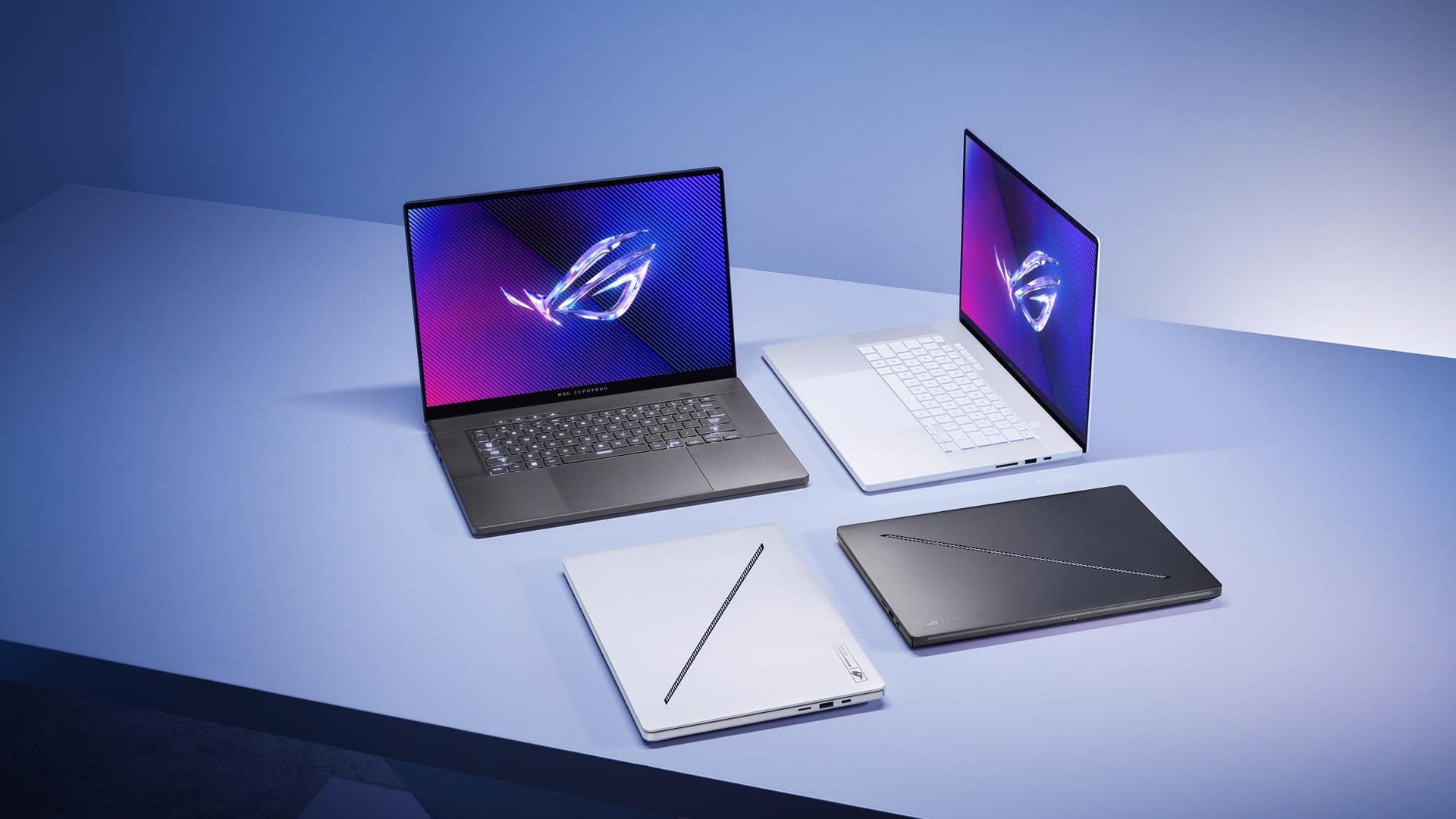
TL;DR The ASUS ROG Zephyrus G14 and G16 remain among the best premium gaming laptops because they successfully combine flagship-level gaming performance, creator-focused hardware, premium OLED displays, powerful RTX 50-series graphics, and highly portable aluminum chassis into sleek thin-and-light gaming machines. The Zephyrus G14 focuses heavily on portability and balanced everyday usability, while the Zephyrus G16 prioritizes larger displays and higher-end configurations for gamers, creators, and workstation-level users. With next-generation AMD Ryzen AI and Intel Core Ultra processors, NVIDIA RTX 50-series GPUs, advanced cooling systems, and creator-friendly OLED displays, both laptops deliver a premium experience for gaming, content creation, AI-assisted workflows, and professional productivity tasks.
Why The ASUS ROG Zephyrus Series Has Become So Popular
The gaming laptop market has changed dramatically because users increasingly want devices that can function as gaming systems, creator workstations, professional laptops, and portable productivity machines simultaneously. ASUS strongly recognized this shift early through the Zephyrus lineup by designing gaming laptops that feel equally comfortable in professional environments, classrooms, creator studios, and gaming setups.
Unlike many traditional gaming laptops that prioritize aggressive RGB-heavy aesthetics and bulky chassis designs, the Zephyrus series focuses heavily on portability, premium materials, clean aesthetics, and creator-focused versatility. This allows the G14 and G16 to appeal not only to gamers, but also to professionals, students, freelancers, editors, developers, and digital creators who want powerful hardware without carrying oversized desktop replacements.
The introduction of NVIDIA RTX 50-series graphics and next-generation AMD Ryzen AI and Intel Core Ultra processors has further strengthened the Zephyrus lineup because modern users increasingly depend on AI-assisted creative workflows, advanced rendering, multitasking, streaming, editing, and hybrid gaming-productivity usage patterns. ASUS has therefore positioned the Zephyrus family as a bridge between premium creator laptops and high-performance gaming systems.
ASUS ROG Zephyrus G14 And G16 Specifications Overview
| Specification | ASUS ROG Zephyrus G14 | ASUS ROG Zephyrus G16 |
|---|---|---|
| Processor | AMD Ryzen AI 9 HX 370 | Intel Core Ultra 9 285H |
| Graphics | Up to RTX 5080 | Up to RTX 5090 |
| RAM | Up to 64GB LPDDR5X | Up to 64GB LPDDR5X |
| Storage | Up to 2TB PCIe 4.0 SSD | Up to 2TB PCIe 4.0 SSD |
| Display | 14-inch 3K OLED 120Hz | 16-inch 2.5K OLED 240Hz |
| Weight | 1.5kg | 1.85kg |
| Thickness | 1.59cm | 1.49cm |
The specifications clearly show how ASUS differentiates both devices while still maintaining the same premium Zephyrus identity. The G14 focuses heavily on portability and efficiency, while the G16 targets users who want larger displays, higher refresh rates, and maximum GPU performance for gaming and workstation-level creative workloads.
Another major advantage of the Zephyrus lineup is that both systems support extremely high RAM capacities and fast PCIe SSD storage. This allows the laptops to comfortably handle advanced multitasking involving gaming, streaming, editing, rendering, AI-assisted applications, and productivity software running simultaneously.
The inclusion of RTX 50-series graphics also significantly improves ray tracing efficiency, DLSS performance, AI acceleration, and rendering capability. This makes the Zephyrus lineup especially attractive for modern gaming and creator-focused workflows that increasingly rely on GPU acceleration.
Premium Aluminum Design And Build Quality
ASUS has continued refining the Zephyrus design language because premium build quality has become one of the biggest strengths of the lineup. Both the G14 and G16 feature CNC-milled aluminum chassis designs that feel substantially more premium than many traditional plastic-heavy gaming laptops.
The design philosophy strongly emphasizes minimalism because ASUS intentionally avoids the exaggerated styling commonly associated with gaming laptops. The clean aluminum finish, subtle branding, and refined aesthetics allow the laptops to blend comfortably into professional workspaces, offices, classrooms, coffee shops, and studio environments without appearing excessively flashy.
| Design Feature | Benefit |
|---|---|
| CNC-Milled Aluminum Chassis | Premium durability |
| Lightweight Construction | Better portability |
| Slim Form Factor | Easier travel usability |
| Minimalist Aesthetic | Professional appearance |
The lightweight construction dramatically improves portability because the G14 weighs only around 1.5kg while the G16 remains impressively portable despite containing significantly more powerful hardware. This makes both systems practical for students, creators, freelancers, and professionals who frequently move between different work environments.
Why Thin-And-Light Gaming Laptops Matter More Today
Modern users increasingly expect gaming laptops to function as everyday productivity machines because many people now use a single laptop for gaming, office work, streaming, editing, studying, and creative workloads simultaneously. Thin-and-light gaming laptops therefore provide much better versatility compared to oversized desktop-replacement systems.
The Zephyrus lineup especially benefits because ASUS successfully balances portability and high-performance hardware without heavily compromising thermal management or structural quality. This allows users to carry workstation-grade hardware in a form factor that still feels practical for daily commuting and travel.
Another major advantage is aesthetic versatility because cleaner gaming laptop designs age much better visually compared to heavily RGB-focused systems. Users can comfortably use the G14 and G16 in professional environments without attracting unnecessary attention.
Keyboard, Touchpad, And Everyday Productivity Experience
ASUS has refined the keyboard and touchpad experience significantly because gaming laptops increasingly serve as professional productivity devices alongside gaming systems. The spacious keyboard layout, comfortable key travel, and large precision touchpads help improve everyday usability substantially.
The keyboard especially benefits professionals and students because long typing sessions feel comfortable during coding, assignments, content writing, spreadsheet work, and office workflows. Unlike many gaming laptops that prioritize aesthetics over practicality, the Zephyrus lineup maintains strong typing ergonomics suitable for extended productivity sessions.
| Productivity Feature | Benefit |
|---|---|
| Spacious Keyboard Deck | Better typing comfort |
| Precision Touchpad | Improved navigation |
| Strong Hinge Mechanism | Better durability |
| Portable Design | Easier everyday usability |
The large touchpads also reduce dependence on external accessories during travel because gesture navigation and cursor tracking remain smooth and accurate. This contributes heavily to the premium ultrabook-style experience ASUS is targeting with the Zephyrus family.
RTX 50-Series Gaming Performance
The inclusion of NVIDIA RTX 50-series GPUs represents one of the most important upgrades in the Zephyrus lineup because modern AAA games and creator workflows increasingly depend on advanced GPU acceleration. The RTX 5080 in the G14 and RTX 5090 in the G16 deliver extremely powerful gaming performance while still fitting inside thin-and-light chassis designs.
Games such as Cyberpunk 2077, Hogwarts Legacy, Red Dead Redemption 2, Microsoft Flight Simulator, Alan Wake 2, and Call of Duty can run at extremely high settings with ray tracing and DLSS enabled. NVIDIA’s Multi Frame Generation technology also significantly improves frame rates in supported games.
| Gaming Feature | Benefit |
|---|---|
| RTX 50-Series GPUs | Strong gaming performance |
| DLSS 4 Support | Higher frame rates |
| Ray Tracing | Better visual realism |
| Advanced Optimus | Smarter power management |
The Zephyrus G16 especially targets enthusiast-level gamers because the RTX 5090 configuration delivers workstation-class GPU capability suitable for extremely demanding gaming and rendering workloads. Meanwhile, the G14 focuses more on balancing portability and high-end gaming performance effectively.
Why RTX 50-Series GPUs Matter For Modern Users
Modern GPUs now do much more than gaming because applications such as Adobe Premiere Pro, Blender, DaVinci Resolve, Unreal Engine, Stable Diffusion, and AI-assisted creative tools heavily rely on GPU acceleration. RTX hardware therefore provides major advantages beyond traditional gaming workloads.
The Zephyrus lineup especially benefits because NVIDIA Studio optimization improves creator-focused workflows significantly. Video exports, rendering tasks, AI-assisted editing, 3D modeling, and simulation workloads all benefit from modern RTX acceleration.
Another important advantage is future readiness because DLSS, ray tracing, and AI-enhanced rendering technologies continue becoming more important in both gaming and creative applications. This helps improve the long-term relevance of the hardware substantially.
AMD Ryzen AI And Intel Core Ultra Performance
The Zephyrus G14 and G16 use different processor strategies because ASUS targets slightly different audiences with each device. The G14 uses the AMD Ryzen AI 9 HX 370 processor, while the G16 uses Intel Core Ultra 9 285H hardware focused heavily on multitasking and creator-focused workflows.
The AMD Ryzen AI processor especially benefits users focused on efficiency and rendering acceleration because AMD’s AI-focused architecture performs extremely well during Blender rendering, creator workflows, and battery-sensitive productivity tasks. Meanwhile, Intel’s Core Ultra platform performs exceptionally well during heavy multitasking, productivity, streaming, and workstation-style workloads.
| Processor Advantage | Benefit |
|---|---|
| AMD Ryzen AI | Better efficiency and rendering |
| Intel Core Ultra | Strong multitasking |
| AI Acceleration | Faster creator workflows |
| Multi-Core Performance | Better heavy workload handling |
Both systems also support AI-assisted workflows extremely well because modern processors increasingly include dedicated AI acceleration hardware. This helps improve compatibility with future AI-enhanced productivity and creator applications.
OLED Display Experience
The ROG Nebula OLED displays remain one of the strongest features of the Zephyrus lineup because ASUS combines high resolutions, excellent color accuracy, fast refresh rates, and OLED contrast into premium creator-focused gaming panels.
The G14 features a 14-inch 3K 120Hz OLED panel while the G16 uses a larger 16-inch 2.5K 240Hz OLED display. Both screens deliver exceptional contrast, true black levels, excellent viewing angles, and highly accurate color reproduction suitable for gaming and professional creative work.
| Display Feature | Benefit |
|---|---|
| OLED Technology | Better contrast and black levels |
| 100% DCI-P3 Coverage | Accurate colors |
| High Refresh Rates | Smoother gaming |
| Dolby Vision Support | Better HDR experience |
The G16 especially targets competitive gamers because the 240Hz refresh rate dramatically improves responsiveness during esports gaming. Meanwhile, creators and editors benefit heavily from factory-calibrated color accuracy and OLED visual depth.
Why OLED Matters For Gaming And Content Creation
OLED technology dramatically improves visual quality because individual pixels can turn off completely, producing true black levels and significantly better contrast compared to traditional LCD panels. This makes games, movies, HDR content, and creative workflows feel substantially more immersive.
Creators especially benefit because accurate color reproduction is extremely important for photography, video editing, graphic design, and digital art workflows. The Zephyrus OLED displays therefore function extremely well for both entertainment and professional content creation.
Another important advantage is motion clarity because high-refresh OLED panels deliver very smooth visual responsiveness during gaming and fast-motion workloads. This improves both gaming immersion and everyday system fluidity.
Cooling System And Thermal Management
Cooling remains one of the most difficult challenges in thin-and-light gaming laptops because modern RTX GPUs and high-core-count processors generate substantial heat during gaming and rendering workloads. ASUS has therefore invested heavily in improving airflow and thermal efficiency across the Zephyrus lineup.
The G14 and G16 both use advanced cooling systems featuring liquid metal thermal compounds, second-generation Arc Flow fans, improved airflow pathways, and large internal cooling coverage areas. These upgrades help maintain more stable gaming performance during extended workloads.
| Cooling Feature | Benefit |
|---|---|
| Liquid Metal Cooling | Better heat transfer |
| Arc Flow Fans | Improved airflow |
| Vapor Chamber Support | Better thermal efficiency |
| Larger Cooling Coverage | More stable performance |
The G14 especially shows strong thermal improvements compared to earlier generations because ASUS significantly increased cooling efficiency while maintaining the compact form factor. The Intel-based G16 configurations can still run hotter under extremely heavy workloads, though they remain highly capable overall.
Why Cooling Quality Matters More Than Raw Specifications
Many gaming laptops advertise powerful hardware but fail to sustain stable performance because inadequate cooling systems cause thermal throttling during long gaming sessions. Cooling quality therefore becomes just as important as raw CPU and GPU specifications.
The Zephyrus lineup especially benefits because ASUS focuses heavily on maintaining balanced sustained performance instead of simply chasing benchmark numbers. Better airflow and thermal management help maintain smoother frame rates and more consistent creator workload performance over time.
Another major advantage is hardware longevity because lower sustained temperatures generally reduce long-term thermal stress on internal components. This improves reliability during extended ownership periods.
Battery Life And Portability
Battery life remains one of the more difficult compromises for gaming laptops because powerful CPUs and GPUs naturally consume much more energy than ultrabook-class systems. However, the Zephyrus lineup still performs reasonably well during lighter productivity-focused workloads.
The G14 especially delivers better unplugged usability because AMD’s efficiency-focused architecture allows stronger battery optimization during browsing, streaming, meetings, office work, and light productivity tasks. Meanwhile, the larger G16 prioritizes maximum performance more aggressively, which affects battery endurance slightly.
| Usage Type | Battery Experience |
|---|---|
| Productivity Work | Good |
| Streaming | Comfortable |
| Gaming | Charger recommended |
| Travel Usage | G14 performs better |
Fast charging support also improves practicality because users can quickly recharge the laptops during travel or short work breaks. This helps reduce downtime significantly for professionals and students frequently working away from power outlets.
Who Should Buy The Zephyrus G14 And G16
The ASUS ROG Zephyrus G14 strongly targets users who want the best balance between portability, gaming power, creator-focused performance, and everyday usability. Students, freelancers, traveling creators, remote professionals, and gamers who frequently travel will especially appreciate the compact lightweight form factor.
The Zephyrus G16 targets users who prioritize larger displays, stronger GPU configurations, and workstation-level gaming or creator performance. Competitive gamers, video editors, 3D artists, and users replacing desktop setups will benefit more from the G16’s larger chassis and higher-end hardware configurations.
| Best For G14 | Best For G16 |
|---|---|
| Students | Competitive gamers |
| Traveling creators | Video editors |
| Freelancers | 3D artists |
| Remote professionals | Desktop replacement users |
Both systems also strongly appeal to hybrid users who need one laptop capable of gaming, productivity, editing, streaming, and creator-focused workloads simultaneously.
Pros And Cons
| Pros | Cons |
|---|---|
| Premium aluminum build quality | Premium pricing |
| Excellent OLED displays | Gaming battery life remains limited |
| Powerful RTX 50-series graphics | G16 Intel models can run hot |
| Thin-and-light portability | Upgrades may be limited in some areas |
| Strong creator-focused performance | Higher configurations are expensive |
The strengths especially make the Zephyrus lineup highly attractive for users who want premium gaming hardware without sacrificing portability or professional aesthetics. The OLED displays, creator optimization, and high-end RTX hardware combine to create one of the most versatile gaming laptop families currently available.
At the same time, buyers should understand that premium thin-and-light gaming laptops naturally involve higher pricing due to the engineering complexity required to balance portability, cooling, and performance simultaneously. However, the Zephyrus lineup largely justifies its premium positioning through strong real-world usability and exceptional versatility.
Why The ASUS ROG Zephyrus G14 And G16 Remain Among The Best Premium Gaming Laptops
The most important takeaway is simple, the ASUS ROG Zephyrus G14 and G16 succeed because they balance gaming performance, creator-focused capability, premium design, portability, OLED display quality, and workstation-level versatility much more effectively than many traditional gaming laptops. Instead of focusing purely on aggressive gaming aesthetics or raw benchmark performance, ASUS strongly emphasizes real-world usability across gaming, productivity, editing, streaming, and creative workloads.
The combination of RTX 50-series graphics, AMD Ryzen AI and Intel Core Ultra processors, OLED Nebula displays, advanced cooling systems, creator-focused optimizations, and premium aluminum construction especially helps the Zephyrus lineup remain highly competitive within the premium gaming laptop market. These features work together to create devices that function equally well as gaming systems, creator workstations, professional productivity laptops, and portable entertainment machines.
At the same time, buyers should choose carefully between the G14 and G16 depending on their priorities. The G14 remains the stronger all-rounder for portability-focused users who still want flagship-level gaming and creator performance. The G16, meanwhile, is ideal for users seeking larger displays, maximum GPU power, and workstation-grade multitasking capability. However, for users seeking some of the best premium gaming laptops that successfully bridge the gap between creator workstations and portable gaming systems, the ASUS ROG Zephyrus G14 and G16 remain among the strongest options available today.
Frequently Asked Questions
Q. Is the ASUS ROG Zephyrus G14 good for gaming?
Yes, the Zephyrus G14 delivers excellent portable gaming performance with AMD Ryzen AI processors and RTX 50-series graphics.
Q. Which is better, the ASUS ROG Zephyrus G14 or G16?
The G14 is better for portability and travel, while the G16 offers larger displays and higher-end gaming performance.
Q. Are the Zephyrus G14 and G16 good for content creators?
Yes, both laptops are highly suitable for creators because they feature OLED displays, RTX acceleration, and creator-focused hardware optimization.
Q. Does the ASUS ROG Zephyrus G14 use an OLED display?
Yes, the 2025 G14 includes a 14-inch ROG Nebula OLED display with 3K resolution and 120Hz refresh rate.
Q. Can the ASUS ROG Zephyrus G16 replace a desktop PC?
Yes, high-end G16 configurations with RTX 5090 graphics are powerful enough for gaming, rendering, and professional creative workflows.
Q. How is battery life on the Zephyrus G14 and G16?
Battery life is good for productivity workloads, though gaming sessions still require charger connectivity for maximum performance.
Q. Are the Zephyrus laptops suitable for students?
Yes, the G14 especially works extremely well for students because it balances portability, productivity, and gaming capability effectively.
Q. How much RAM and storage do the Zephyrus models support?
Both laptops support up to 64GB LPDDR5X RAM and up to 2TB PCIe 4.0 SSD storage.
Q. Do the Zephyrus G14 and G16 support AI workloads?
Yes, both systems support AI-enhanced workflows through modern AMD Ryzen AI, Intel Core Ultra, and NVIDIA RTX hardware.
Q. Is the ASUS ROG Zephyrus G14 worth buying?
Yes, the Zephyrus G14 remains one of the best premium thin-and-light gaming laptops for users seeking portability, gaming performance, OLED displays, and creator-focused versatility.






