
AI PCs vs Traditional Laptops: Are AI Features Worth Paying For?
AI PCs and traditional laptops serve different needs in 2026. AI PCs offer local AI processing, faster performance, enhanced privacy, and better battery efficiency, while traditional laptops remain the more affordable choice for everyday computing, work, and entertainment.

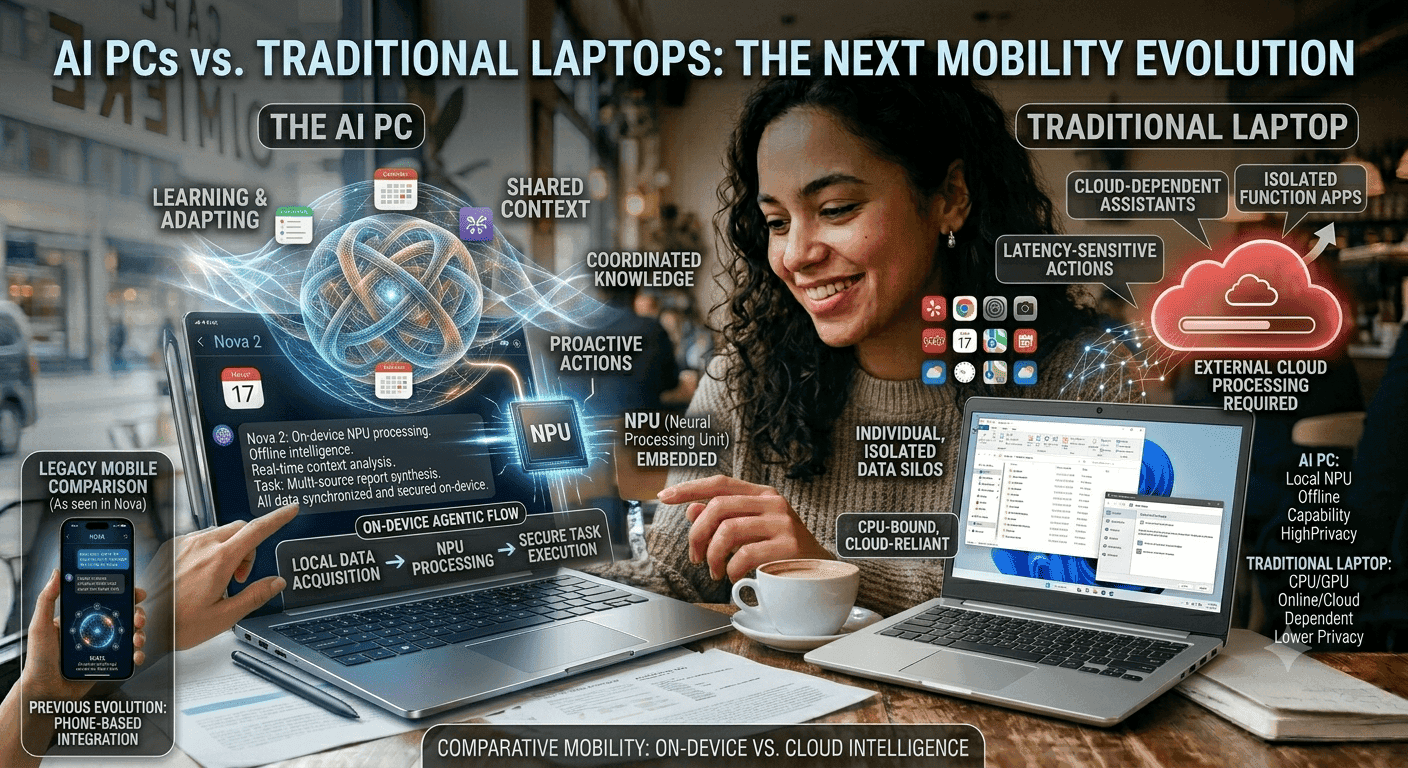
TL;DR AI PCs are the better choice if you want local AI processing, faster responses, and better battery efficiency, while traditional laptops remain the smarter buy for lower-cost general computing.
What The NPU Changes?
A dedicated NPU is not just a marketing label. It is a processing unit built to handle AI tasks efficiently, which means it can reduce power consumption compared with forcing the CPU and GPU to do all the work. That is useful when you are running features like live transcription, background clean-up, or on-device assistance throughout the day.
Traditional laptops still compute well, but they do not have that AI-first architecture. AI PCs are also designed to learn and adapt, which is why they are often described as more autonomous computers. That does not mean they replace the user, but it does mean the machine can support more intelligent workflows with less manual effort.
If your software stack already includes AI-powered tools, the difference becomes obvious quickly. The NPU helps the computer handle those tasks more efficiently than a CPU or GPU alone.
Why Traditional Laptops Still Matter?
Traditional laptops remain relevant because they cover a wide range of budgets and use cases. In India, mainstream models are priced between INR 40,000 and INR 1,20,000, which gives buyers a lot of flexibility if they only need standard computing. For students, office users, and casual consumers, that range is still attractive because it includes plenty of capable computers for browsing, documents, spreadsheets, and media.
The market data also shows why the conversation is changing. AI PCs can run AI tasks locally, which helps reduce network delay and maintain privacy by processing data on the device. Traditional laptops can still handle many everyday tasks well, but they are less optimized for AI-first workloads and often depend more on cloud-based processing for advanced features.
That difference matters most when you use AI features often enough to notice latency. If your work is mostly general computing, a traditional laptop can still be the better fit. If your workflow depends on faster AI responses, the AI PC has a stronger technical foundation.
The Hardware Differences That Separate AI PCs From Traditional Laptops
The most important hardware difference is the NPU. AI PCs include a dedicated Neural Processing Unit for efficient AI processing, while traditional laptops primarily use a Central Processing Unit and Graphics Processing Unit for computing tasks. That split changes how each machine handles AI workloads, especially when the tasks are repeated, local, or time-sensitive.
An NPU can handle machine learning workloads more efficiently than a CPU or GPU, and that usually means lower power consumption. It also means the laptop can keep AI features running without leaning as heavily on the main processor. For buyers, that translates into smoother multitasking and less strain during long sessions.
Traditional laptops still offer broad compatibility and strong general performance. They are built to handle a wide range of software, and they remain dependable for school, office, and entertainment. The difference is that they are not centered on AI acceleration, so they can feel less specialized when the workload shifts toward on-device intelligence and machine learning.
Local Processing Versus Cloud Dependence
AI PCs can run AI tasks locally, which reduces network delay and keeps more data on the device. That is useful when you need quick responses or when you want to avoid sending sensitive information to the cloud. It also makes the experience feel more immediate, especially in tools that react in real time.
Traditional laptops often depend more on cloud AI for advanced features. That can work well when the connection is stable, but it adds delay and creates a dependency on internet access. If your environment is inconsistent, local processing becomes a practical advantage rather than just a technical detail.
This is where the AI PC category starts to stand apart. It is not just about having more hardware; it is about moving the workload closer to the user. That shift improves speed, privacy, and consistency in everyday use.
Battery Life And Power Efficiency
Battery life is one of the clearest places where the architecture matters. AI PCs are built to handle AI workloads more efficiently, which helps reduce power consumption during those tasks. That can make the laptop more practical for travel, long workdays, and sessions away from a charger.
Traditional laptops can still last a long time depending on the model, but they do not have the same AI-focused efficiency advantage. When AI features are active, the CPU and GPU may have to do more of the work, which can increase power draw. That does not make them weak, but it does make them less specialized for this newer workload pattern.
For users who spend a lot of time on video calls, creative apps, or AI-assisted work, battery efficiency becomes part of the buying decision. The NPU helps the laptop keep those features running with less overhead. That is one reason AI PCs can feel more practical even when the raw specs look similar.
Feature Support In Daily Use
AI PCs can perform tasks like real-time translations and background image enhancements without needing to connect to the cloud. They can also improve video conferencing experiences with features like eye contact correction and background effects. Those features are not just cosmetic, because they can make calls, presentations, and content creation feel smoother.
AI PCs can also support camera framing, background blurring, and noise reduction during video calls. In creative software, they can support AI image generation and noise cancellation as well. These tools save time and reduce friction, especially when they are available locally and respond quickly.
Traditional laptops can still run many of the same applications, but they usually do not deliver the same level of built-in AI support. That means the experience can depend more on the software and the connection. If you want the computer itself to do more of the work, the AI PC is the stronger option.
Price Comparison and Value Analysis
AI PCs vs Traditional Laptops is often framed as a premium-versus-budget decision, but the price picture in India is more nuanced. Traditional laptops are priced between INR 40,000 and INR 1,20,000 for mainstream models, while the ideal price for an AI PC should begin at INR 70,000 to INR 75,000. That means an AI PC is not necessarily the most expensive option on the market, and it often sits in the middle of the broader laptop range.
The real question is whether the extra hardware pays off in daily use. The value of an AI PC comes from its dedicated NPU, local AI processing, and support for features that save time. That can matter if you use Microsoft Co-Pilot, creative tools, or frequent video calls.
Traditional laptops still deliver strong value for general computing, especially if you are not using AI features often enough to justify the extra spend. If your day is mostly documents, browsing, and media, the lower upfront cost can make more sense. If AI is becoming part of your routine, the price gap starts to look more reasonable.
Why The Price Gap Exists?
The price difference reflects hardware specialization, not just branding. AI PCs are designed to learn and adapt, handle complex tasks autonomously, and support multiple AI tasks simultaneously. Those capabilities are useful in work environments where AI tools are becoming standard.
Traditional laptops, by contrast, are still designed around broad compatibility and general-purpose performance. That makes them easier to recommend for buyers who want a familiar setup without paying for features they may not use. The value is in matching the machine to the workload, not in choosing the newest category by default.
If your work already includes AI-assisted writing, translation, conferencing, or creative tasks, the AI PC may save enough time to justify the higher entry point. If those tasks are occasional, the traditional laptop can still be the smarter purchase.
Where AI PCs Deliver Better Value?
Local processing keeps data on the device, which reduces cloud dependence and can be important for sensitive work. Faster responses and lower latency also make the laptop feel more premium in actual use, not just on a spec sheet. That is especially relevant for people who use tools like Microsoft Co-Pilot or AI-enabled creative software every day.
The computer can handle those tasks more efficiently than a CPU or GPU alone, which helps keep the experience smooth. Over time, that can turn into real-time savings for productivity and learning. If AI features are occasional extras, the benefit is smaller.
If they are central to your work, the AI PC starts to justify its price more clearly.
When Traditional Laptops Offer Better Value?
Traditional laptops still offer a better deal for buyers who do not need AI-specific hardware. A machine in the INR 40,000 to INR 60,000 range can cover school, office, browsing, and streaming without paying for an NPU. That makes them a strong choice for buyers who want to keep spending under control.
The decision comes down to usage, not just price. If your daily routine does not depend on local AI features, a traditional laptop gives you dependable performance and a lower entry cost. If your workflow is becoming more AI-heavy, the extra spend on an AI PC becomes easier to defend.
Frequently Asked Questions
Q. What is the main difference between AI PCs and traditional laptops?
AI PCs include a dedicated Neural Processing Unit for AI tasks, while traditional laptops mainly rely on the CPU and GPU. That changes how efficiently each machine handles local AI workloads. It also affects speed, power use, and how dependent the computer is on cloud processing.
Q. Why do AI PCs feel faster in AI-supported tasks?
AI PCs can process certain tasks locally, which reduces latency and keeps the work on the device. That makes responses feel quicker in features like translations, conferencing tools, and background enhancements. Traditional laptops can still run those tools, but they usually do not have the same AI-focused hardware path.
Q. Do AI PCs really help with battery life?
They can, because the NPU handles AI workloads more efficiently than the CPU or GPU. That lowers power consumption when AI features are active. The result is often better endurance during long work sessions, especially when those features run alongside other applications.
Q. Are traditional laptops still worth buying in 2026?
Yes, especially if you mainly need browsing, documents, spreadsheets, streaming, and general office work. Traditional laptops still cover a wide range of budgets and remain practical for many buyers. They are often the better value when AI features are not part of your daily routine.
Q. What AI features can an AI PC support in daily use?
AI PCs can support real-time translations, background image enhancements, eye contact correction, background effects, camera framing, background blurring, and noise reduction. These features can save time and make the laptop more useful in everyday work. They also help during learning sessions, meetings, and content creation.
Q. Is an AI PC worth the higher price?
It depends on how often you use AI features. If your workflow includes AI-assisted writing, conferencing, translation, or creative tools, the dedicated NPU can make the laptop more efficient and responsive. If you only need general computing, a traditional laptop can still be the better value.
Which Laptop Type Fits Your Workflow Best?
AI PCs make the most sense if you want local AI processing, faster responses, and better efficiency for AI-supported work. They are a strong fit for users who rely on translation, conferencing tools, creative apps, or privacy-sensitive tasks. The ideal price starts at INR 70,000 to INR 75,000, so they fit buyers who are ready to pay for that extra specialization.
Traditional laptops make more sense if your needs are simpler and your budget matters more. They still cover school, office, browsing, and media very well, and the INR 40,000 to INR 1,20,000 range gives buyers plenty of choice. Choose AI PCs if you want an NPU, local AI processing, and better support for AI-heavy workflows.
Choose traditional laptops if you want dependable general computing at a lower price and do not need AI-specific hardware. Skip AI PCs if you do not use AI features often enough to justify the INR 70,000 to INR 75,000 starting point. Skip traditional laptops if you want the laptop itself to handle more AI work locally and with less delay.
Is an AI PC Worth It in 2026?
AI PCs are the better choice in 2026 if your work depends on local AI processing, faster responses, and better efficiency for AI-supported tasks. Traditional laptops still win on value for general computing, especially in the INR 40,000 to INR 60,000 range, where they can handle school, office work, browsing, and streaming without extra AI hardware. If you use AI features often, the AI PC is the stronger long-term buy because it reduces reliance on the cloud and keeps more data on the device.
If you mainly need dependable everyday performance, a traditional laptop is still the smarter purchase. The best choice depends on how much AI your workflow actually uses, and the right category is the one that matches that need. For most buyers in India, that means choosing AI PCs for frequent AI work and traditional laptops for lower-cost everyday use.
If you are ready to buy now, compare your daily tasks against the features in this guide and pick the category that fits your routine. That simple check will tell you whether the extra NPU is worth paying for or whether a traditional laptop already covers everything you need.






