
Windows on ARM Laptops
Windows on ARM laptops explained, with Surface Laptop 7, Surface Pro 11, Snapdragon chips, pricing, battery life, and app support.

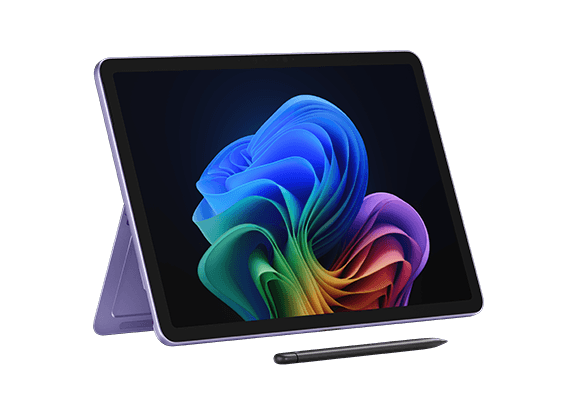
TL;DR Windows on ARM laptops are now practical everyday machines, and the Microsoft Surface Laptop 7 is the best all-round pick in 2026. The Surface Pro 11 is the cheaper entry at ₹1,15,990, and both models use Snapdragon X Elite or Snapdragon X Plus chips with strong battery life and much better app support.
Understanding Windows on ARM Laptops
Windows on ARM laptops use ARM architecture instead of the x86 design found in most older Windows laptops. The category now feels like part of the mainstream Windows laptops market, not a side experiment. Compatibility is the other reason this category is finally credible.
Microsoft says most Windows applications run either natively or through emulation, and Prism improves emulated app performance. Windows on ARM laptops are designed for instant-on resume, so waking one from sleep feels closer to opening a phone than booting a traditional PC. That is useful when you bounce between Outlook, Teams, and a browser full of tabs.
Why ARM Architecture Matters
ARM architecture is built to do more work per watt, and that is why battery life is the headline feature. For students and commuters, that practical difference matters more than benchmark bragging rights. The category is also easier to live with because the hardware stays responsive under normal use.
If you spend most of your time in Chrome, Word, and video calls, the machine feels quick without needing a giant cooling system. That is the kind of quiet operation people notice only after they stop fighting their old laptop. It also helps explain why the platform now feels more practical for everyday efficiency than it once did.
Snapdragon Powers The Category
The current wave of Windows on ARM laptops is led by Snapdragon chips, especially Snapdragon X Elite and Snapdragon X Plus. That is exactly what makes Copilot features more believable on this platform. When the system stays responsive while handling background tasks, Copilot can summarize notes, draft emails, and organize meeting follow-ups without making the device feel sluggish.
In practice, that matters in Outlook, Word, and Teams more than in synthetic tests. It is also part of the platform’s broader efficiency story. The combination of Snapdragon silicon and ARM design is what gives the category its current momentum.
App Support Is Much Better
Most buyers worry about app support first, and that concern is now much smaller. Windows 11 ARM-based PCs can run both 32-bit and 64-bit x86 applications through Prism, which is a big deal for older business software and niche tools. If you depend on apps that were never rebuilt for ARM, Prism often keeps them usable enough for daily work.
That gives the platform a real base of software instead of a handful of showcase apps. If you use cloud tools, browser apps, and common communication software, the experience is much more complete than older ARM machines ever were. For many buyers, that is the difference between curiosity and confidence.
What To Look
For In A Windows On ARM Laptop
Choosing among the hardware starts with battery life, because that is the feature you feel every day. ARM laptops can last 10+ hours in real-world use, and some recent models exceed 15 hours in controlled web-browsing tests. The second filter is the processor.
Snapdragon X Elite and Snapdragon X Plus are the names to watch, and both have enough headroom for common Windows workflows. If your browser, Office apps, and video calls stay open all day, the CPU choice affects how smooth the machine feels after hours of use. RAM and storage matter just as much.
A 16GB configuration is fine for lighter users, but 32GB is the safer pick if you keep many tabs open or work across larger files. 16GB RAM works for Office, Chrome, and Zoom without much drama. 512GB SSD storage is the practical minimum if you keep local files, downloads, and app caches.
1TB SSD storage makes more sense for photo libraries, large work folders, and offline media. For buyers who want an ultra-portable setup, the right balance of memory and storage matters even more. The goal is to avoid a machine that feels fast on day one but cramped after a year.
Battery Life And Portability
Battery life is not just a spec, it changes how you use the machine. If you spend your day moving between meetings, classrooms, and coffee shops, an ARM laptop that wakes instantly and lasts all day feels easier to trust. That is also where the instant-on behavior built into Windows becomes more noticeable, because you stop thinking about shutdowns and start using the device like a tablet.
Portability matters too, especially if you carry the machine in a backpack with a charger, notebook, and tablet. A lighter chassis and cooler CPU make the whole package easier to live with on trains, flights, and long commutes. On a portable device, that balance of weight and endurance is what you notice most.
Processor And Performance
This is also where Copilot and device AI features feel more natural. A fast ARM laptop can keep a meeting open in Teams, a document in Word, and a browser full of research tabs without constant stutters. The result is not magic, just less friction when you switch between apps.
The Snapdragon X Elite and Snapdragon X Plus both fit that use case well. They give the platform enough performance headroom for everyday productivity without turning the laptop into a noisy, hot machine. That makes the category easier to recommend for work and study.
RAM And Storage Choices
Memory and storage are where many buyers overspend or undershoot. A 512GB SSD is usually the sweet spot because it leaves room for apps, files, and offline media without forcing you to micromanage storage every week. If you work with large image folders in Lightroom or keep project files in Photoshop, 1TB is the safer long-term choice.
Storage also affects how useful the machine feels after a year or two. Windows updates, app caches, and downloads add up quickly, especially on a work machine that handles documents, meeting recordings, and images. The right storage choice keeps the system feeling responsive.
Display, Design, And Connectivity
The Surface Pro 11 stands out because it offers a 13-inch OLED or LCD touchscreen with a 120Hz refresh rate and 2880x1920 resolution. That combination makes scrolling, sketching, and reading feel smoother, and the sharper panel is easier on the eyes during long document sessions. The Surface Laptop 7 takes the more traditional route, which is better if you type for hours and want a normal clamshell layout.
That difference matters because it changes how each device fits into your day. The Pro 11 is better for touch, note-taking, and tablet-style use. The Laptop 7 is better if you want a familiar notebook that disappears into the background.
Top Windows On ARM Laptop Models And Specifications
When people ask for a build list, the Microsoft Surface models are the obvious starting point. They are the clearest examples of what the platform can do when Microsoft controls the hardware, software, and design. The Surface Laptop 7 and Surface Pro 11 share the same Snapdragon foundation, including Snapdragon X Plus options, but they solve different problems.
The best parts right now are not about chasing the thinnest chassis or the loudest marketing claims. They are about battery life, a strong CPU, enough RAM, and storage that does not fill up after a few app installs. That is why the Surface lineup keeps coming back into the conversation.
The Surface Laptop 7 is the more straightforward Windows laptop here, while the Surface Pro 11 leans into flexibility. Both devices show how far Windows on ARM has come, and both are useful reference points if you are comparing a Zenbook A14 or other similar devices. In both cases, Snapdragon X Plus helps define the current Windows on ARM baseline.
Microsoft Surface Laptop 7 Specs
The Microsoft Surface Laptop 7 features a Snapdragon X Elite (X1E-80) or Snapdragon X Plus (X1P-64) SoC. It can be configured with 16GB, 32GB, or 64GB of LPDDR5x RAM, which gives it the highest memory ceiling in this group. The Surface Laptop 7 is also the more straightforward Windows laptop here.
It behaves like a normal premium notebook, so you do not have to think about kickstands, detachable keyboards, or tablet-first compromises. For buyers looking at Snapdragon X Plus models, this is the easiest one to understand. It is the safer choice if you want a work machine that feels familiar from day one.
Microsoft Surface Pro 11 Specs
The Microsoft Surface Pro 11 also uses a Snapdragon X Elite (X1E-80) or Snapdragon X Plus (X1P-64) SoC. It can be configured with 16GB or 32GB of LPDDR5x RAM, which is enough for most productivity use. The big difference is the 13-inch OLED or LCD touchscreen with a 120Hz refresh rate, which makes touch input and note-taking feel more natural.
The Surface Pro 11 also has a 2880x1920 resolution, so text looks sharp and images have more detail. That matters if you spend time reviewing PDFs, sketching in OneNote, or marking up documents with a stylus. The touchscreen and resolution are what set it apart.
Side-By-Side Comparison
| Feature | Surface Laptop 7 | Surface Pro 11 |
|---|---|---|
| RAM | 16GB, 32GB, 64GB LPDDR5x | 16GB, 32GB LPDDR5x |
| Storage angle | Better fit for larger SSD configurations | More compact, more mobile-friendly |
| Display | Clamshell laptop display | 13-inch OLED or LCD touchscreen with 120Hz refresh rate |
| Resolution | Standard laptop panel | 2880x1920 |
| Form factor | Traditional laptop | Tablet-friendly design |
What The Specs Mean In Practice
The Surface Laptop 7 is the better all-rounder because of its higher RAM ceiling and familiar design. That makes it a safer pick for people who want a Windows on ARM laptop that behaves like a normal work machine. If you are switching from an older Windows notebook, the learning curve is basically zero.
The Surface Pro 11 makes more sense if you value touch, handwriting, and a lighter, more flexible setup. It gives up the higher RAM ceiling, but it adds a 120Hz touchscreen and a tablet-friendly design. That tradeoff is easy to understand once you decide how you plan to use the device.
Pricing And Value Comparison
The Microsoft Surface Pro 11 is priced at ₹1,15,990, while the Microsoft Surface Laptop 7 costs ₹1,37,990. That makes the Pro 11 the cheaper option and the Laptop 7 the more expensive one. The difference is not just about price.
The Laptop 7 offers more memory headroom and a more conventional notebook design, so the higher cost reflects a more familiar layout and fewer compromises as your workload grows. In that sense, the extra money is paying for flexibility rather than just a higher sticker price. Both models are Snapdragon powered, so the value comparison comes down to how you plan to use them.
If you want the lower entry price, the Surface Pro 11 is easier to justify. If you expect heavier long-term office use, the Surface Laptop 7 makes a stronger case because of the added headroom and the more traditional form factor. The right choice depends on whether you value price, portability, or a more conventional laptop feel.
Market Trends And Why Windows On ARM Matters
ARM-based laptops are projected to capture over one-third of the laptop market by 2029. That is a strong sign that Windows ARM is no longer a niche experiment. The Snapdragon X Elite is a big reason the category has momentum.
It can outperform Intel's latest processors in single-core, multi-core, and graphics performance, which helps explain why the platform now looks credible for mainstream buyers. Snapdragon X Plus keeps the category more affordable, so there is room for both premium and midrange options. The software side matters just as much.
Prism improves compatibility for emulated apps, and that reduces the fear of getting stuck with a machine that cannot run essential software. If you have seen Windows ARM laptops Reddit threads full of old compatibility complaints, the current generation is a very different conversation. That shift is also why more buyers are willing to consider it as a primary machine rather than a secondary one.
There is also a practical credit to give Microsoft and app developers. When Office, Chrome, and Zoom work well, the whole category becomes easier to recommend. That is the point where a device stops being interesting and starts being useful.
Prism And Compatibility Improvements
Prism is the quiet hero of the platform because it keeps older software in play. It handles both 32-bit and 64-bit x86 applications, which helps with business tools, legacy utilities, and some older creative apps. That compatibility layer is one reason these machines feel much safer than they did a few years ago.
It does not make every app perfect, but it does make the platform far more practical for everyday work. That matters if you rely on a mix of modern cloud apps and older desktop software. For most buyers, that balance is enough to make the category worth considering.
Who Should Buy Which Model
If you want a machine that feels like a premium Windows notebook first and an ARM device second, the Surface Laptop 7 is the better fit. It is especially useful for long typing sessions, travel-heavy use, and heavier multitasking. The higher RAM ceiling also gives it more room to grow with your workload.
The Surface Pro 11 makes more sense if you want the lower price and touchscreen flexibility. It is a better match for OneNote, PDF markup, and sketching because the 13-inch OLED or LCD display supports touch and pen-friendly use. It also suits buyers who want a lighter, more mobile setup.
- Pick the Surface Laptop 7 if you want the best all-round balance.
- Pick the Surface Laptop 7 if you need more RAM for heavier multitasking.
- Pick the Surface Pro 11 if you want the lower price and touchscreen flexibility.
- Pick the Surface Pro 11 if you work in OneNote, Edge, and PDF annotation.
Frequently Asked Questions
Q. What are Windows on ARM laptops?
Windows on ARM laptops are Windows machines that use ARM processors instead of traditional x86 chips. They are designed for better battery life, lower heat, and faster wake times, while still running most Windows apps through native support or Prism. That combination is what makes the category more practical now than it used to be.
Q. Which is the best Windows on ARM laptop in 2026?
The Microsoft Surface Laptop 7 is the best Windows on ARM laptop in 2026. It offers the strongest all-round balance, the highest RAM ceiling at 64GB LPDDR5x, and the most familiar notebook design in this group. That makes it the easiest model to recommend for most buyers.
Q. Is the Surface Pro 11 cheaper than the Surface Laptop 7?
Yes, the Microsoft Surface Pro 11 is cheaper at ₹1,15,990. The Microsoft Surface Laptop 7 costs ₹1,37,990, so it is the more expensive premium option. The price gap reflects the Laptop 7’s higher RAM ceiling and more traditional design.
Q. Do Windows 11 ARM-based PCs support older Windows apps?
Yes, Windows 11 ARM-based PCs can run both 32-bit and 64-bit x86 applications through Prism. That makes older business tools and niche software much more practical than they were on early ARM systems. It is one of the biggest reasons the platform now works for more people.
Q. Which model is better for note-taking and touch use?
The Surface Pro 11 is better for note-taking and touch use because it has a 13-inch OLED or LCD touchscreen with a 120Hz refresh rate. It also has a 2880x1920 resolution, which makes text and images look sharp. That setup is better for OneNote, PDF markup, and stylus work.
Q. Are Windows on ARM laptops worth it for Office and Chrome?
Yes, they are worth it for Office and Chrome because those apps are available natively and the battery life is strong. The instant-on behavior also makes the experience feel more practical than older Windows machines. For everyday productivity, that combination is a major advantage.
Is Windows On ARM Ready For Most Buyers?
Windows on ARM laptops are ready for most buyers who want a main machine for Excel, Word, Teams, Chrome, and travel. The Surface Laptop 7 shows the strongest all-round case with up to 64GB LPDDR5x RAM, while the Surface Pro 11 starts at ₹1,15,990 for buyers who want a lower entry price and a touchscreen-first design. Both models benefit from Snapdragon X Elite or Snapdragon X Plus chips, and both have much better app support than earlier ARM laptops.
If you want the most familiar laptop experience, buy the Surface Laptop 7. If you want a cheaper, more flexible device for note-taking and touch input, buy the Surface Pro 11. The category now makes sense for real daily use, not just for early adopters.
If you are ready to buy, choose based on your work style rather than the ARM label. The Laptop 7 is the safer long-term notebook, and the Pro 11 is the better fit for portability and touch. Either way, this is a category that finally feels ready for mainstream Windows users.





