
Wi-Fi Mesh vs Range Extender: Which Is Better for Indian Homes?
Discover the differences between Wi-Fi Mesh and Range Extenders in India. Compare coverage, speed, pricing, setup, and performance to choose the best option for your home, whether you need whole-home Wi-Fi or a simple fix for one weak room.

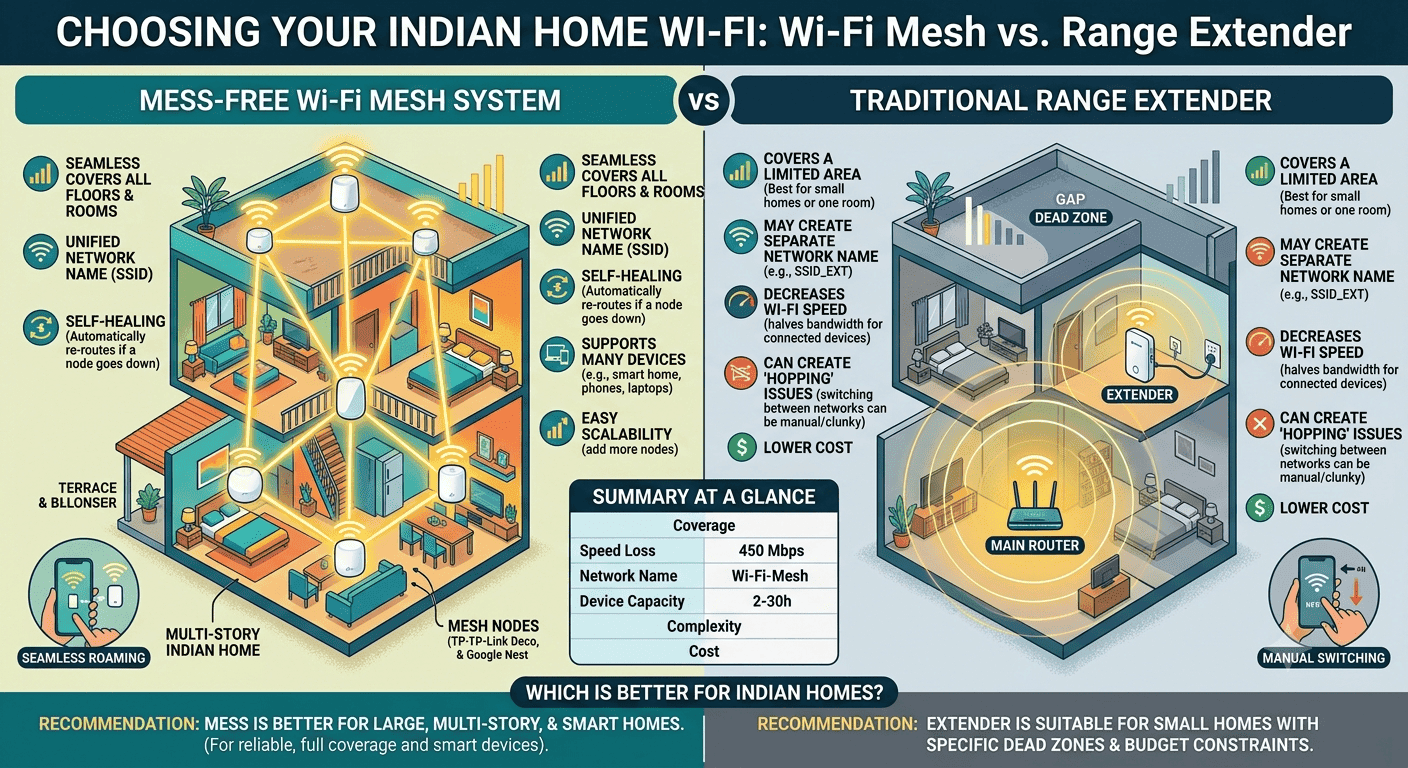
TL;DR Wi-Fi Mesh vs Range Extender in India comes down to coverage, stability, and budget. Mesh is the better fit for larger homes, thick walls, and multiple devices, while an extender is a cheaper fix for one weak room.
Overview of Wi-Fi Mesh and Range Extenders
Wi-Fi Mesh vs Range Extender is really a choice between a whole-home system and a patch job. A Wi-Fi extender rebroadcasts the existing Wi-Fi signal from a router, which works well for one stubborn corner but less convincingly across a full plan. That difference matters in Indian homes with thick walls, longer corridors, and multiple floors.
If your laptop drops during a Google Meet call or your TV buffers in the bedroom, you are not dealing with a speed plan problem alone. You are dealing with Wi-Fi coverage that does not reach the right zones. For a small flat, a Wi-Fi extender can be a good, low-cost fix. For larger homes, a mesh network usually offers a cleaner answer because the system is built to cover more space without forcing you to manually switch between signals.
In a mesh network, devices can move more smoothly between nodes, while a range extender is simpler and solves a narrower problem. If the weak spot is isolated, extending the signal is all you need.
Why Indian Homes Feel The Difference?
Concrete walls and floor slabs can weaken Wi-Fi faster than most people expect. A router may look strong in the living room and still leave dead zones in a bedroom or study. That is where the difference between extenders and mesh becomes obvious.
Mesh systems are built for extending coverage across a wider area without the usual drop in signal strength. They automatically connect your devices to the strongest node, so your phone does not keep clinging to a weaker source. If you move from a kitchen Zoom call to a bedroom YouTube session, the handoff feels much smoother.
- Mesh Wi-Fi works best when the whole home has an uneven signal.
- Wi-Fi extenders make sense when one room needs a stronger connection.
- Dead zones are easier to fix with nodes than with a single add-on unit.
- A Wi-Fi mesh setup is easier to live with throughout the day.
Performance and Coverage Comparison
The biggest difference between Wi-Fi Mesh and Range Extender is how each one handles traffic. Mesh Wi-Fi systems distribute data across nodes, while a Wi-Fi extender rebroadcasts the router signal and shares the same radio band for router and device communication. That shared bandwidth is why Wi-Fi extenders can feel slower when the connection gets busy.
In real use, this shows up during video calls, 4K streaming, and cloud backups. A family on Netflix, a student in Microsoft Teams, and a laptop syncing files to OneDrive can all expose the limits of a basic extender. Mesh systems generally offer more consistent coverage and faster speeds because the load is spread more intelligently across the network.
Speed, Stability, And Device Load
Mesh systems are designed to handle more devices at once. That matters if you have phones, laptops, smart TVs, tablets, and smart speakers connected at the same time. The network stays more stable because the traffic is distributed instead of squeezed through one weak point.
Wi-Fi extenders can amplify the existing signal, but they may not deliver the same level of performance under pressure. They also require manual switching between the home router's network and the extender's network in some setups, which gets annoying fast during a long day of work. If you are on Slack, Google Docs, and a video call at once, that extra friction is hard to ignore.
Mesh Wi-Fi systems also use self-healing algorithms to reroute traffic if one node fails. That does not make them magical, but it does make them more resilient when a node has a bad day.
Coverage, Expansion, And Network Behaviour
Mesh systems can be expanded by adding more nodes as needed. That makes them a better long-term plan for larger homes that may need more coverage later. You are not stuck with one awkward fix that has to be replaced the moment the layout changes.
Wi-Fi extenders are more limited. They are suitable for smaller spaces or areas that only need coverage extension, and they are often easy to install with a power outlet and minimal setup. But if you place them too far from the router, they stop helping and start repeating a weak signal. Multiple Wi-Fi extenders in proximity can also create congestion.
- Mesh systems keep a single network name across all nodes.
- Wi-Fi extenders may require manual configuration before they work properly.
- Multiple extenders in close proximity can create congestion.
- A mesh Wi-Fi system usually feels more seamless throughout the day.
Pricing and Value in India
Price is where the split becomes very clear. The price point for Wi-Fi range extenders in India runs to ₹15,000, while the TP-Link Deco X50 mesh Wi-Fi 2-Pack is priced at ₹18,999. The TP-Link RE200 Wi-Fi Range Extender is priced at ₹2,099, so it sits near the affordable end of the Wi-Fi extenders market.
That gap matters because a mesh Wi-Fi system is not just a stronger extender; it is a different kind of Wi-Fi system. A Wi-Fi extender is cheaper, but it usually asks you to accept more compromises. The Indian Wi-Fi range extender market size reached USD 74. That growth makes sense because many buyers start with a low-cost Wi-Fi extender and only move to mesh Wi-Fi after the coverage problem keeps coming back.
What does the price gap mean?
The lower price can be enough for a child’s online class, a printer in the corner, or a laptop on the far side of the flat. In that case, paying for a full mesh Wi-Fi setup would be overkill. If your broadband plan is fine but the signal falls apart in bedrooms or upstairs rooms, the extra spend buys consistency.
That matters more than raw speed numbers on a box. The right choice is not always the cheapest one, especially when the weak signal affects work calls, streaming, or schoolwork.
Setup, Placement, And Common Mistakes
Setup is another area where Wi-Fi Mesh vs Range Extender differs sharply. A Wi-Fi extender is usually simple to place, but placement matters more than people think. To set up a Wi-Fi extender, place it halfway between your router and the area needing coverage.
If you put it outside the router's range, you get a weak signal instead of better Wi-Fi. Skipping firmware updates is another common mistake, and it can leave performance on the table. The extender should sit where it still gets a strong signal from the router. Too close, and you waste the extra hardware. Too far, and you create another dead zone instead of fixing one.
Mesh systems take a little more setup at the start, but they are easier to live with later. Once the nodes are set, the system handles roaming more cleanly, and your phone, laptop, or tablet moves across the house without much fuss. That is why mesh Wi-Fi feels more polished in everyday use. Mesh nodes are more forgiving because they are designed to work together. You can place them to cover upstairs rooms, long halls, or a living room plus study combination. If you use Microsoft Teams in one room and stream on an Apple TV in another, that flexibility pays off quickly.
Placement Rules That Actually Matter
- Put a Wi-Fi extender halfway between the router and the weak area.
- Avoid placing extenders outside the router's range.
- Update firmware before you judge performance.
Where Extenders Still Make Sense?
Wi-Fi extenders are still useful when the problem is small and the budget is tight. A single bedroom with a poor signal does not need a full mesh system in many cases. It just needs enough extension to keep a phone call or Netflix stream stable.
They are also easier to understand than a bigger mesh Wi-Fi setup. If you want a quick fix for one room and do not want to think about multiple nodes, a Wi-Fi extender is the simpler buy. Just do not expect it to behave like a mesh Wi-Fi system.
Which Option Fits Your Home Best?
That rule is why the question of whether mesh Wi-Fi is better than an extender usually ends with mesh for larger homes. A mesh router system automatically connects devices to the strongest node, which makes roaming feel natural during calls, streaming, or gaming. A range extender can work well, but it is still a compromise.
The phrase, " Which is better, mesh Wi-Fi or Wi-Fi extender, sounds simple, but the answer depends on how much of the house you want to fix. If you want better Wi-Fi throughout the whole house, mesh wins on experience. The better pick is mesh Wi-Fi if you work from home, host online classes, or keep many devices online at once.
It is also the safer choice if your house has multiple floors or thick walls. The system is built to stay consistent, where a single router struggles. It also makes sense if you hate manually switching between networks. A single network name across nodes is a small detail that saves a lot of annoyance. That matters when you are moving between a bedroom, kitchen, and living room all day.
- Choose mesh if you need reliable coverage across the whole house.
- Choose mesh if multiple people are streaming or gaming at once.
- Choose mesh if your layout creates repeated dead zones.
- Choose mesh if you want a system that can grow later.
When A Wi-Fi Extender Is Enough?
A Wi-Fi extender is enough when the problem is narrow and the budget is tight. It is the practical answer for one weak room, a balcony, or a study area that sits just beyond the router's reach. In that situation, paying for mesh would be unnecessary.
It is also the easier choice if you want the fastest possible fix. You plug it in, place it carefully, and extend the signal into the problem area. For a small apartment or a single stubborn zone, that can be perfectly good.
- Choose a Wi-Fi extender if you only need one room fixed.
- Choose a Wi-Fi extender if you want the lowest upfront cost.
- Choose a Wi-Fi extender if your layout is simple.
- Choose a Wi-Fi extender if you do not need whole-home roaming.
Real-World Scenarios And Product Examples
The Netgear Wi-Fi mesh range extender EX8000 is a useful example of how the category can blur. Some products try to sit between a classic extender and a full mesh system, but the basic trade-off still stays the same. Either you want a simple signal boost, or you want a coordinated Wi-Fi mesh system.
That distinction matters because marketing names can sound similar while the experience is very different. A device that extends the signal does not automatically give you the roaming behaviour of mesh Wi-Fi. If your laptop keeps dropping during a Zoom call, the label matters less than the architecture.
People usually care less about specs and more about whether the connection stays steady while they move around. That is where mesh routers usually pull ahead. A Wi-Fi extender can be enough for browsing, email, and one streaming room. It gives you a cheaper way to push the signal farther without replacing the whole setup.
That is why many buyers start there. It is the stronger answer for smart TVs, work laptops, tablets, and phones all connected at once. The system is built to serve the whole house, not just one far end. In that sense, mesh routers are designed for broader coverage, while extenders are better for one weak area. The better choice depends on how many zones need help.
- Wi-Fi extenders are fine for one weak area.
- Mesh Wi-Fi is stronger for larger homes.
- Extenders and mesh solve different kinds of coverage problems.
Frequently Asked Questions
Q. Is mesh Wi-Fi better than an extender for most Indian homes?
Mesh Wi-Fi is better than an extender for most Indian homes because it gives more consistent coverage, faster speeds, and better handling of multiple devices. A Wi-Fi extender is still useful for one weak room, but mesh is the stronger choice when you need whole-home coverage. The TP-Link Deco X50 Mesh 2-Pack at ₹18,999 shows the kind of investment that makes sense for larger layouts.
Q. Which is better, mesh Wi-Fi or a Wi-Fi extender, for a large flat?
Mesh Wi-Fi is better for a large flat because it keeps the signal steadier across multiple rooms and floors. A Wi-Fi extender can help one dead zone, but it is less reliable when the layout creates several weak spots. The TP-Link RE200 at ₹2,099 is better suited to a single room than to a large flat.
Q. What is the main difference in the hardware setups?
Mesh systems use multiple nodes that work together under one network name, while a Wi-Fi extender rebroadcasts the router signal from a single point. That means mesh feels more seamless, while an extender is a cheaper fix for one problem zone. The difference shows up most clearly when you move between rooms during calls or streaming.
Q. Can Wi-Fi extenders slow down my connection?
Yes, a Wi-Fi extender can reduce your internet speed in some setups because it shares radio resources between the router and your devices. That is why extenders are fine for light use, but mesh usually performs better under load. In a busy home with Netflix, Microsoft Teams, and cloud backups, the difference becomes easier to notice.
Q. Is the TP-Link RE200 a mesh system?
No, the TP-Link RE200 Wi-Fi Range Extender is a Wi-Fi extender, not a full mesh system. It is priced at ₹2,099 and is meant to extend one area rather than cover the whole house. That makes it a practical option for a single weak room.
Q. What does the Netgear Wi-Fi mesh range extender EX8000 actually do?
The Netgear Wi-Fi mesh range extender EX8000 sits in the middle of the category and is meant to extend the signal while trying to behave more smoothly than a basic extender. It still does not change the core rule; mesh Wi-Fi is better for broader coverage, while a Wi-Fi extender is for a smaller fix. That makes it a useful example of why the label alone does not tell you everything.
The Smarter Pick For Indian Homes
The TP-Link Deco X50 Mesh 2-Pack at ₹18,999 costs more, but it buys a cleaner whole-home experience. The TP-Link RE200 at ₹2,099 is the cheaper option, and it is the right call when one room needs help. The price gap matters because the mesh system solves coverage across the home, while the extender stretches signal into a single zone.
Choose mesh if you live in a larger home, move between rooms often, or keep many devices online at once. Choose a Wi-Fi extender if you only need to extend signal into one stubborn area and want to keep costs down. If your home has thick walls, multiple floors, or repeated dead zones, the extra spend on mesh is easier to justify.
Act on the layout of your house first, then pick the system that matches it. Use the ₹2,099 RE200 for a single weak room, and choose the ₹18,999 Deco X50 when you want steadier coverage across the home. That is the clearest way to separate a mesh setup from a Wi-Fi extender without overthinking it.
- Choose mesh if you want one network name throughout the house.
- Choose mesh if you hate manually switching between Wi-Fi networks.
- Choose a Wi-Fi extender if you only need a quick fix for one zone.
- Choose a Wi-Fi extender if your budget is the main constraint.
Mesh is the better choice for most buyers because it solves the real problem instead of just stretching the signal a little farther. If your home has thick walls, multiple floors, or repeated dead zones, mesh gives you a more reliable long-term answer. If your coverage problem is limited to one room, the extender remains the practical and lower-cost fix.






