
What Is Multi-Link Operation (MLO) in Wi-Fi 7?
Learn how Wi-Fi 7 Multi-Link Operation (MLO) improves speed, lowers latency, and boosts reliability by using multiple frequency bands at once. Discover how MLO works, its real-world benefits, and whether Wi-Fi 7 is worth upgrading to.

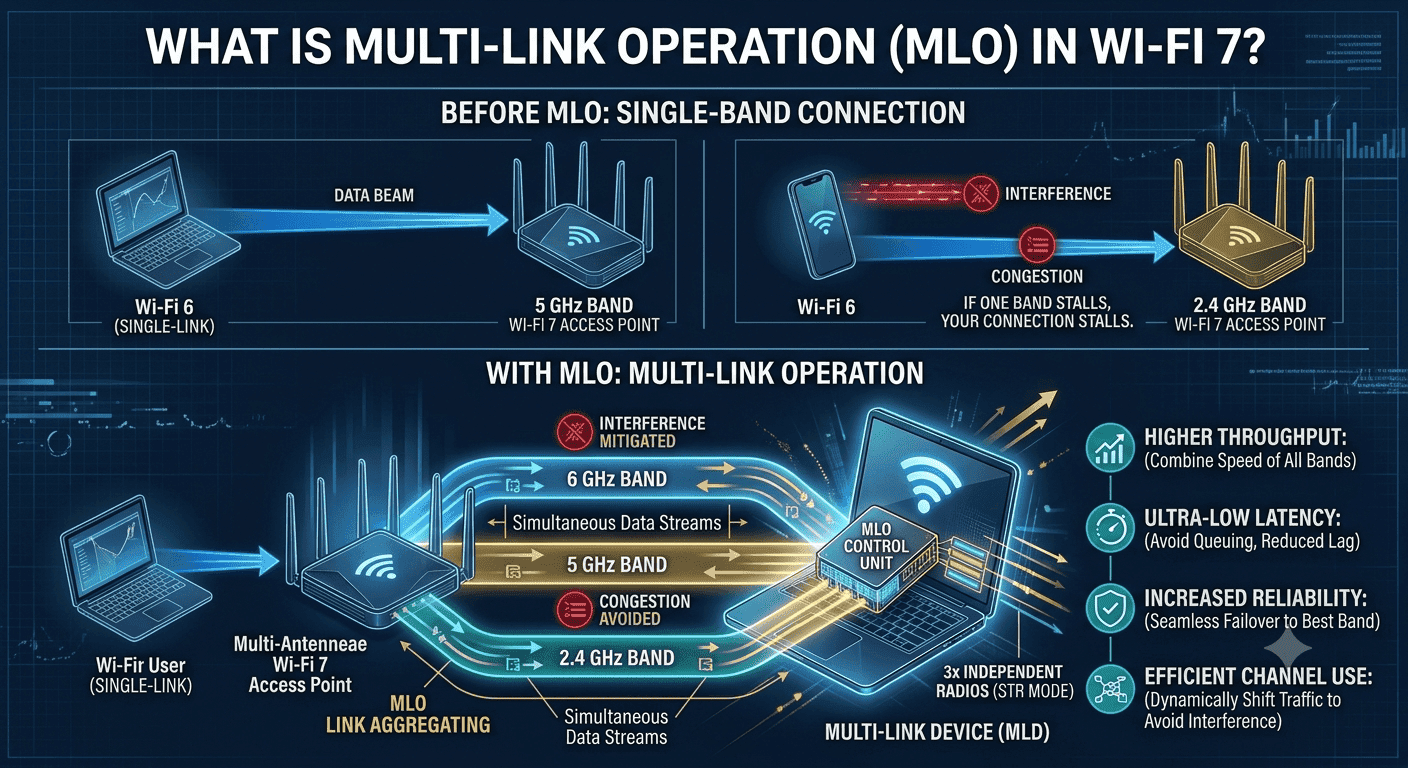
TL;DR Multi-Link Operation Wi-Fi 7 is the feature that makes Wi-Fi 7 feel meaningfully different, because it lets devices send and receive across multiple bands at once. It improves throughput, reduces latency, and adds reliability, especially in crowded networks.
Understanding Multi-Link Operation in Wi-Fi 7
Wi-Fi 7’s Multi-Link Operation, or MLO, is the feature that lets devices send and receive data across different frequency bands and channels at the same time. That is a bigger shift than it sounds like, because traditional Wi-Fi clients usually lean on one connection path at a time, even when more spectrum is available. With MLO, a Multi-Link Device, or MLD, can coordinate several links together across the 2.4 GHz, 5 GHz, and 6 GHz bands, which is where Wi-Fi 7 starts to feel less like a routine refresh and more like a new operating model for wireless connectivity.
The core idea behind MLO is simple: stop forcing every packet through one narrow lane when multiple bands are available. Wi-Fi 7 MLO supports simultaneous use of multiple bands, and that simultaneous behavior is what gives the standard its practical edge in congested environments. It also works alongside STA behavior and features like 4K QAM, helping the connection make better use of available capacity.
TP-Link describes MLO as a way for devices to aggregate links through MLD multi-link coordination, and Cisco notes that this approach improves throughput while reducing latency. In plain terms, your laptop, phone, or access point can keep more than one path open instead of waiting for a single channel to clear. That matters most when you are moving a lot of data at once.
A video call in Microsoft Teams, a file sync in OneDrive, and a browser full of heavy tabs all compete for airtime, and MLO gives the network more places to put traffic. The feature is not just about speed on paper, either, because it also gives the client more options when one band is noisy or overloaded. That flexibility is what makes MLO feel different from older Wi-Fi behavior.
Key Modes, Bands, and Technical Specs
MLO supports two main modes: Simultaneous Transmit and Receive, or STR, and Enhanced Multi-Link Single Radio, or eMLSR. STR lets devices manage multiple Wi-Fi connections on different channels or frequencies at the same time, which is the clearest expression of what MLO is trying to do. eMLSR is more constrained, but it still preserves the multi-link idea by coordinating activity across bands when a device cannot run full simultaneous operation on every link.
That split matters because not every device has the same radio design or power budget. A desktop access point can usually handle more aggressive multi-link behavior than a battery-powered client, while a phone may lean on the more efficient mode when it needs to conserve power. ASUS frames STR as the mode that truly manages multiple connections in parallel, and that distinction helps you judge hardware and features more realistically.
MLO does not work in isolation. Wi-Fi 7 also supports channel widths up to 320 MHz, which gives each link more room to carry data, and it can support up to 16 spatial streams, doubling the capacity compared with Wi-Fi 6. Those numbers matter because MLO needs both spectrum and radio parallelism to do its best work.
Wider channels help a single link move more data, while spatial streams let the system push more independent data paths through the air at once. The practical takeaway is that MLO is a coordination layer, not a magic trick. It works best when the rest of the Wi-Fi 7 stack, especially channel width and spatial stream support, is equally strong.
Latency and Reliability
Latency is the first number to watch when you evaluate Multi-Link Operation in Wi-Fi 7, because MLO can achieve and maintain 1 ms latency for real-time applications. That figure matters less as a bragging right and more as a sign that the system can stay responsive when traffic gets messy. Mediatek also notes that MLO improves reliability by creating more opportunities for interference mitigation through efficient link switching, which is exactly what you want when a single band starts getting crowded.
The 2.4 GHz, 5 GHz, and 6 GHz bands do very different jobs, and MLO gets its value from using them together instead of pretending they are interchangeable. The 2.4 GHz band reaches farther and handles obstruction better, the 5 GHz band is often the workhorse for balanced performance, and the 6 GHz band gives you cleaner spectrum when the environment supports it. When MLO can coordinate all three, your device has more room to move traffic around interference instead of waiting for one channel to clear.
Channel Width and Modes
Channel width matters for the same reason. Wi-Fi 7 supports up to 320 MHz, which means a single link can carry more data when conditions are favorable. Wider channels can be faster, but they are also more sensitive to how crowded the spectrum is, so you should not treat width as a universal winner.
In a busy apartment block, a narrower but cleaner path can outperform a theoretically wider one that keeps colliding with neighboring traffic. STR mode is the most straightforward option for performance-focused setups because it lets devices manage multiple Wi-Fi connections on different channels or frequencies simultaneously. eMLSR is better understood as the efficiency-oriented mode, especially for devices that cannot keep every radio path fully active at once.
ASUS separates the two modes for a reason: the hardware design determines how much parallelism you really get. That distinction is important when you are choosing hardware for a specific workload. A desktop-class access point or a high-end home router can make stronger use of STR mode, while a mobile device may lean on eMLSR to preserve battery life and still keep multiple links available.
If you are comparing devices for a mixed network, pay attention to the mode support instead of assuming all Wi-Fi 7 products behave the same way. The Wi-Fi Alliance also frames these features as part of how Wi-Fi 7 devices coordinate speeds and responsiveness across different conditions.
Why MLO Matters?
Wi-Fi 7 pushes PHY data rates up to 46 Gbps, and MLO is one of the reasons that ceiling exists. That number does not mean every client will see anything close to it in daily use, but it does show how much headroom the standard has compared with older Wi-Fi generations. The real value of MLO is that it helps the network use that headroom more effectively by aggregating links and reducing the chance that one bad channel slows everything down.
MLO can improve throughput by combining bandwidth from multiple links, which is exactly why it matters in high-demand environments. A laptop moving a large Premiere Pro project, a NAS sync running in the background, and a cloud backup all benefit when the network can distribute traffic across multiple bands instead of crowding one path. Aletheatech also notes that MLO configurations can potentially double throughput under severe interference conditions, which is a strong reminder that the feature is not only about ideal conditions.
Technical Trade-offs
Wi-Fi 7 also uses 4096-QAM, which allows each symbol to carry 12 bits instead of 10 bits. ASUS says that translates to a 20% increase in data transmission rates compared with Wi-Fi 6. This is not the same thing as MLO, but it complements MLO by making each link more efficient when signal quality is strong enough to support the higher modulation.
MLO is not free. Compatibility matters, because the feature only helps when both the client and the access point can participate properly. If one side cannot use the extra bands or modes effectively, the practical gain drops fast.
Power consumption can also rise when devices keep multiple links active, and interference still exists, so MLO reduces problems rather than eliminating them. The biggest gains show up when the network is busy, not when it is idle. It is strongest when the device, the access point, and the RF environment all cooperate, which is why Wi-Fi Alliance certification and device support matter in practice.
| Metric | Wi-Fi 7 with MLO | Wi-Fi 6 | Wi-Fi 5 |
|---|---|---|---|
| PHY data rate ceiling | Up to 46 Gbps | Lower than Wi-Fi 7 | Lower than Wi-Fi 6 |
| Channel width | Up to 320 MHz | Lower than Wi-Fi 7 | Lower than Wi-Fi 6 |
| Spatial streams | Up to 16 | Fewer than Wi-Fi 7 | Fewer than Wi-Fi 6 |
| Multi-link support | Yes | No | No |
| Band usage | 2.4 GHz, 5 GHz, 6 GHz | 2.4 GHz and 5 GHz | 2.4 GHz and 5 GHz |
| Modulation | 4096-QAM | Lower-order QAM | Lower-order QAM |
| Latency behavior | Lower under load | Higher under load | Higher under load |
| Interference handling | Stronger through link aggregation | More limited | More limited |
When MLO Helps Most?
MLO changes the user experience most clearly when the network is under stress. Wi-Fi 7’s multi-link design lets devices send and receive across multiple bands simultaneously, which reduces latency and keeps throughput from collapsing when one path gets busy. That is why the feature matters in places where a normal Wi-Fi connection starts to feel sticky, such as a house full of streaming devices or an office with constant cloud traffic.
Online gaming is one of the clearest examples of why MLO matters. A game like Counter-Strike 2 or Valorant does not need enormous bandwidth, but it needs stable latency and consistent packet delivery. When MLO can keep traffic moving across multiple bands, the connection has more room to avoid stalls that would otherwise show up as lag spikes or erratic movement.
Real-World Performance
The same logic applies to cloud conferencing in Microsoft Teams or Zoom, where short pauses and jitter are more annoying than raw speed. AR and VR are even more sensitive because they punish delay immediately. Ezurio notes that Wi-Fi 7 is designed for AR/VR and real-time gaming, and that design focus makes sense when you think about head-tracked motion and responsive rendering.
Dynamic switching is where MLO becomes more than a speed feature. NetAlly notes that Wi-Fi 7’s MLO can switch between bands to maintain connection quality and reduce latency, and that behaviour matters in real environments where interference changes from minute to minute. Instead of waiting for a channel to become unusable, the device can move traffic to a cleaner band and keep the session alive.
The strongest use cases are the ones that punish delay, packet loss, or jitter. Online gaming benefits because MLO keeps latency lower under load. Cloud conferencing benefits because the connection can keep audio and video stable while other traffic is active. Industrial automation benefits because control systems need predictable responsiveness, not just high peak speed.
Who Should Choose Wi-Fi 7 MLO?
Choose Wi-Fi 7 MLO if your network regularly handles gaming, cloud conferencing, AR/VR, or other latency-sensitive work. It makes the most sense when several devices are active at once, and you care about how stable the connection feels, not just how fast a speed test looks. It also fits better in homes and workplaces where interference, congestion, or mixed device types are part of daily use.
Choose hardware with STR support if you want the most direct form of multi-link performance in a fixed setup. Choose eMLSR if you need a more efficient radio strategy and still want the benefits of multi-link coordination. In both cases, the important question is whether the device can actually use the bands and modes it advertises for connectivity and information.
Skip MLO-focused hardware if your network is simple and your current setup already feels stable. Skip it as well if you only care about peak numbers in a clean environment, because MLO’s real advantage shows up under load and interference. For most buyers, the best evaluation rule is simple: pick the device that handles interference gracefully, not the one that only posts the biggest number in a clean environment.
In a real home with multiple phones, laptops, and streaming devices, the router that keeps latency steady is the one you will notice every day. That is the long-term value of MLO, and it is the main reason Wi-Fi 7 feels different in practice for connectivity and information.
Frequently Asked Questions
Q. What is Multi-Link Operation?
MLO is a Wi-Fi 7 feature that lets devices use multiple links at the same time instead of relying on one path. It can move traffic across different bands and channels, which helps when one connection gets crowded or noisy. That makes it useful for real-time traffic, especially when a network has several active devices.
Q. Which bands can MLO use?
MLO allows Multi-Link Devices, or MLDs, to operate across multiple frequency bands, including 2.4 GHz, 5 GHz, and 6 GHz. That flexibility matters because each band plays a different role in coverage, speed, and interference handling. When the device can coordinate them together, it has more options for moving traffic around congestion. The result is a connection that can stay more responsive when one band gets crowded.
Q. What are STR and eMLSR?
STR mode allows devices to manage multiple Wi-Fi connections on different channels or frequencies simultaneously. eMLSR is the more constrained mode, but it still preserves the multi-link idea by coordinating activity across bands when full simultaneous operation is not practical. The right mode depends on the hardware design and the power budget of the device.
Q. Why does MLO help latency?
MLO can achieve and maintain a latency of 1 ms for real-time applications, and that is one of its most important advantages. It helps because the device has more than one path available when traffic gets congested or interference increases. Mediatek also notes that efficient link switching improves reliability, which keeps the connection from stalling when conditions change. That is why MLO matters so much for gaming, conferencing, and other interactive workloads.
Q. Is MLO useful for gaming and virtual reality?
Yes, MLO can significantly improve throughput and reduce latency for applications like online gaming and virtual reality. Those workloads care more about consistency than raw peak speed, and MLO helps by keeping traffic moving across multiple links when one path slows down. That can reduce lag spikes, jitter, and other interruptions that make real-time experiences feel unstable. It is especially useful when other devices are active on the same network.
Q. What should I check before buying Wi-Fi 7 hardware for MLO?
Check whether the device supports the bands and modes you actually need, because MLO only helps when both ends can use it properly. Look for support across 2.4 GHz, 5 GHz, and 6 GHz, and pay attention to whether the hardware supports STR or eMLSR. Compatibility matters more than a label on the box, and interference handling matters more than peak speed in real use.
Is Wi-Fi 7 MLO Worth It for Real-World Networks?
Wi-Fi 7 MLO is worth it when your network has to stay responsive under pressure. The strongest reasons are still the same, including up to 46 Gbps PHY data rates, channel widths up to 320 MHz, and support for up to 16 spatial streams. MLO adds the practical advantage of coordinating multiple bands at once, which is what helps in crowded homes, busy offices, and latency-sensitive workloads.
If you mostly use a simple network with a few devices and little interference, the upgrade may feel less dramatic. In that case, the benefits of MLO are still real, but they may not show up often enough to matter every day. If you game, conference, or move large files while other devices stay active, the feature becomes much easier to appreciate.
The clearest action is to match the hardware to the way you actually use Wi-Fi. Look for support across 2.4 GHz, 5 GHz, and 6 GHz, and make sure the device supports STR or eMLSR in a way that fits your setup. If you want a network that stays steadier when traffic builds up, MLO is the Wi-Fi 7 feature to prioritize.






