
What Is an AI Accelerator Chip and How Is It Different from an NPU?
Compare AI Accelerator Chips vs NPUs in 2026 with a detailed look at architecture, TOPS performance, edge AI use cases, pricing, power efficiency, and buying advice for laptops, embedded systems, Raspberry Pi projects, and on-device AI.

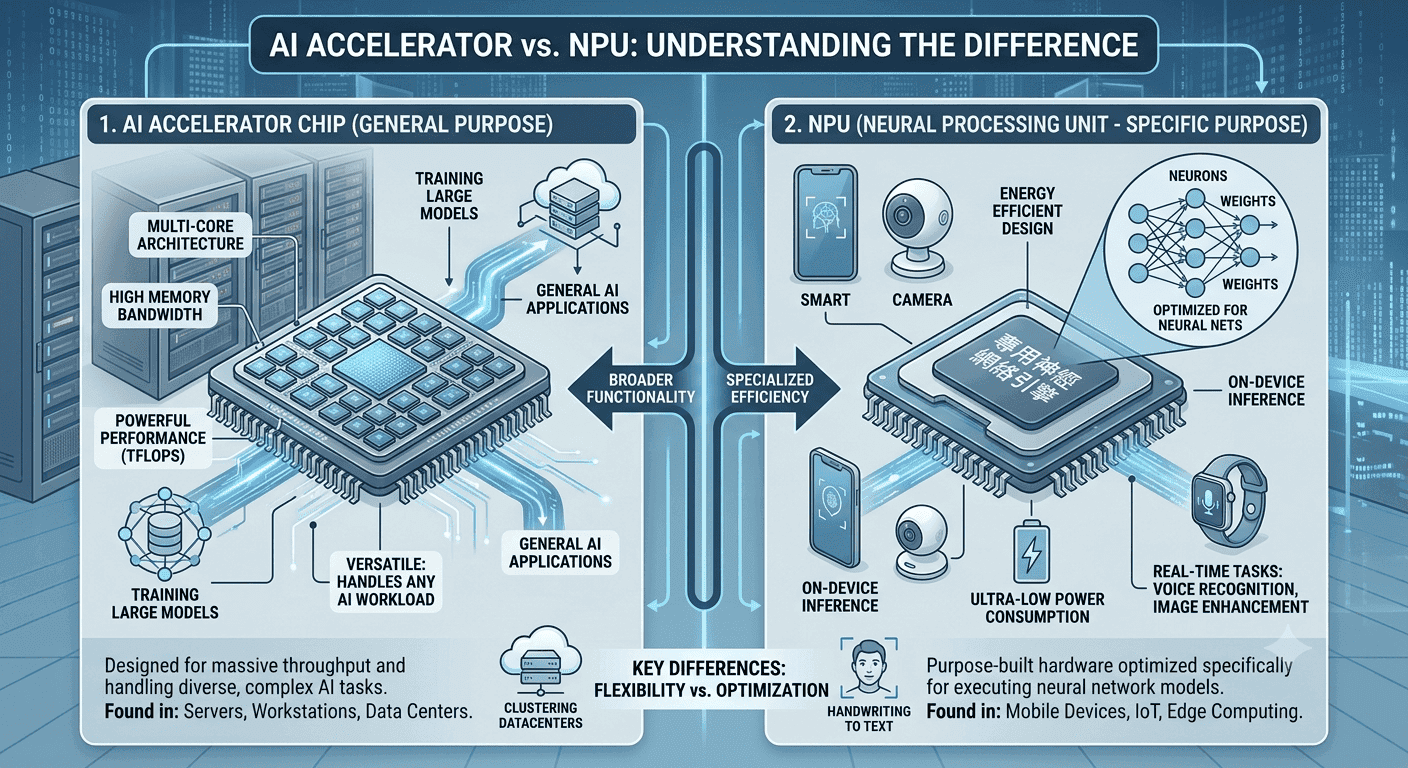
TL;DR AI Accelerator Chip vs NPU comes down to deployment: NPUs fit low-power, low-latency AI on laptops, PCs, and mobile devices, while a dedicated AI accelerator chip like Hailo-8 works better as a discrete module for edge AI.
What AI Accelerator Chips and NPUs Actually Do
That distinction matters because the two are not just different labels for the same thing. They are built around different assumptions about where the work runs, how much power it can use, and how quickly it has to respond. In practice, this is the difference between a built-in processor that quietly handles camera effects in Windows Studio Effects and a separate module that powers a Raspberry Pi 5 vision project.
A neural processing unit is a specialized hardware accelerator designed to speed up artificial intelligence and machine learning applications. It is built for on-device AI tasks in laptops, PCs, and mobile devices, so it can handle routine inference without leaning on the CPU for every step. That matters because the CPU and GPU stay freer for other work. On a laptop, that can mean smoother multitasking while a video call app, a browser, and a local AI assistant are all active at once. On a phone, it means features like live captions or image recognition respond quickly without draining the battery as fast.
An AI accelerator chip is narrower by design. It focuses on repeated mathematical work, especially inference, and it is often used in edge devices, robotics, and embedded systems where a dedicated module is the right tool for the job. The Hailo-8 AI accelerator module is a good example. It delivers 26 TOPS, and the Hailo-8 M.2 AI Accelerator Module is priced at ₹20,999.00. That price makes sense only if you need a separate AI path for a compact system, not as a generic upgrade for every machine.
Why the comparison matters
The real question is not which one sounds more advanced. It is whether your workload lives inside a consumer device or inside a specialized board that needs its own AI path. That is why AI Accelerator Chip vs NPU shows up in so many buying decisions for laptops, PCs, mobile devices, and embedded hardware. The wrong choice usually means paying for capability you will not use, or missing the low-latency response your software actually needs.
Key Performance and Architectural Differences
The biggest technical difference is how each one handles work under the hood. NPUs are often manycore or spatial designs, and they focus on low-precision arithmetic, parallel processing, and low-latency inference. That is why they feel quick in real-time AI workloads like live transcription, camera scene detection, and voice commands. The difference is that NPUs are more often integrated into the platform, while discrete accelerators are built as add-on hardware for a narrower deployment.
For AI models running on consumer devices, that integration can make a noticeable difference in responsiveness. The hardware sits closer to the rest of the system, so the device can keep AI tasks local without pushing everything through the cloud. That is one reason NPUs have become a standard talking point in modern laptops and phones.
Performance metrics: TOPS and latency
TOPS is the headline metric because it tells you raw AI throughput. It stands for trillions of operations per second, and it is useful when you want to compare how much AI work a unit can push through. Latency matters just as much. An NPU can deliver sub-millisecond inference times because its memory paths and execution patterns are optimized for quick responses. That is what keeps live transcription in Teams, camera face detection, and voice assistants feeling immediate instead of laggy.
Intel® AI Boost laptops feature 47 TOPS NPU performance, while the Hailo-8 AI accelerator module delivers 26 TOPS. The number gap matters, but so does the deployment gap. One lives inside consumer hardware, while the other is built as a dedicated module.
Architectural design differences
NPU architecture is based on parallel processing, repeating the same mathematical operation many times. That is why it maps so well to matrix multiplication, tensor operations, and other deep learning workloads that repeat predictable patterns in AI models. A GPU can also accelerate AI, especially when you need graphics-heavy or broad parallel computing. But the NPU is more specialized, and that specialization is exactly why it is energy efficient for always-on features in laptops and phones.
Power efficiency and scalability
Power is where NPUs usually win in everyday devices. Scalability is the trade-off. NPUs are less scalable than TPUs because they are tailored for specific edge AI applications, not broad datacenter-style scale AI deployments. That is fine for on-device learning and inference, but it is not the same thing as building a cluster for large training jobs.
The NPU is the better fit when you want AI to run inside a laptop or phone without leaning on the cloud. A GPU still matters for graphics, training, and mixed workloads that need broader flexibility.
Where Each Option Fits in Real Devices
NPUs are particularly effective for image recognition, voice processing, and natural language tasks, which is why you find them in devices from Apple, Huawei, and Samsung. Those are not abstract workloads. They are the features you notice when a phone unlocks faster, a laptop handles speech input locally, or a device responds without waiting for a cloud round trip.
The same logic applies to AI Accelerator Chip vs NPU when you move from consumer hardware to embedded systems. A discrete accelerator is useful in robotics, Internet of Things devices, and data-intensive tasks where a board needs a focused AI path. The NPU is more common in consumer products because it lives closer to the CPU and GPU, where integrated AI support can improve day-to-day use.
Real-time AI applications
Real-time AI is where low latency becomes obvious. NPUs excel with smaller batch sizes, which is exactly how consumer devices work when they process one image, one voice command, or one text prompt at a time. That is why they fit live camera filters, speech-to-text, and on-device translation so well.
If you use Adobe Photoshop for local image enhancement, Microsoft Teams for live transcription, or a voice assistant on a laptop, the NPU is doing the kind of work that keeps those interactions snappy. The benefit is not just speed, it is also consistency. The device can respond quickly without depending on a network connection.
Edge AI and on-device processing
NPUs can handle workloads locally without relying on cloud servers, which is a major reason they matter in edge computing. That keeps sensitive data on the device and avoids the delay that comes from network traffic. Discrete Neural Processing Units strengthen this model further by improving inference efficiency at the edge, especially in embedded deployments where every millisecond and every watt of energy counts.
That is why edge AI and on-device learning keep showing up together in modern hardware discussions. The closer the processing stays to the device, the easier it becomes to control latency and privacy. That matters in both consumer and industrial settings.
Industry adoption and device integration
The adoption pattern is broad, but the use cases are specific. Apple, Huawei, and Samsung integrate NPUs into consumer devices because those devices benefit from local AI every day. AI accelerator chips show up in robotics, IoT systems, and data-intensive tasks where a dedicated accelerator can handle a narrow but important workload.
The common thread is that both technologies move AI closer to the device, but they do it in different forms and for different classes of hardware. One is usually part of the platform, and the other is often a separate module. That difference shapes cost, integration effort, and long-term flexibility.
- Image recognition for camera apps and photo sorting runs well on an NPU because it is local and repetitive.
- Voice processing for dictation and assistants benefits from low-latency inference and battery-friendly execution.
- Natural language tasks fit on-device processing when you want faster responses and less cloud dependence.
- Robotics and IoT often need discrete AI acceleration for sensor-heavy workloads.
- Embedded edge systems use DNPUs when inference efficiency matters more than broad flexibility.
Common use cases
If you run Photoshop for local image enhancement, use live transcription in Microsoft Teams, or rely on voice commands in a laptop assistant, the NPU is doing the kind of work that keeps those interactions snappy. The Hailo-8 M.2 AI Accelerator Module supports various AI frameworks, which makes it useful for compact computer-vision projects that need a separate unit.
Market size and growth projections
The market numbers show that both categories are growing, but for different reasons. AI accelerator chips are projected to grow from USD 120. The trend points to more specialized hardware in more places, especially where edge AI and local inference matter.
Pricing of AI accelerator modules
The clearest pricing figure here is the Hailo-8 M.2 AI Accelerator Module at ₹20,999.00. In a Raspberry Pi 5 build, that can be the difference between a hobby project and a reliable always-on system. It is a concrete example of how a discrete module changes the economics of a compact AI setup.
Cost-performance analysis
A raw price tag never tells the full story. A module priced at ₹20,999.00 can be cost-effective if it keeps your workload local, reduces reliance on cloud servers, or lets a compact board handle vision tasks on its own. That is why cost per workload matters more than sticker price alone.
If your software is mostly running local learning, inference, and camera analysis, the module can earn its place quickly. If you just need general computing, the extra hardware is wasted money. The right choice depends on whether the AI task is central to the device or just occasional.
- The Hailo-8 module is a practical buy for compact vision systems.
- TPU-class hardware makes more sense when you are thinking about scale AI and larger data centers.
How to Choose the Right AI Hardware
The decision comes down to where you want the AI work to happen and how much control you need over the hardware. NPUs are optimized for low-latency inference with low power consumption, which makes them the obvious choice for laptops, PCs, and mobile devices that need local AI without draining the battery. The hardware stops being abstract once you match the silicon to the software.
If you are using Windows Studio Effects, Teams transcription, or a local assistant on a laptop, the NPU is the right fit. If you are building a discrete system and need a dedicated processing path, the accelerator chip makes more sense. The choice is less about raw power and more about deployment style.
When to choose AI accelerator chips
Choose an AI accelerator chip when you are building a discrete system and need a dedicated processing path for AI workloads. This route is especially useful when your design already assumes external modules, custom integration, or a fixed AI function. It also makes sense when the board is doing one job repeatedly, such as object detection in a kiosk or sensor analysis in an embedded controller.
In that kind of setup, the accelerator does not need to be flexible, it just needs to be fast, efficient, and predictable. That is why a module like Hailo-8 can fit compact edge projects so well. The value comes from specialization.
When to choose NPUs
Choose an NPU when your priority is local inference inside a laptop, PC, or mobile device. Intel® AI Boost laptops with 47 TOPS show why NPUs are becoming central to consumer hardware. They fit real-time tasks, low power budgets, and workloads that must run without cloud dependence.
That makes them a strong choice for everyday productivity and communication features. They also reduce the need for extra hardware, which keeps the device simpler. If the AI task is built into the product experience, the NPU usually belongs there.
Deal-breakers for AI accelerator chips
If you need a single compact consumer device, a discrete accelerator chip can be awkward. It adds hardware integration work, and it makes less sense when the device already includes a capable NPU. It also becomes less attractive if your software stack is built around general-purpose computing rather than a narrow AI path.
That is especially true when the AI workload is occasional instead of constant. A separate module only pays off when it solves a real deployment problem. Otherwise, it just adds cost and complexity.
Deal-breakers for NPUs
If your project needs a separate accelerator module for robotics or IoT, an NPU inside a laptop is not enough. NPUs are less scalable than TPUs and are tailored for specific edge AI applications, so they are not the right answer for every deployment. They also make less sense when you need a discrete hardware component you can swap, mount, or tune independently.
That is where external accelerators and some GPU-based systems still have a clear role. The key is to match the hardware to the deployment, not the other way around. That keeps the system efficient and easier to support.
- Choose an NPU if you want low power use and low-latency inference inside a personal device.
- Skip a discrete accelerator chip if your device already has a strong built-in NPU.
- Skip an NPU if you need a standalone module for robotics or embedded deployment.
- Skip both if your workload is mostly cloud-based and does not benefit from local inference.
Common Pitfalls and Future Trends in AI Hardware
The most common mistake is treating all AI hardware as if it solves the same problem. It does not. If you ignore power, latency, or scalability, you can end up with a chip that looks strong on paper but performs poorly in real deployment. That is especially true when people assume cloud processing can replace local AI in every case.
Common mistakes in choosing AI accelerators
One mistake is buying for TOPS alone and ignoring the actual workload. If the hardware cannot stay cool or respond quickly, the headline number becomes less useful. Another mistake is forgetting the software stack. A model that runs well in TensorFlow Lite may behave differently from one tuned for PyTorch, and a system that depends on NVIDIA GPUs will not behave like a compact NPU-based device.
Risks of ignoring deployment details
It is the difference between a camera app that feels instant and one that feels delayed. Power matters just as much, because a device that burns too much energy cannot sustain local AI for long. That is why matrix multiplication speed, memory paths, and integrated design matter.
The chip is only part of the story, because the processor, model, and workload fit together. If those pieces do not line up, even a strong specification sheet will not help much. Deployment details decide whether the hardware feels useful in daily use.
Emerging technologies in NPUs
Discrete Neural Processing is moving into more devices, and that trend points to a future where more systems split AI workloads across specialized silicon rather than trying to push everything through one processor. It also explains why NPUs keep appearing in more consumer devices. As the hardware matures, you can expect tighter integration, better efficiency, and more local AI features that do not depend on the cloud.
Market growth and future outlook
The market forecasts reinforce that direction. AI accelerator chips are projected to grow sharply through 2035, and the automotive NPU market is also on a steep upward path. That means the next few years will bring more specialized hardware, more device integration, and more pressure to choose the right silicon for the right workload.
For buyers, the future is not about picking the most powerful chip. It is about picking the one that matches the latency, power, and deployment profile you actually need. That is the clearest way to avoid overspending and underbuilding at the same time.
- Do not buy on TOPS alone if your application is latency-sensitive.
- Do not rely on cloud processing when the device must respond in real time.
- Do not assume one accelerator fits laptops, robotics, and IoT equally well.
- Do pay attention to discrete NPUs if you want better edge inference efficiency.
- Do expect more consumer devices to ship with built-in AI hardware.
AI Accelerator Chip vs NPU Overview for 2026 Buyers
A useful way to frame the parts is to start with where the silicon lives and what it is trying to optimize. A neural processing unit, or NPU, is a specialized hardware accelerator designed to speed up artificial intelligence and machine learning applications, especially when the model needs to run directly on the device. In laptops, PCs, and mobile devices, NPUs are increasingly used to offload inference from the CPU and GPU so the system can stay responsive while using less power.
NPU architecture and use cases
NPU architecture is often built around parallel processing and low-precision arithmetic, repeating the same mathematical operation many times efficiently. Many NPUs are implemented as standalone blocks or integrated into a CPU or GPU package, which is why they appear in products from manufacturers like Apple, Huawei, and Samsung. Performance is commonly measured in TOPS, or trillions of operations per second, and that number is useful because it reflects how much AI work the chip can push through in a short time.
For example, Intel® AI Boost laptops advertise 47 TOPS NPU performance, which shows how aggressively vendors are scaling local AI capability. That kind of integration matters most when the device needs to handle real-time tasks without leaning on the cloud. It also helps explain why NPUs keep showing up in consumer devices.
Accelerator chips in edge devices
This is where the comparison becomes practical rather than theoretical. Accelerator chips are common in robotics, embedded vision systems, industrial gateways, and IoT deployments where a separate module can be added to a board or system to handle inference efficiently. The Hailo-8 M.2 AI Accelerator Module is also compatible with Raspberry Pi 5 and supports various AI frameworks, making it a concrete option for developers building compact computer-vision projects.
The performance difference also shows up in how these devices behave under load. They can often deliver sub-millisecond inference times because of optimized memory paths, which matters when you are processing a camera feed, a voice command, or a sensor stream without sending data to the cloud. That local execution model is especially valuable in edge computing, where network delay, privacy concerns, and intermittent connectivity can all become bottlenecks.
A practical workflow makes the distinction even clearer. Suppose a developer is building a Raspberry Pi 5 application with OpenCV and TensorFlow Lite for object detection in a smart retail kiosk. If the same developer is building a Windows laptop workflow using Microsoft Co-Pilot features, local voice transcription, and real-time background effects in Teams, the built-in NPU is the more natural solution. In both cases, latency, power budget, and deployment style matter more than raw marketing claims.
That is why the best decision is rarely about choosing the faster option in the abstract. The Hailo-8 M.2 module, priced at ₹20,999.00, is a good example of accelerator chips being sold as add-on solutions, while NPUs are usually part of the platform itself. Once you look at the actual workload, software stack, and thermal limits, the hardware comparison becomes much easier to apply in real projects.
Frequently Asked Questions
Q. What is the main difference between AI accelerator chips and NPUs?
NPUs are optimized for low-power, low-latency inference, which makes them a strong fit for local tasks like voice and image processing. A discrete accelerator, such as the Hailo-8 module, focuses on a narrower hardware role and is usually sold as a separate add-on. The clearest example in this article is Intel® AI Boost at 47 TOPS versus the Hailo-8 module at 26 TOPS.
Q. Are NPUs better suited for mobile and edge devices than general AI accelerator chips?
Yes, NPUs are usually the cleaner choice for mobile and edge devices because they handle local inference without relying on cloud servers. That matters for battery life, responsiveness, and privacy. They are built into laptops, PCs, and phones, while the Hailo-8 M.2 module is a separate ₹20,999.00 component for embedded systems.
Q. Does TOPS performance tell the whole story in this comparison?
No, TOPS is useful, but it does not tell the whole story. Intel® AI Boost laptops advertise 47 TOPS, while the Hailo-8 module delivers 26 TOPS, yet deployment style still matters more than the raw number. Latency, power use, and whether the hardware is integrated or discrete all affect real-world results.
Q. What are typical price differences between AI accelerator modules and NPUs?
A clear reference point is the Hailo-8 M.2 AI Accelerator Module at ₹20,999.00. NPUs are usually built into the device, so they are not bought as separate line items in the same way. That makes the cost comparison very different depending on whether you are buying a laptop or an add-on module.
Q. Can NPUs operate independently of cloud services for AI tasks?
Yes, NPUs can operate locally without cloud services for many AI tasks. That is one of their biggest advantages because on-device processing lowers latency and keeps data on the hardware. This is why they work well for voice processing, image recognition, and live transcription in devices like laptops and phones.
Q. Which industries are driving growth for NPUs and AI accelerator chips?
Consumer devices, automotive systems, robotics, and IoT are driving much of the growth. NPUs are showing up more often in laptops and phones, while accelerator chips are common in embedded vision and robotics. The article also notes that AI accelerator chips are projected to grow sharply through 2035, which shows how strong the edge AI market remains.
Which AI Hardware Makes Sense for Your Build in 2026?
For most buyers, the recommendation is straightforward. If you want local AI inside a laptop, phone, or PC, the NPU is the better choice because it is integrated, energy efficient, and tuned for real-time inference. If you are building a Raspberry Pi 5 or embedded vision project, the Hailo-8 M.2 AI Accelerator Module at ₹20,999.00 is the more relevant option because it gives you a separate AI path.
The best fit depends on who is buying and what the device must do. Consumers and office users should lean toward built-in NPUs, especially when features like Windows Studio Effects, Teams transcription, or local assistants matter. Developers and embedded builders should look at discrete accelerator chips when they need a dedicated module for OpenCV, TensorFlow Lite, or sensor-heavy workloads.
The clearest action is to match the silicon to the workload before you buy. Check whether your device already includes a capable NPU, then decide whether a separate accelerator is worth the added cost and integration work. That approach keeps the system simpler, faster, and easier to justify over time.





